1. Product Overview
The Faryuan F21 E1B Industrial Remote Controller is designed for wireless control of industrial equipment such as hoists, cranes, and lifts. This system includes two transmitters and one receiver, providing flexible operation. It features a robust design suitable for demanding industrial environments.

Image 1.1: Faryuan F21 E1B Industrial Remote Controller system components.
Key Features:
- High-Quality Construction: Features a PA66 reinforced flame retardant nylon case for durability and resistance to pressure and corrosion.
- IP65 Protection: The product shell is constructed to an IP65 protection level, ensuring excellent performance in environments with high oil pollution and humidity.
- Extended Range: Offers a remote control distance of up to 100 meters (328 feet) with strong penetration and 360-degree barrier-free operation.
- Efficient Control: Equipped with high-performance metal contact buttons and a reliable circuit board.
- Wide Voltage Compatibility: Supports a universal voltage range of 12V to 48V DC.
- Easy Pairing: Features a one-click pairing method for convenient setup.
2. Safety Information
Read and understand all safety instructions before operating the Faryuan F21 E1B Industrial Remote Controller. Failure to follow these instructions may result in serious injury or equipment damage.
General Safety Precautions:
- Ensure all wiring is performed by a qualified electrician in accordance with local and national electrical codes.
- Verify the power supply voltage matches the receiver's specifications (12V-48V DC).
- Do not operate the remote controller if any part is damaged or malfunctioning.
- Keep the remote controller away from excessive heat, moisture, and corrosive substances.
- Always use the safety key switch to disable the transmitter when not in use or during maintenance.
- Do not modify the remote control system in any way. Unauthorized modifications can lead to unsafe operation and void the warranty.
IP65 Rating:
The IP65 rating indicates that the enclosure is dust-tight and protected against water jets from any direction. While robust, it is not designed for submersion. Avoid direct high-pressure water jets.

Image 2.1: Transmitter highlighting IP65 waterproof protection.
Safety Key Switch:
The transmitter is equipped with a safety key switch. Pulling out this key will immediately disable the transmitter, preventing unintended operation. This feature is crucial for emergency stops and ensuring safety during non-operational periods.
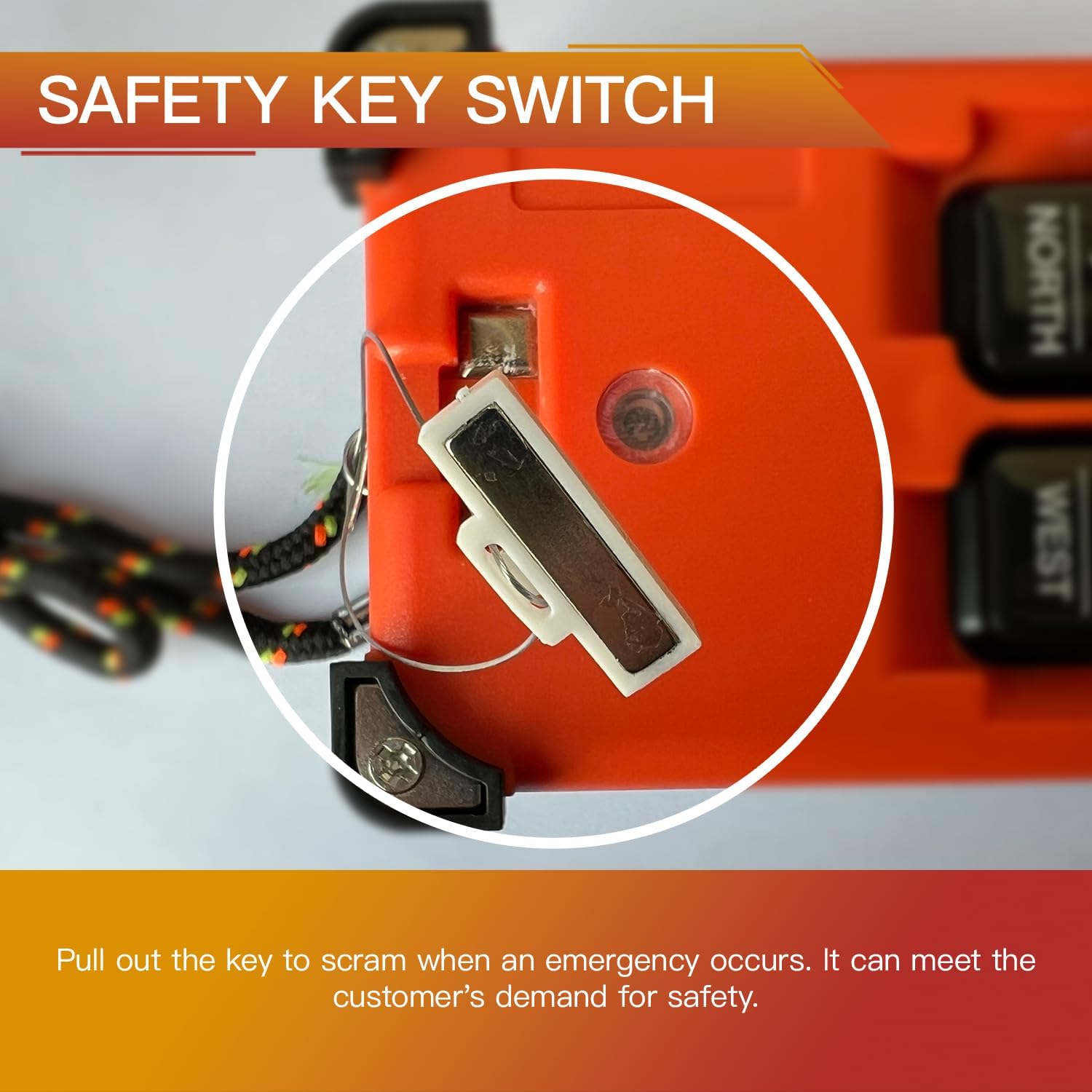
Image 2.2: Detail of the safety key switch for emergency shutdown.
3. Setup and Installation
3.1 Unpacking
Carefully unpack all components and verify that the following items are present:
- 2 x Faryuan F21 E1B Transmitters
- 1 x Faryuan F21 E1B Receiver
- Mounting hardware (screws, rubber absorbers)
- Instruction Manual (this document)
3.2 Receiver Installation
The receiver should be mounted in a secure location, protected from excessive vibration. Use the provided fixing screws and rubber absorbers to minimize the impact of equipment vibration on performance.

Image 3.1: Receiver showing fixing screw installation point and high-quality cables.
3.3 Wiring Diagram
Connect the receiver to your equipment according to the wiring diagram provided on the receiver unit and below. The receiver is equipped with high-quality copper cables with distinguishable colors and numbers, and U-shaped terminals for convenient connection. Ensure all connections are secure and correctly matched to your equipment's control inputs.

Image 3.2: Detailed wiring diagram for the receiver unit.
| Terminal No. | Function | Wire Color (Typical) |
|---|---|---|
| 1 | POWER1 + | Black |
| 2 | POWER2 + | Orange |
| 3 | COM Public Line + | Red |
| 4 | MAIN (No required) | Yellow |
| 5 | UP | Green |
| 6 | DOWN | Blue |
| 7 | EAST | Purple |
| 8 | WEST | Grey |
| 9 | SOUTH | Brown |
| 10 | NORTH | Pink |
| 11-14 | OUT1-OUT4 | Various |
| 15 | R0/START | Blue |
| GROUND | Yellow/Green |
3.4 Transmitter Battery Installation
The transmitters require batteries for operation. Open the battery compartment on the back of each transmitter and insert the required batteries (type not specified in product data, typically AA or AAA). Ensure correct polarity. Close the compartment securely.
4. Operating Instructions
4.1 Pairing the Transmitter and Receiver
The Faryuan F21 E1B system features a convenient one-click pairing method:
- Ensure the receiver is powered off.
- Locate the function key (pairing button) inside the battery box of the transmitter. Press and hold this button. The indicator light on the transmitter will begin to flash slowly.
- While the transmitter indicator is flashing, turn on the power to the receiver.
- Wait for approximately two seconds. The transmitter indicator will flash rapidly for 3 seconds, and then the indicator will turn off, indicating successful code matching.
Note: It is important not to press any other keys on the transmitter during the code matching process. If pairing is unsuccessful, repeat the steps.
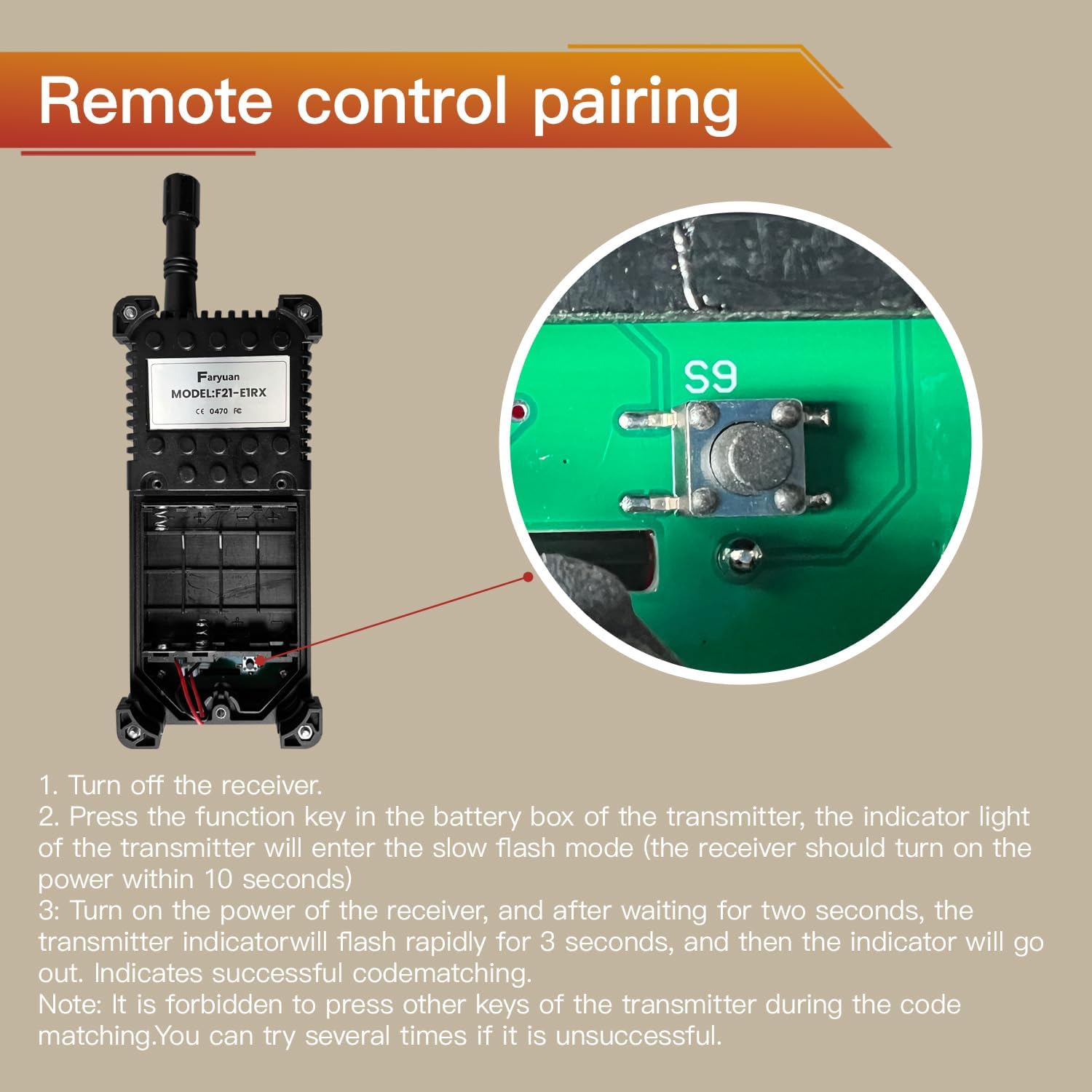
Image 4.1: Location of the pairing button (S9) inside the transmitter's battery compartment.
4.2 Basic Operation
The transmitter features 8 keys, with 6 operational keys for controlling movement and 2 for system functions (Start/Stop). The operational range is up to 100 meters (328 feet).

Image 4.2: Transmitter button layout.
- START (Green Button): Activates the remote control system. The start button must be engaged for other control functions to operate.
- STOP (Red Button): Deactivates the remote control system. This acts as an emergency stop.
- UP / DOWN: Controls vertical movement of the hoist or crane.
- EAST / WEST: Controls horizontal movement along one axis.
- NORTH / SOUTH: Controls horizontal movement along the perpendicular axis.
Note: The specific functionality of each directional button (UP, DOWN, EAST, WEST, NORTH, SOUTH) depends on how the receiver is wired to your equipment. Refer to your equipment's manual and the wiring diagram for correct assignment.
5. Maintenance
Regular maintenance ensures the longevity and reliable operation of your Faryuan F21 E1B Industrial Remote Controller.
5.1 Cleaning
Due to its IP65 rating, the unit is resistant to dust and water jets. Clean the exterior with a damp cloth. Do not use harsh chemicals or abrasive cleaners. Ensure all ports and seals are free from debris.
5.2 Battery Replacement
When the transmitter's indicator light dims or operation becomes intermittent, replace the batteries. Open the battery compartment, remove old batteries, and insert new ones, observing correct polarity. Dispose of old batteries responsibly.
5.3 Inspection
Periodically inspect the following:
- Transmitter Housing: Check for cracks, damage, or wear.
- Receiver Housing: Inspect for physical damage and ensure mounting is secure.
- Cables and Connections: Verify that all wiring connections are tight and free from fraying or corrosion.
- Buttons and Switches: Ensure all buttons operate smoothly and the safety key switch functions correctly.
6. Troubleshooting
This section addresses common issues you might encounter with your remote control system.
6.1 Remote Not Responding
- Check Batteries: Ensure the transmitter batteries are fresh and correctly installed.
- Safety Key: Verify the safety key is fully inserted into the transmitter.
- Receiver Power: Confirm the receiver is powered on and receiving the correct voltage (12V-48V DC).
- Pairing: Re-attempt the pairing process as described in Section 4.1.
- Range: Ensure the transmitter is within the 100-meter operational range of the receiver and there are no significant obstructions.
6.2 Incorrect Movement or Function
- Wiring: Review the wiring diagram (Section 3.3) and verify that all connections from the receiver to your equipment are correct. Incorrect wiring can lead to reversed or non-functional movements.
- Equipment Issues: Ensure the controlled equipment itself is functioning correctly when operated manually or via its original controls.
6.3 Intermittent Operation
- Interference: Strong electromagnetic interference from other industrial equipment can affect wireless communication. Try to minimize sources of interference or reposition the receiver.
- Loose Connections: Check all wiring connections for tightness at both the receiver and the controlled equipment.
7. Specifications
| Feature | Specification |
|---|---|
| Model | F21 E1B (2 Transmitter DC (12-48V)) |
| Brand | Faryuan |
| Operating Voltage | 12V - 48V DC |
| Control Distance | Up to 100 meters (328 feet) |
| Protection Class | IP65 (Dust-tight, protected against water jets) |
| Housing Material | PA66 Reinforced Flame Retardant Nylon |
| Number of Transmitters | 2 |
| Number of Receivers | 1 |
| Operational Keys | 6 (UP, DOWN, EAST, WEST, NORTH, SOUTH) |
| System Keys | 2 (START, STOP) |
| Item Weight | Approximately 2.8 pounds (1.27 kg) |
| Product Dimensions | 10 x 4 x 2.5 inches (approximate for receiver) |
8. Warranty and Support
Faryuan products are manufactured to high-quality standards. For information regarding warranty coverage, technical support, or service, please refer to the contact information provided with your purchase or visit the official Faryuan website. Keep your purchase receipt as proof of purchase.
For further assistance, you may contact the seller directly through the platform where the product was purchased.