
1. Introduction
This manual provides detailed instructions for the safe and efficient operation, maintenance, and troubleshooting of your iwoly D300 Cordless Vacuum Cleaner. Please read this manual thoroughly before first use and retain it for future reference.
The iwoly D300 is a versatile 2-in-1 stick and handheld vacuum cleaner designed for various cleaning tasks. It features a powerful brushless motor, multiple suction modes, and an efficient filtration system.
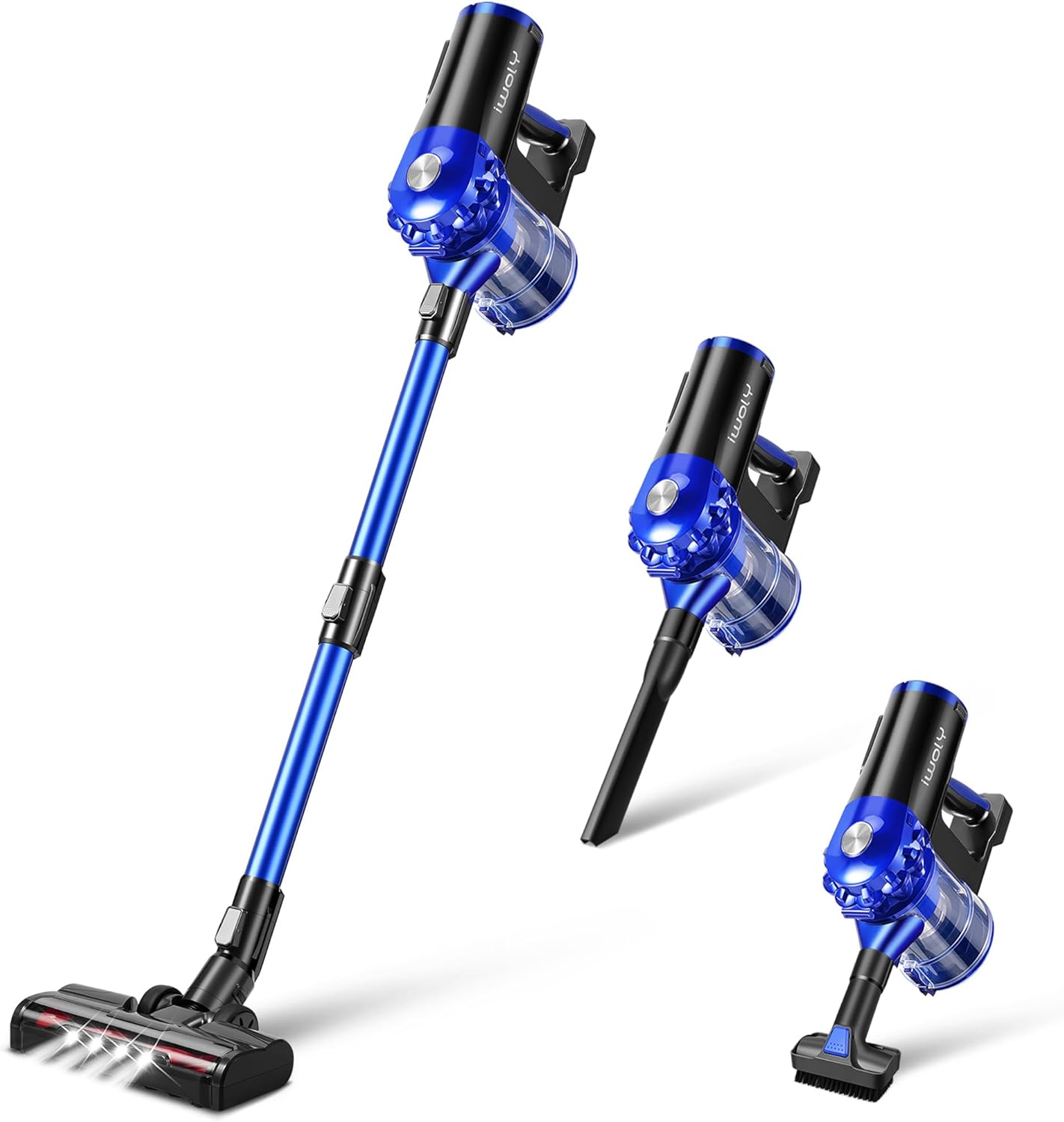
Image: The iwoly D300 Cordless Vacuum Cleaner shown in its full stick configuration and as a compact handheld unit with different attachments.
2. What's Included
Carefully unpack all components and check against the list below. If any items are missing or damaged, please contact customer support.
- Cordless Vacuum Main Body
- LED Motorized Floor Brush Head
- Extension Tube
- Lithium-ion Battery (Detachable)
- AC Adapter (26V Charger)
- 2-in-1 Dusting Brush
- Long Crevice Nozzle
- Wall-mounted Bracket & Screws
- Stainless Steel Filter
- HEPA Filter
- User Manual (this document)

Image: A visual representation of all parts included with the iwoly D300 Cordless Vacuum Cleaner, such as the main unit, various brushes, filters, and charging accessories.
3. Setup and Assembly
3.1 Initial Charging
- Ensure the battery is securely inserted into the main vacuum body or charged separately.
- Connect the AC adapter to the charging port on the vacuum or directly to the battery.
- Plug the AC adapter into a power outlet. The battery indicator lights will illuminate during charging.
- A full charge takes approximately 4 hours. The indicator lights will show a full charge when complete.
3.2 Assembling the Stick Vacuum
- Insert the extension tube into the main vacuum body until it clicks into place.
- Attach the LED motorized floor brush head to the other end of the extension tube until it clicks.
- Ensure all connections are secure before use.
3.3 Assembling the Handheld Vacuum
- Remove the extension tube and floor brush head from the main vacuum body.
- Attach the desired accessory (e.g., 2-in-1 dusting brush or crevice nozzle) directly to the main vacuum body until it clicks.

Image: The iwoly D300 vacuum cleaner stored on its wall mount, demonstrating direct charging and separate battery charging options.
4. Operating Instructions
4.1 Power On/Off and Suction Modes
- Press the power button to turn the vacuum cleaner on. It will start in the default suction mode.
- Press the mode button to cycle through the three available suction modes: Low, Mid, and Max.
- Press the power button again to turn the vacuum cleaner off.
The iwoly D300 offers up to 28,000Pa of suction power in Max mode, suitable for various debris types including pet hair and fine dust.

Image: A visual representation of the vacuum's suction capabilities, showing different suction levels for dust, pet hair, and pet food.
4.2 Using Attachments
- LED Motorized Floor Brush Head: Ideal for hard floors and low-pile carpets. The integrated LED lights illuminate dust and debris in dark areas. Note: Not suitable for high-pile rugs.
- 2-in-1 Dusting Brush: Use the brush bristles for delicate surfaces like keyboards, curtains, and upholstery. Retract the bristles for a wider nozzle to clean larger areas.
- Long Crevice Nozzle: Designed for reaching tight spaces, corners, and crevices in furniture, car interiors, and along baseboards.

Image: The iwoly D300 in action, highlighting its LED headlights for dark areas and its use with different attachments for cleaning sofas, stairs, and general floor surfaces.
5. Maintenance
Regular maintenance ensures optimal performance and extends the lifespan of your vacuum cleaner.
5.1 Emptying the Dustbin
- Ensure the vacuum is turned off.
- Position the dustbin over a trash receptacle.
- Press the dustbin release button to open the bottom flap and empty the contents.
- Close the dustbin flap securely.
The 1.2L large-capacity dustbin allows for extended cleaning sessions before needing to be emptied.

Image: A user demonstrating how to empty the 1.2L dust cup with a single touch and how to wash the components under running water.
5.2 Cleaning the Filters
The iwoly D300 features a 6-stage sealed cyclone filtration system, including a HEPA filter, plastic filter, and stainless steel filter. These components are washable and reusable.
- Ensure the vacuum is turned off and the dustbin is empty.
- Twist and remove the dustbin from the main body.
- Carefully remove the internal filter components (HEPA filter, plastic filter, stainless steel filter).
- Rinse all washable filter components under cool running water until clean. Do not use detergents.
- Allow all filter components to air dry completely for at least 24 hours before reassembling. Do not use the vacuum with wet filters.
- Reassemble the filters and dustbin in reverse order.
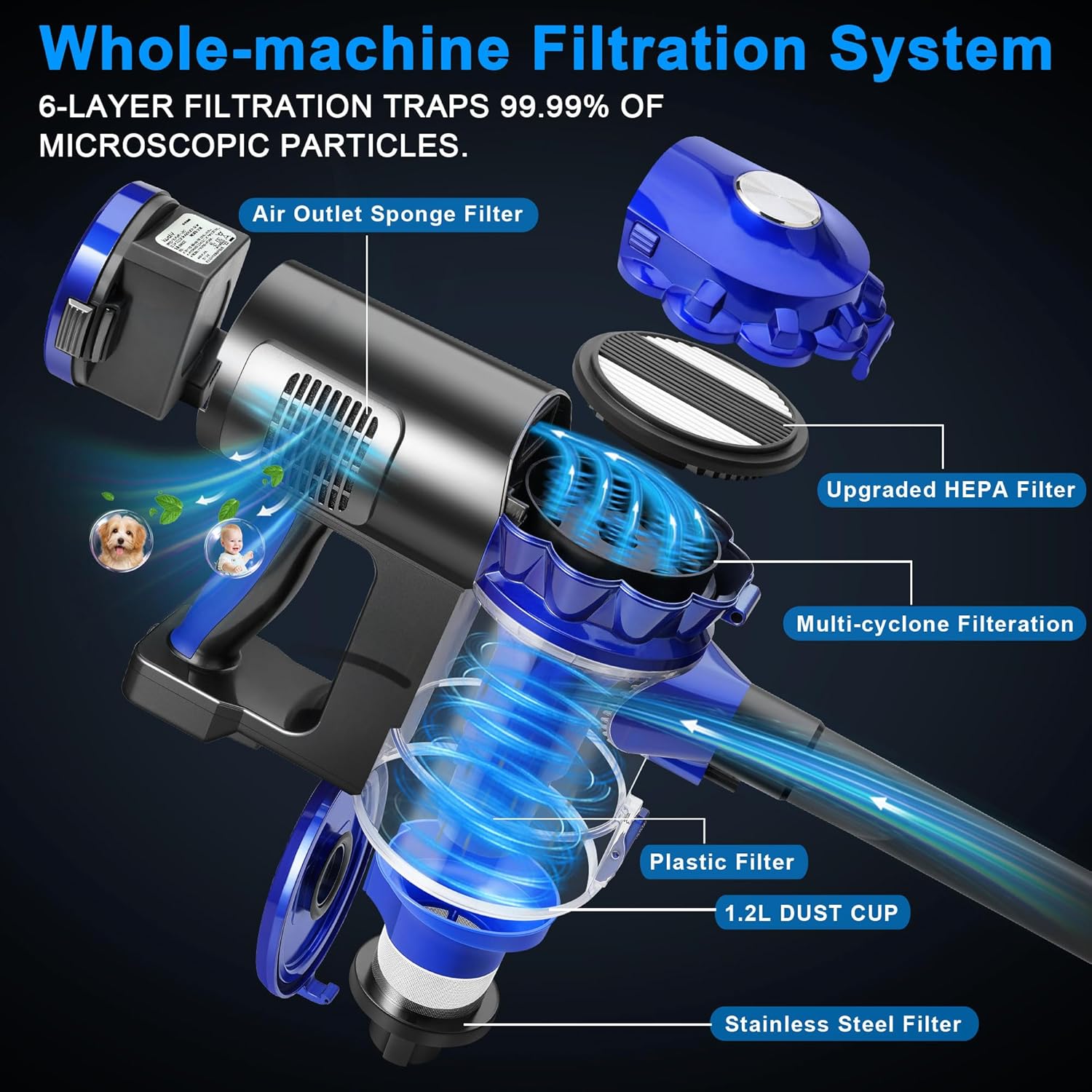
Image: An exploded view diagram detailing the 6-stage filtration system, including the 1.2L dust cup, plastic filter, stainless steel filter, multi-cyclone filtration, upgraded HEPA filter, and air outlet sponge filter.
5.3 Cleaning the Brush Head
- Ensure the vacuum is turned off and disconnected from power.
- Detach the motorized floor brush head from the extension tube.
- Locate the brush roll release mechanism (usually a latch or button) and remove the brush roll.
- Use scissors or a cleaning tool to remove any tangled hair or debris from the brush roll.
- Clean the inside of the brush head housing.
- Reinsert the brush roll and secure it in place.
6. Troubleshooting
If you encounter any issues, refer to the following table for common problems and solutions.
| Problem | Possible Cause | Solution |
|---|---|---|
| Vacuum does not turn on | Battery is not charged or not properly installed. | Charge the battery fully. Ensure the battery is securely clicked into place. |
| Loss of suction power | Dustbin is full. Filters are clogged. Blockage in the nozzle, tube, or brush head. | Empty the dustbin. Clean or replace filters. Check for and remove any blockages. |
| Brush roll not spinning | Hair or debris tangled in the brush roll. Brush roll is not properly installed. | Clean the brush roll of any obstructions. Reinstall the brush roll correctly. |
| Battery life is short | Operating in Max suction mode. Battery not fully charged. Battery degradation. | Use lower suction modes for longer runtime. Ensure battery is fully charged (4 hours). Contact support if battery life significantly decreases over time. |
| Charging indicator lights not working | Charger not connected properly. Power outlet issue. | Ensure the charger is securely connected to both the vacuum/battery and the power outlet. Try a different power outlet. |
7. Specifications
| Feature | Specification |
|---|---|
| Model Name | iwoly D300 Cordless Vacuum Cleaner |
| Brand | iwoly |
| Motor | Brushless Motor, 200 Watts |
| Maximum Suction | 28,000 Pa (280 Centimeters) |
| Suction Modes | 3 (Low, Mid, Max) |
| Battery Type | Detachable Lithium-Ion (2200mAh) |
| Battery Life | Up to 38 minutes (Low mode), 20 minutes (Mid mode), 14 minutes (Max mode) |
| Charging Time | 4 Hours |
| Dustbin Capacity | 1.2 Liters |
| Filter Type | 6-stage sealed cyclone filtration system with HEPA Filter (Washable) |
| Noise Level | 75 Decibels |
| Product Dimensions | 10.63"L x 5.51"W x 47.24"H |
| Item Weight | 5.5 pounds |
| Special Features | Cordless, HEPA, Headlight, Rechargeable, Washable Filter |
| Recommended Uses | Indoor (bedroom, kitchen, living room, car) |
8. Warranty and Support
For warranty information, product support, or to purchase replacement parts, please refer to the contact information provided with your product packaging or visit the official iwoly website.
Please retain your proof of purchase for warranty claims.