
1. Product Overview
The Arduino Pro Opta EXT A0602 is a robust analog expansion module designed to significantly enhance the capabilities of Arduino Opta micro PLCs. This module is engineered for industrial and building automation projects, providing expanded input/output functionality and precise control for various applications.

Figure 1.1: Angled view of the Arduino Pro Opta EXT A0602 Analog Expansion Module, showing its compact design and terminal blocks.
It integrates seamlessly with the Arduino ecosystem, supporting programming via Arduino IDE and industrial programming via PLC IDE (IEC 61131-3). Its DIN rail-ready design simplifies installation in industrial environments.
2. What's in the Box
Upon opening the package, you will find the following components:
- 1 x Arduino Pro Opta EXT A0602 Industrial Extension Module

Figure 2.1: The Arduino Pro Opta EXT A0602 module shown alongside its retail packaging.
3. Key Features
- Expanded I/O Capabilities: Adds 6 programmable inputs (voltage, current, or temperature), 2 analog outputs (0-10V or 0/4-20mA), and 4 PWM channels.
- Seamless Integration: Compatible with Arduino Opta micro PLCs, supporting Arduino Cloud for real-time monitoring and IEC 61131-3 PLC IDE for industrial programming.
- Reliable Industrial Design: Built with Finder expertise, featuring FCC, CE, and RoHS certifications for dependable operation in industrial environments.
- Flexible Snap-On Module: Allows for scalable I/O expansion by managing up to 5 modules, ideal for complex automation systems.
- Easy Installation & Programming: Features a snap-on DIN rail design and supports Arduino IDE for rapid deployment and extensive programming resources.
4. Setup and Installation
The Arduino Pro Opta EXT A0602 is designed for easy installation on a standard DIN rail, typically alongside an Arduino Opta micro PLC. Ensure all power is disconnected before installation.
4.1. DIN Rail Mounting
- Align the module's rear clip with the DIN rail.
- Press firmly until the module snaps securely onto the rail.
- Ensure the module is firmly seated and does not wobble.
4.2. Power Connection
The module requires a 24V DC power supply. Connect the power leads to the designated terminals on the module. Refer to the module's labeling for correct polarity.
4.3. Connecting to Arduino Opta
The Opta EXT A0602 module is designed to snap directly onto an Arduino Opta controller, expanding its I/O capabilities. Up to 5 expansion modules can be connected to a single Opta controller.
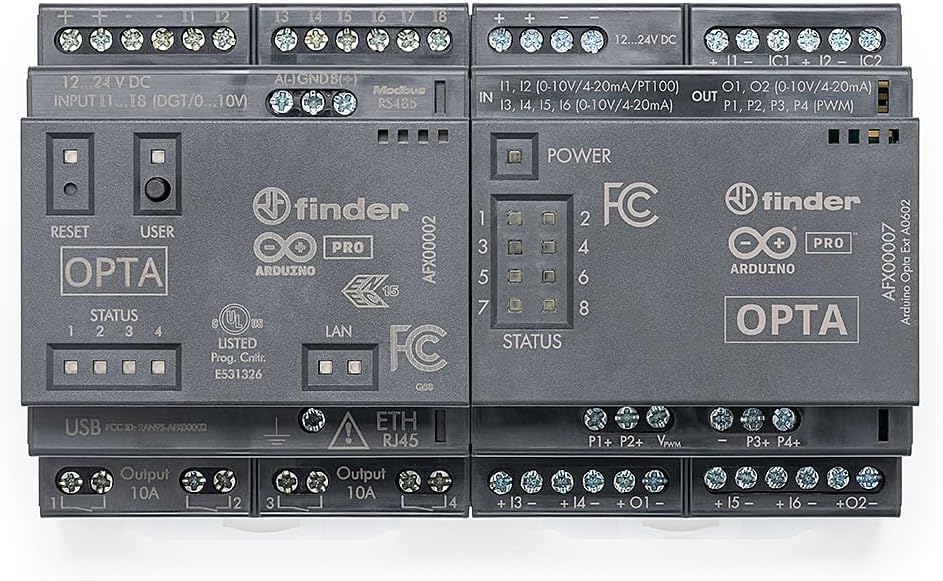
Figure 4.1: An Arduino Opta controller (left) connected to the Opta EXT A0602 module (right), demonstrating the modular expansion capability.

Figure 4.2: Top-down view of the module, highlighting the input (IN) and output (OUT) terminal blocks for wiring connections.
5. Operation
The Opta EXT A0602 module extends the functionality of your Arduino Opta PLC by providing additional analog inputs, analog outputs, and PWM channels. These can be configured and controlled through your chosen programming environment.
5.1. Programmable Inputs
The 6 programmable inputs (I1-I6) can be configured for voltage (0-10V), current (0/4-20mA), or temperature (PT100/PT1000) measurements. This versatility allows the module to interface with a wide range of industrial sensors.
5.2. Analog Outputs
The 2 analog outputs (O1, O2) provide 0-10V or 0/4-20mA signals, enabling precise control of actuators, valves, or other analog devices in your automation system.
5.3. PWM Channels
The 4 PWM (Pulse Width Modulation) channels (P1-P4) allow for fine-grained control of devices requiring PWM signals, such as motor speed controllers or dimmable lighting.
5.4. Programming and Monitoring
The module's functions are controlled via the connected Arduino Opta. Programming can be done using the Arduino IDE for C++ based development or the PLC IDE (IEC 61131-3) for ladder logic and other industrial programming languages. Real-time monitoring of inputs and outputs can be achieved through the Arduino Cloud platform.
6. Maintenance
The Arduino Pro Opta EXT A0602 is designed for robust industrial use and requires minimal maintenance. Follow these guidelines to ensure optimal performance and longevity:
- Cleaning: Keep the module clean and free from dust and debris. Use a soft, dry cloth for cleaning. Do not use liquid cleaners or solvents.
- Environmental Conditions: Ensure the module operates within its specified temperature and humidity ranges. Avoid exposure to extreme temperatures, direct sunlight, or excessive moisture.
- Connections: Periodically check all wiring connections to ensure they are secure and free from corrosion. Loose connections can lead to intermittent operation or damage.
- Firmware Updates: Keep the firmware of your Arduino Opta controller updated, as this may include improvements or bug fixes related to expansion module compatibility and performance.
7. Troubleshooting
If you encounter issues with your Arduino Pro Opta EXT A0602 module, consider the following troubleshooting steps:
- No Power/Module Not Responding:
- Verify that the 24V DC power supply is correctly connected and providing the specified voltage.
- Check the power indicator LED on the module. If it's off, re-check power connections.
- Ensure the module is securely snapped onto the Arduino Opta controller.
- Inputs/Outputs Not Working as Expected:
- Review your wiring connections for the specific input/output. Ensure correct polarity and terminal assignment.
- Check your programming code (Arduino IDE or PLC IDE) to ensure the inputs/outputs are correctly configured and addressed.
- Verify the type of sensor/actuator connected matches the input/output configuration (e.g., 0-10V vs. 4-20mA).
- Test the sensor/actuator independently if possible to rule out external device issues.
- Communication Issues with Arduino Opta:
- Ensure the Arduino Opta controller's firmware is up to date.
- Re-seat the expansion module on the Opta controller.
- Consult the Arduino Opta documentation for specific communication protocols and troubleshooting.
For more detailed troubleshooting or complex issues, refer to the official Arduino documentation and support resources available on the Arduino website.
8. Specifications
| Feature | Specification |
|---|---|
| Model Name | Arduino Pro Opta EXT A0602 |
| Supply Voltage | 12-24V DC |
| Programmable Inputs | 6 (0-10V, 0/4-20mA, PT100/PT1000) |
| Analog Outputs | 2 (0-10V, 0/4-20mA) |
| PWM Outputs | 4 |
| Connectivity | DIN Rail (snap-on to Opta) |
| Operating System (Host) | Linux (on Opta) |
| Item Weight | 6.4 ounces |
| Package Dimensions | 14.33 x 4.49 x 3.5 inches |
| Manufacturer | Arduino S.r.l. |
9. Certifications
The Arduino Pro Opta EXT A0602 module complies with the following industrial standards and certifications:
- FCC: Federal Communications Commission compliance.
- CE: Conformité Européenne (European Conformity).
- RoHS: Restriction of Hazardous Substances Directive compliance.
10. Warranty and Support
For detailed warranty information, please refer to the official Arduino website or the documentation provided with your purchase. Arduino provides comprehensive support resources, including forums, documentation, and technical assistance.
For further assistance, visit the official Arduino support page: www.arduino.cc


