
CC7O Life technology shoping
CC7O Wireless Bluetooth Speaker with 7-inch LED Display
User Manual for Model F55 GRAY
1. Introduction
This manual provides detailed instructions for the operation and maintenance of your CC7O Wireless Bluetooth Speaker (Model F55 GRAY). This device combines a portable Bluetooth speaker with a 7-inch LED display, FM radio, TF card slot, and MP4 music and video playback capabilities, offering a versatile audio and visual experience.
Please read this manual thoroughly before using the product to ensure proper function and to maximize its lifespan.
2. Product Features
- Portable Design: Compact and lightweight, ideal for outdoor activities and travel.
- 7-inch LED Display: High-definition screen supporting 1080P video playback.
- Bluetooth 5.3 Connectivity: Seamless wireless pairing with mobile phones, tablets, and computers.
- FM Radio Function: Receives 87.5-108 MHz frequency bands for listening to radio stations.
- Multi-format Playback: Supports MP3, MP4, and other media formats via TF card or USB flash drive.
- Long Battery Life: Built-in 4400mAh rechargeable lithium battery for extended use.
- Sound Quality Adjustment: Equipped with an equalizer for fine-tuning audio frequencies.
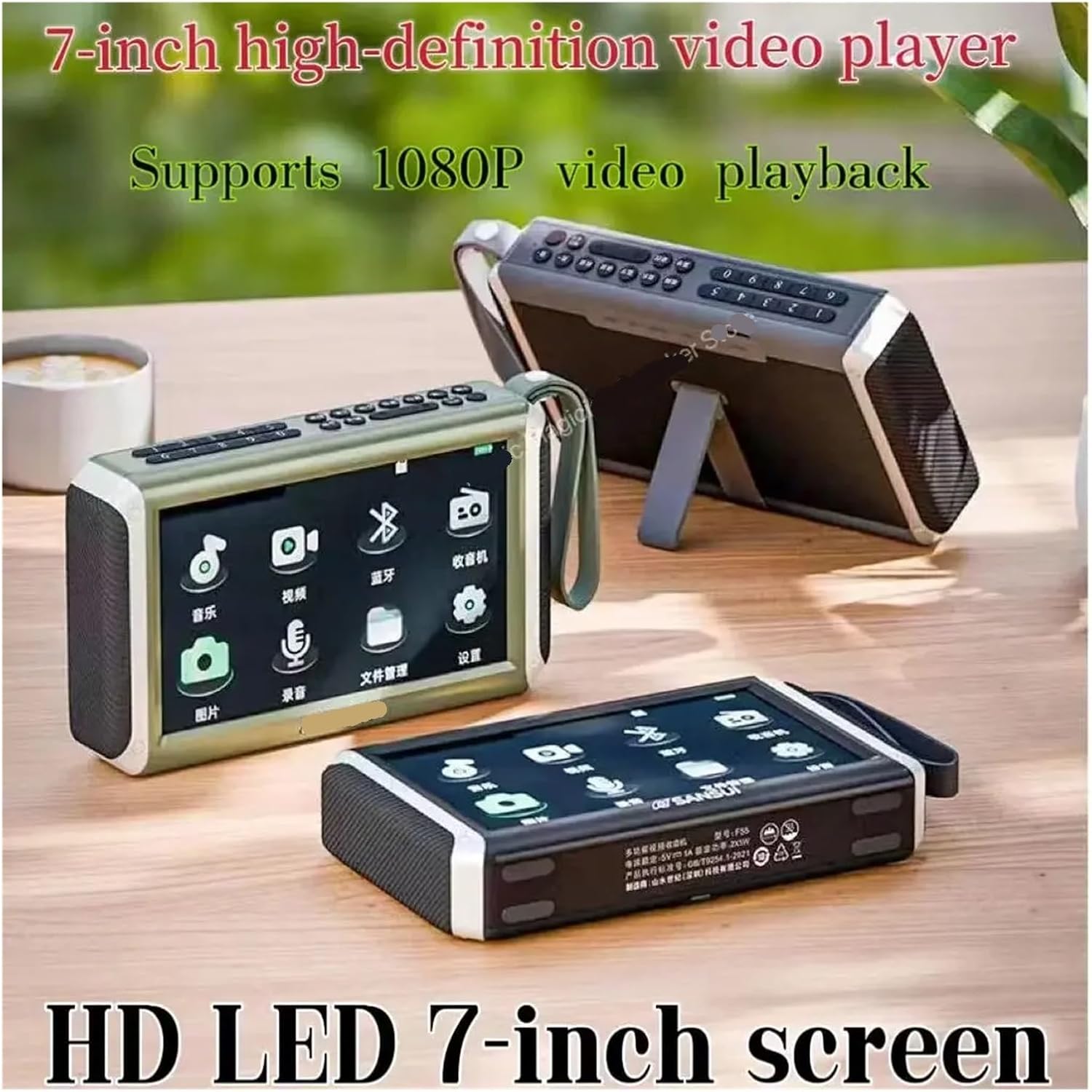
Figure 2.1: The 7-inch high-definition LED display supports 1080P video playback.
3. Setup Guide
3.1 Initial Charging
Before first use, fully charge the speaker. Connect the provided charging cable to the speaker's charging port and a compatible USB power adapter (not included). The charging indicator will show the charging status and turn off when fully charged.
3.2 Powering On/Off
- To Power On: Press and hold the Power button (usually located on the top panel) for a few seconds until the display lights up.
- To Power Off: Press and hold the Power button again until the display turns off.
3.3 Bluetooth Pairing
- Ensure the speaker is powered on and in Bluetooth pairing mode (indicated by a blinking Bluetooth icon on the display).
- On your mobile device (phone, tablet, computer), enable Bluetooth and search for available devices.
- Select "CC7O F55" or a similar name from the list of found devices.
- Once connected, the Bluetooth icon on the speaker's display will become solid, indicating a successful pairing.

Figure 3.1: Easily connect your smartphone or tablet via Bluetooth for wireless audio playback.
4. Operating Instructions
4.1 Navigating the Display Interface
The 7-inch LED display provides a user-friendly interface with icons for different functions. Use the physical buttons on the top panel or the touch controls (if available) to navigate between modes such as Music, Video, Bluetooth, Radio, Picture, Recording, File Management, and Settings.

Figure 4.1: The main interface of the speaker's 7-inch display, showing various application icons.
4.2 Bluetooth Mode Operation
After successful pairing (refer to Section 3.3), select the 'Bluetooth' icon on the display. Your speaker is now ready to play audio wirelessly from your connected device. Use your connected device to control playback (play/pause, skip tracks, volume).
4.3 FM Radio Operation
- Select the 'Radio' icon on the display to enter FM mode.
- To auto-scan for stations, press the 'Scan' button (refer to button layout in product diagram, if available, or general control). The speaker will automatically search and save available FM stations.
- To manually tune, use the 'Previous/Next' buttons to navigate through saved stations or directly input the frequency using the numeric keypad (if present).

Figure 4.2: The FM radio interface allows for easy tuning and station selection.
4.4 MP4 Music and Video Playback
- Insert a TF card (MicroSD) or USB flash drive into the designated slot on the speaker. Ensure your media files (MP3, MP4, etc.) are stored on the card/drive.
- Select the 'Music' icon for audio files or the 'Video' icon for video files on the display.
- Navigate through your folders and select the desired file to play.
- Use the on-screen controls or physical buttons for playback functions (play/pause, next/previous, volume).

Figure 4.3: Enjoy video playback directly on the speaker's 7-inch display from your TF card or USB drive.
4.5 File Management and Other Functions
The 'File Management' icon allows you to browse and manage files on your inserted storage devices. Other icons like 'Picture' for image viewing and 'Recording' for audio recording (if supported) can be accessed similarly.
5. Maintenance
- Cleaning: Use a soft, dry cloth to clean the speaker's surface. Do not use abrasive cleaners, alcohol, or solvents, as they may damage the finish.
- Storage: When not in use for extended periods, store the speaker in a cool, dry place away from direct sunlight and extreme temperatures.
- Battery Care: To prolong battery life, avoid fully discharging the battery frequently. Charge the speaker regularly, even if not in active use, to maintain battery health.

Figure 5.1: The speaker features a built-in 4400mAh battery for extended usage. Proper battery care ensures longevity.
6. Troubleshooting
| Problem | Possible Cause | Solution |
|---|---|---|
| Speaker does not power on. | Low battery or no charge. | Charge the speaker fully. |
| No sound from speaker. | Volume too low; incorrect mode; device not connected. | Increase volume; switch to correct input mode (Bluetooth, TF, FM); ensure device is paired. |
| Bluetooth connection fails. | Speaker not in pairing mode; device too far; interference. | Ensure speaker is in pairing mode; move devices closer; restart both devices. |
| FM radio static/poor reception. | Weak signal; environmental interference. | Adjust speaker position; extend antenna (if applicable); try auto-scan again. |
| Video/Music files not playing. | Unsupported file format; corrupted file; TF card/USB issue. | Ensure files are in supported formats (MP3, MP4); try a different file; reformat or replace TF card/USB. |
7. Specifications
| Feature | Detail |
|---|---|
| Model Number | Life technology shoping (F55 GRAY) |
| Display Screen | 7-inch LED Display |
| Bluetooth Version | 5.3 |
| Maximum Wireless Range | 10m-20m |
| Battery Capacity | 4400mAh (Built-in rechargeable) |
| Output Power | 25W |
| Frequency Range | 100Hz-20KHz |
| FM Frequency Range | 87.5-108 MHz |
| Support Memory Card | Yes (TF Card) |
| Playback Function | Radio, MP3, MP4 (Video) |
| Item Weight | 1.76 ounces (0.05 kg) |
| Dimensions (Approx.) | 1.18 x 0.79 x 0.39 inches (Package Dimensions) |
| Material | Plastic (Cabinet, Woofer/Widerange, Mid-range, Tweeter) |
8. Warranty and Support
This product comes with a standard manufacturer's warranty. Please refer to the product packaging or purchase documentation for specific warranty terms and conditions.
For technical support, troubleshooting assistance, or warranty claims, please contact the retailer or manufacturer directly using the contact information provided at the point of purchase.
Ask a question about this manual
Ask about setup, troubleshooting, compatibility, parts, safety, or missing instructions. Manuals+ will review the question and use this page’s manual context to help answer it.