
ReTrack C11 C05
Retrack™ C17 AI Intelligent Face Tracking Smart Gimbal User Manual
Model: C11 C05 | Brand: ReTrack
Introduction
Thank you for choosing the Retrack™ C17 AI Intelligent Face Tracking Smart Gimbal. This device is designed to enhance your mobile videography and photography experience with advanced AI face-tracking, 360° auto-rotation, and a versatile tripod selfie stick design. Please read this manual carefully before using the product to ensure proper operation and to maximize its potential.
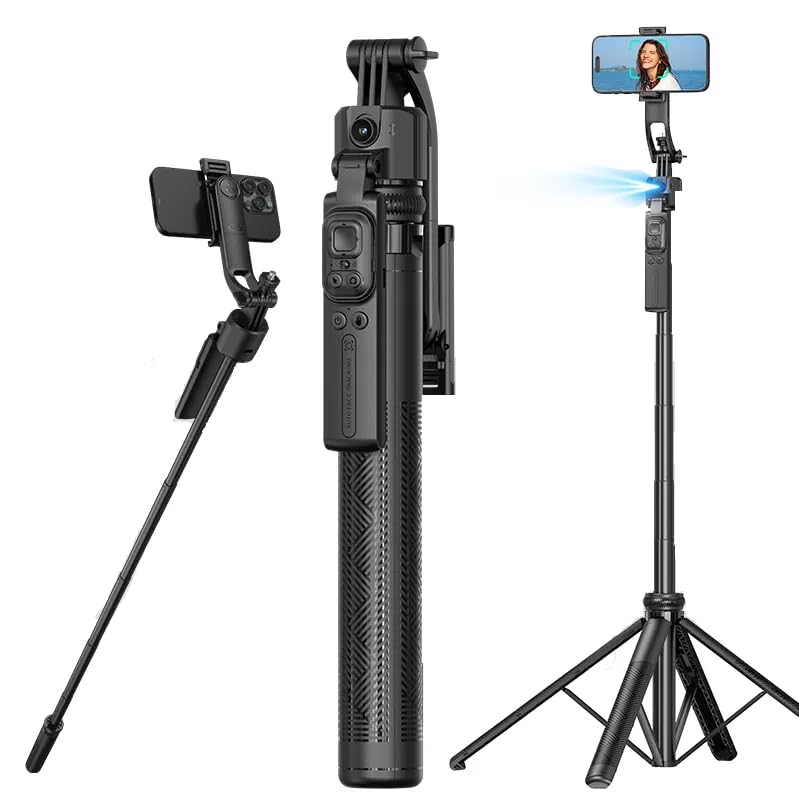
Figure 1: Retrack™ C17 Smart Gimbal - Overview
Safety Information
- Do not disassemble, repair, or modify the device.
- Keep the device away from water, fire, and high temperatures.
- Use only the specified charging cable and adapter.
- Avoid dropping or subjecting the device to strong impacts.
- Ensure the gimbal is in the unlocked state before adjusting the lens angle to prevent motor damage.
Package Contents
The Retrack™ C17 package includes the following items:
- Retrack™ C17 AI Intelligent Face Tracking Smart Gimbal
- Bluetooth Remote Control (Shutter)
- User Manual (this document)
- Charging Cable
Product Overview
Familiarize yourself with the main components of your Retrack™ C17 Smart Gimbal.

Figure 2: Key Components and Remote Control
Main Gimbal Unit:
- Phone Clip: Securely holds your smartphone. Detachable for standalone use.
- AI Tracking Lens: Integrated camera for face tracking.
- Extendable Rod: Made of thickened aluminum alloy, extends up to 1630mm (64 inches).
- Quad-Leg Base: Provides stable support when used as a tripod.
- 1/4" Interface: Universal screw mount for accessories like fill lights or action cameras.
- Lock/Unlock Mechanism: For securing the gimbal head when not in tracking mode or for transport.
Bluetooth Remote Control:
- Power Switch: Slide left to turn on, slide right to turn off.
- Arrow Buttons: Control mouse direction (for scrolling short videos).
- Like Button: Click to pause, double-click to like.
- Camera Button: Click to take photos/videos.
Setup
- Unfold the Gimbal: Gently unfold the tripod legs and extend the main rod to your desired height.
- Mount Your Phone: Open the phone clip and securely insert your smartphone. Ensure it is balanced.
- Unlock the Gimbal Head: If the gimbal head is locked for transport, switch it to the unlocked position. Note: Please use the gimbal in the unlocked state to avoid damaging the motor.
- Power On: Press and hold the Power Button on the gimbal unit (or slide the power switch on the remote if it's integrated).
- Pair Bluetooth Remote:
- Turn on the Bluetooth remote control by sliding its power switch.
- On your smartphone, go to Bluetooth settings and search for "Retrack C17" or similar.
- Select the device to pair. Once paired, the remote is ready for use.
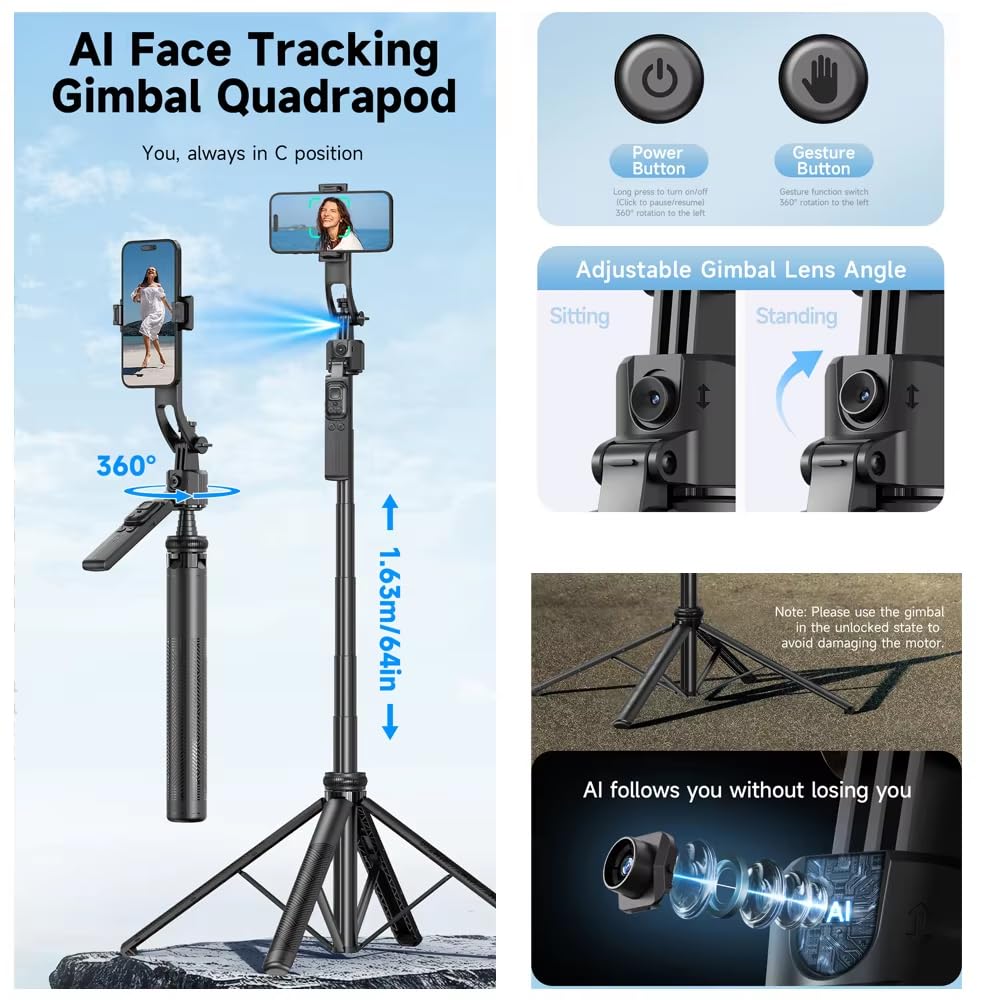
Figure 3: Gimbal Setup and Adjustable Lens Angle
Operating Instructions
AI Face Tracking (Protagonist Mode):
The C17 gimbal features intelligent AI face tracking to keep you in the frame automatically.
- Ensure the gimbal is powered on and your phone is mounted.
- Position yourself in front of the gimbal's AI tracking lens.
- To activate tracking, make an "OK" gesture with your hand. The gimbal will begin to follow your movements.
- To pause tracking, show your open palm to the AI tracking lens.
- The gimbal supports 360° auto-rotation to follow you seamlessly.

Figure 4: AI Face Tracking in Action

Figure 5: Gesture Recognition and Remote Control Functions
Using the Bluetooth Remote Control:
The detachable Bluetooth remote provides convenient control over your phone's camera and media.
- Taking Photos/Videos: Press the Camera Button once to take a photo, or press and hold to start/stop video recording (functionality may vary slightly based on phone camera app).
- Scrolling Short Videos: Use the Arrow Buttons to navigate through short video feeds on compatible apps.
- Like/Pause: Click the Like Button to pause content, double-click to "like" or interact with content.
Multi-Angle Adjustment and Panoramic Shooting:
The gimbal allows for flexible shooting angles and panoramic capabilities.
- The gimbal head can rotate 360° horizontally, 270° vertically, and 90° for elevation shots.
- For 360° panoramic shots, ensure the gimbal is stable on its quad-leg base. The balance handle assists in smooth rotation.
- The detachable phone clip can be used as a standalone phone holder for hands-free viewing.

Figure 6: Versatile Shooting Angles and Accessory Compatibility
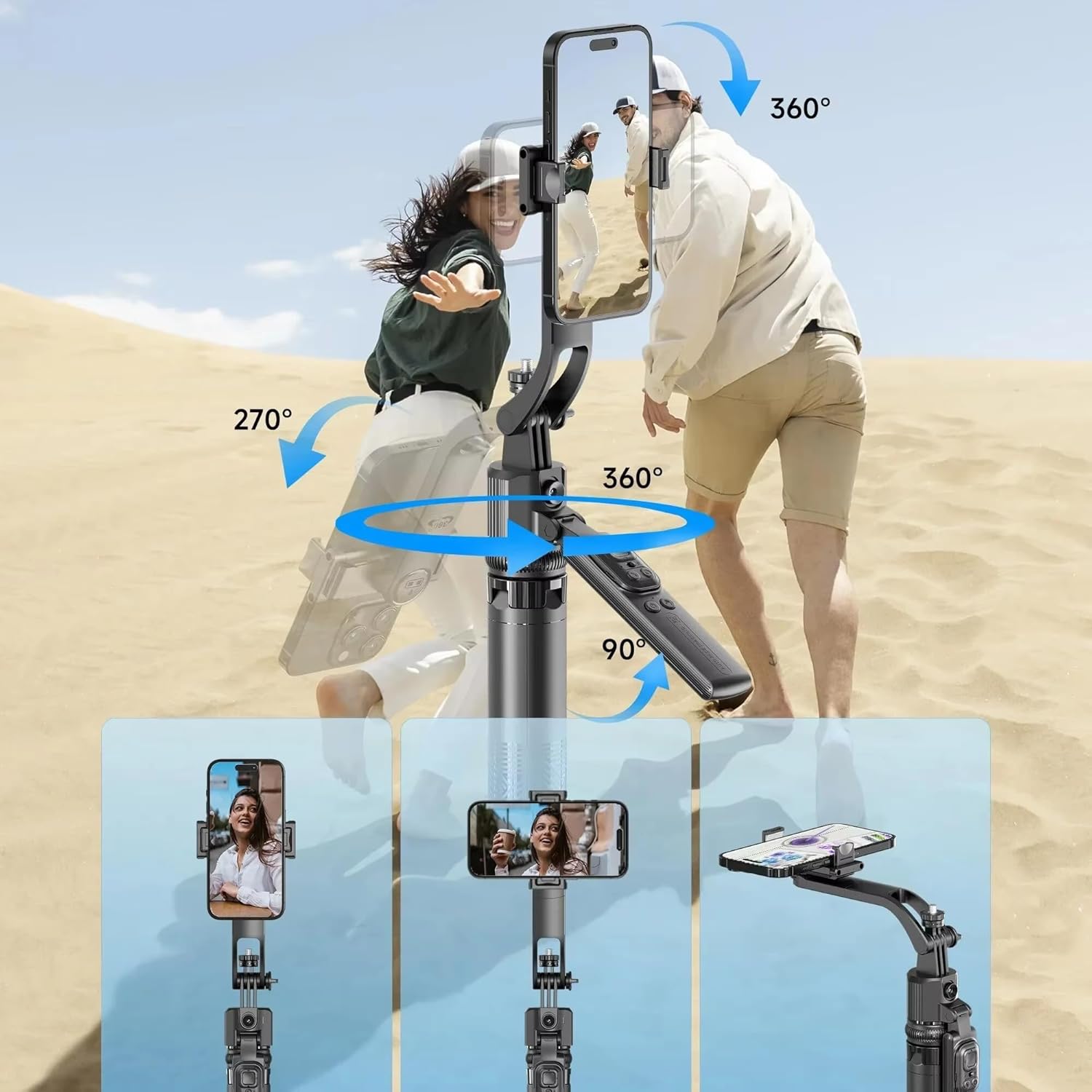
Figure 7: Dynamic Multi-Angle Shooting
Multi-Scenario Usage:
The Retrack™ C17 is adaptable for various content creation needs.

Figure 8: Versatile Applications
- Vlog Shot: Use AI tracking for dynamic self-recording.
- Outdoor Live: Stable setup for live streaming events.
- Team Selfie Shot: Extend the rod for wide group photos.
- Outdoor Filming: Capture stable footage on various terrains.
- Steady Shot: Minimize shakes for smooth video recording.
Maintenance
- Cleaning: Wipe the gimbal with a soft, dry cloth. Do not use harsh chemicals or abrasive materials.
- Storage: Store the gimbal in a cool, dry place away from direct sunlight and extreme temperatures. Ensure it is folded and locked for transport.
- Battery Care: For optimal battery life, charge the device regularly, even if not in frequent use. Avoid fully discharging the battery.
Troubleshooting
| Problem | Possible Cause | Solution |
|---|---|---|
| Gimbal not turning on. | Low battery; Power button not pressed long enough. | Charge the gimbal; Press and hold the power button for 3 seconds. |
| AI tracking not working. | Gimbal head is locked; Incorrect gesture; Poor lighting conditions. | Ensure gimbal head is unlocked; Use clear "OK" or palm gesture; Ensure adequate lighting. |
| Bluetooth remote not connecting. | Remote battery low; Not in pairing mode; Already connected to another device. | Check remote battery; Ensure remote is on and discoverable; Disconnect from other devices. |
| Gimbal motor making noise or not moving smoothly. | Gimbal head is locked; Obstruction; Overloaded. | Ensure gimbal head is unlocked; Check for obstructions; Ensure phone is within weight limits. |
Specifications
| Model | C11 C05 |
| Brand | ReTrack |
| Product Dimensions | 10D x 10W x 10H Millimeters (folded) |
| Item Weight | 600 Grams |
| Max Extension Length | 1630mm (64 inches) |
| Tracking Type | AI Intelligent Face Tracking |
| Rotation Angle | 360° Horizontal Auto-Rotation |
| Interface | Universal 1/4" Screw Interface |
| Compatibility | Android and iOS smartphones |
| Included Components | Shutter (Bluetooth Remote) |
Warranty and Support
The Retrack™ C17 Smart Gimbal comes with a standard 30-day warranty. For detailed warranty information, technical support, or service inquiries, please visit the official ReTrack website or contact their customer service.
Official Website: www.retrack.com (Note: This is a placeholder URL, please refer to product packaging or official brand information for the correct website.)