
1. Introduction
This manual provides detailed instructions for the installation, operation, maintenance, and troubleshooting of the AXAUCHOZ H100 Series Variable Frequency Drive (VFD). The H100 Series VFD is designed for precise motor speed control and can function as a phase converter, making it suitable for various industrial applications. Please read this manual thoroughly before installation and operation to ensure safe and efficient use of the device.

Figure 1.1: AXAUCHOZ H100 Series Variable Frequency Drive unit.
2. Safety Information
WARNING: Improper installation or operation can lead to serious injury or death. Always follow safety guidelines.
- Electrical Hazard: This device operates with high voltage. Only qualified personnel should perform installation, wiring, and maintenance.
- Power Disconnection: Always disconnect all power sources before performing any wiring, inspection, or maintenance. Wait at least 5 minutes after power-off for capacitors to discharge.
- Grounding: Ensure the VFD is properly grounded according to local electrical codes.
- Environment: Do not operate the VFD in environments with excessive dust, moisture, corrosive gases, or flammable materials.
- Overload Protection: Do not exceed the rated current or power of the VFD and connected motor.
- Ventilation: Ensure adequate ventilation around the VFD to prevent overheating.
- Secure Mounting: Mount the VFD securely to prevent accidental falls or vibrations.
3. Product Overview
The AXAUCHOZ H100 Series VFD is a versatile device designed for precise control of motor speed and can also function as a phase converter. It features a robust design with multiple safeguards for reliable operation.
3.1 Key Features
- High Accuracy and High Moment of Force for precise motor control.
- Supports up to 8/16 speed modes selection.
- Capable of both synchronization and non-synchronization operation.
- Wide speed regulating range driving.
- Low-noise operation and low electromagnetic interference.
- Constructed with ABS Flame Retardant Material for high-impact resistance and long service life.

Figure 3.1: Illustration of the powerful functions of the H100 Series VFD, including high accuracy, high moment of force, multiple speed modes, synchronization capabilities, and wide speed regulation.
3.2 Safeguards and Protections
The H100 Series VFD incorporates several safety features to protect the unit and connected equipment:
- Fuse Protection: Protects against overcurrent conditions.
- Overload Protection: Prevents damage from excessive load on the motor.
- Over-Voltage Protection: Safeguards against input voltage surges.
- Under-Voltage Protection: Ensures stable operation by shutting down if input voltage drops too low.
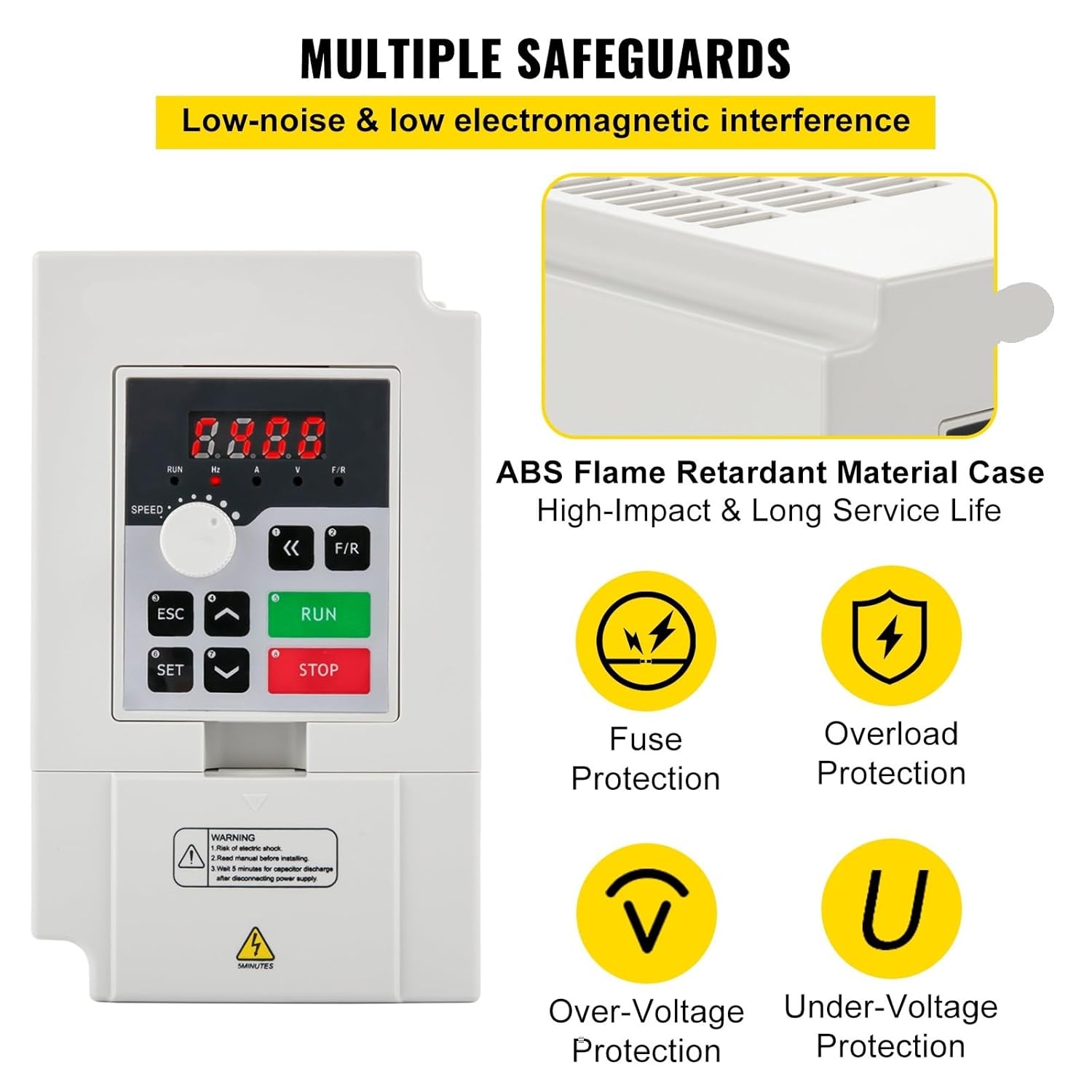
Figure 3.2: Overview of the multiple safeguards integrated into the H100 Series VFD, including fuse, overload, over-voltage, and under-voltage protection.
3.3 Applications
The H100 Series VFD is suitable for a wide range of industrial applications requiring precise motor control and phase conversion, including but not limited to:
- Pharmaceutical Equipment
- Wood Working Machinery
- Textile Machinery
- CNC Machines
- General Motor Speed Control

Figure 3.3: Examples of industrial applications where the H100 Series VFD can be utilized, such as pharmaceutical equipment, woodworking machinery, and textile machinery.
4. Setup & Installation
Proper installation is critical for the safe and efficient operation of your VFD. It is highly recommended that installation be performed by a qualified electrician.
4.1 Unpacking and Inspection
- Carefully unpack the VFD and its accessories.
- Inspect the unit for any signs of physical damage during transit. If damage is found, contact your supplier immediately.
- Verify that all components listed in the package content are present. (e.g., VFD unit, extension wire).
4.2 Mounting
- Choose a mounting location that is clean, dry, well-ventilated, and free from direct sunlight, excessive dust, corrosive gases, and vibrations.
- Ensure sufficient clearance around the VFD for proper heat dissipation.
- Mount the unit vertically on a stable, non-flammable surface using appropriate fasteners.
4.3 Wiring
CAUTION: Ensure all power is disconnected before wiring. Incorrect wiring can damage the VFD and connected equipment.
- Input Power: Connect the appropriate single-phase or three-phase AC power supply to the VFD's input terminals (L1/R, L2/S, L3/T). Refer to the VFD's label for specific voltage requirements (e.g., 110V or 220V).
- Motor Connection: Connect the three-phase motor to the VFD's output terminals (U, V, W). Ensure correct phase sequence for desired motor rotation.
- Grounding: Connect the VFD's ground terminal to a reliable earth ground. This is essential for safety and to minimize electromagnetic interference.
- Control Wiring: If using external control signals (e.g., remote start/stop, speed potentiometer), connect them to the designated control terminals. An extension wire is provided for convenience.
- Cable Sizing: Use appropriately sized cables for all power connections to handle the maximum current draw.
Refer to the wiring diagram provided on the VFD unit or in a separate detailed wiring manual (if applicable) for precise terminal connections.
5. Operating Instructions
The H100 Series VFD features an intuitive control panel for easy operation.
5.1 Control Panel Overview
The front panel typically includes:
- Digital Display: Shows frequency, voltage, current, and error codes.
- RUN Button: Initiates motor operation.
- STOP Button: Halts motor operation.
- ESC Button: Exits current menu or cancels an operation.
- SET Button: Enters menu or confirms a setting.
- Up/Down Arrows: Navigate menus or adjust parameter values.
- Speed Knob: Adjusts output frequency/motor speed.
5.2 Basic Operation
- Power On: After ensuring all wiring is correct and secure, apply power to the VFD. The digital display should illuminate.
- Set Speed: Use the Speed Knob to set the desired output frequency (motor speed). The display will show the current frequency setting.
- Start Motor: Press the RUN button. The motor should begin to accelerate to the set speed.
- Stop Motor: Press the STOP button. The motor will decelerate and stop.
5.3 Advanced Settings (Parameter Programming)
The H100 Series VFD allows for advanced configuration through parameter programming. This includes setting acceleration/deceleration times, maximum/minimum frequencies, motor parameters, and various control modes.
- Press the SET button to enter the parameter menu.
- Use the Up/Down arrows to navigate through different parameter groups and individual parameters.
- Press SET again to select a parameter for editing.
- Use the Up/Down arrows to change the parameter value.
- Press SET to confirm the new value.
- Press ESC to exit the current menu level.
Refer to the detailed parameter manual (if provided separately) for a complete list of parameters and their functions. Incorrect parameter settings can lead to improper operation or damage.
6. Maintenance
Regular maintenance helps ensure the longevity and reliable operation of your VFD.
- Cleaning: Periodically clean the exterior of the VFD with a soft, dry cloth. Ensure ventilation openings are free from dust and debris. Do not use liquid cleaners.
- Connection Checks: Regularly inspect all wiring connections for tightness. Loose connections can cause overheating and poor performance.
- Environmental Conditions: Ensure the operating environment remains within the specified temperature and humidity ranges.
- Fan Inspection: Check the cooling fan (if present) for proper operation and ensure it is not obstructed.
- Capacitor Discharge: Remember that internal capacitors can hold a charge for several minutes after power is removed. Always wait for the discharge indicator to turn off before touching internal components.
7. Troubleshooting
This section provides basic troubleshooting steps for common issues. For more complex problems, contact technical support.
| Problem | Possible Cause | Solution |
|---|---|---|
| VFD does not power on. | No input power; loose connections; internal fuse blown. | Check power supply; verify all wiring connections; inspect internal fuse (by qualified personnel only). |
| Motor does not run. | Incorrect wiring; VFD in stop mode; parameter settings incorrect; motor fault. | Verify motor wiring; press RUN button; check parameter settings (e.g., min frequency, control mode); inspect motor. |
| Motor speed is unstable. | Poor grounding; motor parameters not set correctly; external interference. | Ensure proper grounding; adjust motor parameters in VFD settings; check for sources of electromagnetic interference. |
| VFD displays an error code. | Overcurrent, overvoltage, undervoltage, overload, overheating, etc. | Note the error code and refer to the detailed parameter manual for specific meaning and corrective actions. Address the underlying cause (e.g., reduce load, check voltage). |
| Excessive noise or vibration. | Loose mounting; motor imbalance; VFD parameter settings. | Secure VFD mounting; check motor for balance; adjust VFD switching frequency or other relevant parameters. |
8. Specifications
The AXAUCHOZ H100 Series Variable Frequency Drives are available in several power ratings. The specifications for common models are listed below. Please refer to the product label on your specific unit for exact details.
| Parameter | H100-2.2C2-1B (2.2KW) | H100-3S2-1B (3KW) | H100-4S2-1B (4KW) | H100-7.5S2-1B (7.5KW) |
|---|---|---|---|---|
| Power | 2.2 kW | 3 kW | 4 kW | 7.5 kW |
| Horsepower | 3 HP | 4 HP | 5.5 HP | 10 HP |
| Input Voltage | 110V | 220V | 220V | 220V |
| Output Voltage | 0-110V | 0-220V | 0-220V | 0-220V |
| Input Current | Refer to product label | 0-14A | 0-17A | 0-33A |
| Output Current | Refer to product label | 0-14A | 0-17A | 0-33A |
| Input Phase | 1 or 3 Phase | 1 or 3 Phase | 1 or 3 Phase | 1 or 3 Phase |
| Output Phase | 3 Phase | 3 Phase | 3 Phase | 3 Phase |
| Input Frequency | 50/60 Hz | 50/60 Hz | 50/60 Hz | 50/60 Hz |
| Output Frequency | 0-1000 Hz | 0-1000 Hz | 0-1000 Hz | 0-1000 Hz |
| Working Temperature | 23~104°F / -5~40°C | 23~104°F / -5~40°C | 23~104°F / -5~40°C | 23~104°F / -5~40°C |
| Humidity | 0-90% RH (non-condensing) | 0-90% RH (non-condensing) | 0-90% RH (non-condensing) | 0-90% RH (non-condensing) |
| Vibration | Below 0.5 G | Below 0.5 G | Below 0.5 G | Below 0.5 G |
| Net Weight | Approx. 2.43 lbs / 1.1 kg | 2.43 lbs / 1.1 kg | 5.73 lbs / 2.6 kg | 5.73 lbs / 2.6 kg |
| Product Size (L x W x H) | Approx. 5.9 x 3.54 x 4.6 in / 150 x 90 x 118 mm | 5.9 x 3.54 x 4.6 in / 150 x 90 x 118 mm | 8.7 x 4.6 x 5.8 in / 220 x 118 x 148 mm | 8.7 x 4.6 x 5.8 in / 220 x 118 x 148 mm |
Note: Specifications are subject to change without notice. Always refer to the product label for the most accurate information for your specific model.
9. Warranty & Support
For warranty information, technical support, or service inquiries, please contact your original point of purchase or the manufacturer directly. Keep your purchase receipt as proof of purchase.
For the latest information and support resources, please visit the official AXAUCHOZ website or contact their customer service department.