
1. Introduction
The AXAUCHOZ H100-4S2-1B is a Variable Frequency Drive (VFD) designed for precise motor speed control and phase conversion in various industrial applications. This device converts fixed-frequency, fixed-voltage AC power into variable-frequency, variable-voltage AC power, enabling efficient control over motor speed and torque. It is suitable for use with CNC machinery, pharmaceutical equipment, woodworking machinery, and textile machinery.

Figure 1: The AXAUCHOZ H100-4S2-1B Variable Frequency Drive shown with examples of its application in pharmaceutical, woodworking, and textile machinery.
2. Safety Information
Please read and understand all safety instructions before installing, operating, or maintaining this equipment. Failure to comply with these instructions may result in serious injury or death, and/or damage to the equipment.
- Electrical Hazard: This device operates with high voltages. Only qualified personnel should perform installation and maintenance.
- Disconnect Power: Always disconnect all power sources to the VFD and wait at least 5 minutes for capacitors to discharge before performing any work on the unit.
- Proper Grounding: Ensure the VFD is properly grounded according to local and national electrical codes.
- Environmental Conditions: Do not operate the VFD in environments exceeding specified temperature, humidity, or vibration limits.
- Protection: The unit features built-in safeguards including fuse protection, overload protection, over-voltage protection, and under-voltage protection. However, external protection may still be required depending on the application.
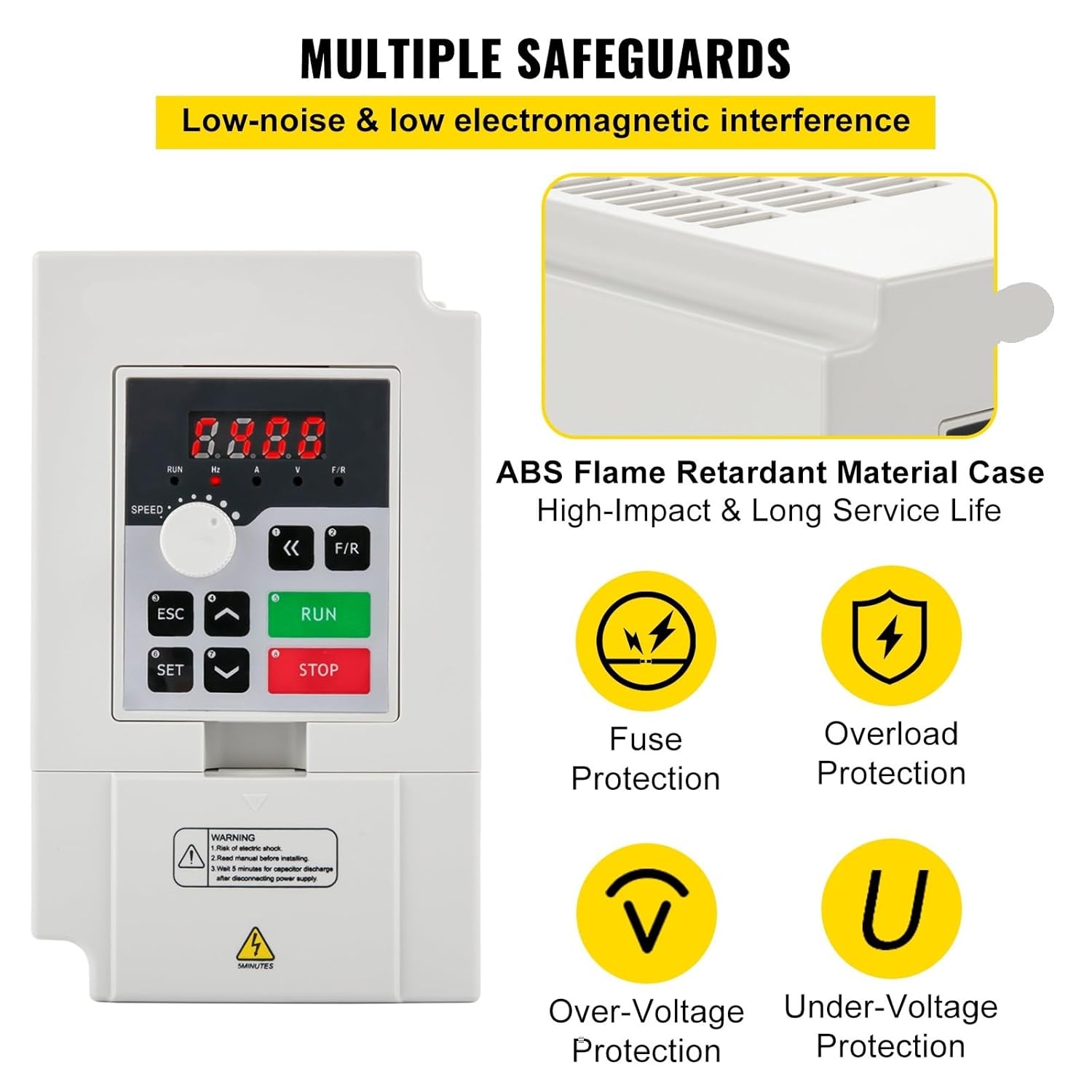
Figure 2: The AXAUCHOZ H100-4S2-1B Variable Frequency Drive highlighting its multiple safeguard features, including fuse, overload, over-voltage, and under-voltage protection.
3. Setup
3.1 Unpacking and Inspection
- Carefully remove the VFD from its packaging.
- Verify that all components listed in the package content are present: 1 x 4 KW Variable Frequency Drive Inverter, 1 x Extension Wire.
- Inspect the unit for any signs of physical damage incurred during shipping. Do not install a damaged unit.
3.2 Mounting
- Mount the VFD vertically on a stable, non-flammable surface.
- Ensure adequate clearance around the unit for proper ventilation and heat dissipation. Refer to the product dimensions for space requirements (8.7 x 4.6 x 5.8 inches / 220 x 118 x 148 mm).
- Avoid mounting in direct sunlight, near heat sources, or in areas with excessive dust, moisture, or corrosive gases.
3.3 Wiring
All wiring must be performed by a qualified electrician in accordance with local and national electrical codes.
- Power Input: Connect the 220V AC power supply (1-phase or 3-phase) to the designated input terminals. Ensure the input current capacity meets the VFD's requirements (0-17A).
- Motor Output: Connect the 3-phase motor to the VFD's output terminals. Ensure the motor's voltage and current ratings are compatible with the VFD's output (0-220V, 0-17A).
- Grounding: Connect the VFD's ground terminal to a reliable earth ground. This is critical for safety and proper operation.
- Control Wiring (Optional): If external control signals (e.g., start/stop, speed reference) are used, connect them to the appropriate control terminals as per the detailed wiring diagram in the full product manual (not provided here).
4. Operating Instructions
4.1 Control Panel Overview
The VFD features a user-friendly control panel for operation and parameter adjustment.
- Display: Shows operational parameters such as frequency (Hz), current (A), and direction (F/R).
- SPEED Knob: Used to adjust the output frequency and motor speed.
- RUN Button: Initiates motor operation.
- STOP Button: Halts motor operation.
- ESC Button: Exits current menu or cancels an operation.
- SET Button: Enters menu or confirms a setting.
- Up/Down Arrows: Navigate menus and adjust parameter values.

Figure 3: The AXAUCHOZ H100-4S2-1B Variable Frequency Drive control panel, highlighting features such as high accuracy, high moment of force, multiple speed modes, synchronization options, and wide speed regulating range.
4.2 Basic Operation
- Power On: Ensure all wiring is correct and secure, then apply power to the VFD. The display should illuminate.
- Set Speed: Rotate the SPEED knob to set the desired output frequency (motor speed).
- Start Motor: Press the RUN button to start the motor. The display will show the current operating frequency and current.
- Stop Motor: Press the STOP button to halt the motor.
- Parameter Adjustment: Use the SET and arrow buttons to access and modify advanced parameters, such as acceleration/deceleration times, motor parameters, and various control modes (e.g., 8/16 speed modes, synchronization settings). Refer to the comprehensive programming manual for detailed parameter descriptions.
5. Maintenance
Regular maintenance ensures optimal performance and extends the lifespan of your VFD.
- Cleaning: Periodically clean the VFD's exterior, especially the ventilation openings, to prevent dust accumulation. Use a soft, dry cloth. Do not use liquid cleaners or solvents.
- Inspection: Regularly inspect all wiring connections for tightness and signs of wear or damage. Check for any unusual noises or odors during operation.
- Environmental Check: Ensure the operating environment remains within the specified limits:
- Working Temperature: -5°C to 40°C (23°F to 104°F)
- Humidity: 0-90% Relative Humidity (without dew)
- Vibration: Below 0.5 G
- Fan Check: Ensure the cooling fan (if present) is operating correctly and not obstructed.
6. Troubleshooting
This section provides guidance for common issues. For complex problems, contact technical support.
- No Power/Display Off:
- Check the main power supply to the VFD.
- Verify all input power connections are secure.
- Inspect for blown fuses (internal or external).
- Motor Not Running:
- Ensure the RUN button has been pressed.
- Check motor wiring connections.
- Verify that no fault codes are displayed on the VFD.
- Confirm motor parameters are correctly set in the VFD.
- Incorrect Motor Speed:
- Adjust the SPEED knob.
- Check VFD output frequency on the display.
- Verify speed reference settings if using external control.
- Overload/Overcurrent Fault:
- Check for mechanical issues with the motor or driven equipment.
- Ensure the motor is not undersized for the load.
- Verify VFD current limits and motor parameters are correctly set.
- Over-Voltage/Under-Voltage Fault:
- Check the input power supply voltage stability.
- Ensure proper braking resistors are used if rapid deceleration is required.
7. Specifications
Technical specifications for the AXAUCHOZ H100-4S2-1B 4KW Variable Frequency Drive.
| Parameter | Value |
|---|---|
| Model | H100-4S2-1B |
| Power | 4 kW |
| Horsepower | 5.5 HP |
| Input Voltage | 220V |
| Output Voltage | 0-220V |
| Input Current | 0-17A |
| Output Current | 0-17A |
| Input Phase | 1 or 3 Phase |
| Output Phase | 3 Phase |
| Input Frequency | 50/60 Hz |
| Output Frequency | 0-1000 Hz |
| Working Temperature | 23~104°F (-5~40°C) |
| Humidity | 0-90% Relative Humidity (without dew) |
| Vibration | Below 0.5 G |
| Net Weight | 5.73 lbs / 2.6 kg |
| Product Size (L x W x H) | 8.7 x 4.6 x 5.8 in / 220 x 118 x 148 mm |
| Case Material | ABS Flame Retardant Material |
8. Warranty and Support
For warranty information, technical support, or service inquiries, please contact your seller or the manufacturer directly. Keep your purchase receipt as proof of purchase.