1. Introduction
This manual provides essential instructions for the safe and effective use of your DQFART Beginner Tattoo Machine Kit. Please read all instructions carefully before operating the equipment. This kit is designed for beginners and includes all necessary tools for practice and learning.
2. Safety Information
Important Safety Warnings:
- This product is suitable for adults. Keep all components out of reach of children to prevent accidental ingestion or injury.
- Always ensure your workspace is clean, sterile, and well-lit.
- Use only sterile, single-use needles. Dispose of used needles properly in a sharps container.
- Wear appropriate personal protective equipment, including gloves, during setup and operation.
- Do not use the tattoo machine near water or in damp environments. The device is not water-resistant.
- Ensure all connections are secure before powering on the device.
- If you are new to tattooing, practice extensively on synthetic practice skin before attempting to tattoo on human skin.
- Consult with a professional or local regulations regarding proper tattooing techniques and hygiene practices.
3. Kit Contents
Your DQFART Beginner Tattoo Machine Kit includes the following components:
- Tattoo Machine (Pen Style) x 1
- Tattoo Power Supply (TPN-020) x 1
- Mixed Model Tattoo Needles x 10
- Tattoo Foot Switch x 1
- Tattoo Transfer Paper x 2
- Tattoo Gloves x 2
- Tattoo RCA Cable x 1
- Tattoo Practice Skin x 1
- Tattoo Bandage x 1
- 5ml Tattoo Ink (Assorted Colors) x 7
- Tattoo Ink Cups x 20
- Instruction Manual x 1 (This document)

Image: Overview of the DQFART Beginner Tattoo Machine Kit components.
4. Setup
Follow these steps to set up your tattoo machine kit:
- Connect the Power Supply: Plug the power cord into the 'PLUG IN' port on the tattoo power supply (TPN-020) and then into a suitable electrical outlet.
- Connect the Foot Switch: Insert the foot switch cable into the 'FOOT PEDAL IN' socket on the power supply.
- Connect the Tattoo Machine: Attach one end of the RCA cable to the RCA interface on the tattoo machine and the other end to the 'CLIP CORD IN' socket on the power supply.
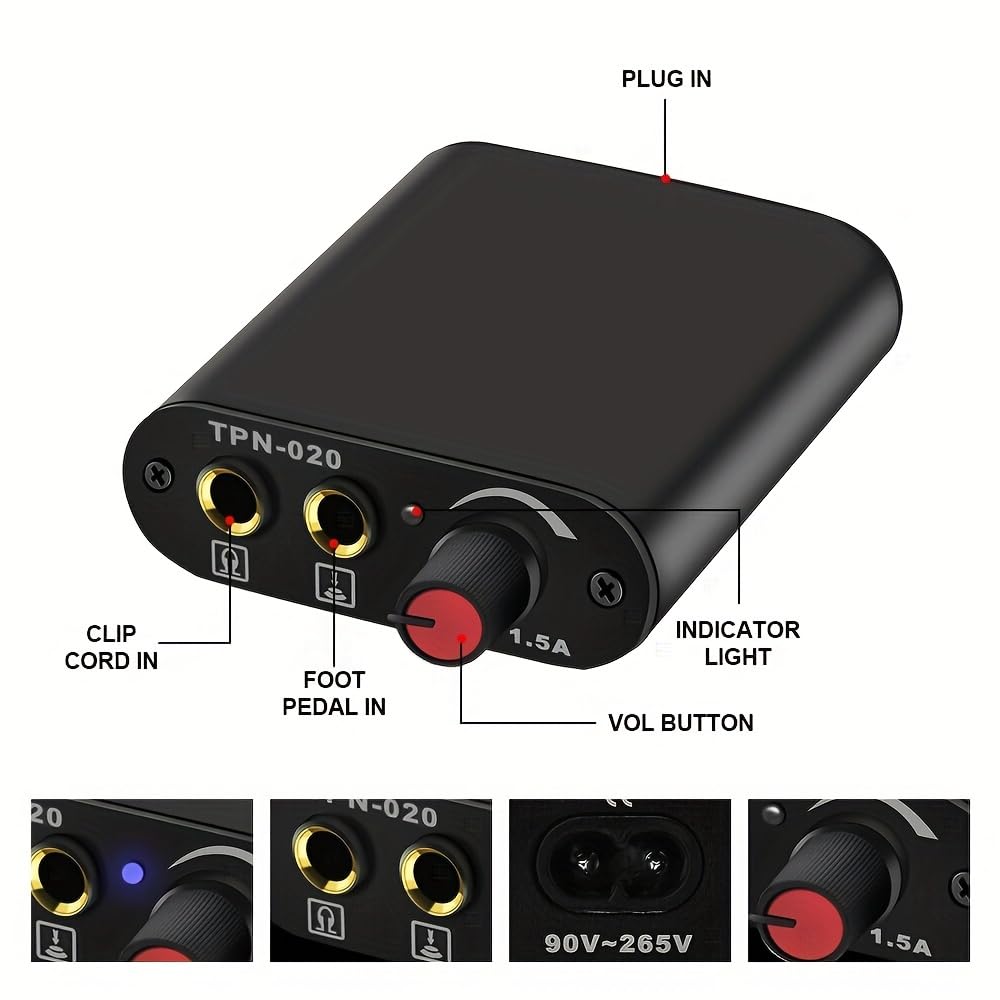
Image: The DQFART TPN-020 power supply showing the 'PLUG IN', 'CLIP CORD IN', 'FOOT PEDAL IN', 'INDICATOR LIGHT', and 'VOL BUTTON'.

Image: Detailed view of the power supply sockets, indicating compatibility with most tattoo clip cords and foot pedals.

Image: The RCA interface on the tattoo machine, designed for better transmission performance.
- Install the Needle Cartridge: Carefully insert a sterile needle cartridge into the front of the tattoo machine. Twist or push until it clicks securely into place. The machine is compatible with 99% of all-in-one needles on the market.

Image: The tattoo machine's pin interface, demonstrating compatibility with various needle types.

Image: A selection of DQFART mixed tattoo needle cartridges (1RL, 3RL, 5RL, 7RL, 5RS, 7RS, 7M1, 9M1, 7RM, 9RM).
- Prepare Ink: Pour a small amount of desired tattoo ink into a sterile ink cup.
- Prepare Practice Skin: Place the practice skin on a stable, clean surface.

Image: A 5ml bottle of DQFART multicolor tattoo ink, showing its dimensions and examples of tattoo art.
5. Operation
Once the kit is set up, follow these steps for operation:
- Power On: Turn on the power supply. The indicator light on the power supply will illuminate.
- Adjust Voltage: Use the 'VOL BUTTON' on the power supply to adjust the voltage to your desired setting. Start with a lower voltage and gradually increase as needed for your practice.
- Engage Machine: Press the foot switch to activate the tattoo machine. The machine will begin to operate. Release the foot switch to stop.
- Dip Needle: Gently dip the tip of the needle cartridge into the ink cup to load ink.
- Practice: Begin practicing on the synthetic practice skin. Maintain a steady hand and consistent depth.
The DQFART tattoo machine is versatile and can be used for various applications beyond traditional tattooing, such as striped hair simulation, eyeliner, and lip lining on practice skin.

Image: The DQFART tattoo machine illustrating its suitability for multiple purposes including tattoo, striped hair, eyeliner, and floating lips.
6. Maintenance
Proper maintenance ensures the longevity and performance of your tattoo kit:
- Cleaning the Machine: After each use, disconnect the machine from the power supply. Wipe down the exterior of the tattoo machine with a clean, damp cloth. Do not immerse the machine in water.
- Needle Disposal: Always dispose of used needle cartridges immediately into a designated sharps container. Never reuse needles.
- Power Supply Care: Keep the power supply clean and dry. Avoid spilling liquids on it.
- Storage: Store all components of the kit in a clean, dry, and cool place, away from direct sunlight and moisture.
7. Troubleshooting
If you encounter issues with your DQFART Tattoo Machine Kit, refer to the following common problems and solutions:
- Machine Not Turning On:
- Check if the power supply is properly plugged into the wall outlet.
- Ensure the power cord is securely connected to the power supply.
- Verify that the RCA cable is firmly connected to both the machine and the power supply.
- Confirm the foot switch is properly connected and functioning.
- Needle Not Moving Correctly:
- Ensure the needle cartridge is fully and correctly inserted into the machine.
- Check for any obstructions in the needle housing.
- Verify the voltage setting on the power supply is adequate.
- Machine Overheating:
- Allow the machine to cool down. Prolonged continuous use at high voltage can cause overheating.
- Ensure proper ventilation around the machine.
If problems persist, please contact customer support.
8. Specifications
Tattoo Machine:
- Brand: DQFART
- Weight: Approximately 80g
- Dimensions: 11.3 cm (4.4 in) length, 2.2 cm (0.86 in) diameter
- Interface: RCA
- Needle Compatibility: 99% all-in-one needles
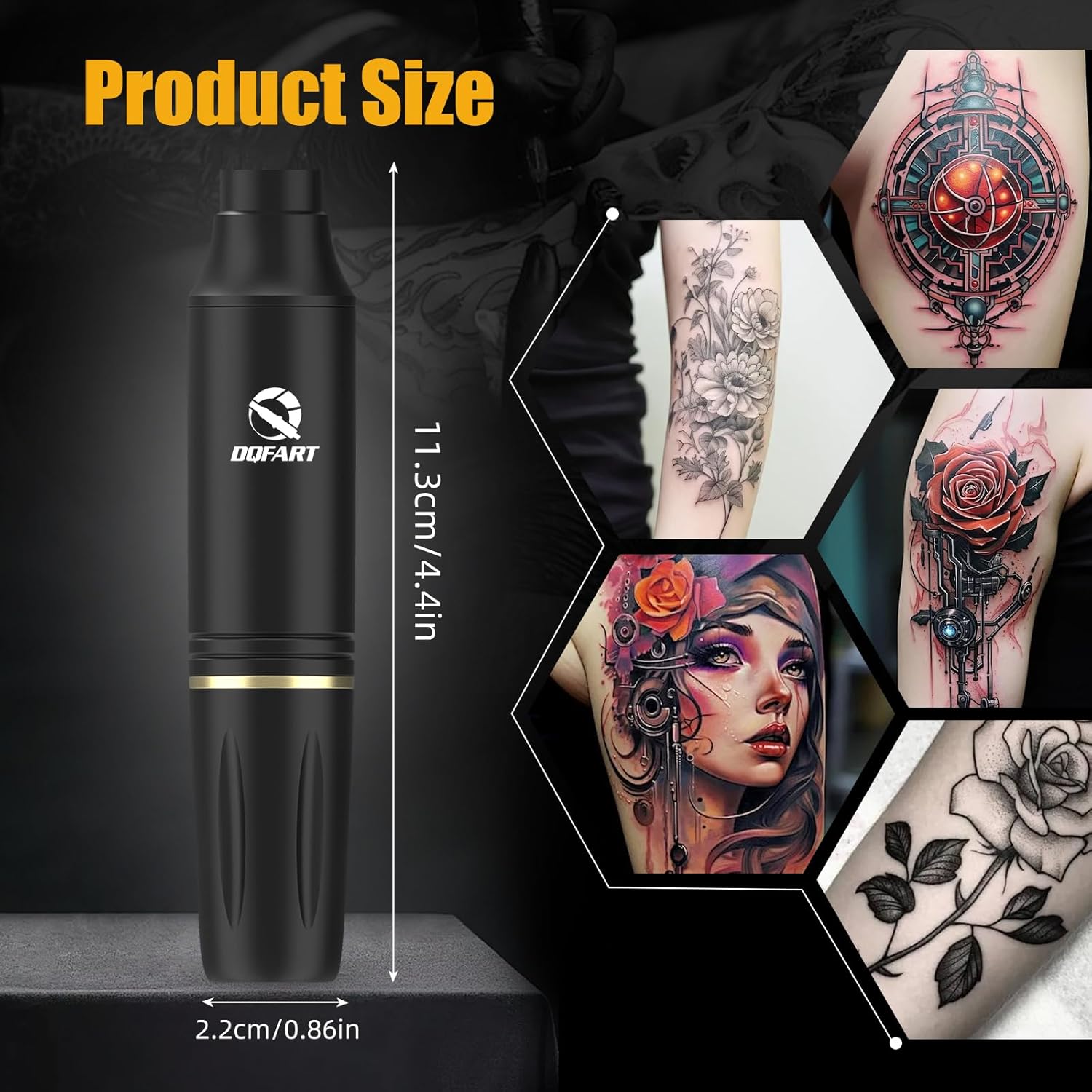
Image: The DQFART tattoo machine with dimensions indicating 11.3cm (4.4in) length and 2.2cm (0.86in) diameter.
Tattoo Power Supply (TPN-020):
- Input Voltage: 90V~265V
- Output Current: 1.5A
Tattoo Ink:
- Name: Tattoo Ink
- Capacity: 5ml per bottle
- Size: 69mm x 17.5mm
- Net Weight: 8g per bottle
General:
- Manufacturer: DQFART
- ASIN: B0DPBVXKJD
- Age Range: Adult
- Water Resistance Level: Not Water Resistant
9. Warranty and Support
For warranty information, technical support, or any questions regarding your DQFART Beginner Tattoo Machine Kit, please contact the seller or manufacturer directly through your purchase platform. Keep your purchase receipt or order number handy for faster service.