
ANWBROAD UBDT78W
ANWBROAD Vanity Desk with Mirror and Lights
Model: UBDT78W
User Instruction Manual
1. Introduction
Thank you for choosing the ANWBROAD Vanity Desk with Mirror and Lights. This product is designed to provide a functional and aesthetically pleasing space for your daily beauty routine, featuring integrated lighting, ample storage, and convenient charging options. This manual provides detailed instructions for assembly, operation, maintenance, and troubleshooting to ensure optimal use and longevity of your vanity desk.
Please read this manual thoroughly before assembly and use, and retain it for future reference.
2. Safety Information
- Always assemble the vanity desk on a soft, clean surface to prevent scratches.
- Ensure all parts are present and undamaged before beginning assembly.
- Do not overtighten screws during assembly to avoid damaging the engineered wood.
- Keep small parts and packaging materials away from children and pets.
- Use the provided gloves during assembly to protect your hands.
- Do not exceed the weight capacity of drawers or shelves.
- Ensure the vanity is placed on a stable, level surface to prevent tipping.
- Unplug the vanity from the power outlet before cleaning or performing any maintenance.
- Avoid exposing electrical components to water or excessive moisture.
3. Package Contents and Parts Identification
Before assembly, verify that all components listed in the packing list are present and undamaged. All parts and accessories are labeled for easy identification.
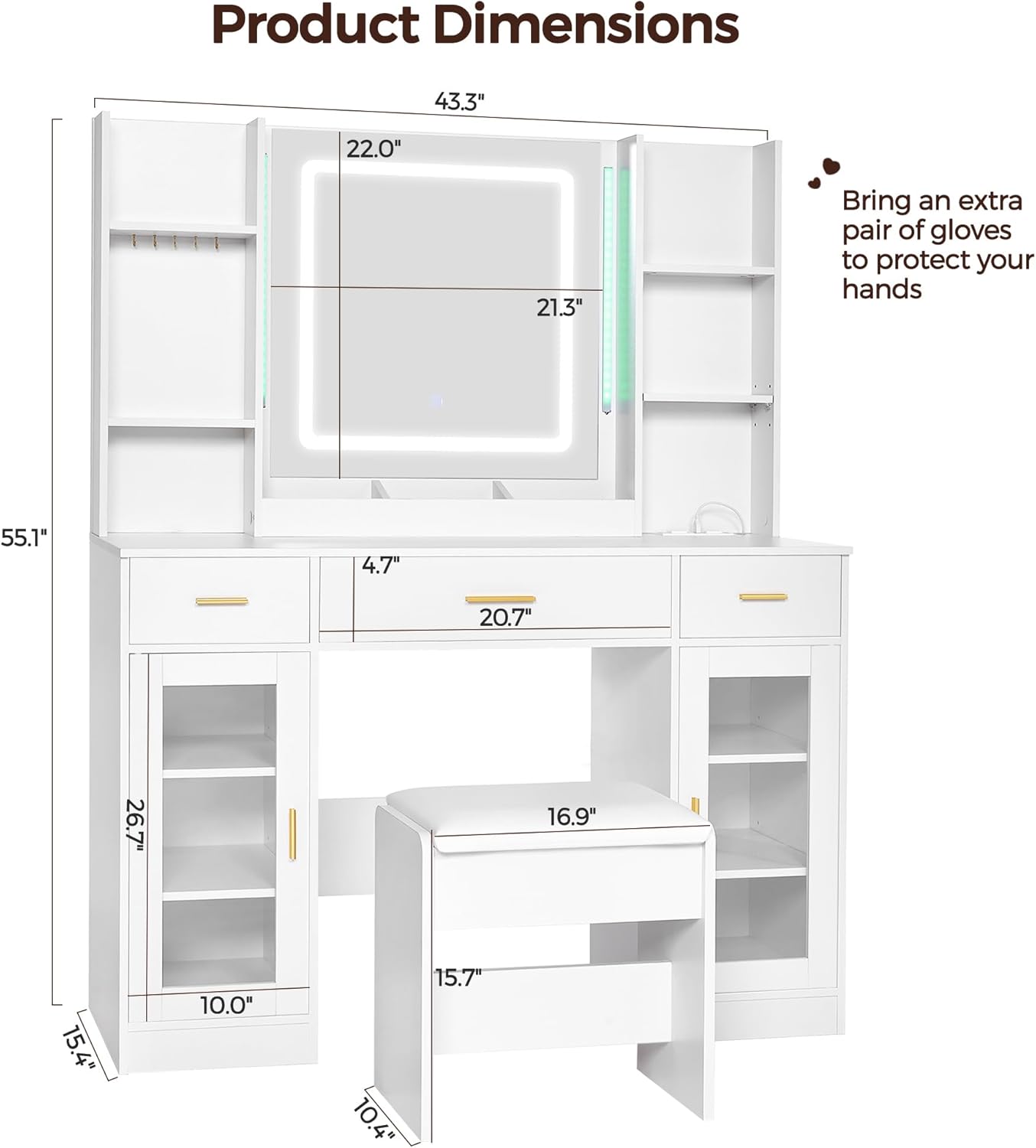
Figure 3.1: Product Dimensions and Key Components. This diagram illustrates the overall dimensions of the vanity desk (15.4"D x 43.3"W x 55.1"H) and the cushioned stool (10.4"D x 15.7"W x 16.9"H), along with various sections of the vanity including the mirror, drawers, and side shelves.
Key Components:
- Vanity Table Frame (Engineered Wood)
- Mirror with Integrated LED Lights
- RGB LED Light Tubes (2)
- Cushioned Stool (Faux Leather seat)
- Drawers (3 large)
- Open Storage Shelves (6)
- Glass Doors (2)
- Makeup Trays (3)
- Jewelry Hooks (5)
- Built-in Power Strip (2 standard outlets, 2 USB ports)
- Remote Control for RGB Lights
- Assembly Hardware (screws, pegs, etc.)
- Protective Gloves (1 pair)
4. Setup and Assembly Instructions
Assembly is required for this product. It is recommended to have at least two people for assembly. Please follow the step-by-step instructions provided in the included assembly manual. Wear the protective gloves to prevent hand injuries during handling of parts.
General Assembly Tips:
- Lay out all components on a clean, soft surface (e.g., a carpet or blanket) to prevent scratches.
- Identify each part using the labels and the provided parts list.
- Do not fully tighten screws until all components for a section are loosely assembled. This allows for minor adjustments.
- Refer to the detailed diagrams in the separate assembly guide for visual steps.

Figure 4.1: Vanity Desk during assembly, illustrating the drawer mechanisms and structural components. This image provides a visual reference for the internal layout and how drawers are integrated.
5. Operating Instructions
5.1. HD Lighted Mirror Operation
The main mirror features adjustable brightness and three lighting modes to suit various makeup needs.

Figure 5.1: Mirror Lighting Modes and Controls. This image demonstrates the three available light settings (Cool, Natural, Warm) and the touch sensor for adjusting brightness and modes.
- Power On/Off & Mode Adjustment: Short-touch the switch on the mirror to cycle through the three lighting modes: Warm, Natural, and Cool. Short-touch again to turn off.
- Brightness Adjustment: Long-touch the switch to adjust the brightness level. Release when the desired brightness is achieved.
- Button Light Control: After turning off the main mirror lights, long-touch the switch for 3 seconds to turn off the button light.
5.2. Ambient RGB Lighting Operation
The two LED light tubes on the sides of the mirror provide ambient RGB lighting, controllable via remote or mobile application.

Figure 5.2: RGB Ambient Lighting Features. This image highlights the extensive color options (over 60,000 colors) and control methods, including a remote and a smartphone application with features like music sync and scheduling.
- Remote Control: Use the provided remote control to easily change colors, adjust brightness, and select various light modes.
- Mobile APP Control: Download the dedicated mobile application (refer to the QR code or app store name in the separate quick start guide) to control the RGB lights. The app offers a wider variety of colors, timing functions, and music sync capabilities.
- Music Sync: The LED light tubes can change color in sync with music played through your smartphone application, enhancing the ambiance.
5.3. Convenient Charging Station
The vanity desk includes a built-in power strip for charging electronic devices.

Figure 5.3: Integrated Power Strip. This image shows the two standard power outlets and two USB ports, designed for convenient charging of various electronic devices.
- The power strip features 2 standard power outlets and 2 USB ports.
- Connect hair dryers, cell phones, and other electronic devices for convenient charging while using the vanity.
5.4. Storage Features
The vanity desk offers extensive storage solutions to keep your cosmetics and accessories organized.

Figure 5.4: Detailed Storage Features. This image highlights the three makeup trays, five jewelry hooks, and the built-in power strip, demonstrating the comprehensive storage and utility options.
- Drawers: Utilize the 3 large drawers for storing larger items or items you wish to keep out of sight.
- Open Storage Shelves: The 6 open shelves provide easy access and display for frequently used items or decorative pieces.
- Glass Door Cabinets: The 2 unique style glass doors allow for organized storage while keeping contents visible and protected from dust.
- Makeup Trays: The 3 dedicated makeup trays help organize smaller cosmetic items neatly.
- Jewelry Hooks: The 5 jewelry hooks are ideal for hanging necklaces, bracelets, or hair ties, preventing tangles.
6. Care and Maintenance
- Cleaning: Wipe the vanity desk surfaces with a damp cloth. Avoid using harsh chemicals or abrasive cleaners, as they may damage the finish.
- Mirror Care: Clean the mirror with a glass cleaner and a soft, lint-free cloth. Do not spray cleaner directly onto the mirror, spray onto the cloth first.
- Dusting: Regularly dust all surfaces with a soft, dry cloth to prevent buildup.
- Spills: Wipe up spills immediately to prevent staining or damage to the engineered wood.
- Electrical Components: Ensure the vanity is unplugged before cleaning near any electrical outlets or lights. Do not immerse any part of the electrical components in water.
- Hardware: Periodically check and tighten all assembly hardware to ensure stability.
7. Troubleshooting
| Problem | Possible Cause | Solution |
|---|---|---|
| Mirror lights not turning on or flickering. | Loose power connection; damaged LED; incorrect operation. | Ensure power cord is securely plugged in. Check if the touch switch is being used correctly (short-touch for on/off, long-touch for brightness). If issue persists, contact customer support. |
| RGB ambient lights not responding to remote/app. | Remote battery low; remote not pointed correctly; app not connected. | Replace remote battery. Ensure remote is pointed at the receiver. Check Bluetooth connection for app control. Restart the app. |
| Power outlets/USB ports not working. | Vanity not plugged in; power strip overloaded; internal wiring issue. | Verify the vanity's main power cord is plugged into a working wall outlet. Ensure total power draw does not exceed the strip's rating. Avoid using damaged cables. |
| Drawers do not close smoothly or are misaligned. | Incorrect assembly of drawer slides; obstruction; damaged slide. | Review assembly instructions for drawer slide installation. Check for any objects obstructing the drawer path. Ensure the vanity is on a level surface. |
| Missing or damaged parts upon arrival. | Shipping damage; packaging error. | Immediately contact ANWBROAD customer support with your order details and a description/photo of the missing/damaged part. Do not attempt to force assembly with incorrect parts. |
8. Product Specifications
| Feature | Detail |
|---|---|
| Brand | ANWBROAD |
| Model Number | UBDT78W |
| Product Dimensions (Vanity) | 15.4"D x 43.3"W x 55.1"H |
| Product Dimensions (Stool) | 10.4"D x 15.7"W x 16.9"H |
| Item Weight | 98.5 pounds |
| Color | White |
| Frame Material | Engineered Wood |
| Seat Material Type | Faux Leather |
| Mirror Lighting | HD LED, 3 Color Modes (Warm, Natural, Cool), Adjustable Brightness |
| Ambient Lighting | RGB LED Tubes, Remote & APP Control, Music Sync, Timing Function |
| Power Outlets | 2 Standard AC Outlets |
| USB Ports | 2 USB Ports |
| Assembly Required | Yes |
| Product Care Instructions | Wipe with Damp Cloth |
9. Warranty and Support
ANWBROAD is committed to providing high-quality products. This vanity desk comes with a commitment to customer satisfaction. If you encounter any quality problems, missing parts, or require assistance with assembly or operation, please do not hesitate to contact our customer support team.
We aim to reply to all inquiries within 24 hours to provide prompt assistance and resolution.
For further information or to explore other ANWBROAD products, please visit the official ANWBROAD Store: ANWBROAD Store on Amazon
Related Documents - UBDT78W
 |
Ivy Bronx DJ504199 Fluted Makeup Vanity Desk Assembly Instructions Detailed installation and assembly guide for the Ivy Bronx DJ504199 Fluted Makeup Vanity Desk, featuring a large mirror, lights, power strip, multiple shelves, cabinets, and drawers. Includes parts list and step-by-step instructions. |
 |
Latitude Run Makeup Vanity Desk Installation and Assembly Guide Step-by-step instructions for assembling the Latitude Run Makeup Vanity Desk with lighted mirror, drawers, and charging station. Includes parts list and assembly diagrams. |
 |
Latitude Run Vanity Desk Installation Guide Comprehensive installation instructions for the Latitude Run Vanity Desk, featuring a mirror with lights and multiple drawers. This guide provides detailed steps for assembly, part identification, and hardware usage. |
 |
ANWBROAD UBDT77 Vanity Table Assembly Instructions Detailed assembly instructions for the ANWBROAD UBDT77 vanity table, including parts list, accessories, and step-by-step guidance for home assembly. |
 |
Jaxenor 37" Vanity Desk with Mirror and Lights Installation Manual Comprehensive installation manual for the Jaxenor 37-inch vanity desk with mirror and LED lights. Includes instructions for simple, basic, and luxury versions, parts list, hardware details, and step-by-step assembly guidance. |
 |
Costway Vanity Desk with Mirror and Lights Assembly Instructions - Model JV13117 Detailed assembly instructions for the Costway Vanity Desk with Mirror and Lights (Model JV13117). This guide provides a comprehensive parts list, hardware specifications, step-by-step assembly procedures, and adjustment guidance for furniture assembly. |
Ask a question about this manual
Ask about setup, troubleshooting, compatibility, parts, safety, or missing instructions. Manuals+ will review the question and use this page’s manual context to help answer it.