
1. Introduction
This manual provides detailed instructions for the installation, operation, and maintenance of your dreeong Bluetooth Interface Adapter Converter. This device is designed to add Bluetooth connectivity to compatible Icom radio models, specifically the IC-910, IC-970A, IC-970H, and IC-375. It enables wireless communication for data or audio, depending on the radio's capabilities and the specific application.
Please read this manual thoroughly before using the adapter to ensure proper function and to prevent damage to the device or your radio equipment.
2. Safety Information
- Do not expose the adapter to moisture, rain, or extreme temperatures.
- Avoid dropping or subjecting the adapter to severe impacts.
- Do not attempt to disassemble or modify the adapter. This will void any potential warranty and may cause damage.
- Ensure your radio is powered off before connecting or disconnecting the adapter.
- Use only with the specified Icom radio models.
3. Package Contents
Verify that your package contains the following item:
- 1 x dreeong Bluetooth Interface Adapter Converter
4. Setup and Installation
Follow these steps to connect the Bluetooth adapter to your Icom radio:
- Power Off Radio: Ensure your Icom IC-910, IC-970A, IC-970H, or IC-375 radio is completely powered off before proceeding.
- Identify Ports: Locate the appropriate accessory/data port (typically a multi-pin DIN connector) and the 3.5mm audio jack on your Icom radio. Refer to your radio's manual for exact port locations.
- Connect DIN Connector: Carefully insert the 5-pin DIN connector of the Bluetooth adapter into the corresponding data/accessory port on your Icom radio. Ensure it is securely seated.
- Connect 3.5mm Jack: Insert the 3.5mm stereo jack of the Bluetooth adapter into the appropriate audio input or accessory jack on your Icom radio. This connection may be used for audio transmission or control signals, depending on your radio model and desired functionality.
- Power On Radio: Once both connectors are securely attached, power on your Icom radio. The Bluetooth adapter will receive power from the radio.
- Observe Indicator: The small LED indicator on the Bluetooth adapter module should illuminate, indicating it is powered on and ready for pairing.
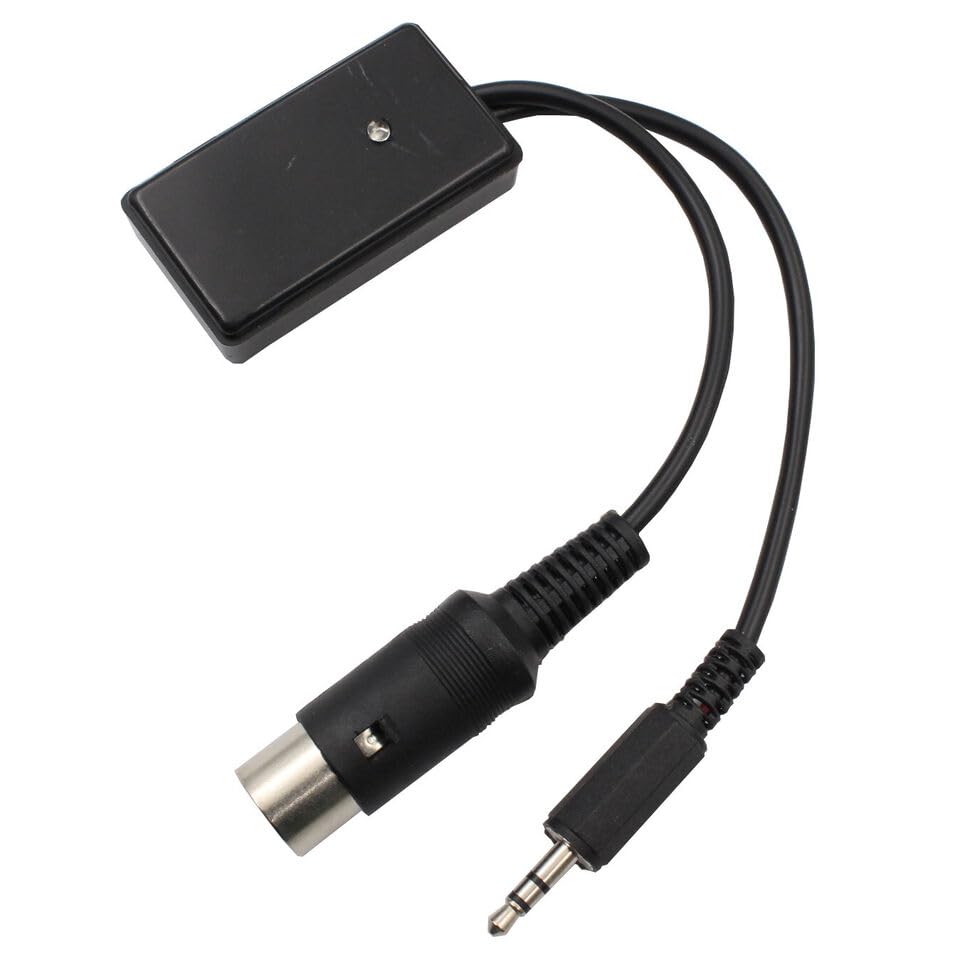
Figure 1: The dreeong Bluetooth Interface Adapter Converter, showing the main module, 5-pin DIN connector, and 3.5mm audio jack. This image illustrates the physical components of the adapter.
5. Operating Instructions
After successful installation, you can proceed with Bluetooth pairing and operation.
5.1 Bluetooth Pairing
- Activate Pairing Mode: The adapter typically enters pairing mode automatically when powered on for the first time or if no previous connection is found. The LED indicator may flash rapidly to signify pairing mode.
- Enable Bluetooth on Device: On your Bluetooth-enabled device (e.g., smartphone, computer, Bluetooth headset), enable Bluetooth and search for new devices.
- Select Adapter: Look for a device named similar to "dreeong BT Adapter" or a generic Bluetooth name. Select it to initiate pairing.
- Confirm Connection: Once paired, the LED indicator on the adapter will typically change to a solid light or a slower flash, indicating a successful connection.
Note: Specific pairing steps may vary slightly depending on your Bluetooth device. Refer to your device's manual for detailed instructions.
5.2 Usage
Once paired, the adapter facilitates communication between your Icom radio and the connected Bluetooth device. The exact functionality (e.g., data transfer for programming, audio input/output for communication) depends on the specific Icom radio model and the software/application you are using.
- Data Communication: For applications requiring data transfer (e.g., radio programming, remote control), ensure the appropriate software on your Bluetooth device is configured to use the newly paired Bluetooth serial port.
- Audio Communication: If used for audio, ensure your radio's settings are configured to output audio to the accessory port or accept audio input from it, as applicable.

Figure 2: A different perspective of the dreeong Bluetooth Interface Adapter Converter, highlighting the compact design and cable connections. This view provides additional detail on the adapter's construction.
6. Maintenance
- Cleaning: Use a soft, dry cloth to clean the adapter. Do not use liquid cleaners or solvents.
- Storage: When not in use, store the adapter in a cool, dry place, away from direct sunlight and extreme temperatures.
- Cable Care: Avoid bending or twisting the cables excessively to prevent internal damage.
7. Troubleshooting
| Problem | Possible Cause | Solution |
|---|---|---|
| Adapter LED does not light up. | No power from radio; incorrect connection. | Ensure radio is powered on. Check that the DIN and 3.5mm connectors are fully and correctly inserted into the radio's ports. |
| Cannot find adapter during Bluetooth scan. | Adapter not in pairing mode; too far from device; interference. | Ensure adapter is powered on and its LED is flashing (indicating pairing mode). Move your Bluetooth device closer to the adapter. Try restarting both the adapter (by cycling radio power) and your Bluetooth device. |
| Bluetooth connection is unstable or drops. | Distance too great; obstacles; interference from other devices. | Reduce the distance between the adapter and your Bluetooth device. Minimize obstacles (walls, large metal objects). Avoid areas with strong Wi-Fi or other 2.4GHz wireless signals. |
| Data/audio not transmitting correctly. | Incorrect radio settings; software configuration issues; incompatible application. | Verify your Icom radio's settings for accessory port usage. Ensure your software/application is correctly configured to use the Bluetooth serial port. Confirm compatibility with your specific radio model and desired function. |
8. Specifications
- Product Type: Bluetooth Interface Adapter Converter
- Brand: dreeong
- Compatible Icom Models: IC-910, IC-970A, IC-970H, IC-375
- Connectors: 5-pin DIN, 3.5mm Stereo Jack
- Power Source: Powered by connected radio
- UPC: 606052729526
- ASIN: B0DP9XRDJ9
- Manufacturer: dreeong
9. Warranty and Support
Warranty information and specific support contact details are not provided in the product listing. For assistance, please refer to your purchase documentation or contact the seller directly through the platform where the product was purchased.