1. Introduction
Thank you for choosing the Generic Solar Outdoor Wall Mounted Light. This manual provides essential information for the proper installation, operation, and maintenance of your solar light. Please read these instructions carefully before use and retain them for future reference.
This solar light is designed for outdoor use, providing illumination for fences, porches, patios, and other areas. It features automatic charging during the day and turns on automatically at night, incorporating a light-sensitive device and motion sensor for efficient operation.
2. Product Overview
The solar light integrates a solar panel, LED light source, and motion sensor into a compact, wall-mountable unit. It is constructed from durable plastic, designed to withstand outdoor conditions.

Figure 2.1: The solar light automatically charges during daylight hours and illuminates at night.
3. Package Contents
- 1 x Solar Outdoor Wall Mounted Light
- Mounting hardware (screws, wall plugs) - (Note: Specific hardware may vary, ensure suitability for your mounting surface)
- Instruction Manual (this document)
4. Specifications
| Feature | Specification |
|---|---|
| Model Number | B0DP9SQF81 |
| Dimensions | Approximately 5.98 × 5.12 inches (15.2 × 13 cm) |
| Material | Plastic |
| Color | Black |
| Light Source | LED |
| Power Source | Solar Powered |
| Sensor Type | Light Sensitive Device, Motion Sensor |
| Item Weight | 8.6 ounces (approx. 244 grams) |

Figure 4.1: Product dimensions for installation planning.
5. Setup and Installation
5.1 Choosing a Location
- Select a location that receives at least 6-8 hours of direct sunlight daily to ensure optimal charging.
- Avoid placing the light under eaves, trees, or other obstructions that may block sunlight.
- Ensure the chosen location is away from other strong light sources (e.g., streetlights, other outdoor lights) at night, as these may interfere with the light sensor and prevent the solar light from turning on.
5.2 Mounting Instructions
- Prepare the Mounting Surface: Ensure the wall or fence surface is clean and stable.
- Mark Drill Points: Hold the solar light in the desired position and mark the locations for the mounting screws.
- Drill Holes: Use an appropriate drill bit to drill holes at the marked points. Insert wall plugs if necessary for your mounting surface.
- Secure the Light: Align the light with the drilled holes and secure it firmly using the provided screws.
6. Operating Instructions
6.1 Initial Use
Before first use, allow the solar light to charge in direct sunlight for at least 8-10 hours. This ensures the internal battery is fully charged for optimal performance.
6.2 Automatic Operation
- The solar light is equipped with a light-sensitive device. It will automatically turn off and charge during the day when sufficient light is detected.
- At dusk or when ambient light levels drop, the light will automatically turn on.
6.3 Motion Sensor Function
The integrated motion sensor detects movement within its range, typically up to 10 meters. When motion is detected, the light will illuminate at full brightness. After a period of no motion, the light will return to a dimmer state or turn off, depending on its specific mode (if multiple modes are available, refer to product packaging for details).
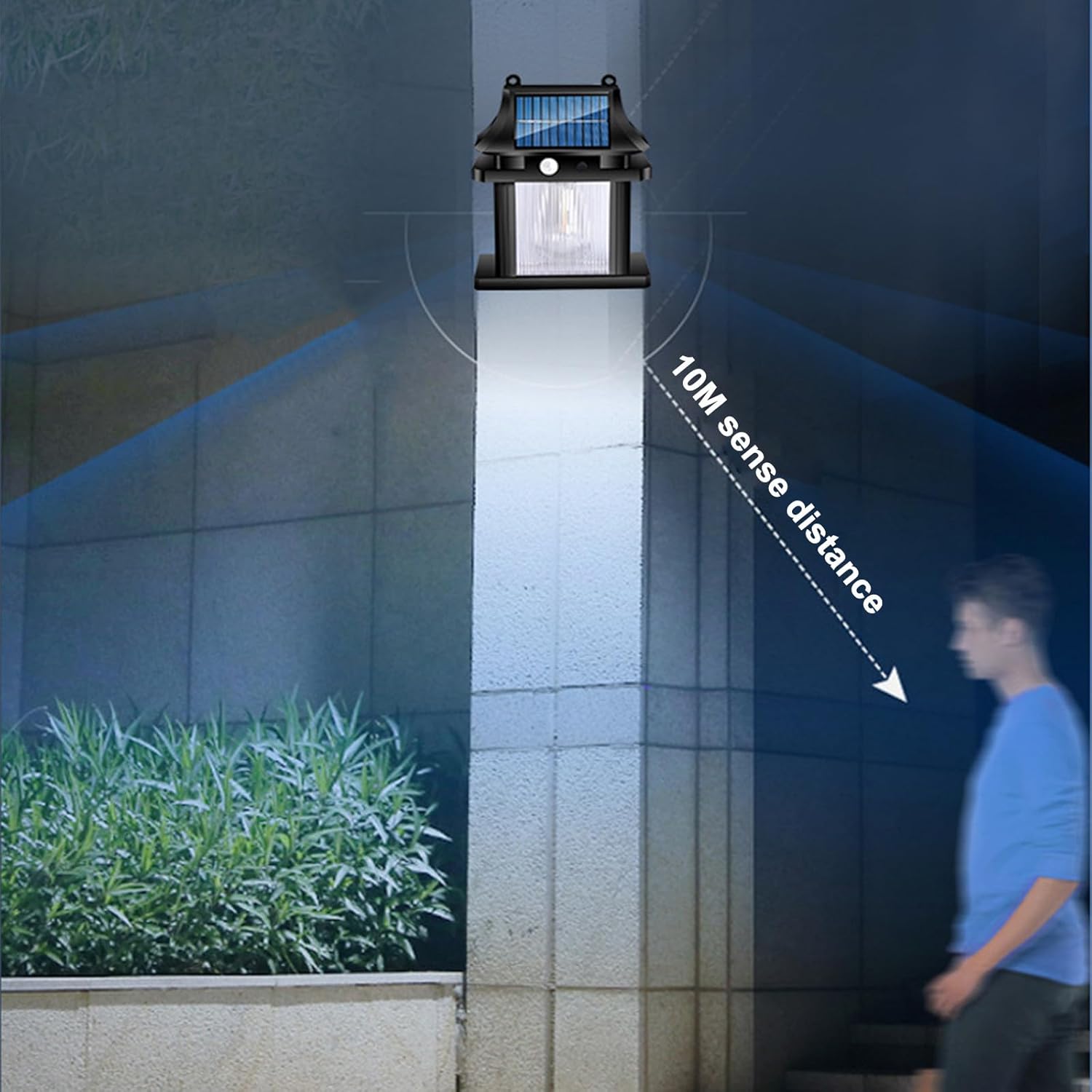
Figure 6.1: The motion sensor detects movement up to 10 meters.
7. Maintenance
7.1 Cleaning
- Regularly clean the solar panel surface with a soft, damp cloth to remove dust, dirt, and debris. A clean panel ensures efficient charging.
- Do not use abrasive cleaners or harsh chemicals, as these can damage the solar panel or light housing.
7.2 Weather Resistance
This solar light is designed to be waterproof and withstand various outdoor weather conditions, including rain. However, prolonged exposure to extreme weather may affect its lifespan.

Figure 7.1: The solar light is designed to be waterproof.
8. Troubleshooting
| Problem | Possible Cause | Solution |
|---|---|---|
| Light does not turn on at night. | Insufficient sunlight for charging. | Relocate the light to an area with more direct sunlight. Ensure the solar panel is clean. |
| Ambient light interference. | Ensure the light is not installed near other strong light sources (e.g., streetlights) that might trick the sensor into thinking it's daytime. | |
| Light is dim or only stays on for a short time. | Battery not fully charged. | Allow the light to charge for 1-2 full sunny days. Clean the solar panel. |
| Motion sensor not detecting movement. | Obstruction in sensor's path. | Clear any foliage or objects blocking the sensor's view. |
| Sensor range issues. | Ensure movement is within the 10-meter detection range. |
9. Warranty and Support
For warranty information and customer support, please refer to the details provided by your retailer or contact the manufacturer directly. Keep your purchase receipt as proof of purchase.
If you encounter issues not covered in this manual, please reach out to the seller or manufacturer for assistance.