1. Introduction
This manual provides essential information for the safe and efficient operation of your Joyfox Pure Sine Wave Power Inverter. Please read this manual thoroughly before installation and use, and keep it for future reference. This inverter is designed to convert 24V DC power from batteries into 220V AC power, suitable for a wide range of electronic devices and appliances.
2. Product Features
The Joyfox Pure Sine Wave Power Inverter offers advanced features for reliable power conversion:
- Pure Sine Wave Output: Provides clean, stable AC power, ideal for sensitive electronics like refrigerators, washing machines, air conditioners, LED lights, induction cookers, water pumps, electric drills, and stereos. Unlike modified sine wave inverters, pure sine wave output ensures optimal performance and longevity for your appliances.
- High Conversion Efficiency: Achieves over 90% conversion efficiency, minimizing power loss during the DC to AC conversion process.
- Multiple Safety Protections: Equipped with comprehensive protection features including undervoltage, overvoltage, overtemperature, overload, and short-circuit protection. LED indicators provide status updates.
- Cooling System: Integrated cooling fans prevent overheating, ensuring stable operation and extending the inverter's lifespan.
- Convenient Connectivity: Features USB ports for charging mobile devices and a multi-functional AC socket for various appliance plugs.
- Versatile Applications: Suitable for use in homes, RVs, trucks, and off-grid solar power systems.
- ETL Certified: Ensures safety and quality standards are met.

Image: This diagram illustrates which appliances are compatible with Pure Sine Wave inverters (marked "Sim" for Yes) versus Modified Sine Wave inverters (marked "Não" for No or "Sim" for Yes). Appliances like refrigerators, washing machines, air conditioners, LED lights, induction cookers, water pumps, electric drills, and stereos are shown to require Pure Sine Wave. Other appliances like hair dryers, computers, fans, printers, irons, electric shavers, and CFL bulbs are compatible with both types.

Image: This graphic highlights the multi-protection features of the inverter, including protection against overheating, overload, reverse polarity, low voltage, overvoltage, and short-circuit.
3. Package Contents
Please check the package for the following items:
- Joyfox Pure Sine Wave Power Inverter (2500W, 24V to 220V)
- Battery connection cables (red and black)
- Spare fuses
- Terminal connectors
- User Manual

Image: A visual representation of the inverter and its accessories, including battery cables, terminal connectors, fuses, and the instruction manual.
4. Setup Instructions
- Placement: Choose a dry, well-ventilated area for the inverter. Ensure there is sufficient space around the unit for proper airflow and cooling. Avoid direct sunlight, heat sources, and moisture.
- DC Connection:
- Connect the red battery cable to the positive (+) terminal of your 24V battery bank and to the positive (+) DC input terminal on the inverter.
- Connect the black battery cable to the negative (-) terminal of your 24V battery bank and to the negative (-) DC input terminal on the inverter.
- Ensure all connections are tight and secure to prevent loose connections, which can cause overheating or damage.

Image: This image shows the DC input terminals (positive and negative) on the inverter, along with the cooling fans. It emphasizes the importance of correct 24-volt DC connection.
- AC Output Connection: Plug your 220V AC appliances into the multi-functional AC socket on the front panel of the inverter. For USB charging, use the provided USB ports.
5. Operating Instructions
- Power On: After ensuring all connections are secure, press the power switch on the inverter's front panel to turn it on. The LED indicators and digital display will illuminate.
- Monitor Display: The digital display shows the DC input voltage and AC output voltage. For this model, the DC input should be around 24V (e.g., 23.6V-27.6V) and the AC output should be 220V.
- Connect Appliances: Once the inverter is powered on and displaying correct voltages, you can connect your AC appliances to the output socket and USB devices to the USB ports.
- Power Off: To turn off the inverter, first disconnect all AC appliances and USB devices, then press the power switch.

Image: This image details the front panel of the inverter, highlighting the multi-functional AC socket, the power switch, USB charging ports, and the digital display which shows DC input voltage and AC output voltage.
Video: This video demonstrates the inverter in operation, showing the DC input voltage (13.6V) and AC output voltage (120V) on the inverter's display, and also measuring the output voltage with a multimeter. It also shows the connection to a 12V battery and a solar charge controller. Note: The video shows a 12V to 120V model, while this manual is for a 24V to 220V model. The operational principles remain the same.
6. Safety Information
Always observe the following safety precautions to prevent injury or damage to the inverter and connected devices:
- Do not open the inverter casing. There are no user-serviceable parts inside.
- Ensure proper ventilation to prevent overheating. Do not block the cooling vents.
- Keep the inverter away from water, moisture, and flammable materials.
- Connect the inverter only to a 24V DC power source. Connecting to a different voltage will damage the unit.
- Always connect the battery cables with correct polarity (red to positive, black to negative). Reverse polarity will cause severe damage.
- Do not exceed the inverter's continuous power rating (2500W) or peak power rating (5000W).
- If the inverter emits unusual smells, sounds, or smoke, immediately disconnect it from the power source and contact support.
- Use appropriate wiring and fuses for your installation to ensure safety and prevent overcurrent.
7. Specifications
| Feature | Detail |
|---|---|
| Brand | JOYFOX |
| Model | J-451/459 |
| Input Voltage | 24 Volts (DC) |
| Output Voltage | 220 Volts (AC) |
| Continuous Power | 2500W |
| Peak Power | 5000W |
| Waveform | Pure Sine Wave |
| Frequency | 60 Hz |
| Conversion Efficiency | >92% |
| Power Source Type | AC (Output) |
| Product Weight | 3.9 Kilograms |
| Dimensions (Packaging) | 41 x 25 x 14.4 cm |
| Certifications | ETL (mentioned in feature bullets) |
| Applications | RV, Home, Outdoor, Emergency |
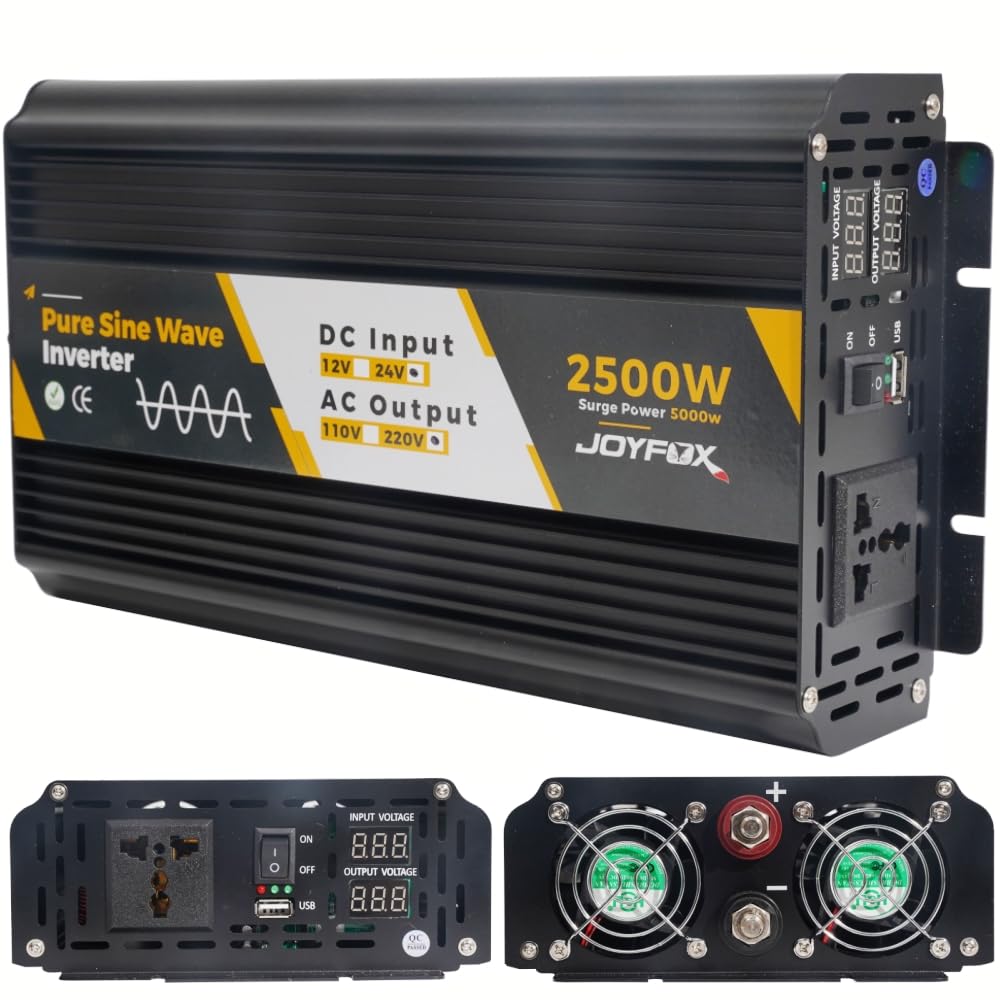
Image: Top-down view of the Joyfox Pure Sine Wave Power Inverter, highlighting its compact design and branding.
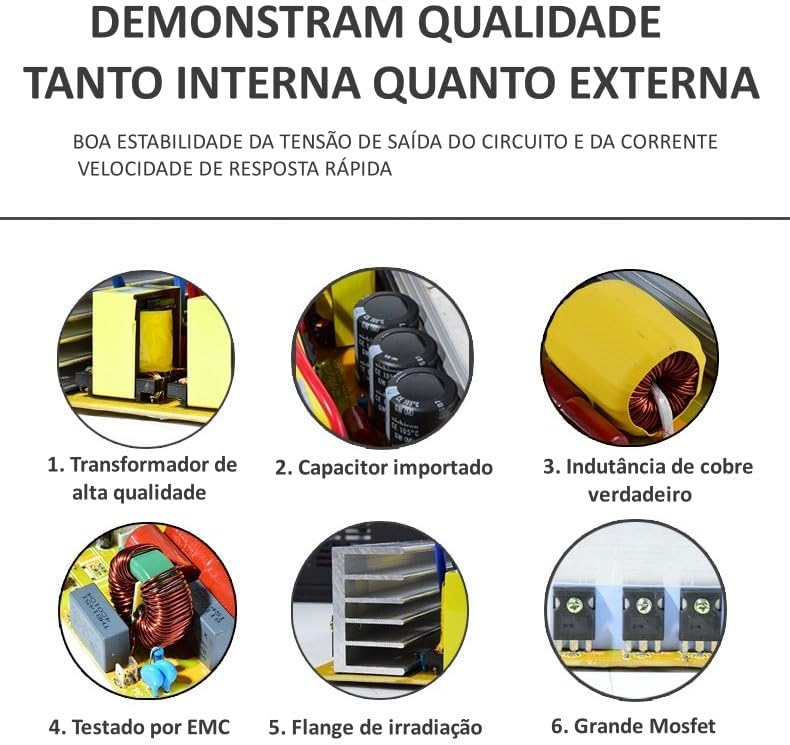
Image: Detailed view of the inverter's internal components, showcasing the quality of its transformer, capacitors, copper inductance, and MOSFETs, indicating robust construction.
8. Troubleshooting
If you encounter issues with your inverter, refer to the following common problems and solutions:
- No Power Output:
- Check battery connections for tightness and correct polarity.
- Ensure the inverter's power switch is ON.
- Verify the battery voltage is within the operating range (24V nominal).
- Check for blown fuses (replace if necessary with the same type and rating).
- Low Output Voltage:
- Ensure the DC input voltage from the battery is sufficient. A low battery can cause low AC output.
- Reduce the load on the inverter. Overloading can cause voltage drops.
- Inverter Shuts Down:
- This often indicates a protection mode (overload, overtemperature, low/high voltage).
- Disconnect the load, turn off the inverter, and allow it to cool down if it was running hot.
- Check the total wattage of connected appliances to ensure it does not exceed the inverter's capacity.
- Verify battery voltage. Recharge or replace batteries if they are too low.
- Unusual Noise:
- A slight hum from the inverter is normal, especially with inductive loads.
- Loud or abnormal noises may indicate a problem. Disconnect power and inspect connections.
If the problem persists after following these steps, please contact customer support.
9. Maintenance
Regular maintenance ensures the longevity and optimal performance of your inverter:
- Cleaning: Periodically clean the exterior of the inverter with a dry, soft cloth. Ensure cooling vents are free from dust and debris. Do not use liquid cleaners.
- Connections: Regularly check all DC and AC connections to ensure they are tight and free from corrosion.
- Storage: If storing the inverter for an extended period, ensure it is clean, dry, and disconnected from all power sources. Store in a cool, dry place.
- Battery Health: Maintain your 24V battery bank according to its manufacturer's instructions to ensure a stable power supply to the inverter.
10. Warranty and Support
Your Joyfox Pure Sine Wave Power Inverter is covered by a 3-month seller warranty. Additionally, it includes a half-year warranty for material and workmanship, ensuring quality and reliability.
For technical support, warranty claims, or any questions regarding your product, please contact your seller or refer to the contact information provided in your purchase documentation.