
1. Safety Information
Important Safety Warnings: Always secure the loft bed to the wall using the provided anti-tip kit. Keep the top of the mattress at least 5 inches from the edge of the guardrail to prevent falls. This product is not intended for children under 6 years old due to small parts and potential tip-over risks. Always supervise children while using this product.

Image: Safety features including the anti-tipping device and guardrail height. Ensure the bed is securely anchored to the wall.

Image: Key structural and safety features of the loft bed, highlighting the two-layer guardrail, anti-tipping device, sturdy metal frame, and non-slip pads for enhanced stability.
2. Product Overview
The Itaar Twin Loft Bed with L-Shaped Desk is designed to maximize space and functionality in a bedroom. It features a twin-sized sleeping area elevated above an L-shaped desk, providing a dedicated workspace. The bed includes integrated LED lights, a charging station, 3-tier storage shelves, and a clothes rail for organization. Constructed with a sturdy metal frame, it offers durability and stability.
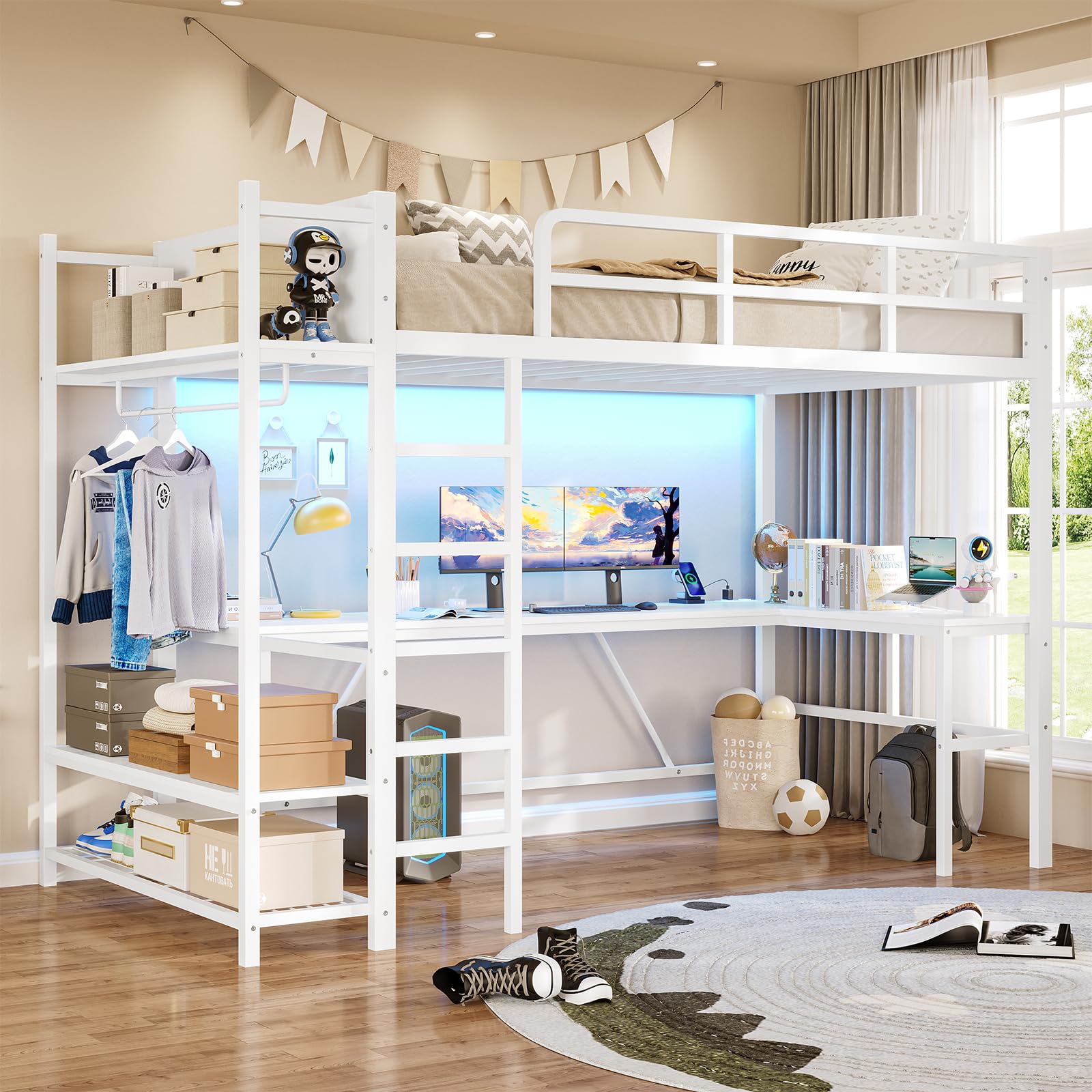
Image: An overall view of the Itaar Twin Loft Bed, showcasing the elevated sleeping area, L-shaped desk, integrated storage, and LED lighting.
Video: An official product video demonstrating the features and design of the Itaar Twin Loft Bed with L-Shaped Desk.
3. Components List
Before assembly, ensure all components listed below are present in your package:
- Metal Frame Components (various beams, posts, slats)
- L-Shaped Desk Panels
- 3-Tier Storage Shelves
- Clothes Rail
- Ladder
- Safety Guardrails
- Built-in Charging Station (with 2 AC outlets and 2 USB ports)
- RGB LED Light Strip
- LED Light Remote Control
- Anti-tip Kit
- Hardware Pack (screws, bolts, nuts, washers)
- Easy Assemble Tools
- Installation Manual
4. Assembly Instructions
Assembly is required for the Itaar Twin Loft Bed. The product comes with easy-to-use assembly tools and a detailed installation manual. Follow the numbered steps in the provided manual carefully. It is recommended that two adults assemble this product for safety and efficiency.
- Unpack and Verify: Carefully unpack all components and compare them against the components list to ensure all parts are present and undamaged.
- Prepare Workspace: Clear a spacious area for assembly, preferably near the final placement of the bed.
- Follow Manual: Refer to the included installation manual for step-by-step instructions. Each part is numbered for easy identification.
- Secure Connections: Ensure all screws, bolts, and fasteners are tightened securely. Do not overtighten.
- Install Anti-tip Kit: Crucially, install the anti-tip kit to securely fix the bed to the wall. This prevents accidental tipping.

Image: Dimensional diagram of the loft bed, useful for planning placement and understanding component sizes during assembly.

Image: The reversible design of the loft bed, allowing the L-shaped desk and storage unit to be configured on either the left or right side during assembly.
5. Operating Instructions
5.1. L-Shaped Desk and Charging Station
The integrated L-shaped desk provides a spacious work or study area measuring 78.74 inches by 39.37 inches. It includes a built-in charging station with two 125V/12A AC outlets and two 5V/2.1A USB ports, powered by a 5.9-foot power cord. Connect your devices such as laptops, monitors, gaming consoles, or mobile phones directly to the charging station for convenience.

Image: The L-shaped desk area under the loft bed, configured with computer monitors and other items, demonstrating its ample workspace.

Image: A detailed view of the built-in charging station, showing the two AC outlets and two USB ports, along with the power cord.
5.2. LED Lights
The loft bed features RGB LED lights that can be controlled via a remote or a dedicated mobile application. Choose from over 60,000 colors and 29 flashing modes to customize the ambiance. The LED lights also include a music sync function with a built-in adjustable microphone, allowing the light color to change with the rhythm of sound and music.
- Remote Control: Use the provided remote to power on/off, change colors, adjust brightness, and select modes.
- App Control: Download the specified mobile application (refer to the LED light manual for details) to access advanced features, including custom color settings, music sync, and scheduling.

Image: The loft bed with its RGB LED lights activated, demonstrating various color options and highlighting the remote and app control capabilities.

Image: Screenshots of the mobile application used to control the LED lights, illustrating features like color customization, music synchronization, and various lighting modes.
5.3. Storage Shelves and Clothes Rail
The side of the loft bed features powerful storage options, including three open storage shelves and a clothes hanging rod. These are designed to accommodate various items such as storage boxes, books, shoes, and clothing.

Image: The integrated storage unit of the loft bed, showing three open shelves and a clothes rail, organized with various items.
6. Maintenance
- Cleaning: Wipe down the metal frame and desk surfaces with a soft, damp cloth. Avoid abrasive cleaners or harsh chemicals that could damage the finish.
- Hardware Check: Periodically check all bolts, screws, and connections to ensure they remain tight. Retighten if necessary to maintain stability and safety.
- LED Lights: Ensure the LED light strip and connections are free from dust. If issues arise, consult the LED light manual or contact customer support.
- Charging Station: Keep the charging station free from dust and debris. Do not overload the outlets.
7. Troubleshooting
- Bed is Noisy/Creaky:
Ensure all assembly hardware (bolts, screws) are securely tightened. Loose connections can cause creaking. The slats are designed with a buckle design to prevent noise, but re-checking all connections is recommended.
- Bed Feels Unstable:
Verify that the anti-tip kit is correctly installed and securely anchored to the wall. Re-check all frame connections for tightness. Ensure the bed is on a flat, level surface.
- LED Lights Not Working:
Check if the power adapter is properly connected to a working outlet. Ensure all connections to the LED strip are secure. Try replacing the remote control battery if applicable. If using the app, ensure Bluetooth is enabled and the app is correctly paired.
- Charging Station Not Functioning:
Confirm the power cord is fully plugged into a live wall outlet. Test the outlet with another device. Ensure devices are properly connected to the AC outlets or USB ports.
- Missing or Damaged Parts:
If your loft bed arrives damaged, scratched, or with missing parts, please contact Itaar customer service immediately for assistance. Refer to the "Warranty & Support" section for contact information.
8. Product Specifications
| Model Number | 3861_2 |
| Brand | Itaar |
| Size | Twin |
| Color | White |
| Frame Material | Metal, Engineered Wood |
| Overall Dimensions (L x W x H) | 89.96"L x 41.34"W x 70.87"H |
| Item Weight | 111 pounds |
| Weight Capacity (Maximum) | 400 pounds |
| Recommended Mattress Thickness | 4-6 inches (Top of mattress at least 5" from guardrail edge) |
| Charging Station | 2 AC Outlets (125V/12A), 2 USB Ports (5V/2.1A), 5.9-foot Power Cord |
| LED Lights | RGB, Remote & App Control, Music Sync Function |
| Special Features | L-Shaped Desk, 3-Tier Storage Shelves, Clothes Rail, Safety Guard, Ladder, Anti-tip Kit |

Image: Recommended mattress dimensions (75"x38") and thickness (4-6 inches) for safe use with the loft bed's guardrails.
9. Warranty and Support
The Itaar Twin Loft Bed comes with a Limited Warranty. For specific details regarding the warranty period and coverage, please refer to the documentation included with your product or contact Itaar customer service.
If you encounter any issues, have questions about assembly, or require replacement parts, please contact Itaar customer support.
- Customer Service: Refer to your purchase documentation or the Itaar official website for the most current contact information.
- Online Resources: Additional support and FAQs may be available on the Itaar brand store page on Amazon: Itaar Store