
mGYDY SW900
mGYDY SW900 Ebike LCD Display User Manual
Model: SW900 | Brand: mGYDY
1. Introduction and Overview
This manual provides detailed instructions for the installation, operation, and maintenance of your mGYDY SW900 Ebike LCD Display. The SW900 is a universal control panel designed for electric bicycles and scooters, compatible with 24V, 36V, 48V, 60V, and 72V systems. It offers clear, intuitive display of essential riding information.

Figure 1: The mGYDY SW900 Ebike LCD Display unit, including the main screen, the handlebar-mounted remote control, and the attached wiring harness.
2. Product Features
- Durable Construction: The ABS shell ensures strength and durability, allowing normal operation in temperatures ranging from -20℃ to 60℃.
- Clear LCD Display: A color LCD screen provides clear and intuitive visualization of various vehicle driving information.
- Universal Compatibility: Designed for 24V, 36V, 48V, 60V, and 72V electric bicycle systems.
- Waterproof Connectivity: Features a waterproof SM link x line, compatible with both waterproof and ordinary controllers.
- Low Failure Rates: Cables and connectors are engineered for durability, contributing to extended reliability.
- Compact and Portable: Small and lightweight design minimizes space requirements, making it easy to carry and store.
- Easy Replacement: Simple installation and disassembly allow for direct replacement of old or damaged units.
3. Specifications
| Specification | Detail |
|---|---|
| Model Name | SW900 Colorful display |
| Brand | mGYDY |
| Applicable Voltage | 24V/36V/48V/60V/72V (Universal) |
| Material | ABS shell + LED LCD meter |
| Color | Black |
| Plug Specifications | 5PIN |
| Weight | 218g (excluding packaging and accessories) |
| Mounting Diameter Options | 22.5mm, 25.4mm, 28.6mm |

Figure 2: Physical dimensions of the SW900 display unit in centimeters.
4. Package Contents
The package includes:
- 1 x SW900 Colorful LCD Display Unit
5. Setup and Installation
Proper installation is crucial for the optimal performance of your SW900 display. Please follow these steps carefully:
- Mounting the Display: Choose an appropriate mounting diameter (22.5mm, 25.4mm, or 28.6mm) for your handlebar. Securely attach the display unit to your ebike's handlebar using the integrated brackets. Ensure it is positioned for clear visibility and easy access to the remote control.
- Connecting the Cables: The SW900 display connects to your ebike's controller via a 5-pin connector. Ensure your ebike controller also supports communication protocol #2 for proper functionality. Carefully align and connect the display's cable to the corresponding port on your controller.
- Remote Control Placement: Position the remote control unit on the handlebar within easy reach of your thumb for convenient operation while riding.

Figure 3: The SW900 display unit showing the 5-pin connector for connection to the ebike controller.
6. Operating Instructions
Once installed and connected, the SW900 display provides real-time information and control over your ebike's functions.
- Power On/Off: Press and hold the power button on the remote control to turn the display on or off.
- Mode Selection: Use the mode buttons on the remote to cycle through different display modes or adjust power assist levels.
- Information Display: The screen will automatically show various parameters such as speed, mileage, battery level, and power assist level.
7. Display Interface Overview
The SW900 LCD display provides a clear overview of your ebike's status and performance. Key indicators include:
- Power Display: Indicates the current battery charge level.
- Speed: Shows current riding speed (Km/h or Mph).
- Mileage: Displays total distance traveled (ODO) and trip distance (TRIP).
- Vehicle Mode: Indicates the current riding mode (e.g., ECO, STD, POWER).
- Power Assist System (PAS): Shows the current level of pedal assist.
- Wattage: Displays real-time power output.

Figure 4: A detailed diagram of the 5-pin circular connector, indicating the pin positions for various wire colors.
8. Wiring Diagram
The SW900 display uses a 5-pin connector for communication and power. Refer to the diagram below for correct wiring:
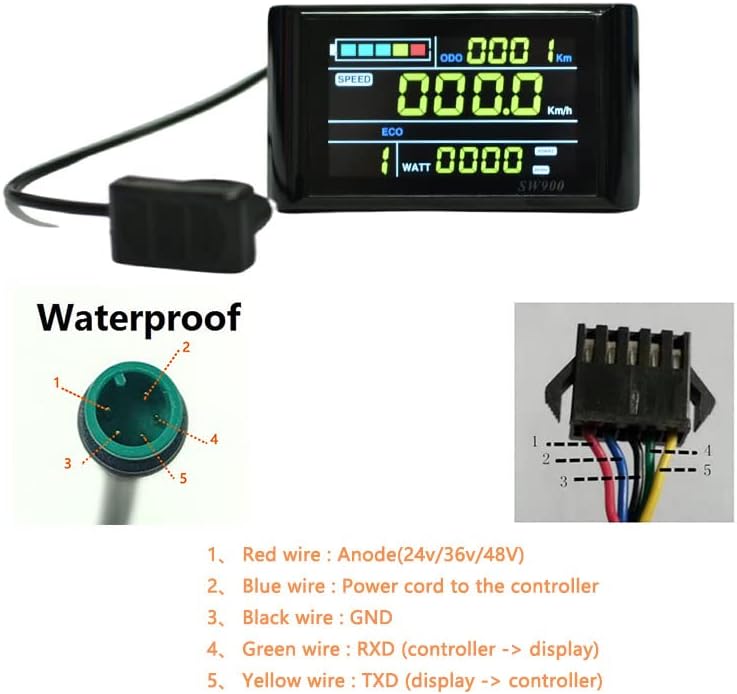
Figure 5: Comprehensive wiring diagram for the 5-pin connector, labeling each wire color with its corresponding function.
- Red wire: Anode (24V/36V/48V)
- Blue wire: Power cord to the controller
- Black wire: GND (Ground)
- Green wire: RXD (Controller to Display data transmission)
- Yellow wire: TXD (Display to Controller data transmission)
Important: Ensure all connections are secure and correctly matched to avoid damage to the display or controller.
9. Maintenance
To ensure the longevity and optimal performance of your SW900 display, follow these maintenance guidelines:
- Cleaning: Wipe the display screen and unit with a soft, damp cloth. Avoid using abrasive cleaners or solvents that could damage the screen or casing.
- Environmental Protection: While the unit is waterproof, avoid prolonged exposure to heavy rain or submersion in water. Store your ebike in a dry place when not in use.
- Cable Inspection: Periodically check all cables and connectors for any signs of wear, damage, or loose connections.
- Temperature Range: Operate the display within its specified temperature range of -20℃ to 60℃.
10. Troubleshooting
If you encounter issues with your SW900 display, consider the following common troubleshooting steps:
- Display Not Turning On:
- Check if the ebike battery is charged.
- Ensure all cable connections, especially the 5-pin connector to the controller, are secure.
- Verify that the controller is powered on and functioning correctly.
- Incorrect Readings (Speed/Mileage):
- Ensure the wheel size setting in your controller (if applicable) is correct.
- Check the speed sensor connection on your ebike.
- Display Freezes or Malfunctions:
- Try turning the ebike power off and then on again to reset the display.
- Ensure there is no moisture ingress or physical damage to the unit.
- No Communication with Controller:
- Confirm that your ebike controller uses communication protocol #2, as required by the SW900.
- Inspect the 5-pin cable for any damage or bent pins.
If these steps do not resolve the issue, please contact customer support.
11. Warranty Information
The mGYDY SW900 Ebike LCD Display comes with a 1-Year Manufacturer Warranty. This warranty covers defects in materials and workmanship under normal use. It does not cover damage resulting from misuse, accidents, unauthorized modifications, or improper installation.
12. Support
For further assistance, technical support, or warranty claims, please contact your retailer or the mGYDY customer service department. When contacting support, please have your product model (SW900) and purchase information readily available.
Ask a question about this manual
Ask about setup, troubleshooting, compatibility, parts, safety, or missing instructions. Manuals+ will review the question and use this page’s manual context to help answer it.