
fmooostore PS-212
fmooostore PS-212 6000A Portable Car Jump Starter User Manual
Model: PS-212

Image: The fmooostore PS-212 6000A Portable Car Jump Starter, featuring a digital display, jumper cable port, USB outputs, and an LED light.
Introduction
This manual provides essential instructions for the safe and effective operation and maintenance of your fmooostore PS-212 6000A Portable Car Jump Starter. Please read this manual thoroughly before using the product and retain it for future reference.
The fmooostore PS-212 is a powerful and versatile device designed to jump start 12V vehicles, including cars, SUVs, motorcycles, trucks, and boats, with gas engines up to 10.0L and diesel engines up to 10.0L. It also functions as a portable power bank for USB devices and features an integrated LED flashlight for emergencies.
Safety Information
Always observe the following safety precautions to prevent injury or damage to the device and your vehicle:
- Ensure the jump starter is fully charged (above 25%) before attempting to jump start a vehicle.
- Connect the jumper cables correctly: red clamp to the positive (+) terminal and black clamp to the negative (-) terminal or a vehicle ground point.
- Do not touch the red and black clamps together once connected to the jump starter.
- Do not expose the device to extreme temperatures (outside -20℃ to 60℃) or moisture.
- Keep out of reach of children.
- Refer to your vehicle's owner's manual for specific jump starting procedures.
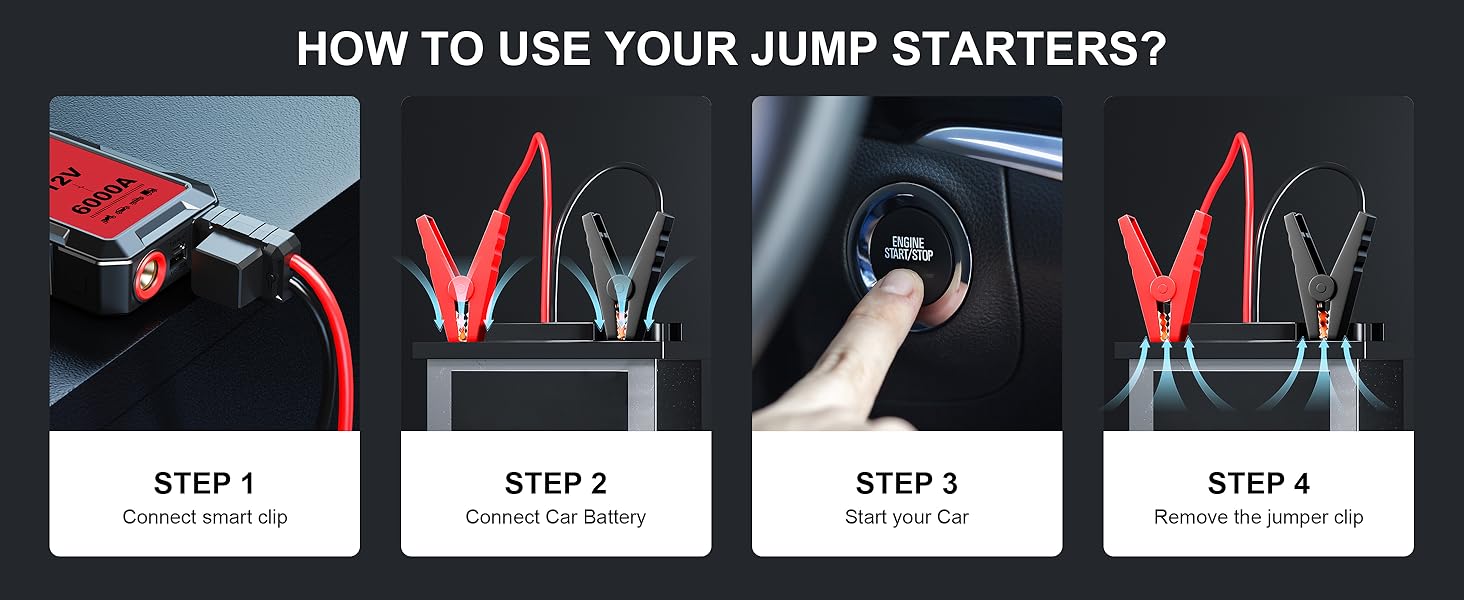
Image: The jump starter features 10 integrated safety protection technologies, including safeguards against overcharge, overcurrent, short circuit, reverse connection, low and high temperatures, overvoltage, overload, anti-spark, and reverse charge.
Product Contents
Verify that all items are present in the package:
- 1 x fmooostore PS-212 Jump Starter Unit
- 1 x Smart Jumper Cable with Clamps
- 1 x USB-A to USB-C Charging Cable
- 1 x EVA Storage Case
- 1 x User Manual

Image: The package includes the jump starter, smart jumper cables, USB-A to USB-C cable, EVA case, and user manual.
Setup
Initial Charging
Before first use, fully charge the jump starter using the provided USB-A to USB-C cable and a compatible USB wall adapter (not included). The battery level display will indicate the charging progress.
- Connect the USB-C end of the charging cable to the Type-C Input port on the jump starter.
- Connect the USB-A end to a 5V/2A USB wall adapter.
- Allow the unit to charge until the battery level display shows 100%.
Note: If not used for a long time, it’s recommended to charge the jump starter every 2-3 months to maintain battery health.
Operating Instructions
1. Jump Starting a Vehicle
Ensure the jump starter has at least 25% charge before attempting to jump start your vehicle.
- Connect Smart Jumper Cable: Insert the blue plug of the smart jumper cable into the 12V Car Jump Start port on the jump starter. Ensure a secure connection.
- Connect to Vehicle Battery:
- Attach the red (+) clamp to the positive terminal of the vehicle's battery.
- Attach the black (-) clamp to the negative terminal of the vehicle's battery or a solid, unpainted metal part of the car chassis.
- Start Your Car: Once the clamps are securely connected, start your vehicle. If it doesn't start immediately, wait 10-15 seconds and try again. Do not crank for more than 3 seconds per attempt.
- Remove Jumper Cables: Once the vehicle starts, immediately remove the black (-) clamp first, then the red (+) clamp. Disconnect the smart jumper cable from the jump starter.

Image: Step-by-step guide for jump starting a vehicle using the fmooostore PS-212.
2. Using as a Portable Power Bank
The jump starter can charge various USB-powered devices.
- Connect your device's USB charging cable to one of the USB Output ports (5V/2A) on the jump starter.
- The jump starter will automatically begin charging your device.
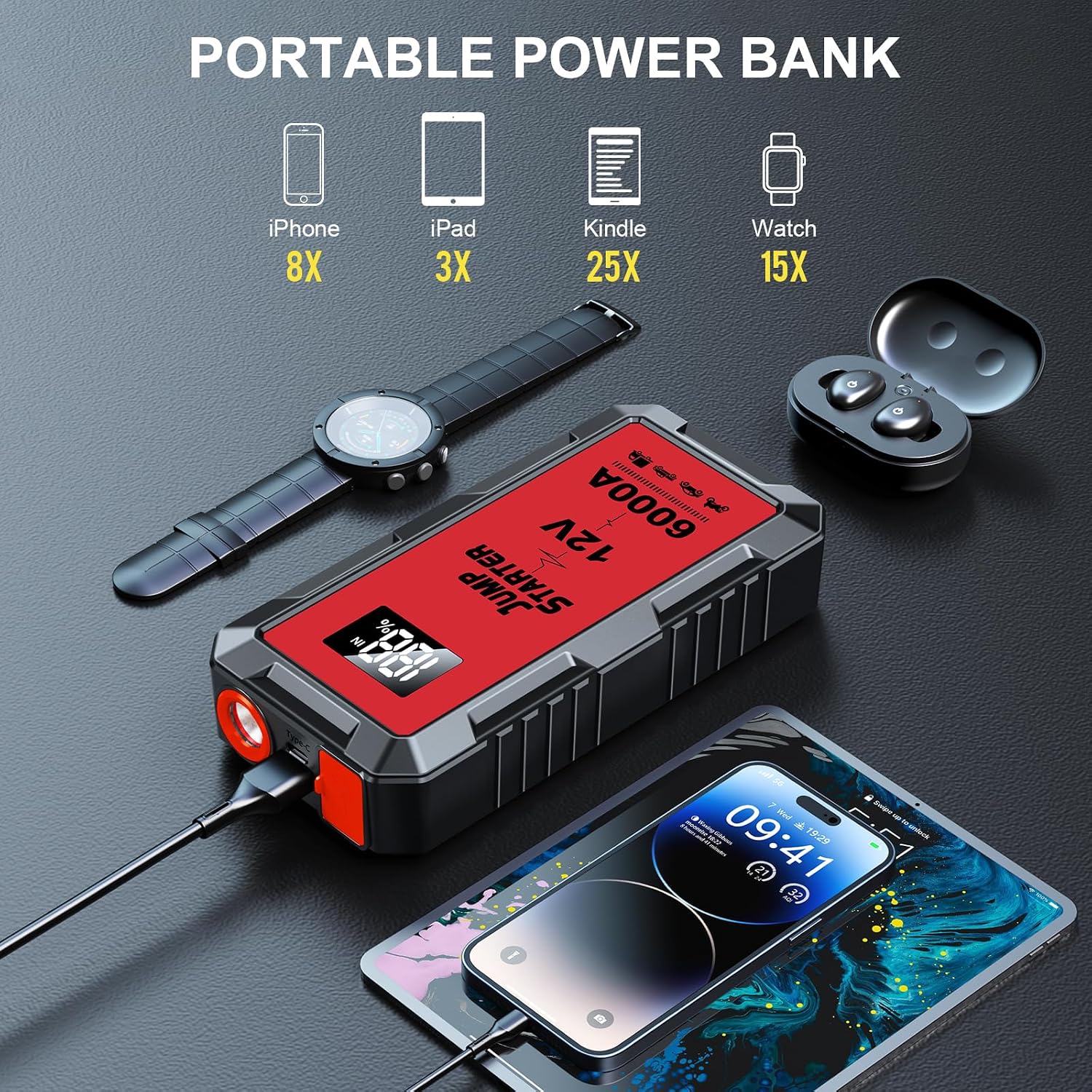
Image: The jump starter can be used to charge phones, tablets, and other USB devices.
3. Using the LED Flashlight
The built-in LED flashlight provides illumination and emergency signaling.
- Press and hold the Power Button for 3 seconds to turn on the flashlight (steady mode).
- Press the Power Button again to cycle through modes: steady light, strobe light, SOS signal.
- Press and hold the Power Button for 3 seconds to turn off the flashlight.

Image: The integrated LED flashlight offers steady, strobe, and SOS modes for various situations.
Video: Seller's Product Overview
Video: An overview of the portable battery jumper starter, demonstrating its features and ease of use.
Maintenance
- Recharge Regularly: To prolong battery life, recharge the jump starter every 2-3 months, even if not in use.
- Storage: Store the device in its EVA case in a cool, dry place, away from direct sunlight and extreme temperatures.
- Cleaning: Use a soft, dry cloth to clean the exterior of the jump starter. Do not use harsh chemicals or abrasive materials.
Troubleshooting
| Problem | Possible Cause | Solution |
|---|---|---|
| Vehicle does not start. | Jump starter battery is too low. | Ensure the jump starter is charged above 25%. |
| Vehicle does not start. | Incorrect cable connection. | Verify red clamp is on positive (+), black clamp on negative (-) or ground. |
| Vehicle does not start. | Vehicle battery is severely damaged. | Consult a professional mechanic. |
| Jump starter not turning on. | Battery is completely drained. | Charge the jump starter fully. |
| USB devices not charging. | Incorrect USB port used or cable issue. | Ensure using USB Output ports and check cable integrity. |
Specifications
| Feature | Detail |
|---|---|
| Brand | fmooostore |
| Model | PS-212 |
| Peak Current | 6000 Amps |
| Voltage | 12V |
| Engine Compatibility | All Gas, up to 10.0L Diesel |
| Battery Type | Lithium Polymer (included) |
| USB Output | 5V/2A |
| LED Light | Yes (Steady, Strobe, SOS modes) |
| Product Dimensions | 6"D x 4.1"W x 4"H |
| Item Weight | 1.23 pounds (560 Grams) |

Image: Detailed view of the jump starter's ports and controls.
Warranty and Support
Your fmooostore PS-212 Jump Starter comes with a 24-month warranty. We also provide lifetime technical support for our products.
For any questions or assistance regarding your product, please contact fmooostore customer service. You will receive a satisfactory solution.
Please refer to the contact information provided on the product packaging or the official fmooostore website for support.
Ask a question about this manual
Ask about setup, troubleshooting, compatibility, parts, safety, or missing instructions. Manuals+ will review the question and use this page’s manual context to help answer it.