1. Introduction
This manual provides comprehensive instructions for the installation, operation, and maintenance of your Chelhead P2-6Gang RGB Bluetooth Switch Panel. This universal circuit control system is designed for various 12V/24V vehicles, offering convenient control of auxiliary devices via a sleek panel and a dedicated mobile application.

Image 1.1: Chelhead P2-6Gang RGB Bluetooth Switch Panel. This image shows the switch panel, a smartphone displaying the control app, and a vehicle with auxiliary lights, illustrating the product's functionality and application.
2. Safety Information
Please read all safety warnings and instructions carefully before installation and use. Failure to follow these instructions may result in electric shock, fire, and/or serious injury.
- Always disconnect the vehicle's battery before performing any electrical work.
- Ensure all wiring connections are secure and properly insulated to prevent short circuits.
- Do not exceed the maximum current ratings for each circuit or the overall system. Refer to the specifications section.
- Install the control box in a dry, protected location away from excessive heat or moisture. The panel itself is IP65 waterproof, but the control box requires protection.
- If you are unsure about any part of the installation process, consult a qualified professional.
3. Package Contents
Verify that all items listed below are included in your package:
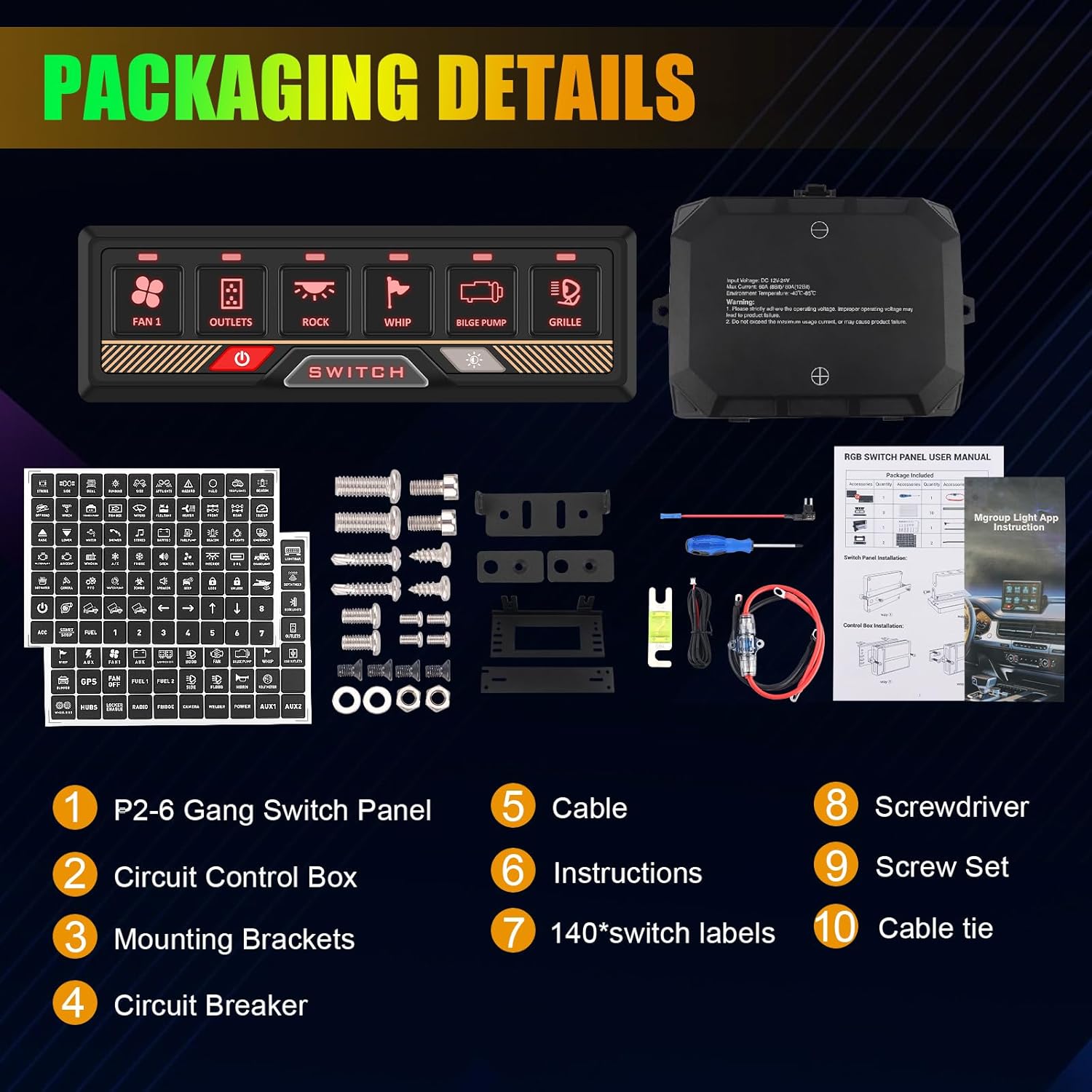
Image 3.1: Package Contents. This image displays all components included in the Chelhead P2-6Gang RGB Bluetooth Switch Panel kit, such as the switch panel, control box, wiring, and labels.
- P2-6Gang Switch Panel
- Circuit Control Box
- Mounting Brackets (various types)
- Circuit Breaker (60A)
- Power Cable
- Instruction Manual
- 140 PCS DIY Stickly Labels
- Screwdriver
- Screw Set
- Cable Ties
4. Product Features
- Bluetooth App Control: Easily connect and control the panel via the Mgroup Light app within a 15-18 meter range.
- Compact Design: Sleek and slim panel with three silicone buttons for power (with memory function), adjustable brightness, and RGB backlight color adjustment.
- Four Light Control Modes: Choose from Constant Light, Momentary Mode, Flash Mode, and Strobe Mode.
- RGB Backlight & Adjustable Brightness: 8 different RGB backlight colors (Red, Orange, Yellow, Green, Cyan, Blue, Purple, White) with gradient, jump, and breathing effects. 5-level brightness adjustment (100%, 75%, 50%, 25%, 10%).
- High-Quality Material: Constructed with an aluminum panel and high-quality ABS/PC switches, offering excellent physical properties, temperature resistance, electrical properties, and flame retardancy.
- Comprehensive Protection: Features over-current, over-voltage, reverse polarity, waterproof (IP65 for panel), and thermal protection.
- Universal Application: Suitable for various 12V/24V vehicles including ATVs, UTVs, Boats, SUVs, RVs, Pickups, Off-Road vehicles, and Trucks.

Image 4.1: IP65 Waterproof Rating. This image highlights the IP65 waterproof rating of the switch panel, demonstrating its suitability for use in various environments, including marine and off-road applications.
5. Specifications
| Feature | Detail |
|---|---|
| Product Dimensions (L x W x H) | 14.4 x 4.6 x 1.2 cm |
| Weight | 1.65 kilograms |
| Manufacturer | Chelhead |
| Model Number | P2-6Gang APP |
| Operating Mode | ON-OFF |
| Current Rating | 65 A (System Max) |
| Operating Voltage | 12 Volts |
| Contact Type | Normally Open |
| Connector Type | Clamping Connector |
| Material | Acrylonitrile Butadiene Styrene (ABS) |
| Terminal Type | Solder |

Image 5.1: Product Dimensions and Protections. This image illustrates the compact dimensions of the switch panel (14.4cm x 4.6cm) and highlights its built-in protection features: over-current, over-voltage, reverse polarity, waterproof, and thermal protection.
6. Setup and Installation
6.1. Wiring Diagram and Power Connection
The control box provides two methods for obtaining power: directly from the battery or via an ACC connection. For optimal performance and ease of use, connecting directly to the battery is recommended.

Image 6.1: Wiring Diagram. This diagram illustrates the two power connection methods (Battery or ACC) and the individual circuit ratings for the 6-gang control box.
| Circuit | Current Rating |
|---|---|
| Circuit 1 | 30A |
| Circuit 2 | 20A |
| Circuit 3 | 20A |
| Circuit 4 | 15A |
| Circuit 5 | 15A |
| Circuit 6 | 10A |
6.2. Circuit Breaker
The system includes an upgraded 60A circuit breaker for enhanced safety. This breaker is designed to automatically disconnect the circuit if the current exceeds 60A, protecting the product and your vehicle's electrical system.

Image 6.2: 60A Circuit Breaker. This image details the specifications of the upgraded 60A circuit breaker, including its maximum current, input voltage, max power, and operating temperature range.
6.3. Control Box Installation
The control box can be installed using two different methods, allowing for flexible placement within your vehicle. Refer to the included mounting brackets and hardware.

Image 6.3: Control Box Installation Methods. This image illustrates two distinct methods for mounting the control box, providing flexibility for installation in various vehicle types.
6.4. Applying Labels
The kit includes 140 DIY stick-on labels to customize your switch panel. Select the appropriate labels for your connected accessories and apply them to the corresponding switch buttons.
7. Operating Instructions
7.1. Panel Button Functions
The switch panel features three silicone buttons for direct control:
- Power Button: Turns the panel ON/OFF. Includes a memory function to recall the last state.
- Brightness Adjustment Button: Adjusts the backlight brightness.
- RGB Color Switch Button: Changes the RGB backlight color.
7.2. Bluetooth App Control
The Mgroup Light app allows for remote control of your switch panel. Download the app from your device's app store and follow the in-app instructions for pairing. The app provides comprehensive control over individual switches, light modes, RGB colors, and brightness settings.

Image 7.1: App Control and Light Modes. This image demonstrates the Mgroup Light app interface for remote control and illustrates the four available light modes: Constant Light, Momentary Mode, Flash Mode, and Strobe Mode.
7.3. RGB Backlight and Brightness Adjustment
The panel offers 8 distinct RGB backlight colors and 5 levels of brightness. You can cycle through colors and brightness levels using the dedicated buttons on the panel or through the Mgroup Light app.
- Short Press Color Button: Cycles through 8 different RGB colors.
- Long Press Color Button: Toggles between gradient, jump, and breathing effects for the backlight.
- Short Press Brightness Button: Adjusts brightness through 5 levels (100%, 75%, 50%, 25%, 10%).
- Double Click Brightness Button: Turns off the backlight.

Image 7.2: RGB Colors and Brightness. This image displays the 11 different RGB color options and the 5 adjustable brightness levels (100%, 75%, 50%, 25%, 10%) for the switch panel's backlight.
7.4. Light Control Modes
The panel supports four distinct light modes for connected accessories. These modes can be configured via the app or by following specific button press sequences detailed in the app's help section.
- Constant Light: Standard ON/OFF operation.
- Momentary Mode: Output is active only while the button is pressed.
- Flash Mode: Output flashes at a regular interval.
- Strobe Mode: Output strobes rapidly.
8. Maintenance
To ensure the longevity and optimal performance of your Chelhead P2-6Gang RGB Bluetooth Switch Panel, follow these maintenance guidelines:
- Cleaning: Wipe the switch panel with a soft, damp cloth. Avoid using harsh chemicals or abrasive cleaners that could damage the surface or electronics.
- Inspection: Periodically check all wiring connections for tightness and signs of corrosion or damage. Ensure the control box remains in a dry and protected environment.
- Fuse Check: If a circuit fails, inspect the corresponding fuse in the control box. Replace blown fuses with ones of the correct amperage rating.
9. Troubleshooting
If you encounter issues with your switch panel, refer to the following common problems and solutions:
- Panel Not Powering On:
- Check the main power connection to the battery or ACC.
- Verify the 60A circuit breaker has not tripped.
- Ensure all wiring connections are secure.
- Individual Switch Not Working:
- Check the fuse for the specific circuit in the control box.
- Inspect the wiring from the control box to the accessory.
- Ensure the accessory itself is functioning correctly.
- Bluetooth Connection Issues:
- Ensure Bluetooth is enabled on your mobile device.
- Restart the Mgroup Light app.
- Ensure the panel is within the 15-18 meter operating range.
- Try re-pairing the device through the app settings.
- RGB Backlight Not Changing/Adjusting:
- Ensure the panel is powered on.
- Try adjusting via the app if panel buttons are unresponsive.
10. Warranty and Support
Specific warranty information for the Chelhead P2-6Gang RGB Bluetooth Switch Panel is not provided in this document. Please refer to the product packaging or the seller's website for detailed warranty terms and conditions.
For technical support, troubleshooting assistance beyond this manual, or inquiries regarding replacement parts, please contact Chelhead customer service through the platform where the product was purchased or visit the official Chelhead website for contact information.