1. Product Overview
The Movols Guard your home Dual Lens Linkage 8MP Pan/Tilt WiFi PTZ Security Camera is designed for comprehensive outdoor surveillance. It features a dual-lens system, combining a fixed wide-angle camera with a pan/tilt/zoom (PTZ) camera for extensive coverage. Key functionalities include 8MP HD imaging, 2.4GHz WiFi connectivity, AI-powered human detection, automatic tracking, color night vision, two-way audio, and local/cloud storage options.
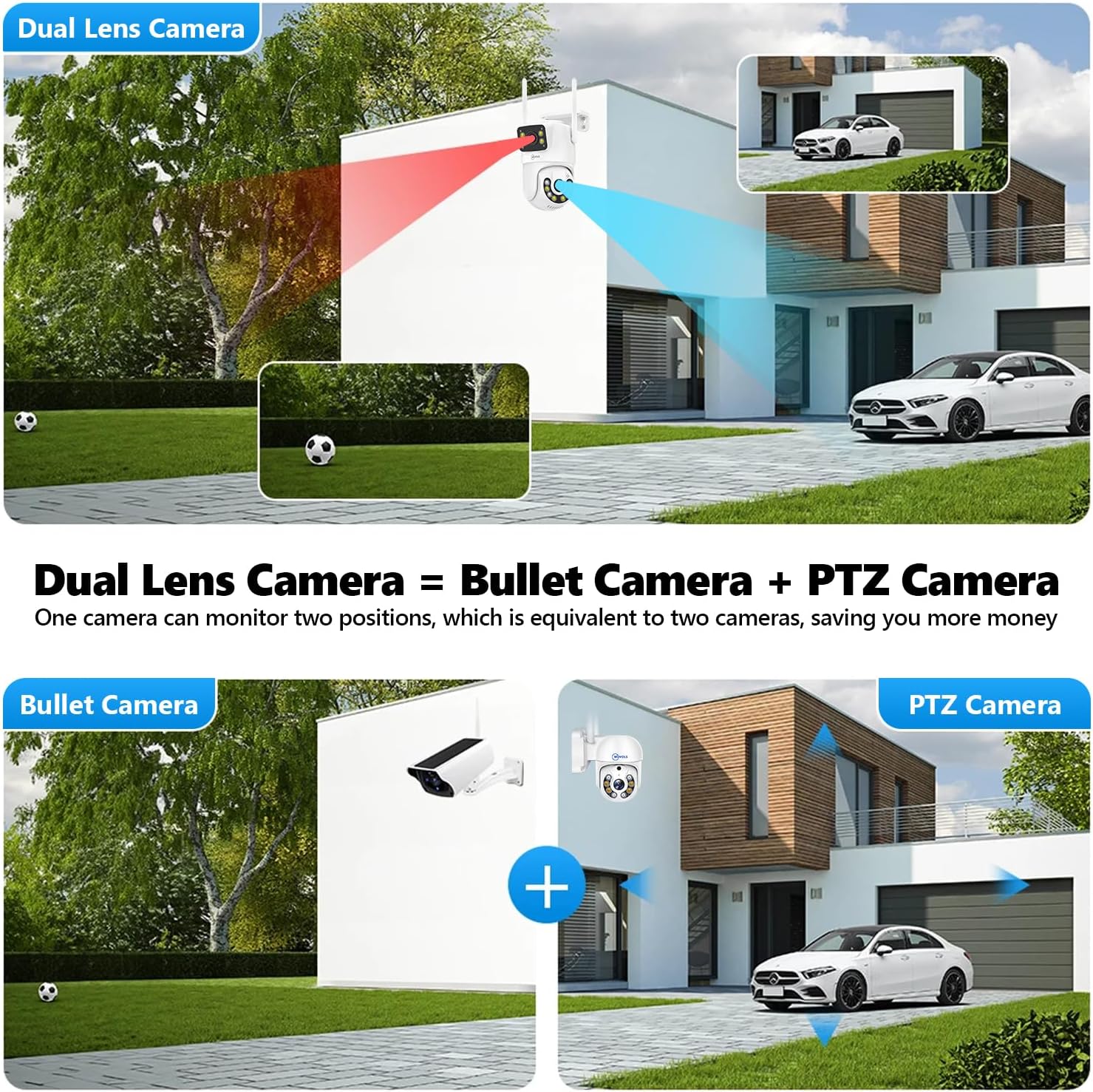
Image: The dual-lens camera system integrates a fixed bullet camera and a PTZ camera, providing both wide-angle and detailed surveillance.

Image: Detailed view of the camera's components and their functions.
2. What's in the Box
Verify that all components are present in the package:
- Dual Lens PTZ Security Camera (1 unit)
- 64GB TF Card (1 unit)
- Power Adapter (1 unit)
- Waterproof Lid (1 unit)
- Pack of Screws (for installation)
- Quick Operation Guide (Instruction Manual)

Image: All items included in the product packaging.
3. Setup Guide
3.1 Physical Installation
The camera can be mounted on a wall or under a ceiling. Ensure the mounting location provides a clear view and is within range of your 2.4GHz WiFi network.

Image: Mounting options for the camera.
3.2 Power Connection
Connect the camera to the provided power adapter. This camera is a corded electric device and does not operate on battery power.
3.3 App Setup and WiFi Connection
Follow these steps to connect your camera to the mobile application:
- Search and download the "IPC360 Home" app from your device's app store (available on Apple App Store and Google Play).
- Open the app, add a new device, and select the QR code connection method.
- Scan the QR code located on the camera using the app on your phone.
- Follow the on-screen prompts within the app to proceed.
- Choose your 2.4GHz WiFi network and enter the correct WiFi password. (Note: The camera supports 2.4GHz WiFi only, not 5GHz WiFi).
- Once connected, you can enjoy live viewing and access all camera features.

Image: Step-by-step guide for app and WiFi setup.

Image: Explanation of 2.4GHz WiFi usage for optimal coverage.
4. Operating Instructions
4.1 Pan, Tilt, and Zoom Control
The PTZ camera offers 270° horizontal pan and 90° vertical tilt, providing a 360° view. Use the mobile app to remotely control the camera's movement and digital zoom (up to 10X).

Image: Pan and tilt functionality for wide-area viewing.
4.2 Dual-Screen Monitoring
The dual-lens design allows for simultaneous display of a fixed panoramic view and a detailed PTZ view on your phone, enabling comprehensive monitoring.
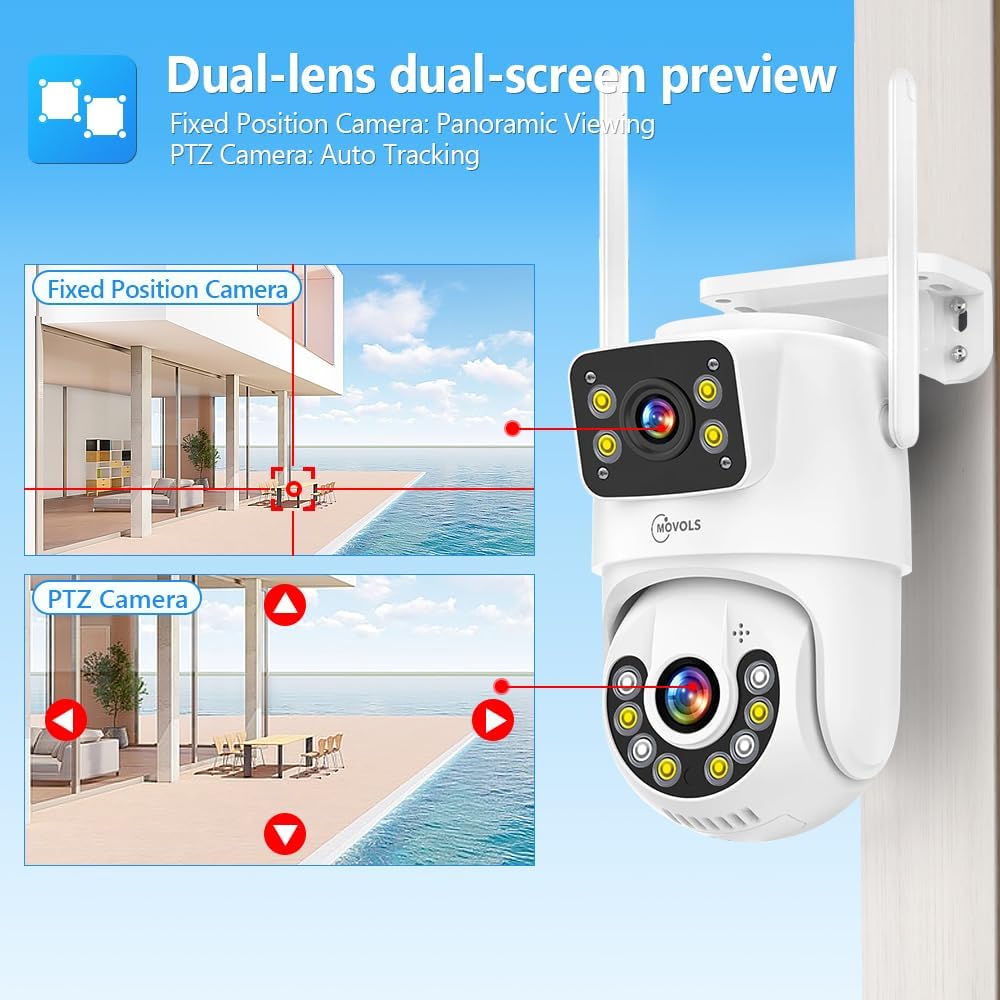
Image: Dual-lens dual-screen preview for enhanced monitoring.
4.3 Night Vision Modes
The camera features three night vision modes for optimal visibility in low-light conditions:
- Full-Color Night Vision: Provides color images when ambient light is insufficient, utilizing built-in white lamps.
- Infrared Night Vision: Switches to black and white display using infrared lights in complete darkness.
- Smart Night Vision: Automatically turns on white lights for color images when motion is detected in dim conditions, otherwise uses infrared.
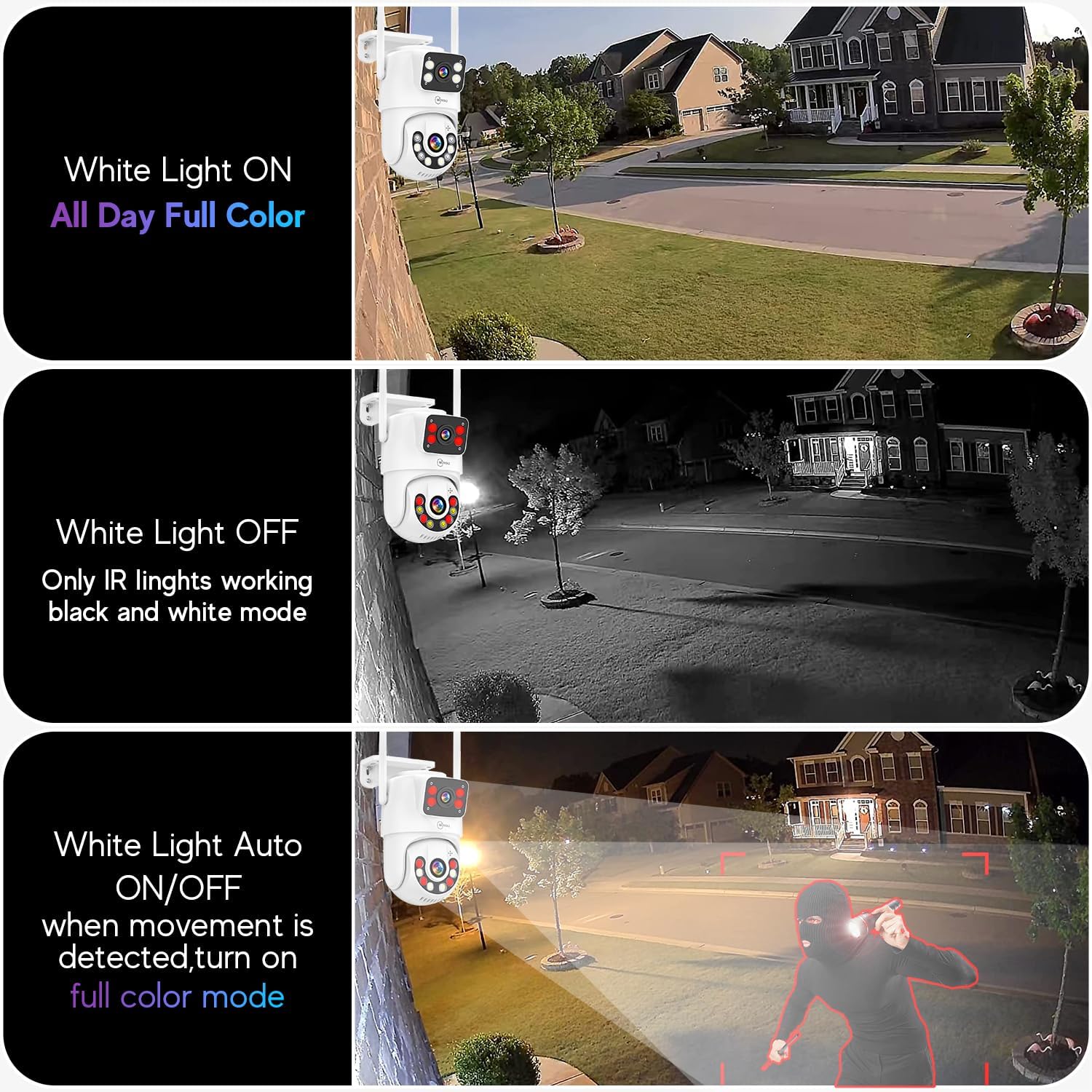
Image: Comparison of different night vision modes.
4.4 AI Motion Detection & Tracking
The camera uses an intelligent AI algorithm to detect human movement, reducing false alarms. Upon detection, the camera can automatically track the moving target and send alerts to your mobile phone. You can also set specific detection areas and alarm time periods.

Image: AI motion detection and instant alerts.

Image: Automatic tracking of detected humanoids.

Image: Setting custom detection areas.

Image: Configuring alarm time periods.
4.5 Two-Way Audio
Communicate with visitors or deter intruders using the built-in microphone and speaker through the mobile app.
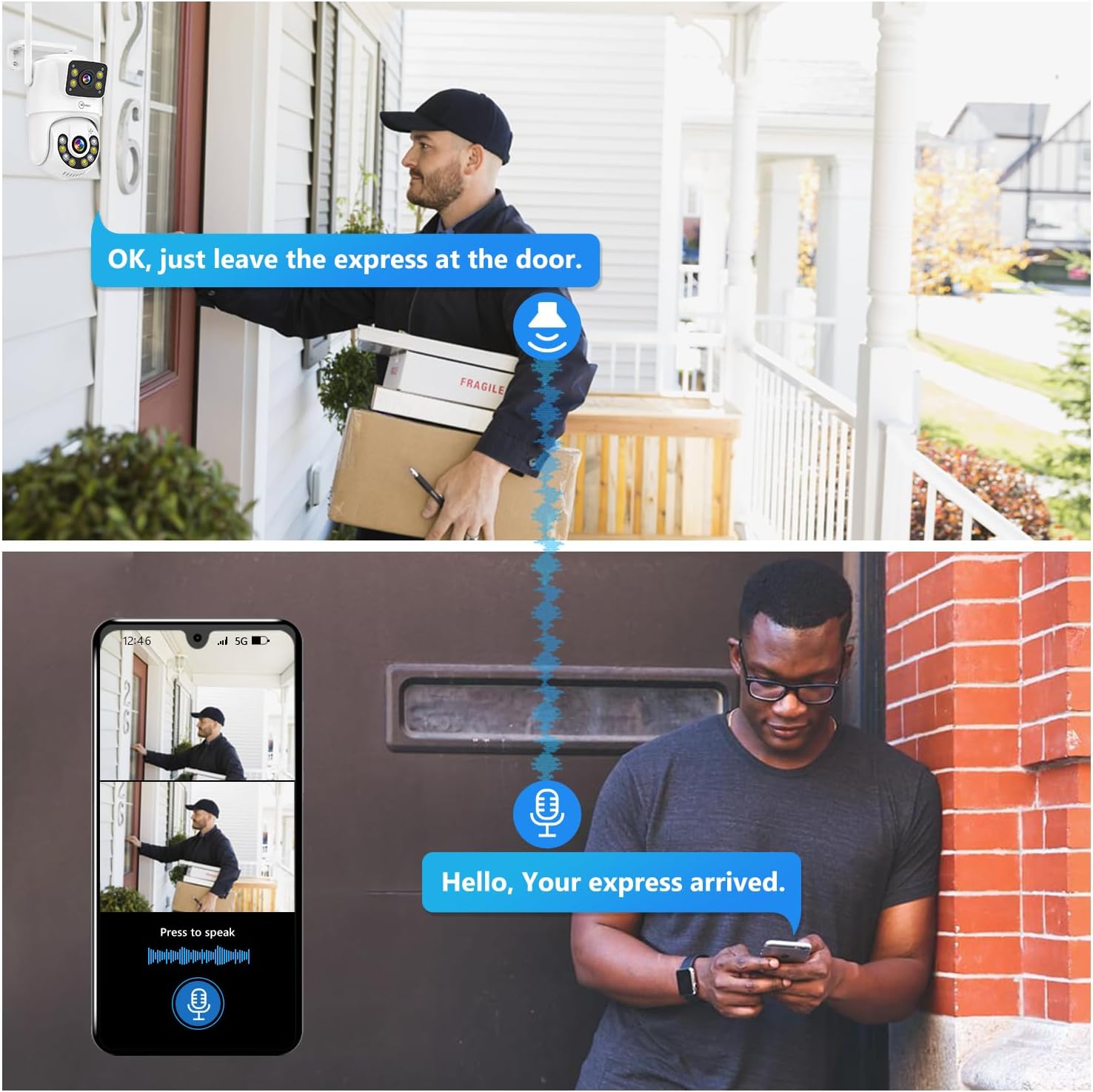
Image: Two-way audio communication via the camera.
4.6 Storage Options & 24/7 Recording
The camera supports both local storage via an SD card (up to 128GB, 64GB TF card included) and cloud storage. Continuous 24/7 recording is available with either SD card or cloud storage, ensuring no important moments are missed.

Image: SD card and cloud storage capabilities.

Image: 24/7 recording feature.
4.7 Multi-User Sharing
Share camera access with multiple users through the app. Only the primary account holder can manage and share access.

Image: Multi-user sharing functionality.
4.8 Preset Points & Guard Position
Set up to 8 preset points for frequently viewed locations. The camera can return to a designated guard position after tracking a moving target.

Image: Setting and utilizing preset points for surveillance.
5. Maintenance
5.1 Weather Resistance
The camera has an IP66 waterproof rating, ensuring protection against rain, snow, wind, dust, and extreme temperatures (-35°C to 50°C). This allows for reliable operation in various outdoor conditions.

Image: IP66 weather resistance features.
5.2 Cleaning
Periodically clean the camera lens and housing with a soft, damp cloth to ensure clear image quality. Avoid using harsh chemicals.
5.3 Firmware Updates
Check the IPC360 Home app regularly for available firmware updates to ensure optimal performance and access to new features. Follow the in-app instructions for updating.
6. Troubleshooting
- Camera not connecting to WiFi: Ensure your WiFi network is 2.4GHz. Verify the WiFi password is correct. Move the camera closer to the router to improve signal strength. Restart both the camera and your router.
- No image/video: Check the power connection. Ensure the camera is properly connected to the app. Verify your internet connection.
- Motion detection not working: Ensure motion detection is enabled in the app settings. Adjust sensitivity levels and detection areas as needed.
- Poor image quality: Clean the camera lens. Ensure there are no obstructions in the camera's field of view. Check your internet speed for streaming issues.
- Firmware update failure: Ensure a stable internet connection during the update process. Try restarting the camera and attempting the update again.
7. Specifications
| Feature | Specification |
|---|---|
| Video Capture Resolution | 8MP (4MP+4MP) |
| Connectivity Technology | Wireless (2.4GHz Wi-Fi) |
| Power Source | Corded Electric (12V DC, 12W) |
| Pan/Tilt Range | Pan 270°, Tilt 90° |
| Night Vision Range | Up to 65 feet |
| Storage Options | SD Card (Max 128GB), Cloud Storage |
| International Protection Rating | IP66 (Waterproof, Dustproof) |
| Operating Temperature | -35°C to 50°C |
| Two-Way Audio | Yes |
| Human Detection & Tracking | Yes |
| Video Encoding | H.265 |
| Dimensions (L x W x H) | 7 x 6 x 9 inches |
| Item Weight | 2.5 pounds |

Image: Benefits of H.265+ video encoding.
8. Warranty and Support
Movols Guard your home provides the following support for this product:
- Unconditional returns and exchanges within 60 days of purchase.
- Prompt responses from after-sales service within 24 hours.
- Replacement or repair within a one-year maintenance period.
- Lifetime technical support.
For technical assistance or warranty claims, please contact Movols Guard your home customer service.