1. Product Overview
This manual provides instructions for the installation and care of the Lkfyyds SIM Card Tray and Micro SD Card Tray designed specifically for the TCL Tab 8 4G. This replacement part is essential for enabling cellular connectivity and expandable storage on your device.
The product is a replacement component for your device's original SIM and Micro SD card tray. It is designed to fit perfectly and function correctly, allowing you to insert your SIM card for mobile network access and a Micro SD card for additional storage.

Figure 1: Front view of the SIM and Micro SD card tray, showing slots for SIM and SD cards.
2. Important Safety Information and Installation Notes
Warning: Professional installation is highly recommended for this component. Improper installation may cause damage to your device, and the manufacturer will not be responsible for any damages incurred during the replacement process.
- Ensure your device is powered off before attempting any installation.
- Use appropriate tools to eject the existing tray. Avoid excessive force.
- Handle the new tray and your device with care to prevent damage to sensitive internal components.
- Keep small parts away from children.
3. Setup and Installation
Follow these steps carefully to replace or install the SIM and Micro SD card tray in your TCL Tab 8 4G.
- Power Off Device: Before beginning, ensure your TCL Tab 8 4G is completely powered off to prevent any electrical damage.
- Locate Tray Slot: Identify the SIM/SD card tray slot on the side of your TCL Tab 8 4G. This is typically a small opening with a tiny hole next to it.

Figure 2: The red circle indicates the typical location of the SIM/SD card tray slot on a tablet.
- Eject Old Tray (if applicable): Insert a SIM ejector tool (or a small paperclip) into the small hole next to the tray slot. Apply gentle pressure until the tray pops out slightly. Carefully pull the old tray completely out.
- Prepare New Tray: If you are installing a SIM card and/or a Micro SD card, carefully place them into the designated slots on the new tray. Ensure they are oriented correctly according to the icons on the tray (SIM and SD).

Figure 3: Close-up of the tray, highlighting the "SIM" and "SD" indicators for correct card placement.
- Insert New Tray: Align the new tray with the slot on your TCL Tab 8 4G. Gently push the tray into the slot until it sits flush with the device's body. Do not force it.
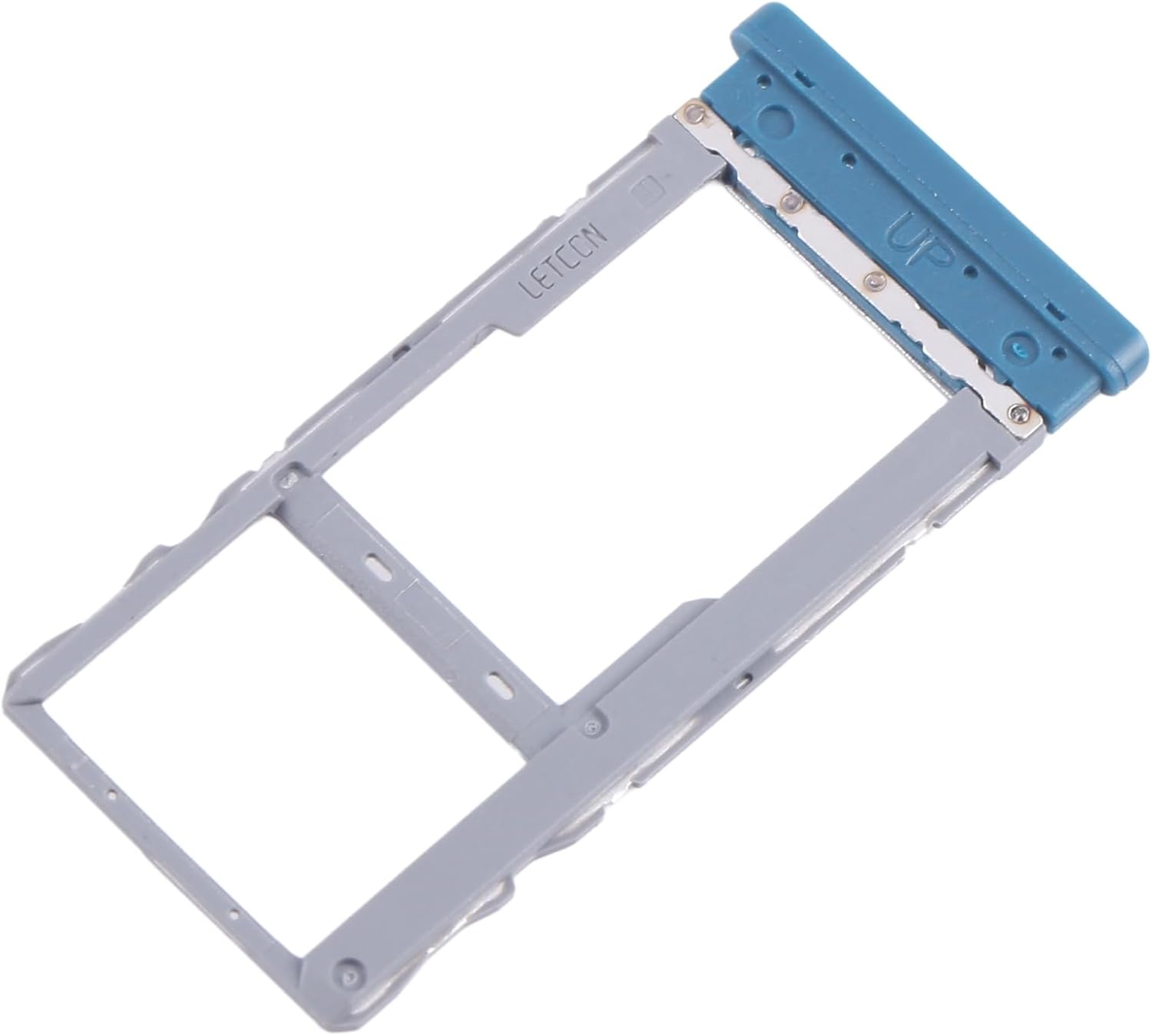
Figure 4: Angled view of the tray, showing its design for proper insertion. Note the "UP" indicator.
- Power On Device: Once the tray is securely in place, power on your TCL Tab 8 4G. The device should now recognize the inserted SIM and Micro SD cards.
4. Operating the SIM/SD Card Tray
The SIM/SD card tray is a passive component designed to hold your cards securely within the device. Its operation is primarily limited to insertion and removal.
- Inserting Cards: Always ensure the device is powered off before inserting or removing cards from the tray. Align the SIM card and Micro SD card according to the cut-out corners and icons on the tray.
- Removing Cards: To remove cards, first power off your device. Then, use the SIM ejector tool to pop out the tray and carefully remove the cards.
5. Maintenance
The SIM/SD card tray requires minimal maintenance. Follow these guidelines to ensure its longevity:
- Cleaning: If necessary, gently wipe the tray with a soft, dry, lint-free cloth. Do not use liquid cleaners or abrasive materials.
- Storage: If the tray is not in use, store it in a clean, dry place away from dust and extreme temperatures.
- Avoid Bending: Do not bend or apply excessive force to the tray, as this can deform it and prevent proper fit or function.
6. Troubleshooting
If you encounter issues after installing the SIM/SD card tray, consider the following:
- Tray Not Fitting:
- Ensure the tray is oriented correctly. There is usually only one way it can be inserted.
- Check for any obstructions in the device's tray slot.
- Verify that this tray is indeed for the TCL Tab 8 4G model.
- SIM Card Not Recognized:
- Ensure the SIM card is correctly seated in the tray.
- Try restarting your device.
- Test the SIM card in another compatible device to rule out a faulty SIM card.
- Check your device's network settings.
- Micro SD Card Not Recognized:
- Ensure the Micro SD card is correctly seated in the tray.
- Try restarting your device.
- Test the Micro SD card in another compatible device or card reader.
- Check your device's storage settings.
If problems persist, it is recommended to seek professional assistance.
7. Specifications
| Feature | Detail |
|---|---|
| Product Type | SIM Card Tray + Micro SD Card Tray |
| Compatibility | TCL Tab 8 4G |
| Brand | Lkfyyds |
| Item Weight | 0.704 ounces |
| Manufacturer | CHENYANENY Cell Phone Spare Parts |
| ASIN | B0DP89N6H7 |
8. Warranty and Support
This product is a replacement part. The manufacturer, CHENYANENY Cell Phone Spare Parts, states that professional installation is recommended and they will not be responsible for any damages to your device that you may cause during the changing of replacement parts.
Specific warranty details for this replacement part are not explicitly provided. For any issues or further support, please refer to the seller or the original point of purchase.