
LVYUAN 20A-PRO black
LVYUAN 12V/24V Smart Battery Charger
Model: 20A-PRO black
Introduction
This manual provides comprehensive instructions for the safe and efficient operation of your LVYUAN 12V/24V Smart Battery Charger, Model 20A-PRO black. This intelligent charger is designed for various battery types, including lead-acid (AGM, GEL, SLA, VRLA) and 12V LiFePO4 batteries, offering multi-stage charging, maintenance, and repair functions. Please read this manual thoroughly before first use to ensure proper operation and to prevent damage to the unit or your battery.
Safety Information
WARNING: Read all safety warnings and instructions. Failure to follow the warnings and instructions may result in electric shock, fire, and/or serious injury.
- Always connect the charger to the battery terminals correctly: positive to positive, negative to negative.
- Ensure adequate ventilation during charging. Batteries can produce explosive gases.
- Do not charge frozen batteries. Allow them to thaw before charging.
- Avoid sparks or flames near the battery during charging.
- Disconnect the AC power before connecting or disconnecting the charging clamps.
- This charger is not compatible with 24V LiFePO4 batteries.
- Keep out of reach of children.
- Do not expose the charger to rain or wet conditions.
This charger features multiple protection functions including short circuit protection, overcurrent protection, cooling system, reverse polarity protection, over-charge protection, low-voltage protection, and over-temperature protection.

Image: Smart Multi-Protection features of the LVYUAN battery charger.
Product Overview

Image: Front view of the LVYUAN Smart Battery Charger with its included battery clamps.
Familiarize yourself with the components and controls of your LVYUAN Smart Battery Charger.
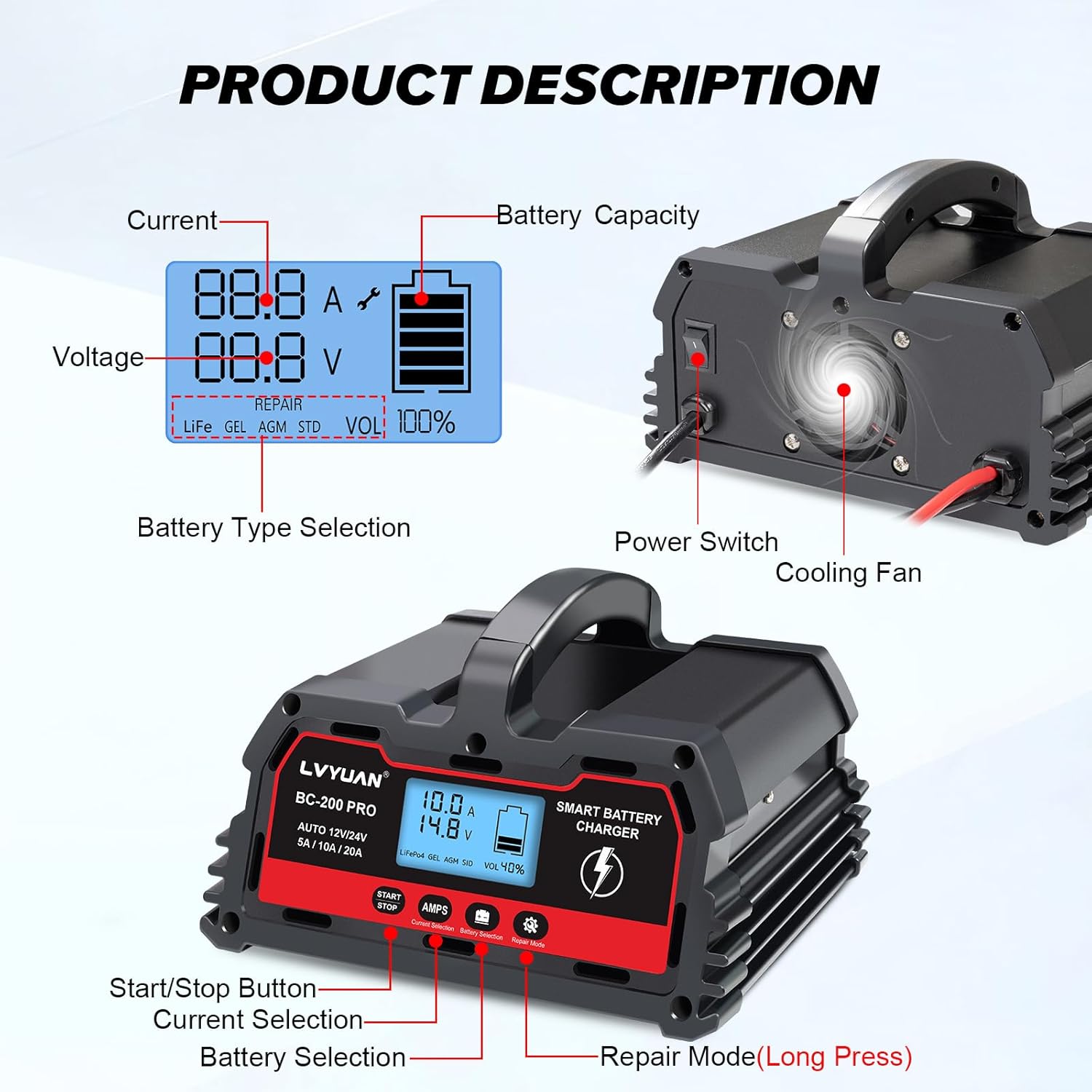
Image: Detailed view of the LVYUAN Smart Battery Charger's display and controls.
- Intelligent Digital LED Display: Shows ambient temperature, voltage, current, and remaining battery capacity.
- Power Switch: Turns the unit on/off.
- Cooling Fan: Activates when internal temperature exceeds 114°F/45°C to dissipate heat.
- Start/Stop Button: Initiates or halts the charging process.
- AMPS (Current Selection) Button: Selects charging current (5A/10A/20A).
- Battery Selection Button: Chooses battery type (LiFePO4, GEL, AGM, STD).
- Repair Mode Button (Long Press): Activates the battery repair function.
- Input Power Cord: Connects to AC power (Length: 52 inches / 130 cm).
- Output Clip Cord: Connects to battery terminals (Length: 33 inches / 83 cm).

Image: Dimensions and cable lengths of the LVYUAN Smart Battery Charger.
Setup
- Placement: Place the charger on a stable, flat surface in a well-ventilated area, away from direct sunlight, heat sources, or moisture.
- Battery Preparation: Ensure the battery terminals are clean and free of corrosion. If necessary, clean them with a wire brush.
- Connect to Battery:
- Connect the red (+) charging clamp to the positive (+) battery terminal.
- Connect the black (-) charging clamp to the negative (-) battery terminal.
- Ensure a secure connection.
- Connect to Power: Plug the charger's AC power cord into a standard electrical outlet (100-240V AC, 50/60Hz). The charger will power on and display current battery status.
Operating Instructions
The LVYUAN Smart Battery Charger operates with a 6-stage smart charging process for efficiency and safety.
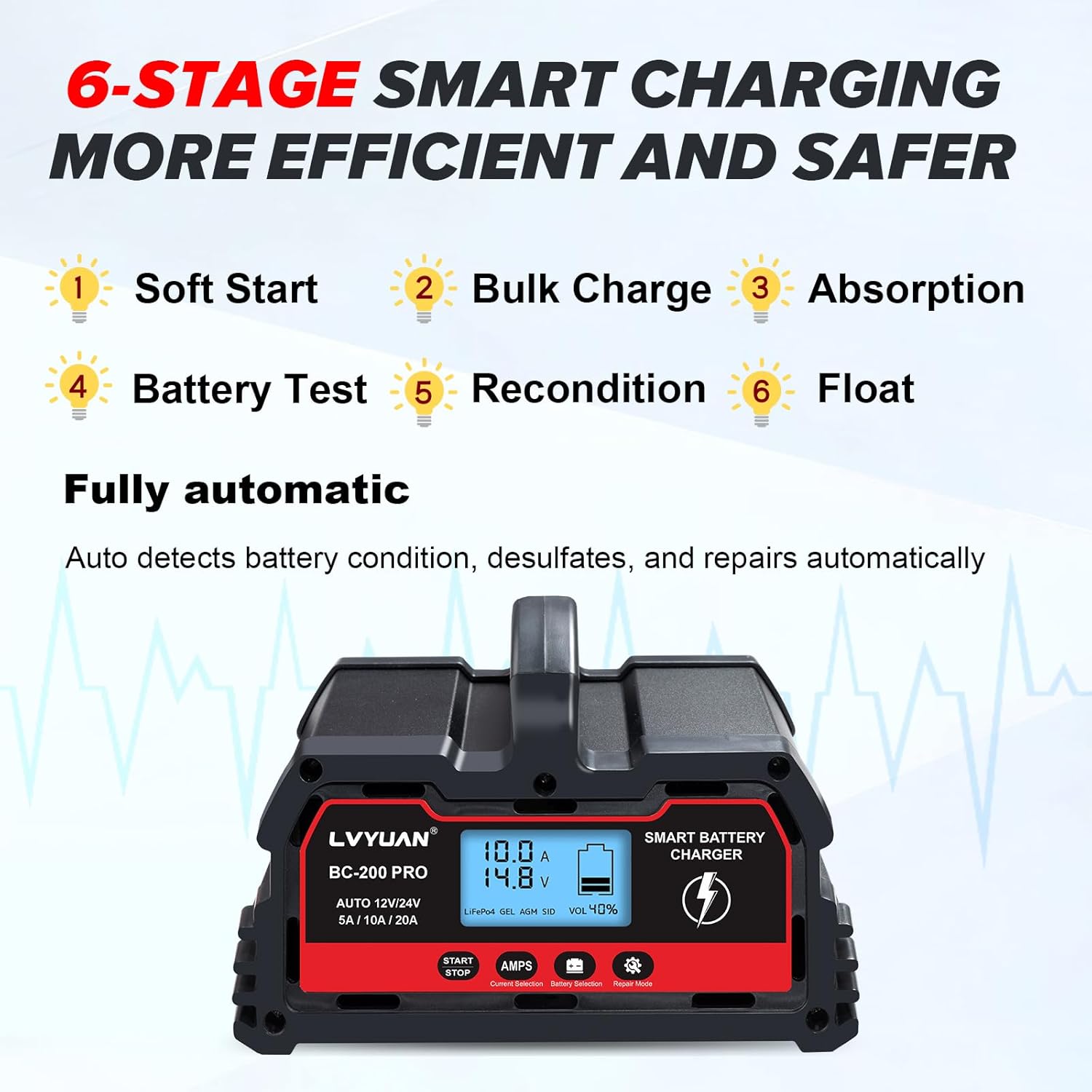
Image: The 6-stage smart charging process of the LVYUAN charger.
1. Automatic Detection and Initial Display
Once connected to the battery and power, the charger will automatically detect the battery voltage (12V or 24V) and display the current battery status (voltage, current, capacity, and ambient temperature) on the LED screen.
2. Selecting Charging Current (AMPS)
Press the AMPS button to cycle through available charging currents: 5A, 10A, or 20A. The 20A setting provides faster charging for compatible batteries. The charger will automatically adjust the current based on battery condition to maintain battery life.
3. Selecting Battery Type
Press the Battery Selection button to choose the correct battery type for optimal charging:
- LiFePO4: For 12V Lithium Iron Phosphate batteries. (Note: Not compatible with 24V LiFePO4 batteries).
- GEL: For Gel batteries.
- AGM: For Absorbed Glass Mat batteries.
- STD: For standard Lead-Acid (WET/MF/EFB/SLA/VRLA) batteries.

Image: The LVYUAN charger supports various 12V/24V lead-acid and 12V LiFePO4 battery types.
4. Starting and Stopping Charge
Press the START/STOP button to begin the charging process. The charger will automatically proceed through its multi-stage charging cycle. To stop charging at any time, press the START/STOP button again.
5. Repair Mode (0V Start)
If a battery is deeply discharged (down to 0V) or has not been used for a long time, the repair mode can be used to attempt to recondition it. Long press the Repair Mode button to activate this function. This mode aims to remove sulfate deposits and restore battery health, allowing charging to commence even from very low voltage states.

Image: The charger's ability to recondition and repair batteries, including 0V start.
6. Automatic Shut-off and Trickle Charging
The charger will automatically turn off when the battery is fully charged. It will then enter a trickle charging (float) mode to maintain the battery at optimal charge without overcharging. Charging will automatically restart if the battery voltage drops below a certain level.

Image: The charger's battery maintenance and zero overcharge capabilities.
7. Temperature Compensation
The charger features intelligent temperature compensation, optimizing charging performance for various climates. It adjusts charging parameters based on ambient temperature to ensure safe and efficient charging in both hot and cold environments.

Image: Temperature compensation for optimized charging in all climates.
Maintenance
- Cleaning: Disconnect the charger from power and battery before cleaning. Wipe the exterior with a soft, damp cloth. Do not use harsh chemicals or abrasives.
- Storage: Store the charger in a cool, dry place when not in use. Ensure cables are neatly coiled and not kinked.
- Cable Inspection: Regularly inspect the power cord and charging cables for any signs of damage, fraying, or exposed wires. Do not use if damaged.
- Cooling Fan: Ensure the cooling fan vents are not obstructed to allow proper heat dissipation. The intelligent temperature control system will activate the fan when needed.

Image: Intelligent temperature control and cooling fan operation.
Troubleshooting
| Problem | Possible Cause | Solution |
|---|---|---|
| Charger does not turn on. | No power from outlet; loose connection; faulty power cord. | Check power outlet; ensure power cord is securely plugged in; inspect power cord for damage. |
| Charger not charging battery. | Incorrect battery connection (reverse polarity); battery too damaged; incorrect battery type selected. | Verify correct positive/negative connections; try Repair Mode for deeply discharged batteries; ensure correct battery type is selected on the charger. |
| Charging current fluctuates or is lower than selected. | Normal operation for smart charger; battery nearing full charge; battery condition. | This is normal. The charger intelligently adjusts current to protect battery life, especially when starting or nearing full charge. |
| Charger gets warm during operation. | Normal operation; cooling fan may be active. | Ensure adequate ventilation around the charger. The cooling fan will activate automatically if needed. |
| Display shows error code or unusual readings. | Internal fault; severe battery issue. | Disconnect from power and battery, wait a few minutes, then reconnect. If issue persists, contact customer support. |
Specifications
- Model: 20A-PRO black
- Input Voltage: 100-240V AC, 50/60Hz
- Output Voltage: 12V DC / 24V DC (Auto-detection)
- Output Current: 12V/20A, 24V/10A (Selectable: 5A/10A/20A)
- Battery Capacity: 2Ah - 150Ah
- Battery Types: Lead-Acid (AGM, GEL, SLA, VRLA, WET, MF, EFB), 12V LiFePO4 (Not for 24V LiFePO4)
- Charging Stages: 6-stage smart charging (Soft Start, Bulk Charge, Absorption, Battery Test, Recondition, Float)
- Protection Features: Short-circuit, Overcurrent, Cooling System, Reverse Polarity, Over-charge, Low-voltage, Over-temperature
- Dimensions: 6.88 x 7.87 x 4.5 inches (17.5 x 20 x 11.5 cm)
- Item Weight: 3.86 pounds (1.75 kg)
- Operating Temperature: Optimized for various climates (Temp Compensation)
- Certifications: UL (as per product data)
Warranty and Support
For warranty information and technical support, please refer to the contact details provided with your purchase or visit the official LVYUAN website. Keep your purchase receipt as proof of purchase for any warranty claims.
Manufacturer: Guangzhou LVYUAN Technology Co., Ltd.
Country of Origin: China
For further assistance, please contact LVYUAN customer service.
Related Documents - 20A-PRO black
 |
LVYUAN リン酸鉄リチウムイオンバッテリー 取扱説明書 LVYUAN (リョクエン)製リン酸鉄リチウムイオンバッテリーの取扱説明書です。安全な設置、操作、メンテナンス方法について詳しく解説しています。太陽光発電システムやオフグリッド環境での使用に最適です。 |
 |
LVYUAN DC10 Smart Battery Charger: Features, Specifications, and Usage Guide Comprehensive guide to the LVYUAN DC10 Smart Battery Charger, covering its product description, applications, technical specifications, operating instructions, performance characteristics, and important safety precautions for charging 12V and 24V lead-acid batteries. |
 |
LVYUAN 51.2V 100Ah LiFePO4 バッテリー 取扱説明書 (JHXNY-512V100AH-JJ) LVYUAN リョクエン リン酸鉄リチウムイオンバッテリー (JHXNY-512V100AH-JJ) の取扱説明書。製品の概要、技術仕様、設置方法、安全上の注意事項、BMSの詳細について解説しています。 |
 |
LVYUAN リン酸鉄リチウムイオンバッテリー 取扱説明書 - DGPX-51.2V-100AH-JJ LVYUAN (リョクエン) 製 51.2V 100Ah リン酸鉄リチウムイオンバッテリー (DGPX-51.2V-100AH-JJ) の公式取扱説明書。安全な設置、使用、メンテナンス、技術仕様、保証に関する詳細情報を提供します。 |
 |
LVYUAN リン酸鉄リチウムイオンバッテリー 取扱説明書 LVYUAN リン酸鉄リチウムイオンバッテリー (DGPX-51.2V-100AH-JJ) の取扱説明書。太陽光発電システム向けバッテリーの安全な設置、操作、メンテナンス方法を解説します。 |
 |
LVYUAN ハイブリッドインバーター HSI3500 取扱説明書 LVYUAN® ハイブリッドインバーター 3kW-24V モデル: HSI3500 の取扱説明書。安全な使用、設置方法、操作方法、およびトラブルシューティングに関する詳細情報を提供します。 |
Ask a question about this manual
Ask about setup, troubleshooting, compatibility, parts, safety, or missing instructions. Manuals+ will review the question and use this page’s manual context to help answer it.