
1. Important Safety Information
Please read all instructions carefully before assembly and use. Failure to follow these instructions may result in injury or damage to the product.
- Always follow the assembly instructions provided.
- Keep fingers and other body parts away from moving parts during height adjustment.
- Ensure the desk is properly anchored to the floor to prevent tipping, if applicable.
- Do not exceed the maximum weight limit of 154 lbs (70 kg) for the desk.
- Keep children and pets away from the desk during operation.
- Disconnect power before cleaning or maintenance.
2. Product Overview
The Seang Electric Standing Desk is designed to provide a versatile and ergonomic workspace. It features an electric height adjustment system, integrated storage, and a monitor shelf.

Figure 2.1: Overview of the Seang Electric Standing Desk in Natural finish.
Key Features:
- Electric Height Adjustment: Smoothly transitions between sitting and standing positions (28.35" to 46.46").
- Programmable Memory Presets: Three customizable height settings for quick adjustments.
- Integrated Storage: Two desktop drawers and one open storage cubicle.
- Full-Sized Monitor Shelf: Elevates monitors to eye level for improved posture.
- Cable Management System: Helps organize and conceal cables.
- Accessory Hooks: Two hooks for headphones or other items.

Figure 2.2: Detailed view of the integrated storage options and monitor stand.
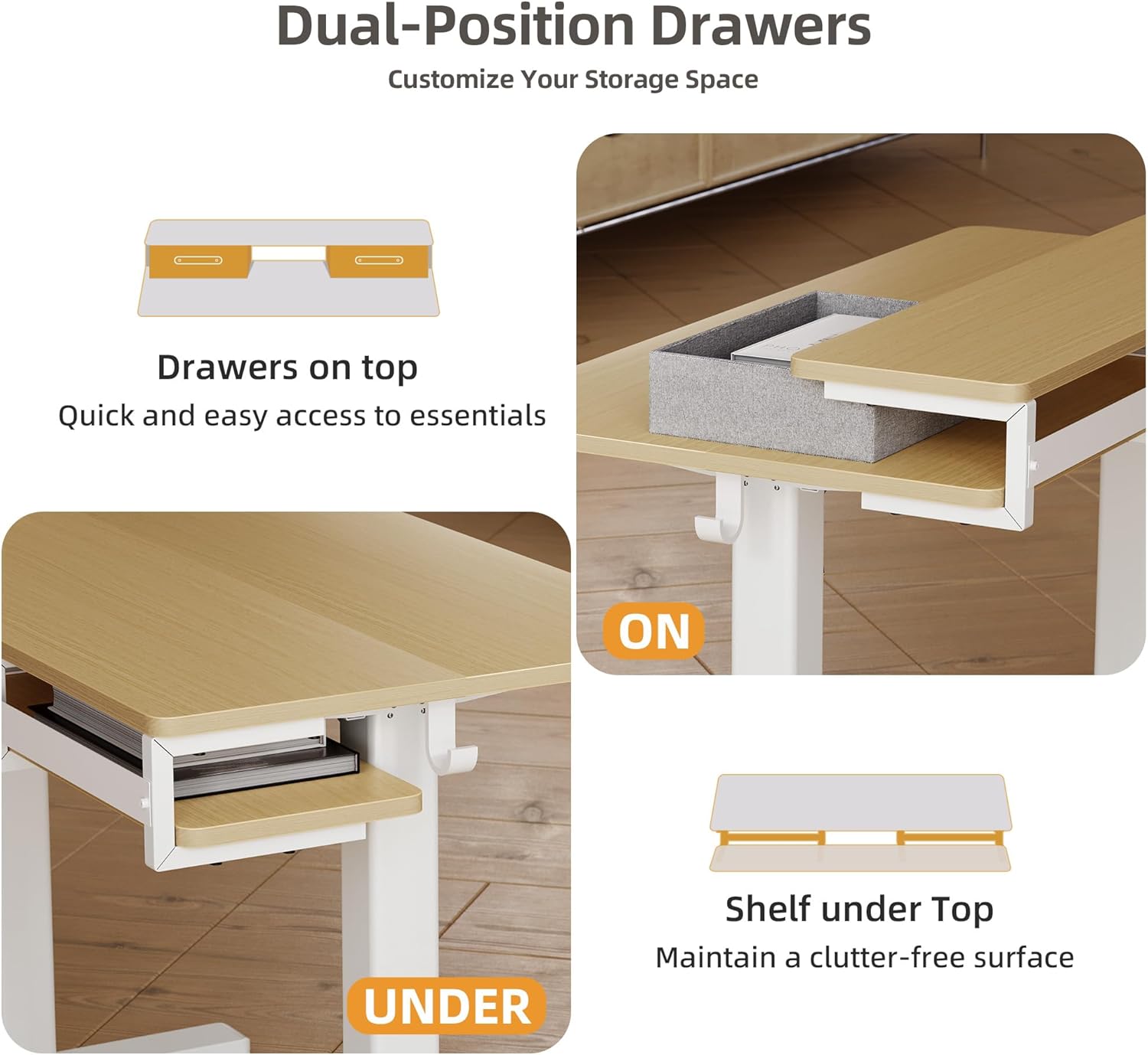
Figure 2.3: The drawers can be positioned on top of the monitor shelf or underneath it for flexible storage.
3. Setup and Assembly
The Seang Electric Standing Desk is designed for simple assembly. All necessary parts and tools are included in one package. Please follow the detailed instruction manual provided with your product for step-by-step guidance.
General Assembly Steps:
- Unpack all components and verify against the parts list.
- Assemble the desk frame according to the diagrams.
- Attach the desktop to the assembled frame.
- Install the monitor shelf, drawers, and accessory hooks.
- Connect the power cable and ensure all connections are secure.
For visual assistance, refer to the assembly video available on the product's Amazon page, if provided by the seller.
4. Operating Instructions
Height Adjustment:
The desk's height can be adjusted electrically from a minimum of 28.35 inches to a maximum of 46.46 inches.

Figure 4.1: The desk offers a wide range of height adjustments for various user preferences.
Control Panel Functions:

Figure 4.2: The multi-function keypad for controlling desk height and memory presets.
- LED Display: Shows the current desk height in inches.
- Up/Down Arrows: Press and hold to adjust the desk height manually. Release to stop.
- Memory Buttons (1, 2, 3):
- To Set a Memory Position: Adjust the desk to your desired height using the Up/Down arrows. Press the 'M' button (if present, or hold a number button) until the display flashes, then press the desired number button (1, 2, or 3) to save the current height.
- To Recall a Memory Position: Press the corresponding number button (1, 2, or 3). The desk will automatically move to the saved height.

Figure 4.3: The desk features a smooth and quiet lifting mechanism for minimal disruption.
5. Maintenance
Regular maintenance ensures the longevity and optimal performance of your standing desk.
- Cleaning: Wipe the desk surface and frame with a soft, damp cloth. Avoid harsh chemicals or abrasive cleaners.
- Cable Management: Periodically check the cable management system to ensure cables are neatly organized and not pinched.
- Connections: Ensure all screws and bolts are tight. Do not overtighten.
- Motor Care: The electric motor is maintenance-free. Avoid obstructing the lifting columns during operation.
6. Troubleshooting
If you encounter issues with your desk, refer to the following common troubleshooting steps:
- Desk Not Moving:
- Check if the power cable is securely plugged into both the desk and the wall outlet.
- Ensure there are no obstructions preventing the desk from moving.
- Try resetting the desk by unplugging it for 30 seconds and then plugging it back in.
- Error Code on Display:
- Refer to the specific error code in the full printed manual for detailed instructions.
- Often, an error code can be cleared by performing a reset (unplugging and replugging).
- Uneven Movement:
- Ensure the desk is on a level surface.
- Check that the weight on the desk is evenly distributed and does not exceed the maximum load.
If problems persist, please contact customer support.
7. Specifications
Detailed technical specifications for the Seang Electric Standing Desk (55-inch).
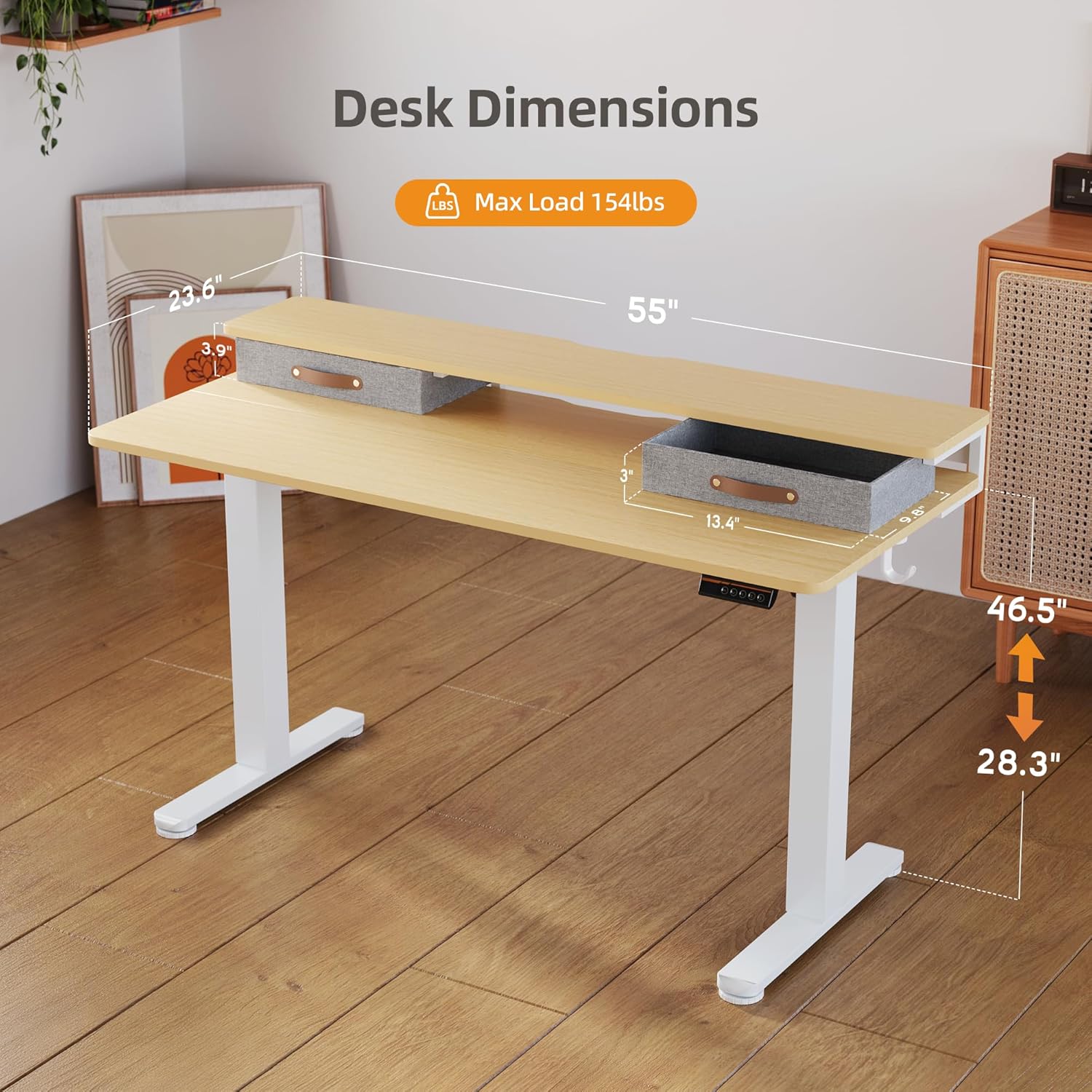
Figure 7.1: Key dimensions and weight capacity of the standing desk.
| Feature | Specification |
|---|---|
| Brand | Seang |
| Model | 55inch |
| Product Dimensions (D x W x H) | 24"D x 55"W x 28.3"H (Minimum Height) |
| Adjustable Height Range | 28.35" to 46.46" |
| Maximum Load Capacity | 154 lbs |
| Color | Natural |
| Top Material Type | Engineered Wood |
| Base Material | Alloy Steel |
| Number of Drawers | 2 (Fabric) |
| Number of Shelves | 1 (Monitor Shelf) |
| Included Components | Monitor Shelf, Cable Management System, 2 Drawers, 1 Storage Cubicle |
| Assembly Required | Yes (All assembly tools included) |
8. Warranty and Support
Warranty Information:
This product comes with a Limited Warranty. Please refer to the warranty card included in your package for specific terms and conditions, including coverage duration and what is covered.
Customer Support:
For any questions, assistance with assembly, troubleshooting, or warranty claims, please contact Seang customer support through the retailer's platform or the contact information provided in your product packaging.
Please have your model number (55inch) and purchase date ready when contacting support.