
X8 Ultra Max Y&H
Hry Fine X8 Ultra Max Smart Watch User Manual
Model: X8 Ultra Max Y&H | Brand: Generic
Introduction
Welcome to the user manual for your Hry Fine X8 Ultra Max Smart Watch. This device combines a stunning gold appearance with advanced features to enhance your daily life. It comes equipped with three versatile straps in black, gold, and orange, allowing you to customize its look for any occasion. The X8 Ultra Max offers a long-lasting battery, smart notification technology, and comprehensive physical activity tracking, including step and heart rate monitoring, and sleep tracking.
This manual will guide you through the setup, operation, and maintenance of your new smartwatch, ensuring you get the most out of its capabilities.

Image: The Hry Fine X8 Ultra Max Smart Watch in its elegant gold finish, accompanied by its interchangeable black and orange straps, showcasing its versatile design.
1. Setup Guide
1.1 Package Contents
Before you begin, please ensure all items are present in your package:
- Hry Fine X8 Ultra Max Smart Watch (Gold Edition)
- Gold Metal Strap (pre-attached or separate)
- Black Silicone Strap
- Orange Silicone Strap
- Wireless Charging Cable
- User Manual (this document)

Image: A clear view of the Hry Fine X8 Ultra Max Smart Watch packaging, displaying the gold watch, the black and orange interchangeable straps, and the wireless charging cable neatly arranged.
1.2 Charging the Smart Watch
For optimal performance, fully charge your smartwatch before first use.
- Connect the wireless charging cable to a USB power adapter (not included).
- Place the back of the smartwatch onto the charging pad. The watch will magnetically align.
- The charging indicator will appear on the watch screen. Allow approximately 2-3 hours for a full charge.
1.3 Installing the Hry Fine Application
To unlock all features of your smartwatch, download and install the Hry Fine application on your smartphone.
- Scan the QR code provided in the watch's quick start guide or on the watch screen (if available) to download the app.
- Alternatively, search for "Hry Fine" in your smartphone's app store (Google Play Store for Android, Apple App Store for iOS).
- Install the application and grant necessary permissions when prompted.
1.4 Pairing with Your Smartphone
Follow these steps to pair your smartwatch with the Hry Fine app:
- Ensure Bluetooth is enabled on your smartphone.
- Open the Hry Fine application.
- Navigate to the "Device" or "My Watch" section within the app.
- Tap "Add Device" or "Scan for Device".
- Select "X8 Ultra Max" from the list of found devices.
- Confirm the pairing request on both your smartphone and the smartwatch.
- Once paired, the app will synchronize data with your watch.
2. Operating Instructions
2.1 Basic Navigation
The X8 Ultra Max features a 2-inch HD touchscreen display and a side crown for navigation.
- Swipe Up/Down: Scroll through menus and notifications.
- Swipe Left/Right: Access quick functions or different watch faces.
- Tap: Select an item or open an application.
- Press Side Button/Crown: Return to the home screen, or long-press for power options.
2.2 Making and Receiving Calls
With Bluetooth connectivity, you can effortlessly manage calls directly from your wrist.
- To Make a Call: Access the dialer or contacts list on your watch and select the desired contact.
- To Receive a Call: When a call comes in, you can answer or reject it directly from the watch screen.
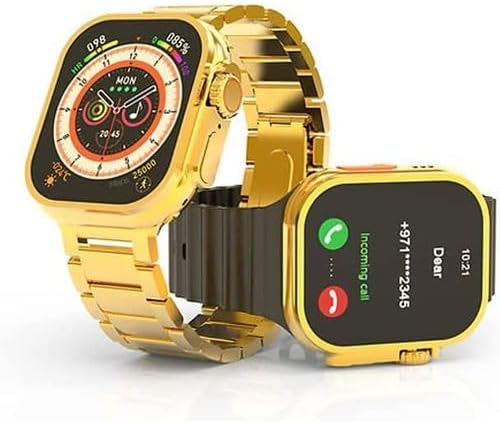
Image: The Hry Fine X8 Ultra Max Smart Watch showing an incoming call notification on its screen, demonstrating its call management feature.
2.3 Smart Notifications
Receive notifications for calls, messages, and app alerts directly on your watch.
- Ensure notification permissions are enabled for the Hry Fine app on your smartphone.
- Customize which app notifications you receive through the Hry Fine app settings.
2.4 Activity Tracking
The X8 Ultra Max tracks various fitness metrics to help you stay active and healthy.
- Step Counter: Monitors your daily steps.
- Heart Rate Monitor: Provides real-time heart rate data.
- Sleep Tracking: Analyzes your sleep patterns.
- Sports Modes: Dedicated modes for activities like running, cycling, and more, providing specific data for each.
View detailed activity reports within the Hry Fine application on your smartphone.
3. Maintenance
3.1 Cleaning and Care
To keep your smartwatch in excellent condition, follow these cleaning and care tips:
- Wipe the watch screen and body with a soft, lint-free cloth.
- For stubborn smudges, slightly dampen the cloth with water. Avoid harsh chemicals.
- Clean the straps regularly, especially silicone ones, with mild soap and water, then dry thoroughly.
- Avoid exposing the watch to extreme temperatures or direct sunlight for prolonged periods.
3.2 Battery Tips
Maximize your battery life with these recommendations:
- Charge the watch fully before it completely drains.
- Avoid overcharging for extended periods.
- Reduce screen brightness and turn off unnecessary notifications to conserve power.
3.3 Changing Straps
The X8 Ultra Max allows for easy strap interchangeability to match your style.
- Locate the quick-release pins on the underside of the strap where it connects to the watch body.
- Gently pull the pin inwards to release the strap.
- Align the new strap with the watch lugs and insert one end of the pin into the corresponding hole.
- Pull the quick-release pin inwards, align the other end with the second hole, and release the pin to secure the strap.
- Ensure the strap is securely attached before wearing.

Image: A hand holding the Hry Fine X8 Ultra Max Smart Watch, illustrating the process of changing or attaching a watch strap, highlighting the ease of customization.
4. Troubleshooting
| Problem | Possible Cause | Solution |
|---|---|---|
| Watch does not turn on. | Low battery. | Charge the watch for at least 30 minutes. |
| Cannot pair with smartphone. | Bluetooth is off; app not running; watch not discoverable. | Ensure Bluetooth is on. Restart the Hry Fine app. Restart both watch and phone. Try pairing again. |
| Notifications not received. | App permissions not granted; notifications disabled in app. | Check app notification permissions in phone settings. Enable notifications for specific apps within the Hry Fine app. |
| Inaccurate activity tracking. | Watch not worn correctly; software glitch. | Ensure the watch is snug on your wrist. Restart the watch. Update the app and watch firmware if available. |
| Short battery life. | High screen brightness; frequent use of power-intensive features. | Reduce screen brightness. Limit continuous heart rate monitoring. Turn off always-on display if not needed. |
5. Technical Specifications
| Feature | Detail |
|---|---|
| Model Name | X8 Ultra Max |
| Item Model Number | X8 Ultra Max Y&H |
| Brand Name | Generic |
| Color | Gold |
| Screen Size | 2 inches (HD Display) |
| Connectivity Technology | Bluetooth |
| Wireless Communication Standard | Bluetooth |
| Battery Cell Composition | Lithium Polymer |
| GPS | Without GPS |
| Special Features | Alarm, Always-on display, Notifications, Phone calls, Wireless charging |
| Package Dimensions | 21.8 x 13.6 x 2.7 cm |
| Item Weight | 10 grams |
| Batteries | 1 P76 battery required (Included) |
| First Available Date | November 28, 2024 |
6. Warranty and Support
For warranty information and customer support, please refer to the documentation provided with your purchase or contact the retailer where you purchased the Hry Fine X8 Ultra Max Smart Watch.
Typically, warranty details are included on a separate card or within the product packaging. Keep your proof of purchase for any warranty claims.
For technical assistance or further inquiries, please reach out to the manufacturer's support channels if available, or the customer service of your point of purchase.
Related Documents - X8 Ultra Max Y&H
 |
Руководство пользователя ноутбуков Thunderobot Серия Zero Данное руководство пользователя содержит подробную информацию о ноутбуках Thunderobot Серия Zero, включая настройку, функции, меры предосторожности и устранение неполадок. Оно охватывает модели под управлением Microsoft Windows 11. |
 |
Руководство пользователя ноутбука Thunderobot серии Zero: Начало работы, безопасность и Windows 11 Полное руководство пользователя для ноутбуков Thunderobot серии Zero. Включает инструкции по настройке, меры предосторожности, информацию о Windows 11 и советы по безопасному использованию. |
 |
DOOGEE Tab G6 FCC RF Test Report - Bluetooth Compliance Comprehensive FCC RF test report for the DOOGEE Tab G6 tablet, detailing Bluetooth compliance testing according to FCC CFR Title 47 Part 15C. Includes conducted and radiated emission measurements, test setup, procedures, and results. |
 |
SCHMETZ ABC Pocket Guide: Home Sewing Machine Needles Discover the SCHMETZ ABC Pocket Guide for Home Sewing Machine Needles. This comprehensive guide details needle types, anatomy, color coding, and fabric suggestions for optimal sewing results. Learn about the 130/705 H system and find the perfect needle for your project. |
 |
GE Ballast Products Catalog: UltraMax™ Electronic Ballasts Explore the GE Ballast Products Catalog featuring UltraMax™ Electronic Ballasts. Discover advanced lighting solutions, energy efficiency, and technical specifications for various fluorescent and High Intensity Discharge (HID) applications. |
 |
Ninebot Gokart Pro & Ninebot S-Max User Manual Comprehensive user manual for the Ninebot Gokart Pro and Ninebot S-Max, covering setup, safety, operation, specifications, and maintenance for these electric ride-on vehicles. |
Ask a question about this manual
Ask about setup, troubleshooting, compatibility, parts, safety, or missing instructions. Manuals+ will review the question and use this page’s manual context to help answer it.