
Cleyver CL660+ ODHW10
Cleyver CL660+ Cordless Phone and ODHW10 Wireless Headset User Manual
Model: CL660+ & ODHW10 | Brand: Cleyver
Product Overview
The Cleyver CL660+ Cordless Phone and ODHW10 Wireless Headset combine to offer a comprehensive communication solution designed for professional use. This system provides exceptional comfort, superior sound quality, and extended wireless range, ensuring seamless and flexible communication.
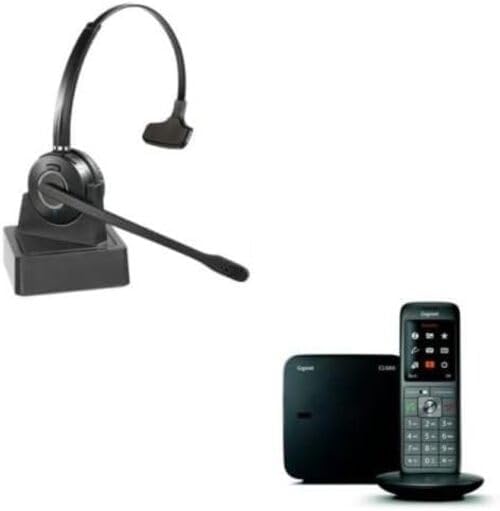
Image: The Cleyver CL660+ cordless phone and the ODHW10 wireless headset, showcasing the complete communication system.
What's in the Box
- Gigaset CL660 Cordless Phone
- Cleyver HW10 Wireless Headset
- Charging Base
Setup Guide
The headset and cordless phone are designed for easy, out-of-the-box setup without complex configuration. Follow these steps to connect your devices.
Connecting the Gigaset CL660 Phone
There are two primary connection variants for the Gigaset CL660 cordless phone.

Image: Diagrams illustrating two connection methods for the Gigaset CL660 phone, showing power and telephone line connections. Variant 1 shows direct connection to wall outlets, while Variant 2 shows connection via a router.
- Connect the power adapter: Plug the power adapter into the phone base and then into an electrical outlet.
- Connect the telephone line:
- Variant 1 (Direct Connection): Plug the telephone cable from the phone base directly into your telephone wall socket.
- Variant 2 (Via Router): If using a router, plug the telephone cable from the phone base into the designated telephone port on your router. (Note: A router is not included).
- Route cables: Carefully insert the cables into the cable guides on the phone base to keep them tidy.
Pairing the Cleyver HW10 Headset with CL660+ Phone
The Cleyver HW10 headset and Gigaset CL660 phone are compatible and designed to work together. For detailed pairing instructions, please refer to the official pairing guide: Cleyver HW10 & Gigaset CL660 Pairing Guide (PDF).
Operating Instructions
Using the Gigaset CL660 Phone

Image: The Gigaset CL660 cordless phone, showing its display and keypad, ready for use.
- Superior Sound Quality: The CL660 handset features a high-performance speaker (HSP) for excellent sound clarity during calls.
- Hands-Free Functionality: Activate speakerphone mode to enjoy hands-free conversations.
- Address Book: The phone can store up to 400 contacts in its address book.
- Customization: Adjust image and ringtone settings to personalize your phone.
Using the Cleyver HW10 Wireless Headset

Image: A woman wearing the Cleyver HW10 wireless headset while working at a computer, demonstrating its use in a professional setting.

Image: A man wearing the Cleyver HW10 wireless headset, illustrating its comfortable fit and professional application.
- Exceptional Comfort: The Cleyver HW10 wireless headset is extremely lightweight and comfortable, with an adjustable headband that does not press on the temples or ears.
- Extended Range: This wireless system allows you to move freely while staying connected, providing flexibility during calls.
- Noise Reduction: The headset features passive noise reduction for clearer communication.
Maintenance
To ensure the longevity and optimal performance of your Cleyver CL660+ phone and ODHW10 headset, follow these general maintenance guidelines:
- Cleaning: Use a soft, dry cloth to clean the surfaces of the phone and headset. Avoid using abrasive cleaners or solvents.
- Storage: Store the devices in a cool, dry place away from direct sunlight and extreme temperatures.
- Battery Care: For the cordless phone, ensure it is regularly placed on its charging base when not in use to maintain battery health.
Troubleshooting
If you encounter issues with your Cleyver CL660+ phone or ODHW10 headset, please refer to the following common solutions:
| Problem | Possible Cause | Solution |
|---|---|---|
| No dial tone or cannot make/receive calls. | Phone not properly connected to the telephone line or power. | Check all cable connections (power adapter, telephone line) to ensure they are securely plugged in. Refer to the "Setup Guide" section. |
| Headset not pairing with the phone. | Incorrect pairing procedure or compatibility issue. | Ensure you are following the correct pairing procedure. The Cleyver HW10 and Gigaset CL660 are designed to be compatible via DECT GAP technology, not Bluetooth. Refer to the official pairing guide: Cleyver HW10 & Gigaset CL660 Pairing Guide (PDF). |
| Poor sound quality (static, low volume). | Interference, low battery, or incorrect volume settings. | Ensure the phone and headset are within range of the base. Charge the phone handset and headset. Adjust volume settings on both devices. Minimize interference from other electronic devices. |
Specifications
| Brand | Cleyver |
| Model Name | CL660+ (Phone), HW10 (Headset) |
| Specific Uses for Product | Business |
| Compatible Devices | Landline Phone |
| Item Weight | 300 Grams |
| Frequency Range | 20 Hz - 20,000 Hz |
| Connectivity Technology | Wireless (DECT GAP for phone, Bluetooth for headset - note: headset connects to phone via DECT GAP, not directly via Bluetooth for calls) |
| Wireless Communication Technology | Bluetooth (for headset's general connectivity, but pairing with phone is DECT GAP) |
| Color | Black |
| Ear Placement | Over-Ear (Headset) |
| Form Factor | On-Ear (Headset) |
| Sound Isolation | Passive Noise Reduction |
| Material | Plastic |
| First Available Date | November 28, 2024 |
Note on Connectivity: While the headset itself may feature Bluetooth technology for general use, its primary connection to the Gigaset CL660+ phone for calls is via DECT GAP technology, ensuring seamless integration within this specific product bundle.
Warranty Information
The Cleyver CL660+ Cordless Phone and ODHW10 Wireless Headset come with a manufacturer's warranty.
- Manufacturer's Warranty: 2 years
- Spare Parts Availability: Information regarding spare parts availability is currently unavailable.
Support
For further assistance or inquiries, please refer to the following resources:
- Official Pairing Guide: Download PDF
- Cleyver Brand Store: Visit the official Cleyver store on Amazon for more products and information: Cleyver Store
Related documentsCL660+ ODHW10

Ask a question about this manual
Ask about setup, troubleshooting, compatibility, parts, safety, or missing instructions. Manuals+ will review the question and use this page’s manual context to help answer it.