
Introduction
This manual provides essential information for the safe and effective operation, maintenance, and troubleshooting of your CharonFit T300 Folding Incline Treadmill. Please read this manual thoroughly before initial use and retain it for future reference.
Safety Instructions
To prevent injury, always adhere to the following safety guidelines:
- Ensure the treadmill is placed on a flat, stable surface with adequate clearance around it.
- Keep children and pets away from the treadmill during operation.
- Wear appropriate athletic footwear and clothing.
- Do not operate the treadmill if it is damaged or malfunctioning.
- Always use the safety key. Attach it to your clothing before starting your workout.
- Consult a physician before starting any new exercise program.
- Maximum user weight capacity: 120 kg.
Product Overview
The CharonFit T300 is a folding incline treadmill designed for home use, featuring a robust alloy steel frame and a powerful yet quiet motor.

Image: The CharonFit T300 treadmill in an unfolded state with a user running, and a smaller image showing the treadmill in its folded, upright storage position.
Key Components:
- Console: Displays time, distance, speed, calories burned, heart rate, and steps. Includes 15 preset programs and 3 countdown modes.
- Running Belt: 7-layer safety deck with double sound insulation and shock-absorbing system for joint protection. Running surface dimensions: 103 cm (length) x 40 cm (width).
- Motor: 2.5 HP motor, operating quietly at less than 50 dB.
- Incline System: Manual 3-level incline adjustment.
- Safety Key: Magnetic safety key for emergency stops.
- Handlebars: Equipped with heart rate sensors and speed control buttons.
- Folding Mechanism: Hydraulic assist for easy folding and unfolding, with a "Kick-to-Reset" feature.

Image: A close-up view of the treadmill's control console, showing the digital display, various buttons for speed, mode, and start/stop, and integrated heart rate sensors on the handlebars.

Image: An exploded view diagram illustrating the multi-layer construction of the treadmill's running deck, highlighting its shock-absorbing and sound-insulating properties. Arrows indicate cushioning action.
Setup
- Unpacking: Carefully remove all components from the packaging. Retain packaging for potential future transport or returns.
- Placement: Choose a flat, stable surface for the treadmill. Ensure at least 0.6 meters (2 feet) of clear space on all sides and 2 meters (6.5 feet) at the rear for safety.
- Unfolding:
- Gently lower the running deck from its folded position until it locks into place. The "Kick-to-Reset" mechanism assists in this process.
- Ensure all locking pins or levers are securely engaged.
- Handlebar Assembly (if required): Some minor assembly may be needed for the handlebars. Refer to the included quick start guide for specific instructions.
- Power Connection: Plug the power cord into a grounded electrical outlet.
- Initial Check: Before first use, ensure all bolts and nuts are tightened and the running belt is centered and tensioned correctly.

Image: A visual comparison of the treadmill in its unfolded state, showing its operational dimensions (130cm length, 63cm width), and in its folded state, highlighting its compact storage footprint (less than 1 square meter) and the "Just kick it to reset" folding mechanism.
Operating Instructions
Starting a Workout:
- Power On: Plug in the treadmill and press the power button on the console.
- Attach Safety Key: Clip the safety key to your clothing. The treadmill will not operate without it.
- Start: Press the "Start" button. The belt will begin moving at a low speed.
- Adjust Speed: Use the speed control buttons on the console or handlebars to increase or decrease speed.
- Walking: 1-5 km/h
- Jogging: 5-8 km/h
- Running: 8-12 km/h
- Adjust Incline: Manually adjust the incline to one of the 3 available levels to increase workout intensity. This typically involves adjusting pins or levers at the rear of the treadmill base.
- Monitor Progress: The console displays real-time data including time, distance, speed, calories burned, heart rate (via handlebar sensors), and steps.

Image: A triptych showing three individuals exercising on treadmills, illustrating different speed ranges: 1-5 km/h for walking, 5-8 km/h for jogging, and 8-12 km/h for running.
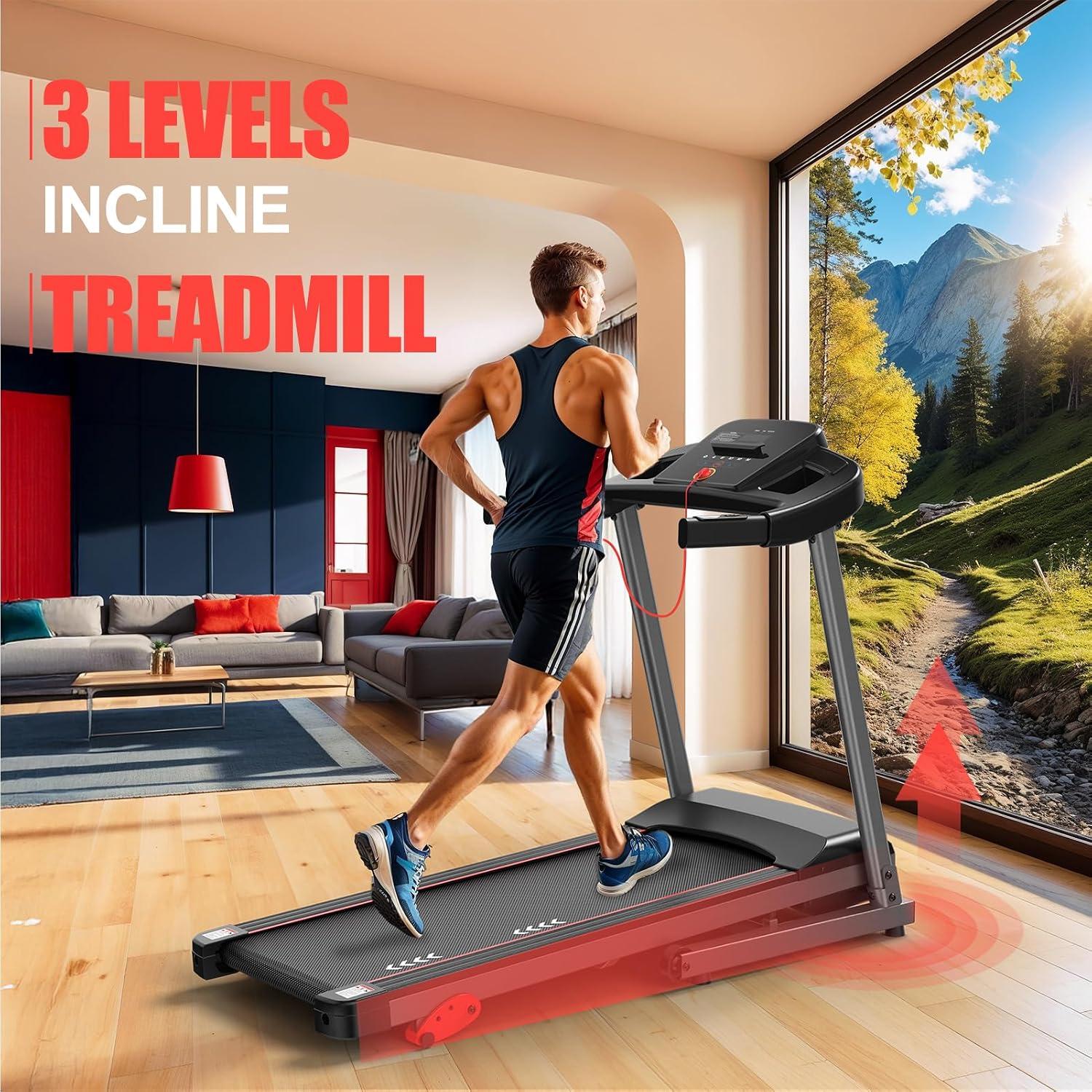
Image: A man running on the treadmill, with red arrows indicating the adjustable incline feature, simulating uphill running.
Using Programs and Modes:
- Preset Programs: The treadmill offers 15 pre-programmed workouts. Select a program using the "Program" button on the console. Each program varies speed and intensity over time.
- Countdown Modes: Choose from 3 countdown modes (time, distance, or calories) to set specific workout goals. The treadmill will count down from your set target.

Image: A couple celebrating their fitness achievements next to the CharonFit T300 treadmill, with graphic overlays indicating "15 Preset Programs" and "3 Countdown Mode" options.
Bluetooth Connectivity:
Connect your smartphone or tablet via Bluetooth to compatible fitness applications like KINOMAP and FITSHOW for an interactive workout experience.
- Enable Bluetooth on your device.
- Open the desired fitness application (e.g., KINOMAP, FITSHOW).
- Follow the app's instructions to pair with your CharonFit T300 treadmill.

Image: A woman running on the treadmill in a scenic virtual environment, with logos for KINOMAP and FITSHOW apps, and a smartphone screen displaying a fitness app interface, demonstrating Bluetooth connectivity.
Stopping a Workout:
- Press the "Stop" button on the console. The belt will gradually slow down and stop.
- Alternatively, pull the safety key to immediately stop the treadmill in an emergency.
Maintenance
Regular maintenance ensures the longevity and optimal performance of your treadmill.
- Cleaning: Wipe down the console and exterior surfaces with a damp cloth after each use. Do not use abrasive cleaners.
- Belt Lubrication: Lubricate the running belt every 3-6 months, or after approximately 100 hours of use, using silicone lubricant. Lift the belt and apply lubricant evenly to the deck.
- Belt Tension and Alignment: Periodically check the running belt for proper tension and alignment. If the belt slips or drifts to one side, adjust it according to the instructions in the full user manual (usually involving adjusting bolts at the rear of the treadmill).
- Motor Cover: Keep the motor cover free from dust and debris to ensure proper ventilation.
Troubleshooting
| Problem | Possible Cause | Solution |
|---|---|---|
| Treadmill does not start. | Power cord not plugged in; Safety key not in place; Power switch off. | Ensure power cord is securely plugged in; Insert safety key; Turn on power switch. |
| Running belt slips. | Belt tension too loose. | Adjust belt tension (refer to full manual for detailed steps). |
| Belt drifts to one side. | Belt alignment incorrect. | Adjust belt alignment (refer to full manual for detailed steps). |
| Unusual noise during operation. | Loose components; Lack of lubrication; Motor issue. | Check for and tighten any loose parts; Lubricate the running belt; If noise persists, contact customer support. |
| Console display not working. | Loose cable connection; Console malfunction. | Check all cable connections to the console; If problem persists, contact customer support. |
For more detailed troubleshooting, please refer to the comprehensive user manual included with your product or contact CharonFit customer support.
Specifications
- Model: T300
- Brand: CharonFit
- Motor Power: 2.5 HP
- Speed Range: 1 - 12 km/h
- Incline Options: 3 manual levels
- Running Surface: 103 cm (L) x 40 cm (W)
- Max User Weight: 120 kg
- Noise Level: < 50 dB
- Unfolded Dimensions (L x W x H): 139 cm x 70 cm x 24.5 cm
- Folded Footprint: < 1 m²
- Net Weight: 31 kg
- Frame Material: Alloy Steel
- Display Type: LED
- Programs: 15 preset programs, 3 countdown modes
- Connectivity: Bluetooth (compatible with KINOMAP, FITSHOW)
- Special Features: Manual incline, heart rate monitor, bottle holder, foldable design.

Image: An illustration highlighting the 2.5 HP motor and key specifications of the treadmill, including speed range (1-12 km/h), low noise (<50 dB), net weight (31 kg), and load bearing capacity (120 kg).
Warranty and Support
Your CharonFit T300 Treadmill comes with a 2-year warranty. CharonFit also provides lifetime customer support to assist you with any issues or questions.
How to Get Support:
- Via Email: Find the support email address on the back cover of your User Manual. Expect a reply within 24 hours.
- Via Telephone: The support phone number is also available on the back cover of the User Manual (during limited working hours).
- Via Amazon: Log in to your Amazon account, find your order number, and click "Contact Seller." Expect a reply within 24 hours.

Image: A smiling customer support representative wearing a headset, symbolizing available assistance.