
Cleyver AS690 / ODHW10
Cleyver AS690 DECT Cordless Phone and ODHW10 Mono Headset User Manual
Your comprehensive guide to setting up, operating, and maintaining your Cleyver communication system.
1. Product Overview
This package provides a complete teleworking solution, combining the Cleyver AS690 DECT Cordless Phone with the Cleyver ODHW10 Mono Headset. Designed for hands-free communication, this system offers flexibility and clear audio for your daily calls.

Image: The Cleyver AS690 DECT Cordless Phone and the Cleyver ODHW10 Mono Headset, shown together as a complete communication system.
The AS690 cordless phone features a large backlit display and a user-friendly keypad, ensuring excellent audio quality. The ODHW10 mono headset is lightweight and adjustable, providing optimal comfort for extended calls.

Image: A man wearing the Cleyver ODHW10 Mono Headset while working at a computer, demonstrating its use in a professional setting.
Enjoy freedom of movement with a range of up to 300 meters outdoors and 50 meters indoors. Practical features include a 200-contact directory, caller ID, hands-free mode, and automatic redial function.
2. What's in the Box
Please ensure all the following components are present in your package:
- Gigaset AS690 DECT Phone Handset
- Cleyver ODHW10 Headset
- Base Station for DECT Phone
- Charging Cradle for Headset
- Power Adapters for Phone Base and Headset Cradle
- Telephone Connection Cable
- AAA Batteries (for DECT Phone Handset)
3. Setup
3.1. DECT Phone Setup
- Connect the Base Station: Plug the power adapter into the DECT phone base station and then into a power outlet. Connect the telephone cable from the base station to your telephone wall socket.
- Install Batteries: Open the battery compartment on the back of the DECT phone handset. Insert the provided AAA batteries, ensuring correct polarity. Close the compartment.
- Charge the Handset: Place the handset on the base station or charging cradle. The display will indicate charging. Allow the handset to charge for at least 6-8 hours before first use to ensure optimal battery life.

Image: The Cleyver AS690 DECT Cordless Phone handset placed on its charging base.
3.2. Headset Setup
- Charge the Headset: Place the Cleyver ODHW10 headset on its charging cradle. Connect the cradle's power adapter to a power outlet. The indicator light on the headset or cradle will show charging status.
- Pairing the Headset with the DECT Phone: The product is designed for compatibility. For detailed pairing instructions, please refer to the official pairing guide available at: Cleyver Pairing Guide (PDF). Follow the steps carefully to ensure proper connection between your phone and headset.

Image: The Cleyver ODHW10 Mono Headset on its charging base.
4. Operating Instructions
4.1. Making and Receiving Calls
- Making a Call: Dial the number using the keypad and press the green call button.
- Receiving a Call: When the phone rings, press the green call button to answer.
- Ending a Call: Press the red end call button or place the handset back on the base/cradle.
4.2. Using the Headset
Once paired, you can use the headset for hands-free communication:
- Answering/Ending Calls with Headset: Depending on the headset model and phone settings, you may be able to answer/end calls directly from the headset button. Refer to the headset's specific instructions for details.
- Switching to Headset: During a call on the handset, you can typically switch to the headset by pressing a dedicated button on the phone or headset.
- Adjusting Headset Volume: Use the volume controls on the headset or the phone handset to adjust call volume.

Image: The Cleyver ODHW10 Mono Headset resting on a desk, ready for use.
4.3. Key Features
- Phonebook: Store up to 200 contacts in the phone's directory.
- Caller ID: View incoming caller information (requires network service).
- Hands-free Mode: Activate speakerphone function on the handset for group listening.
- Automatic Redial: Quickly redial the last number called.
- Call Blocking: Block up to 32 unwanted numbers.
- Volume Control: Adjust handset volume with 5 levels.
- Range: Up to 300 meters outdoors and 50 meters indoors, providing significant mobility.
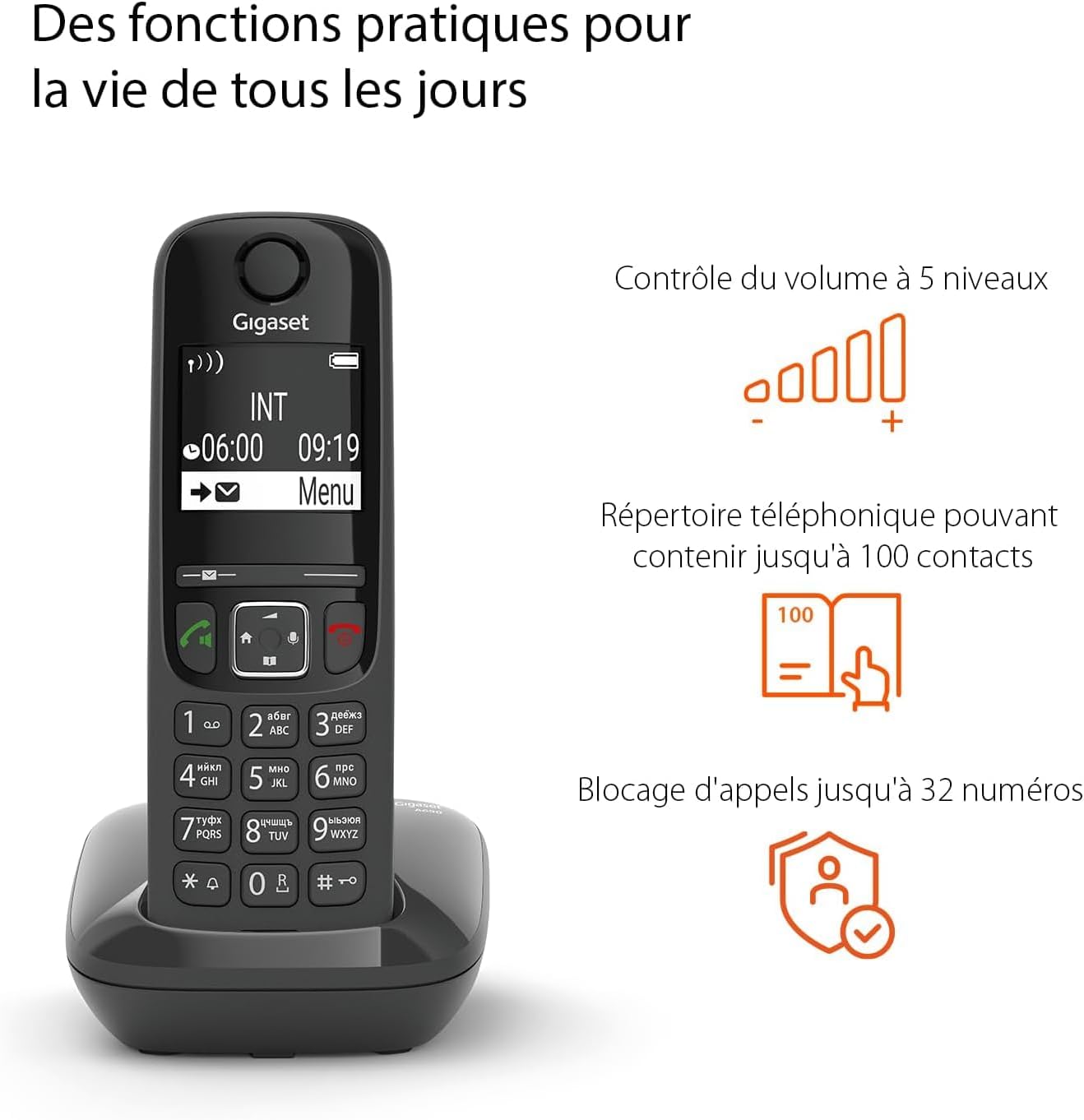
Image: The Cleyver AS690 DECT Phone displaying its screen and keypad, with visual icons illustrating features like volume control, phonebook, and call blocking.
5. Maintenance
- Cleaning: Use a soft, dry cloth to clean the phone and headset. Do not use liquid cleaners or aerosols.
- Battery Care: For optimal battery life, fully charge the handset and headset regularly. Avoid extreme temperatures. If the phone will not be used for an extended period, remove the batteries.
- Storage: Store the devices in a cool, dry place away from direct sunlight and moisture.
6. Troubleshooting
| Problem | Possible Cause | Solution |
|---|---|---|
| No dial tone on phone. | Phone not connected to line; power issue; batteries low. | Check telephone line connection. Ensure base station is powered. Recharge handset batteries. |
| Poor audio quality (static, low volume). | Out of range; interference; low battery. | Move closer to the base station. Avoid placing near other electronic devices. Recharge batteries. Adjust volume. |
| Headset not connecting to phone. | Not paired correctly; headset battery low. | Ensure headset is charged. Re-attempt the pairing process as described in Section 3.2 and the Cleyver Pairing Guide. |
| Phone display is blank. | Handset battery is completely drained. | Place the handset on the charging base and allow it to charge for several minutes before attempting to power on. |
7. Specifications
| Feature | Detail |
|---|---|
| Brand | Cleyver |
| Model | AS690 (Phone), ODHW10 (Headset) |
| Color | Black |
| Compatible Devices | Fixed Telephone |
| Material | Plastic |
| Power Source | Rechargeable Battery |
| Item Weight | 450 Grams |
| Dimensions (L x W x H) | 15 x 20 centimeters (approximate) |
| Phonebook Capacity | Up to 200 contacts |
| Call Blocking Capacity | Up to 32 numbers |
| Indoor Range | Up to 50 meters |
| Outdoor Range | Up to 300 meters |
| Battery Type (Phone) | AAA batteries required |
| ECO DECT Technology | Yes, for reduced energy consumption |

Image: The Cleyver AS690 DECT Phone highlighting its ECO DECT technology for energy efficiency.
8. Warranty and Support
Your Cleyver AS690 DECT Cordless Phone and ODHW10 Mono Headset come with a 2-year manufacturer's warranty.
For technical support, warranty claims, or further assistance, please contact Cleyver customer service through their official website or the retailer where you purchased the product. Keep your proof of purchase for warranty purposes.
For additional resources and product information, you may visit the Cleyver brand store on Amazon: Cleyver Amazon Store.
Related documentsAS690 / ODHW10

Ask a question about this manual
Ask about setup, troubleshooting, compatibility, parts, safety, or missing instructions. Manuals+ will review the question and use this page’s manual context to help answer it.