
Introduction
This user manual provides comprehensive instructions for the installation, operation, and maintenance of your Hoover H-WASH 500 top-load washing machine, model THOS476TM5-S. To ensure safe and efficient use, please read this manual carefully before operating the appliance and retain it for future reference.
Safety Information
Always follow basic safety precautions when using electrical appliances to reduce the risk of fire, electric shock, or injury to persons. This appliance is intended for household use only.
- Ensure the appliance is properly grounded.
- Do not allow children to play with or operate the washing machine.
- Keep flammable materials away from the appliance.
- Do not touch the appliance with wet hands.
- Unplug the appliance before cleaning or performing any maintenance.
- Do not force the door open during operation.
Setup and Installation
1. Unpacking
Carefully remove all packaging materials. Inspect the washing machine for any damage during transit. Report any damage immediately to your retailer.
2. Positioning
Place the washing machine on a firm, level surface. Ensure there is adequate space around the appliance for ventilation and access. The dimensions are approximately 41 cm (D) x 60 cm (W) x 85 cm (H).

Figure 1: Front-side view of the Hoover H-WASH 500 washing machine.
3. Leveling
Adjust the adjustable feet at the bottom of the washing machine to ensure it is perfectly level. A level appliance reduces vibration and noise during operation.
4. Water Connection
Connect the water inlet hose to a cold water tap with a 3/4 inch thread. Ensure all connections are tight to prevent leaks. Do not use old hoses; always use the new hoses supplied with the appliance.
5. Drainage
Position the drain hose correctly into a standpipe or over the edge of a sink, ensuring it is securely fastened to prevent displacement during the wash cycle. The drain hose should not be kinked or submerged in water.
6. Electrical Connection
Plug the power cord into a grounded electrical outlet (220 Volts). Ensure the electrical supply matches the requirements specified on the appliance's rating plate. Do not use extension cords or adapters.
7. Initial Use
Before the first wash with laundry, run a short cycle (e.g., 'Drum Clean' or a quick wash) without any clothes or detergent to clean the drum and internal components.
Operating Instructions
1. Control Panel Overview
The washing machine features an intuitive display with scrolling text and touch controls for easy program selection and function activation.

Figure 2: Top-side view highlighting the control panel and program selector.
2. Loading Laundry
Open the top lid and the drum door. Load laundry into the drum, ensuring not to exceed the maximum capacity of 7 kg. For optimal results, avoid overloading and sort laundry by fabric type and color.

Figure 3: Top lid and drum open, ready for loading laundry.

Figure 4: View of the open drum and the detergent dispenser compartment.
3. Detergent Dispenser
Add the appropriate amount of detergent and fabric softener to the designated compartments in the dispenser. Refer to your detergent packaging for recommended dosages.
4. Selecting a Program
Turn the program selector dial or use the touch controls to choose your desired wash program. The H-WASH 500 offers 17 standard cycles. The AI Weight Sense feature automatically adjusts optimal wash parameters based on the load size, ensuring efficient water usage.
5. hOn App Connectivity
Connect your washing machine to the hOn App for access to over 60 specialized cycles, energy efficiency monitoring, self-maintenance planning, and remote control of wash status.
6. Starting a Cycle
Press the 'Start/Pause' button to begin the selected wash cycle. The display will show the remaining time and current cycle status.
7. Special Functions
- Delayed Start: Postpone the start of the wash cycle for up to 24 hours.
- Child Lock: Prevents accidental changes to settings during operation.
- Reload Function: Allows you to add forgotten items after the cycle has started, provided the water level and temperature are safe.
- Steam Care Pro: Removes odors and softens fibers using steam.
- Allergy Care Pro: Deeply sanitizes garments by combining steam action with a powerful rinse.
8. Ending a Cycle
Once the cycle is complete, the machine will signal with an audible alert or a message on the display. Open the lid and remove your laundry promptly to prevent wrinkles.
Programs and Cycles
The Hoover H-WASH 500 offers a variety of programs tailored for different fabric types and washing needs. Consult the program guide in the full manual for detailed information on each of the 17 standard cycles.
- Active Wash: Designed for smaller loads, optimizing energy and water without compromising cleaning performance.
- Night & Day: An extremely quiet cycle, ideal for washing during off-peak hours.
- Drum Clean: A specialized program to eliminate dirt, odors, and bacteria from the washing machine drum.
- Care Cycles: Programs designed to preserve fibers and maintain garments in perfect condition for longer.
Maintenance
1. Cleaning the Exterior
Wipe the exterior surfaces with a soft, damp cloth. Do not use abrasive cleaners or solvents.
2. Cleaning the Detergent Dispenser
Regularly remove and clean the detergent dispenser drawer under running water to prevent residue buildup.
3. Cleaning the Filter
Periodically check and clean the drain pump filter, usually located at the bottom front of the machine. This helps prevent blockages and ensures efficient drainage.
4. Drum Cleaning
Use the dedicated 'Drum Clean' program regularly to maintain hygiene and prevent odors inside the drum.
5. Winter Storage
If the machine is to be stored in an unheated area, drain all water from the hoses and pump to prevent freezing and damage.
Troubleshooting
If you encounter issues with your washing machine, refer to the following common problems and solutions before contacting service.
- Machine does not start: Check if the power cord is plugged in, the door is closed properly, and a program is selected.
- No water filling: Ensure the water tap is open and the water inlet hose is not kinked.
- Water not draining: Check the drain hose for kinks or blockages, and clean the drain pump filter.
- Excessive vibration/noise: Ensure the machine is level and the transit bolts (if any) have been removed. Check for unbalanced load.
- Error codes on display: Consult the full user manual for specific error code meanings and solutions.
Specifications
Technical data for the Hoover H-WASH 500 washing machine, model THOS476TM5-S.
| Feature | Value |
|---|---|
| Brand | Hoover |
| Model Name | THOS476TM5-S |
| Capacity | 7 Kilograms |
| Maximum Spin Speed | 1400 Revolutions per minute |
| Energy Class | A |
| Dimensions (DxWxH) | 41P x 60l x 85H cm |
| Weight | 58 Kilograms |
| Noise Level (Spin) | 79 Decibels |
| Control Type | Touch |
| Number of Programs | 17 |
| Voltage | 220 Volts |
| Material (Drum) | Stainless Steel |
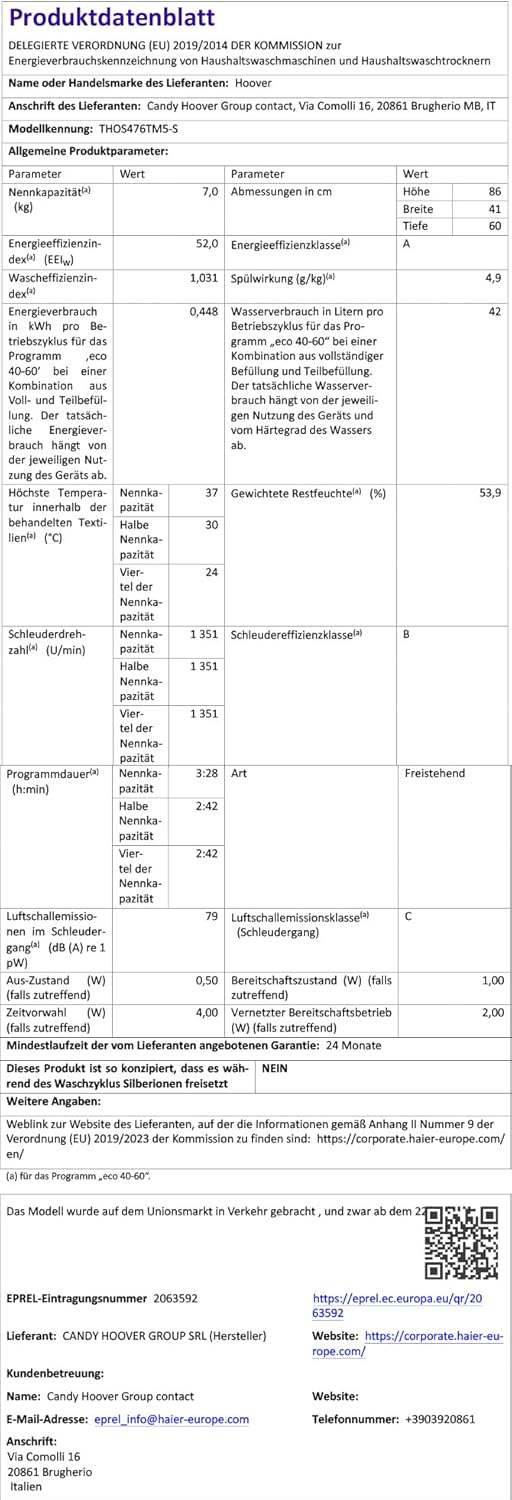
Figure 5: Energy Label for Hoover H-WASH 500. For more details, visit EPREL Database.

Figure 6: Product Data Sheet for Hoover H-WASH 500. For more details, visit EPREL Database.
Warranty and Support
This Hoover H-WASH 500 washing machine comes with a 2-year warranty from the date of purchase. Please retain your proof of purchase for warranty claims.
For technical assistance, troubleshooting beyond this manual, or warranty service, please contact Hoover customer support. Contact information can typically be found on the Hoover official website or in the documentation included with your appliance.