
Introduction
This manual provides detailed instructions for the proper use and care of your LILUOKE LK90series Men's Dual Display Quartz Watch. Please read this manual thoroughly before using your watch to ensure optimal performance and longevity.

Figure 1: LILUOKE LK90series Men's Dual Display Quartz Watch, front view.
Watch Components and Functions

Figure 2: Watch components and button functions.
- Minute Hand: Analog display minute indicator.
- Second Time Zone: Analog display for a second time zone.
- Adjust the Time: Crown/button for setting analog time.
- Light: Button to activate backlight for digital display.
- Mode: Button to cycle through digital display modes (Time, Alarm, Timer, Stopwatch).
- Start: Button for starting/stopping functions like stopwatch or timer.
- Reset: Button for resetting functions like stopwatch or timer.
- Calendar: Digital display shows date (Month-Day).
- Prime Meridian: Digital display shows current time (Hour:Minute:Second).
- Dual Time: Digital display for a second time zone (T2).
- Alarm: Indicator for alarm status.
Setup and Initial Configuration
Setting Analog Time
- Pull out the crown located on the right side of the watch case (refer to "Adjust the Time" in Figure 2).
- Rotate the crown to set the hour and minute hands to the desired time.
- Push the crown back in to secure the time setting.
Setting Digital Time and Date
- Press the "Mode" button (refer to Figure 2) repeatedly until the digital display shows the time setting mode (usually indicated by flashing digits).
- Use the "Start" and "Reset" buttons to adjust the hours, minutes, and seconds. The "Mode" button typically cycles between the adjustable fields.
- Once the time is set, press the "Mode" button to proceed to date setting (Year, Month, Day).
- Adjust the date using the "Start" and "Reset" buttons.
- Press the "Mode" button again to exit the setting mode.
Setting Dual Time Zone (T2)
- Press the "Mode" button until the digital display shows "DUAL TIME" or "T2" with flashing digits.
- Use the "Start" and "Reset" buttons to set the desired second time zone.
- Press the "Mode" button to confirm and exit.
Operating Instructions
Using the Backlight
Press the "Light" button (refer to Figure 2) to illuminate the digital display for a few seconds, improving visibility in low-light conditions.
Alarm Function
- Press the "Mode" button until the digital display shows the alarm setting mode.
- Use the "Start" and "Reset" buttons to set the desired alarm time.
- Activate or deactivate the alarm using a specific button (often "Start" or "Reset" in alarm mode, or a dedicated alarm ON/OFF indicator).
- The alarm will sound at the set time. Press any button to stop the alarm.
Stopwatch Function
- Press the "Mode" button until the digital display shows the stopwatch mode (usually "00:00:00").
- Press the "Start" button to begin timing.
- Press the "Start" button again to pause timing.
- Press the "Reset" button to clear the stopwatch to zero.
Timer Function
- Press the "Mode" button until the digital display shows the timer mode.
- Use the "Start" and "Reset" buttons to set the countdown time.
- Press the "Start" button to begin the countdown.
- The watch will alert you when the timer reaches zero.
Maintenance and Care
Water Resistance

Figure 3: The watch is water resistant up to 30 meters.
Your LILUOKE LK90series watch is water resistant to 30 meters (3 ATM). This means it is suitable for daily use, splashes, rain, and brief immersion in water. It is not recommended for swimming, diving, or prolonged water activities. Do not operate buttons while the watch is wet or submerged.
General Care
- Clean the watch regularly with a soft, dry cloth. For stubborn dirt, a slightly damp cloth can be used, followed by drying.
- Avoid exposing the watch to extreme temperatures, direct sunlight for extended periods, or strong magnetic fields.
- Keep the watch away from chemicals, solvents, and detergents, as these can damage the case, strap, or internal components.
- Ensure the crown is always pushed in completely to maintain water resistance.
Battery Replacement
The watch uses 1 LR44 battery (included). When the digital display dims or the watch stops functioning, the battery may need replacement. It is recommended to have the battery replaced by a qualified watch technician to ensure proper sealing and water resistance.
Troubleshooting
- Watch not functioning: Check if the battery needs replacement. Ensure the crown is fully pushed in.
- Digital display dim or blank: Battery may be low or depleted. Replace the battery.
- Time is inaccurate: Re-set the time following the "Setting Analog Time" and "Setting Digital Time and Date" instructions.
- Water ingress: If water appears inside the watch, stop using it immediately and seek professional repair to prevent further damage.
Specifications
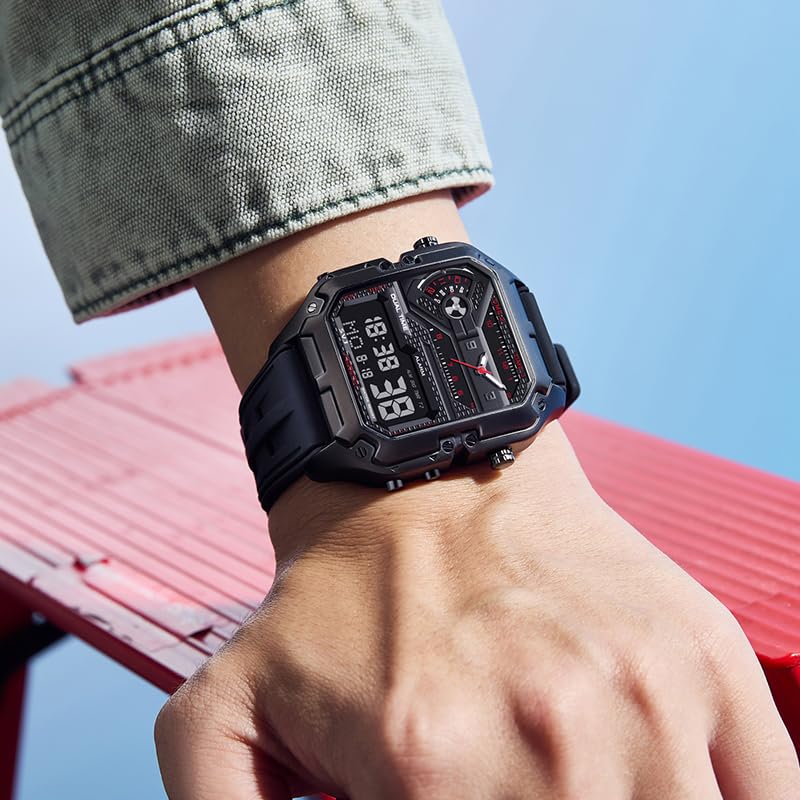
Figure 4: Key dimensions and parameters of the LILUOKE LK90series watch.
| Feature | Specification |
|---|---|
| Model Number | LK90series |
| Movement Type | Quartz |
| Case Diameter | 53 Millimetres |
| Case Thickness | 12 Millimetres |
| Band Material Type | Rubber |
| Band Colour | Black |
| Water Resistance | 30 Meters (3 ATM) |
| Item Weight | 600 g |
| Battery Type | 1 LR44 (included) |
Warranty and Support
Specific warranty information and customer support contact details are not provided within this manual. Please refer to the product packaging or the retailer's website for warranty terms and support options.