Introduction
Thank you for choosing the AOMIAO DV09 Smart Watch. This manual provides essential information for setting up, operating, and maintaining your device. The DV09 Smart Watch features a rotatable dial for easy navigation, Bluetooth calling, comprehensive health monitoring, and multiple sports modes, designed to enhance your daily life and fitness journey.

Image: The AOMIAO DV09 Smart Watch, highlighting its rotatable dial and sleek design.
What's in the Box
Upon opening your AOMIAO DV09 Smart Watch package, you should find the following items:
- AOMIAO DV09 Smart Watch (with pre-installed silicone strap)
- Magnetic Charging Cable
- Additional Leather Strap

Image: All components included in the AOMIAO DV09 Smart Watch package.
Setup Guide
1. Charging the Smart Watch
Before initial use, fully charge your DV09 Smart Watch. Connect the magnetic charging cable to the charging points on the back of the watch and plug the USB end into a power adapter (not included) or a computer's USB port. A full charge typically takes approximately 2.5 hours.

Image: The DV09 Smart Watch connected to its magnetic charging cable.
2. App Installation and Pairing
The AOMIAO DV09 Smart Watch uses the "Da Fit" application for full functionality and data synchronization. Follow these steps to install the app and pair your watch:
- Scan QR Code or Download App: Scan the QR code provided below with your smartphone's camera or visit http://plus.crrepa.com/app-download/dafit to download and install the "Da Fit" app.
- Enable Bluetooth: Ensure Bluetooth is enabled on your smartphone.
- Open Da Fit App: Launch the "Da Fit" application on your phone and follow the on-screen instructions to add a new device.
- Select DV09: From the list of available devices, select "DV09" to initiate the pairing process.

Image: Step-by-step visual guide for connecting the DV09 Smart Watch.

Image: QR Code for Da Fit App Download.
Operating Your Smart Watch
Basic Navigation
The DV09 Smart Watch combines a touch screen with a unique rotatable dial for intuitive control.
- Touch Screen: Swipe left, right, up, or down to navigate through menus and notifications. Tap to select items.
- Rotatable Dial: Rotate the dial to scroll through lists, switch watch faces, or adjust settings quickly.
- Side Button: Press the side button to return to the home screen or wake the watch.

Image: The rotatable dial and various dynamic watch faces of the DV09 Smart Watch.
Key Features and Functions
Bluetooth Calling & Message Alerts
Once paired with your smartphone, the DV09 allows you to answer, make, and hang up calls directly from your wrist. It also displays real-time notifications for messages, emails, and social media apps.

Image: Using the DV09 Smart Watch for calls and message notifications.
Health Monitoring (24/7)
The watch provides continuous monitoring of vital health metrics:
- Heart Rate: Tracks your heart rate throughout the day.
- Blood Oxygen (SpO2): Measures blood oxygen saturation levels.
- Sleep Monitoring: Analyzes sleep cycles and quality (deep sleep, light sleep, REM).
- Stress Monitoring: Provides real-time tracking of stress levels.
Note: This device is not a medical device. Health data is for reference only and should not be used for medical diagnosis.

Image: Health monitoring features of the DV09 Smart Watch.
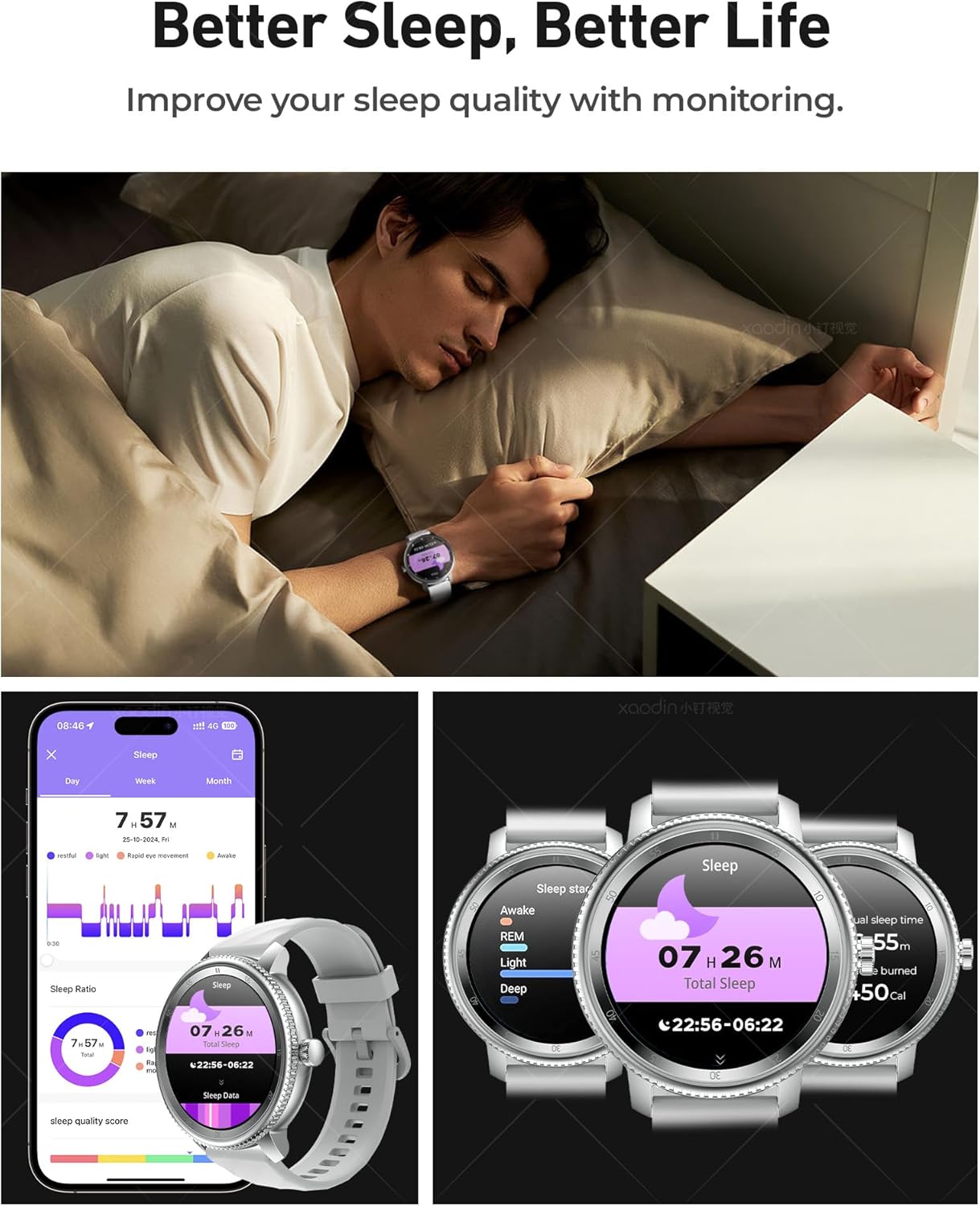
Image: Sleep monitoring interface and data on the DV09 Smart Watch.
Sports Modes & Activity Tracking
The DV09 Smart Watch supports over 123 sports modes, including running, cycling, hiking, and basketball. It records real-time exercise data such as calories burned, time, and distance. View detailed activity logs in the "Da Fit" app.

Image: The DV09 Smart Watch displaying various sports modes.
Customizable Watch Faces
Personalize your watch with over 200 watch face options available through the "Da Fit" app. You can also create custom watch faces using your own photos.

Image: A selection of watch face options for the DV09 Smart Watch.
Maintenance and Care
- Cleaning: Regularly clean your watch and strap with a soft, dry cloth. If necessary, use a slightly damp cloth and dry thoroughly. Avoid harsh chemicals or abrasive materials.
- Water Resistance: The DV09 Smart Watch is IP67 rated waterproof, meaning it can withstand splashes, rain, and brief immersion in water (e.g., washing hands, showering). It is not suitable for swimming, diving, or high-pressure water activities. Avoid prolonged exposure to water.
- Charging: Use only the provided magnetic charging cable. Ensure the charging contacts are clean and dry before charging.
- Storage: Store the watch in a cool, dry place when not in use. Avoid extreme temperatures.
Troubleshooting
| Problem | Possible Solution |
|---|---|
| Watch does not turn on. | Ensure the watch is fully charged. Connect it to the charger for at least 30 minutes. |
| Cannot pair with phone. |
|
| Notifications are not received. |
|
| Health data (steps, heart rate) is inaccurate. |
|
| Short battery life. |
|
Specifications
| Feature | Detail |
|---|---|
| Model Number | DV09 |
| Screen Size | 1.46 Inches HD Display |
| Battery Capacity | 300 mAh Lithium Ion |
| Charging Time | Approx. 2.5 hours |
| Daily Use Battery Life | Up to 7 days |
| Standby Time | Up to 20-30 days |
| Water Resistance | IP67 (Splash, Rain, Shower resistant) |
| Connectivity | Bluetooth |
| Compatible OS | Android, iOS |
| Companion App | Da Fit |
| Features | Bluetooth Call, Message Notifications, AI Voice Assistant, Heart Rate, SpO2, Sleep, Stress Monitoring, 123+ Sports Modes, Activity Tracker, Calorie Tracker, Stopwatch, Timer, Music Control, Alarm Clock, Camera Control, Weather. |
| Dimensions (Package) | 9.17 x 3.35 x 0.71 inches |
| Item Weight | 5.9 ounces (0.17 kg) |
Warranty and Support
AOMIAO is committed to providing high-quality products and excellent customer service. Your DV09 Smart Watch comes with the following:
- 3-Year Warranty: Enjoy peace of mind with a 3-year warranty covering manufacturing defects.
- 30-Day Free Returns and Exchanges: If you are not satisfied with your purchase, you may return or exchange it within 30 days.
- 24/7 Online Customer Service: For any usage questions, technical support, or after-sales issues, please contact our customer service team. We are available 24 hours a day, 7 days a week to provide a satisfactory answer.

Image: AOMIAO's commitment to warranty and customer support.