
1. Introduction
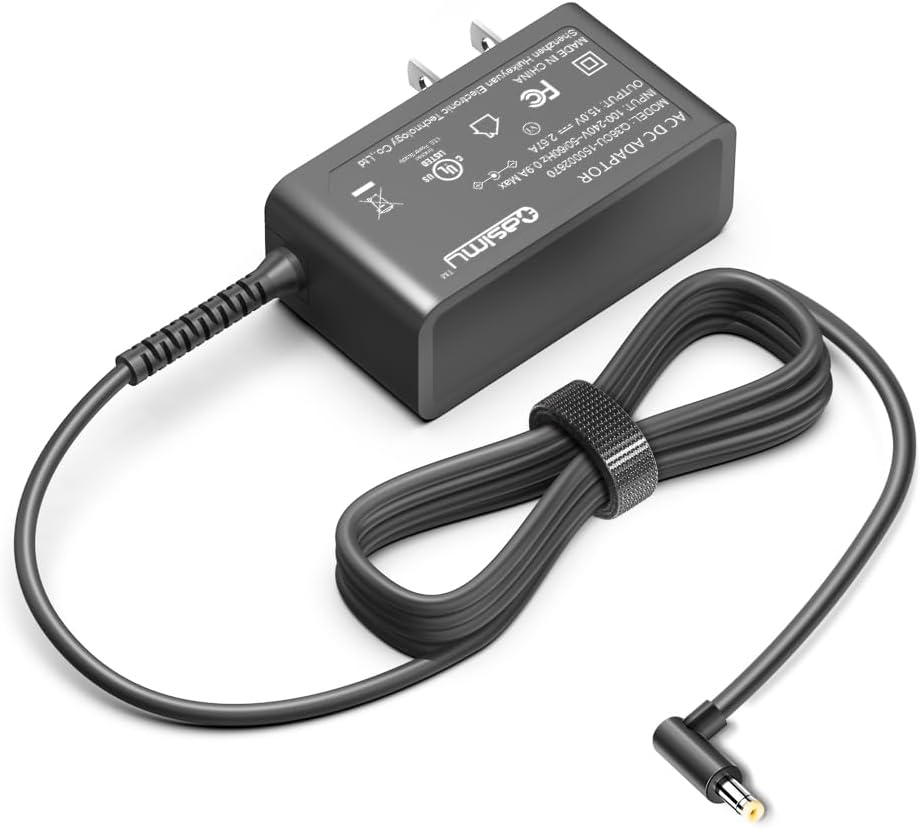
This manual provides essential information for the safe and efficient use of your CASIMY 15V 2.67A Power Adapter. Please read these instructions carefully before use and retain them for future reference. This power adapter is designed as a replacement or spare for specific Belkin BoostCharge Pro wireless charging devices.
2. Product Overview
2.1 What's in the Box
- 1 x CASIMY 15V 2.67A AC Power Adapter
2.2 Key Features
- Input: AC 100-240V (Universal Voltage)
- Output: DC 15V 2.67A (40W)
- Connector Type: L-Shaped 90 Degree Down Angled DC plug
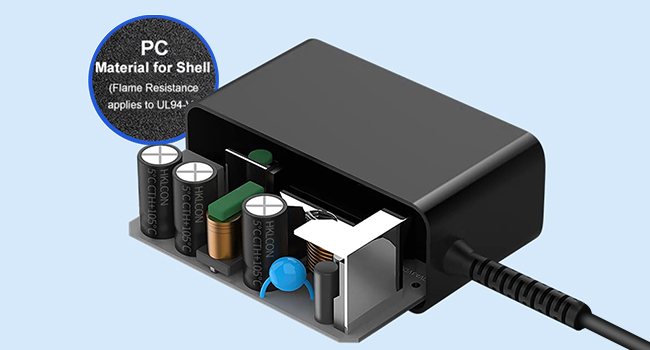
- Material: Constructed from fireproof Polycarbonate (PC) material, meeting UL94-V1 flame resistance standards.
- Safety Features: Built-in protections against over-voltage, over-current, short-circuit, and over-temperature.
- Design: Compact and space-saving design, allowing other plugs to use adjacent outlets.
3. Compatibility
This power adapter is specifically designed for use with the following Belkin BoostCharge Pro wireless charging models:
- Belkin BoostCharge Pro WIZ016 series (WIZ016TTBK, WIZ016TTWH-TL)
- Belkin BoostCharge Pro WIZ017 series (WIZ017TTWH, WIZ017TTBK)
- Belkin BoostCharge Pro WIZ009 series (WIZ009TTWH, WIZ009TTBK)
- Belkin BoostCharge Pro WIZ010 series (WIZ010TTBK, WIZ010TTWH)
- Belkin 3-in-1 Wireless Charging Pad with MagSafe (2ACR040G NJ, 2ACR040GNJ)
Important Note: This charger is compatible only with Belkin devices featuring a T-type charging port. It is not compatible with devices that use a straight I-type charging port.


4. Setup Instructions
- Connect to Device: Insert the L-shaped DC connector of the CASIMY power adapter firmly into the power input port of your compatible Belkin BoostCharge Pro wireless charging stand or pad. Ensure the connection is secure.
- Connect to Power Outlet: Plug the AC prongs of the power adapter into a standard AC 100-240V wall outlet. The adapter's design allows for minimal obstruction of adjacent outlets.
- Verify Power: Once connected, your Belkin charging device should receive power and be ready for use. Refer to your Belkin device's manual for specific power indicator lights or operational details.


5. Operating Instructions
The CASIMY 15V 2.67A Power Adapter functions by providing stable electrical power to your compatible Belkin BoostCharge Pro wireless charging device. Once properly connected to both the charging device and a power outlet, the adapter continuously supplies the necessary power for charging your electronic devices.
- Ensure the adapter is always connected to a functional power outlet.
- Disconnect the adapter from the power outlet when not in use for extended periods.
6. Safety Information
To ensure safe operation and prevent damage, please observe the following safety guidelines:
- Do not expose the adapter to water, moisture, or extreme temperatures.
- Do not attempt to disassemble, modify, or repair the adapter.
- Avoid dropping or subjecting the adapter to severe impact.
- Ensure the adapter is used with devices that match its voltage and current specifications (15V 2.67A).
- Keep out of reach of children.
- Disconnect from the power outlet during lightning storms or when unused for long periods.
6.1 Built-in Protections
The adapter incorporates multiple safety features:
- Over-voltage Protection: Safeguards against excessive voltage input.
- Over-current Protection: Prevents damage from excessive current draw.
- Short-circuit Protection: Automatically shuts down in case of a short circuit.
- Over-temperature Control: Manages internal temperature to prevent overheating.

7. Maintenance
The CASIMY power adapter requires minimal maintenance. Follow these guidelines to ensure its longevity:
- Keep the adapter clean by wiping it with a dry, soft cloth. Do not use liquid cleaners.
- Store the adapter in a cool, dry place when not in use.
- Avoid bending or crimping the power cord excessively, especially near the connectors.
8. Troubleshooting
| Problem | Possible Cause | Solution |
|---|---|---|
| Device not powering on/charging. |
|
|
| Slow charging or intermittent power. |
|
|
9. Specifications
| Input Voltage | AC 100-240V |
| Output Voltage | DC 15V |
| Output Current | 2.67A |
| Output Wattage | 40W |
| Connector Type | L-Shaped 90 Degree Down Angled DC plug |
| Material | Fireproof Polycarbonate (PC) |
| Item Weight | 5.9 ounces (approx. 167 grams) |
| Package Dimensions | 5.08 x 3.54 x 1.54 inches |
10. Warranty and Support
For warranty information and customer support, please refer to the seller's policies or contact the manufacturer directly. Keep your purchase receipt as proof of purchase.
Manufacturer: Shenzhen Huikeyuan Electronic Technology Co.,ltd