
Amovfilm B0DP6DWCWF
Amovfilm Portable WiFi 6 & Bluetooth Mini Projector User Manual
Model: B0DP6DWCWF
Introduction
Thank you for choosing the Amovfilm Portable WiFi 6 & Bluetooth Mini Projector. This device is designed to provide a versatile and immersive viewing experience, supporting 1080P and 4K decoding with a native resolution of 1280x720. Featuring Android TV 11.0, dual-band WiFi 6, and Bluetooth 5.0, it offers seamless connectivity and access to a wide range of entertainment. Its portable design, 270° rotation, and automatic keystone correction make it ideal for various indoor and outdoor settings.
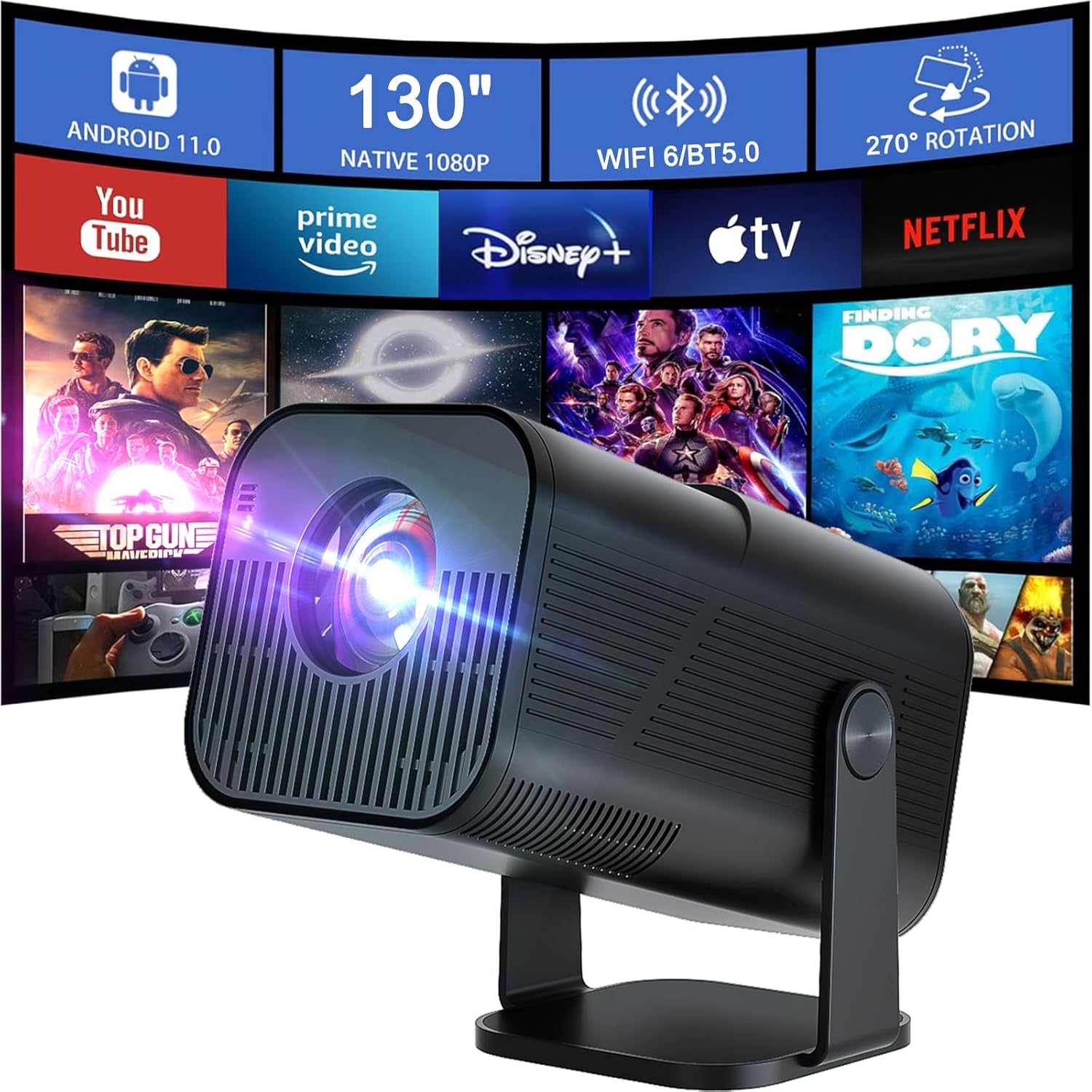
Image: The Amovfilm Portable Mini Projector, showcasing its ability to project a large screen with various streaming application icons, highlighting its smart features and portability.
What's in the Box
- Amovfilm Portable WiFi 6 & Bluetooth Mini Projector
- Remote Control
- Power Cord
- User Manual (this document)
Setup
- Unpacking: Carefully remove all components from the packaging.
-
Placement: Place the projector on a stable, flat surface. The integrated stand allows for 270° rotation, enabling projection onto walls or ceilings. For optimal viewing, ensure the projection surface is smooth and light-colored.
Image: The Amovfilm Portable Mini Projector positioned on its adjustable stand, demonstrating its flexible placement options for various projection angles.
- Power Connection: Connect the power cord to the projector's power input and then to a power outlet.
- Initial Power On: Press the power button on the projector or the remote control to turn on the device.
-
Focus Adjustment: Use the manual focus wheel on the projector to achieve a clear image.

Image: A detailed view of the projector's manual focus wheel, indicating its location for adjusting image clarity.
- Keystone Correction: The projector features automatic vertical keystone correction. If the image appears trapezoidal, the projector will automatically adjust it.
- Network Connection: Navigate to the settings menu to connect to your Wi-Fi network (supports dual-band WiFi 6).
Operating Instructions
1. Smart Features (Android TV 11.0)
The projector runs on Android TV 11.0, providing access to a variety of content and applications. With 8GB internal storage and 1GB RAM, it ensures a smooth streaming experience.

Image: The projector's display showing the Android TV 11.0 interface, featuring icons for popular streaming services and applications, demonstrating its smart capabilities.
- App Access: Browse and install applications directly from the Android TV interface.
- Online Streaming: Enjoy smoother, delay-free online video streaming.
2. Connectivity Options
The projector offers multiple ways to connect your devices:
-
Wireless Connection (WiFi 6 & Bluetooth):
- WiFi 6: Connect to your dual-band (2.4G/5G) WiFi network for high-speed internet access and screen mirroring.
- Bluetooth 5.0: Connect to external Bluetooth speakers for enhanced audio experience. The projector has a built-in 2W HiFi speaker.

Image: The projector wirelessly connected to a smartphone via Bluetooth, illustrating its audio output capabilities to external speakers.
-
Screen Mirroring: Compatible with DLNA, MiracastReceiver, AirPin (PRO), and Cast for mirroring content from iOS, Android, and Windows devices.

Image: The projector displaying content mirrored from both a laptop and a smartphone, demonstrating its wireless screen mirroring capabilities across different operating systems.
-
Wired Connections:
- HDMI: Connect devices like TV sticks, laptops, PS4/PS5, etc.
- USB: Connect USB drives for media playback.
- 3.5mm Headphone Jack: For wired audio output.
3. Image Adjustment
- Manual Focus: Use the focus wheel to sharpen the image.
- Automatic Keystone Correction: The projector automatically corrects vertical image distortion.
- Zoom Function: Adjust the image size from 50% to 100% without moving the projector.
- Projection Distance: The short-throw design allows for a larger image at a shorter distance. Recommended projection distance is 1m-2m for optimal display sizes (e.g., 40" to 130").

Image: A visual guide illustrating how different projection distances (1m, 2.5m, 3.3m) result in varying screen sizes (40", 100", 130"), emphasizing the projector's short-throw capability.
4. Usage Scenarios
The Amovfilm projector is suitable for a variety of uses:
- Home Theater
- Fitness Sessions
- Game Entertainment
- Online Education
- Outdoor Camping and Movie Nights

Image: A group of people enjoying a movie projected outdoors onto a screen, demonstrating the projector's suitability for outdoor entertainment and camping.
Watch a video demonstration of the projector in action:
Video: A demonstration of the Amovfilm mini projector, showcasing its features and projection quality in various settings, including its user interface and media playback.
Maintenance
- Cleaning the Lens: Use a soft, lint-free cloth specifically designed for optical lenses. Do not use abrasive cleaners or cloths.
- Cleaning the Exterior: Wipe the projector's exterior with a soft, dry cloth. Avoid using harsh chemicals.
- Ventilation: Ensure the projector's ventilation openings are not blocked to prevent overheating.
- Storage: When not in use for extended periods, store the projector in a cool, dry place, away from direct sunlight and extreme temperatures.
Troubleshooting
| Problem | Possible Cause | Solution |
|---|---|---|
| No image or blurry image |
|
|
| No sound |
|
|
| Remote control not working |
|
|
| Cannot connect to Wi-Fi |
|
|
Specifications
| Feature | Detail |
|---|---|
| Brand | Amovfilm |
| Model | B0DP6DWCWF |
| Native Resolution | 1280 x 720 (Supports 1080P & 4K decoding) |
| Operating System | Android TV 11.0 |
| Connectivity Technology | Wi-Fi 6 (Dual-band 2.4G/5G), Bluetooth 5.0, HDMI, USB, 3.5mm Audio Jack |
| Internal Storage | 8GB |
| RAM | 1GB |
| Built-in Speaker | 2W HiFi Speaker |
| Keystone Correction | Automatic Vertical |
| Zoom Function | 50% - 100% |
| Rotation Angle | 270° |
| Item Weight | 1.7 pounds |
| Package Dimensions | 8.7 x 5.35 x 4.61 inches |
| Color | Black |
| Recommended Uses | Business, Education, Gaming, Home Cinema |
Warranty and Support
Amovfilm products are designed for reliability and performance. For any questions, technical support, or warranty claims, please contact Amovfilm customer service through the platform where you purchased the product. Please refer to your purchase documentation for specific warranty terms and conditions.
Ask a question about this manual
Ask about setup, troubleshooting, compatibility, parts, safety, or missing instructions. Manuals+ will review the question and use this page’s manual context to help answer it.