
Introduction
The Pious 5-in-1 Digital Water Quality Tester is a multi-functional instrument designed for precise measurement of various water parameters. This device accurately measures pH, Salinity, Electrical Conductivity (EC), Total Dissolved Solids (TDS), and Temperature. It is an essential tool for maintaining optimal water quality in applications such as swimming pools, hot tubs, aquariums, hydroponic systems, and for testing drinking water.
This manual provides detailed instructions on how to set up, operate, maintain, and troubleshoot your Pious Digital Water Quality Tester to ensure accurate and reliable performance.
Product Overview
Familiarize yourself with the components of your Pious 5-in-1 Digital Water Quality Tester.

Figure 1: Pious 5-in-1 Digital Water Quality Tester showing its display and buttons.
The device features a clear digital display, intuitive control buttons, and a sensitive probe for accurate readings. The backlight function enhances visibility in low-light conditions.
Setup
1. Battery Installation
The Pious Digital Water Quality Tester uses LR44 batteries. Ensure correct polarity when inserting the batteries.
- Locate the battery compartment, usually at the top or back of the device.
- Open the compartment cover.
- Insert the LR44 batteries, observing the positive (+) and negative (-) markings.
- Close the battery compartment securely.
2. Initial Preparation
Before first use, remove the protective cap from the probe. Rinse the probe with distilled water and gently pat dry with a clean, soft cloth.
Operating Instructions
Power On/Off
- Press the ON/OFF button to turn the device on.
- Press the ON/OFF button again to turn the device off.
Mode Switching
The device can measure pH, Salinity, EC, and TDS. To switch between these modes:
- Press the MODE/CAL button to cycle through pH, Salinity (ppm/ppt), EC (µS/cm/mS/cm), and TDS (ppm/ppt) readings.
Temperature Unit Switching
To switch between Celsius (°C) and Fahrenheit (°F) for temperature readings:
- Long press and hold the HOLD/TEMP button. The unit will toggle between °C and °F.
Holding Readings
To freeze the current reading on the display:
- Press the HOLD/TEMP button briefly. The reading will be held. Press again to release.
Measurement Procedure
- Turn on the device.
- Immerse the probe into the water sample up to the immersion line. Ensure the probe is fully submerged.
- Gently stir the device to remove any air bubbles.
- Wait for the reading to stabilize on the display.
- Record the reading or press HOLD/TEMP to freeze it.
- After measurement, rinse the probe with distilled water and replace the protective cap.
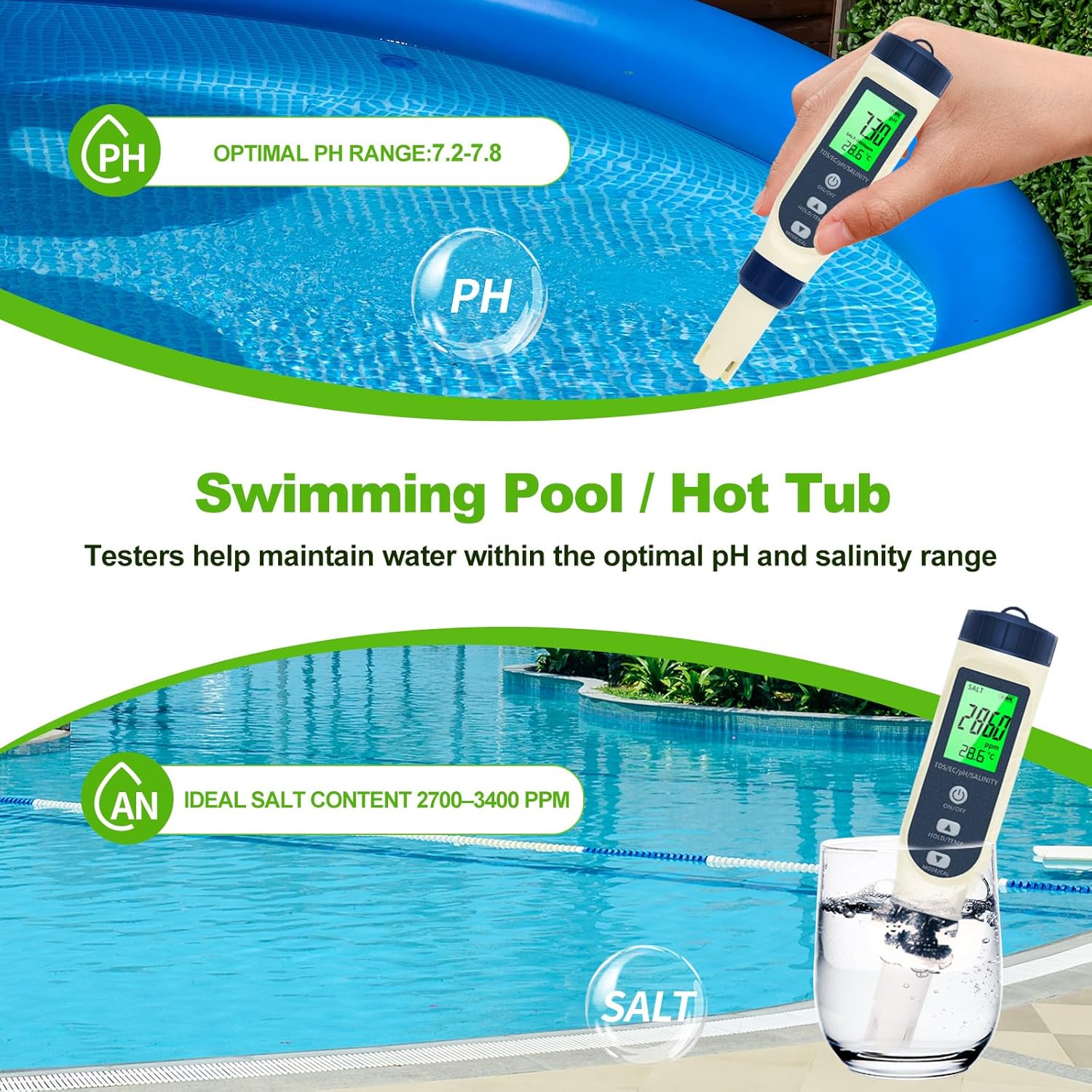
Figure 2: Using the Pious PH Tester in a swimming pool to measure pH and salinity.

Figure 3: The Pious PH Tester is suitable for measuring water parameters in hydroponic cultivation systems.

Figure 4: The Pious PH Tester can be used to check the pH of liquids in food preparation, such as juice.

Figure 5: Monitoring water quality in seawater fish tanks using the Pious PH Tester for TDS, salinity, and pH.
Calibration
The device is factory-calibrated, but re-calibration is recommended periodically or if readings appear inaccurate. The tester supports 3-point automatic calibration.
pH Calibration (3-point: 4.01, 6.86, 9.18)
- Prepare three buffer solutions: pH 4.01, pH 6.86, and pH 9.18. Ensure the solutions are at room temperature.
- Turn on the meter and switch to pH mode.
- Rinse the electrode with distilled water and dry it.
- Immerse the electrode into the pH 6.86 buffer solution.
- Press and hold the MODE/CAL button until "CAL" appears on the display. Release the button.
- The meter will automatically recognize the buffer solution and begin calibration. Wait for the reading to stabilize and display "END" before removing the electrode.
- Rinse the electrode with distilled water.
- Repeat the process for pH 4.01 and pH 9.18 buffer solutions. It is recommended to calibrate pH 6.86 first, then 4.01 or 9.18.
Salinity/EC/TDS Calibration
Specific calibration for Salinity, EC, and TDS may require standard solutions not typically included. Refer to the manufacturer's website or contact support for advanced calibration procedures if needed. For general use, pH calibration is the most critical for accuracy.
Maintenance
Cleaning the Probe
- After each use, rinse the probe thoroughly with distilled water to prevent contamination and residue buildup.
- Do not use abrasive materials or harsh chemicals to clean the probe.
- If the probe is heavily soiled, soak it in a mild cleaning solution (e.g., pH electrode cleaning solution) for 15-30 minutes, then rinse with distilled water.
Storage
- Always replace the protective cap on the probe when not in use.
- Store the meter in a cool, dry place, away from direct sunlight and extreme temperatures.
- For long-term storage, it is advisable to remove the batteries to prevent leakage.
Battery Replacement
When the display dims or the device fails to power on, replace the LR44 batteries as described in the Setup section.
Troubleshooting
| Problem | Possible Cause | Solution |
|---|---|---|
| Device does not turn on. | Dead or incorrectly installed batteries. | Replace batteries, ensuring correct polarity. |
| Inaccurate readings. | Probe is dirty; Calibration is needed; Expired buffer solutions. | Clean the probe; Perform pH calibration; Use fresh buffer solutions. |
| Reading fluctuates or is unstable. | Air bubbles around the probe; Probe not fully immersed; Contaminated probe. | Gently stir the device; Ensure full immersion; Clean the probe. |
| Backlight not working. | Backlight timeout; Low battery. | Press any button to reactivate; Replace batteries. |
Specifications
| Parameter | Detail |
|---|---|
| Product Dimensions | 7 x 1.2 x 1.2 inches |
| Weight | 5.61 ounces |
| Model Number | WYPH06 |
| Manufacturer | Pious |
| Temperature Compensation | Automatic (0°C - 60°C / 32°F - 140°F) |
| Calibration | 3-point automatic pH calibration (4.01, 6.86, 9.18) |
| Power Source | LR44 Batteries (typically 3) |

Figure 6: Dimensions of the Pious PH Tester, highlighting its compact and portable design.
Warranty and Support
Pious products are designed for reliability and performance. For warranty information or technical support, please refer to the contact details provided with your product packaging or visit the official Pious website. Keep your purchase receipt as proof of purchase for warranty claims.
For common questions and troubleshooting, please consult the Troubleshooting section of this manual or the online resources provided by Pious.