
Introduction
This manual provides detailed instructions for the assembly, operation, and maintenance of your Lvifur LED Nightstand with Wireless Charging Station. Please read this manual thoroughly before use to ensure proper function and safety.

Image: Lvifur LED Nightstands in a bedroom setting, highlighting their modern design and integrated lighting.
Important Safety Information
WARNING: To reduce the risk of electric shock, fire, or injury, please observe the following safety precautions:
- Always unplug the nightstand when not in use or before cleaning.
- Keep the wireless charging station and RGB lights away from water and other liquids.
- Do not block the human body sensing sensor while the nightstand is in use.
- Always follow the assembly instructions carefully to avoid injury.
- Do not attempt to modify or repair the nightstand yourself. Contact customer support for assistance.
Package Contents
Verify that all components are present before beginning assembly:
- 2 x Lvifur LED Nightstand Units
- 1 x Instruction Manual
- 1 x Accessories Kit (includes all necessary hardware and tools for assembly)
Product Dimensions

Image: Detailed product dimension diagram for the Lvifur LED Nightstand.
The dimensions of the Lvifur LED Nightstand are approximately:
- Depth: 16 inches (40 cm)
- Width: 20 inches (50 cm)
- Height: 22 inches (58 cm)
Setup and Assembly
The Lvifur LED Nightstand is designed for easy assembly. All necessary parts and accessories are labeled, and step-by-step instructions are included in the package. Please refer to the separate Assembly Guide provided with your product for detailed instructions.
Recommended Tools: Screw Driver (not included, but may be helpful in addition to provided tools).
Operating Instructions
Control Panel Overview
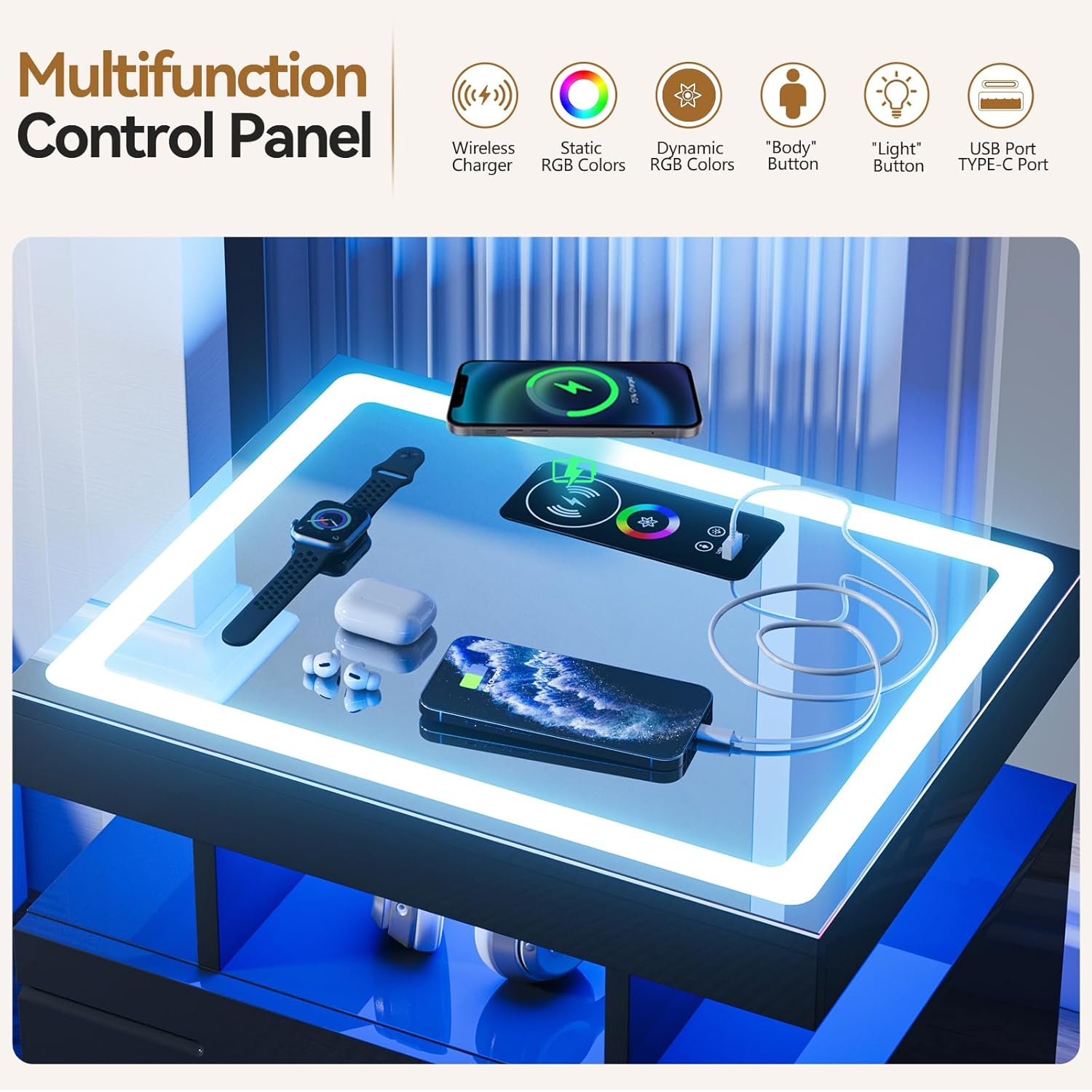
Image: Multifunction control panel on the nightstand's glass tabletop, illustrating wireless charging, USB/Type-C ports, and touch controls.
The nightstand features an intuitive control panel integrated into the glass tabletop for easy access to its smart functions.
RGB LED Lighting

Image: The nightstand illuminated with various RGB colors, demonstrating adjustable brightness and multiple lighting modes.
Your nightstand is equipped with an upgraded RGB LED light strip offering a wide range of customization:
- Color Modes: Switch between 7 dynamic light modes or 24 static color modes.
- Brightness Adjustment: Long-press the touch switch on the control panel to adjust the brightness.
- Color Change: Short-press the touch switch to cycle through color modes.
Wireless Charging Station
The integrated wireless charging station allows for convenient charging of compatible devices. Simply place your device on the designated charging area on the glass tabletop.
- Ports: In addition to wireless charging, the nightstand includes 1 USB port and 1 TYPE-C port for wired charging.
Smart Human Body Sensing

Image: Demonstration of the smart human body induction feature, where the light automatically turns on when motion is detected.
The nightstand features a smart human body sensing function for automated lighting:
- Activation: When the human body sensing function is enabled, the light will automatically illuminate when you are within 1-2 meters of the nightstand.
- Deactivation: The light will automatically turn off approximately 30 seconds after you leave the sensing area.
Storage Capacity

Image: The nightstand's storage features, including three large drawers and an open storage compartment.
The nightstand offers ample storage solutions:
- Drawers: Three hidden drawers provide spacious storage for personal items.
- Open Storage: An open storage compartment is located above the drawers, ideal for frequently accessed items.
- Glass Tabletop: The colorful glass tabletop is suitable for placing items like alarm clocks, mobile phones, chargers, and glasses.
Maintenance
To ensure the longevity and appearance of your Lvifur LED Nightstand, follow these maintenance guidelines:
- Cleaning: Use a soft, dry cloth to wipe down the surfaces. For stubborn marks, a slightly damp cloth with mild soap can be used, followed by drying thoroughly. Avoid abrasive cleaners or solvents.
- Spills: Immediately wipe up any spills, especially on the glass tabletop and near electronic components, to prevent damage.
- Dusting: Regularly dust the nightstand to prevent buildup, which can affect the sensor and light performance.
- Avoid Direct Sunlight: Prolonged exposure to direct sunlight may cause fading or damage to the finish.
Troubleshooting
If you encounter any issues with your Lvifur LED Nightstand, please refer to the following common troubleshooting steps:
| Problem | Possible Cause | Solution |
|---|---|---|
| LED lights not turning on/off. | Power connection issue, sensor blocked, or light mode setting. | Ensure the nightstand is properly plugged in. Check if the sensor is obstructed. Try cycling through light modes using the touch switch. |
| Wireless charging not working. | Device not compatible, misaligned, or foreign objects on charging pad. | Ensure your device supports wireless charging. Reposition the device on the charging pad. Remove any metal objects or thick cases. |
| Human body sensing not activating. | Sensor obstructed, or function is disabled. | Ensure the sensor area is clear. Check the control panel to confirm the human body sensing function is enabled. |
| Drawers are stiff or difficult to open. | Overloaded, or debris in drawer slides. | Reduce the weight in the drawers. Check for and remove any debris from the drawer slides. |
If the problem persists after attempting these solutions, please contact Lvifur customer support for further assistance.
Specifications
| Feature | Detail |
|---|---|
| Brand | Lvifur |
| Model | B0DP63MX4B |
| Product Dimensions (D x W x H) | 16"D x 20"W x 23"H (40cm x 50cm x 58cm) |
| Color | Black*2(stripe) |
| Shape | Rectangular |
| Table Design | Nightstand |
| Style | Modern |
| Material Type | Engineered Wood |
| Furniture Finish | Glossy |
| Number of Drawers | 3 |
| Included Components | Installation Tool, Assembly Guide, Accessories kit |
| Special Features | RGB 24 Color Light Dimmable, Wireless Charging Function, Smart Human Body Sensing, 1 USB Port, 1 TYPE-C Port |
| Indoor/Outdoor Usage | Indoor |
Warranty and Support
For any questions, concerns, or to report missing/defective parts, please contact Lvifur customer support. While specific warranty details are not provided in this manual, your product may be covered by a manufacturer's warranty. Please retain your proof of purchase for any warranty claims.
You can typically find contact information for the seller or manufacturer through the platform where you purchased the product.