
Introduction
Thank you for choosing the YATINEY TV Stand with LED Light and Power Outlets, Model DS03UDBB. This entertainment center is designed to accommodate TVs up to 45 inches and features integrated LED lighting, convenient power outlets, fabric drawers, and open shelving for media devices and storage. This manual provides detailed instructions for assembly, operation, and maintenance to ensure safe and optimal use of your new TV stand.
Safety Information
WARNING:
- Read all instructions carefully before assembly and use.
- Do not exceed the maximum weight limits: 110 lb (50 kg) for the top surface and 44 lb (20 kg) for the mesh shelving. Overloading can cause instability and damage.
- Be aware of sharp edges during assembly and handling.
- Ensure all connections for the power strip and LED lights are secure and correctly installed to prevent electrical hazards.
- Keep small parts and packaging materials away from children to prevent choking hazards.
- Place the TV stand on a flat, stable surface.
Package Contents
Before beginning assembly, verify that all components listed below are present and undamaged. If any parts are missing or damaged, please contact customer support.
- 1 x YATINEY TV Stand (Model DS03UDBB)
- 1 x Accessory Package (includes hardware, tools, LED strip, and remote)
- 1 x Assembly Manual

Image: The YATINEY TV Stand (Model DS03UDBB) with blue LED lighting, showcasing its design and storage capabilities for a television and various media devices.
Specifications
| Brand | YATINEY |
| Model Number | DS03UDBB |
| Dimensions (L x W x H) | 41.7" x 11" x 18.9" (105.9 cm x 27.9 cm x 48 cm) |
| Item Weight | 8.8 Pounds (4 kg) |
| Material | Engineered Wood, Metal |
| Max TV Size Supported | Up to 45 inches |
| Weight Capacity (Top) | 110 lb (50 kg) |
| Weight Capacity (Mesh Shelving) | 44 lb (20 kg) |
| Power Outlets | 2 Standard AC Outlets (120V/12A), 2 USB Ports (5V/2A) |
| Power Cord Length | 4.9 feet (1.5 meters) |
| LED Light Features | 20 Colors, 22 Dynamic Modes, Remote Control |
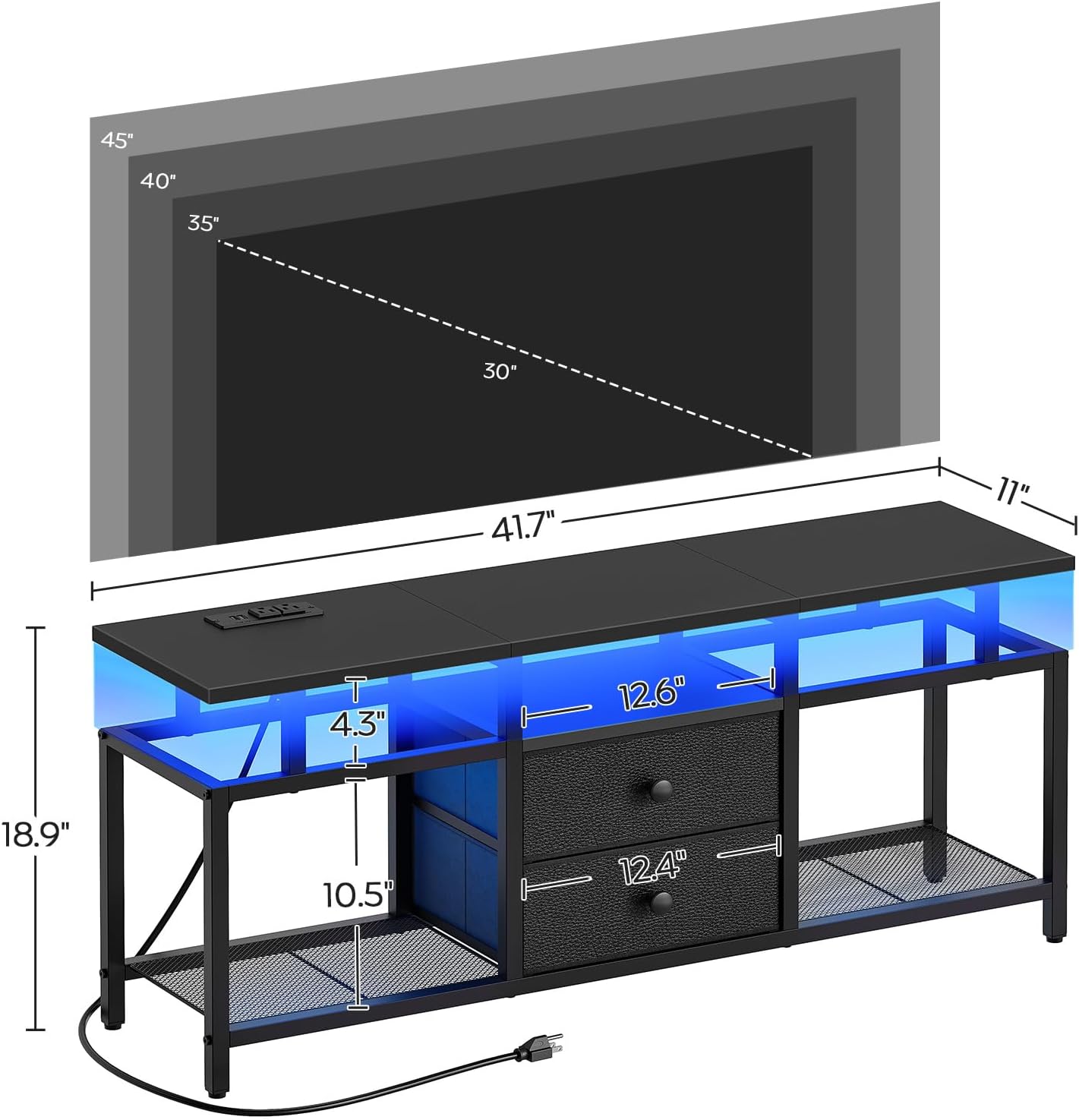
Image: Detailed dimension diagram of the TV stand, including overall size and internal shelf spacing.
Setup and Assembly Instructions
Assembly of the YATINEY TV Stand is designed to be straightforward. Follow the detailed, illustrated manual included in your package. All parts are labeled for easy identification.
- Unpack Components: Carefully remove all parts from the packaging. Lay them out on a clean, soft surface to prevent scratches.
- Identify Parts: Match each part to the corresponding labels in the assembly manual.
- Assemble Frame: Begin by assembling the metal frame components according to the manual's diagrams. Ensure all screws are tightened securely but do not overtighten until the entire frame is stable.
- Attach Shelves: Install the engineered wood and mesh shelves into the frame.
- Install Fabric Drawers: Insert the fabric drawers into their designated compartments.
- Mount Power Strip: Secure the built-in power strip to the designated area on the top shelf.
- Apply LED Light Strip: Adhere the LED light strip to the underside of the top shelf or other desired locations as shown in the manual. Ensure the strip is clean and dry before application.
- Final Tightening: Once all components are in place, go back and fully tighten all screws.
For visual guidance, refer to the official product video:
Video: An overview of the YATINEY TV Stand, highlighting its features including LED lights and power outlets. This video provides a visual demonstration of the product's design and functionality, which can assist with understanding assembly steps and overall setup.
Operating Instructions
LED Light Strip
The integrated LED light strip offers customizable ambient lighting for your entertainment area.
- Power On/Off: Use the provided remote control to turn the LED lights on or off.
- Color Selection: The remote allows you to choose from 20 different static colors.
- Dynamic Modes: Select from 22 dynamic modes, such as flash, strobe, fade, or smooth transitions, to create various lighting effects.
- Brightness Adjustment: Adjust the brightness level of the lights using the remote control.

Image: The TV stand illuminated with orange LED lights, demonstrating the ambient lighting feature. The accompanying remote control and color swatches illustrate the range of customizable lighting options available.
Built-in Power Outlets
The TV stand includes a built-in power strip for convenient access to power for your electronic devices.
- AC Outlets: Two standard 120V/12A AC outlets are available for powering TVs, gaming consoles, sound systems, or other appliances.
- USB Ports: Two 5V/2A USB ports are provided for charging smartphones, tablets, or other USB-powered devices.
- Power Cord: The integrated 4.9-foot power cord connects the power strip to a wall outlet. Ensure the wall outlet is easily accessible.
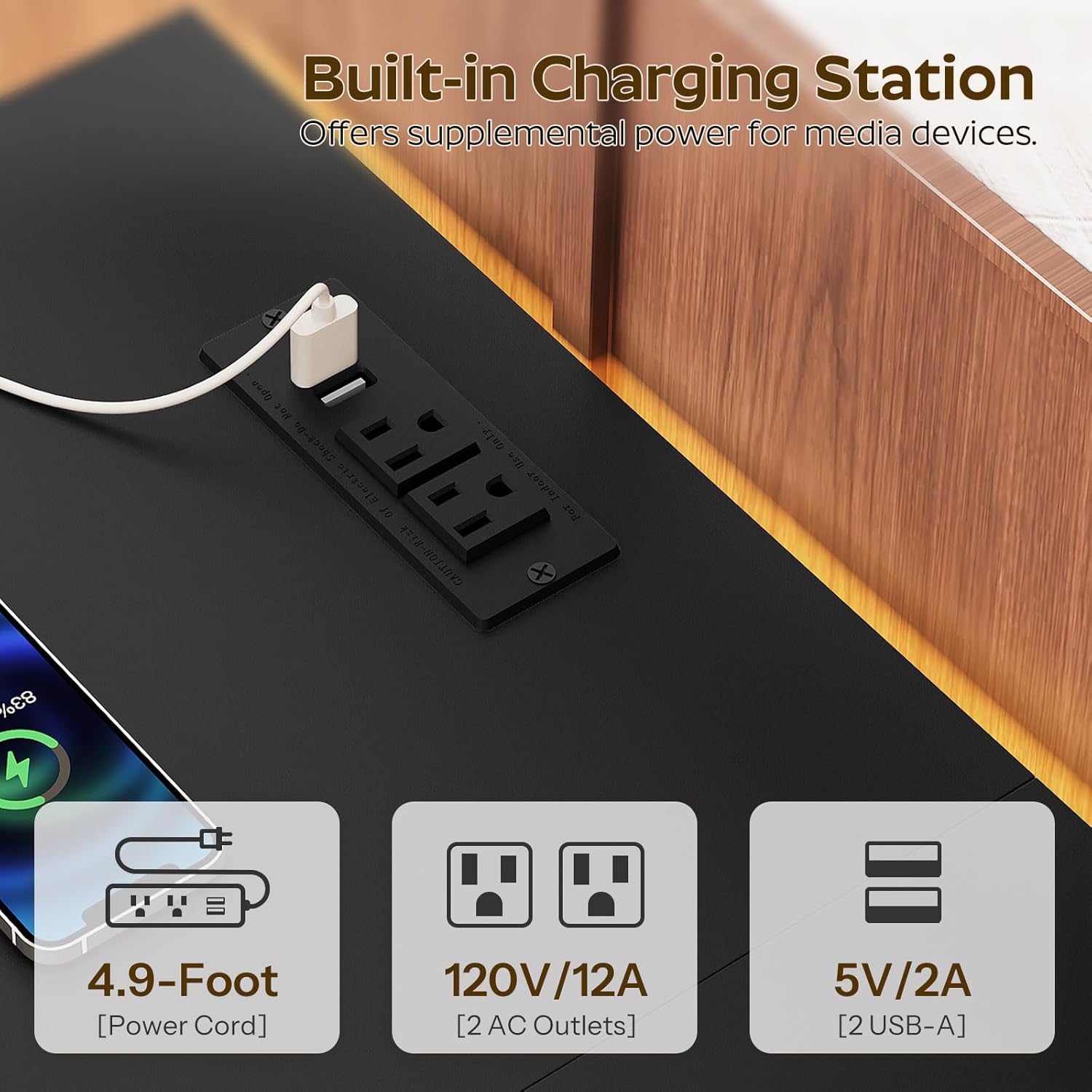
Image: A detailed view of the integrated power strip, featuring two AC outlets and two USB ports, demonstrating its functionality for charging and powering devices.
Maintenance
- Cleaning: Wipe surfaces with a soft, damp cloth. Avoid harsh chemicals or abrasive cleaners that may damage the finish.
- Dusting: Regularly dust the TV stand to prevent buildup, especially on the mesh shelves to maintain ventilation.
- Hardware Check: Periodically check all screws and fasteners to ensure they remain tight. Retighten if necessary.
- Electrical Components: Ensure the power cord and LED light connections are free from damage. Do not attempt to repair damaged electrical components; contact a qualified technician.
- Fabric Drawers: The fabric drawers can be spot cleaned with a mild detergent and water. Allow to air dry completely.
Troubleshooting
| Problem | Possible Cause | Solution |
|---|---|---|
| LED lights do not turn on. |
|
|
| Power outlets are not working. |
|
|
| Stand feels wobbly after assembly. |
|
|
Warranty and Support
For warranty information or technical support, please refer to the documentation included with your purchase or contact YATINEY customer service directly. Keep your purchase receipt for warranty claims.
Contact Information: Please visit the official YATINEY store on Amazon for support and contact details: YATINEY Store