
1. Product Overview
The Waveshare RP2350-Zero Mini Development Board is a Pico-like microcontroller unit (MCU) board. It is based on the Raspberry Pi RP2350A microcontroller chip, featuring a unique dual-core and dual-architecture design. This board is suitable for various embedded applications, including SMD integration, and supports C/C++ and MicroPython development.
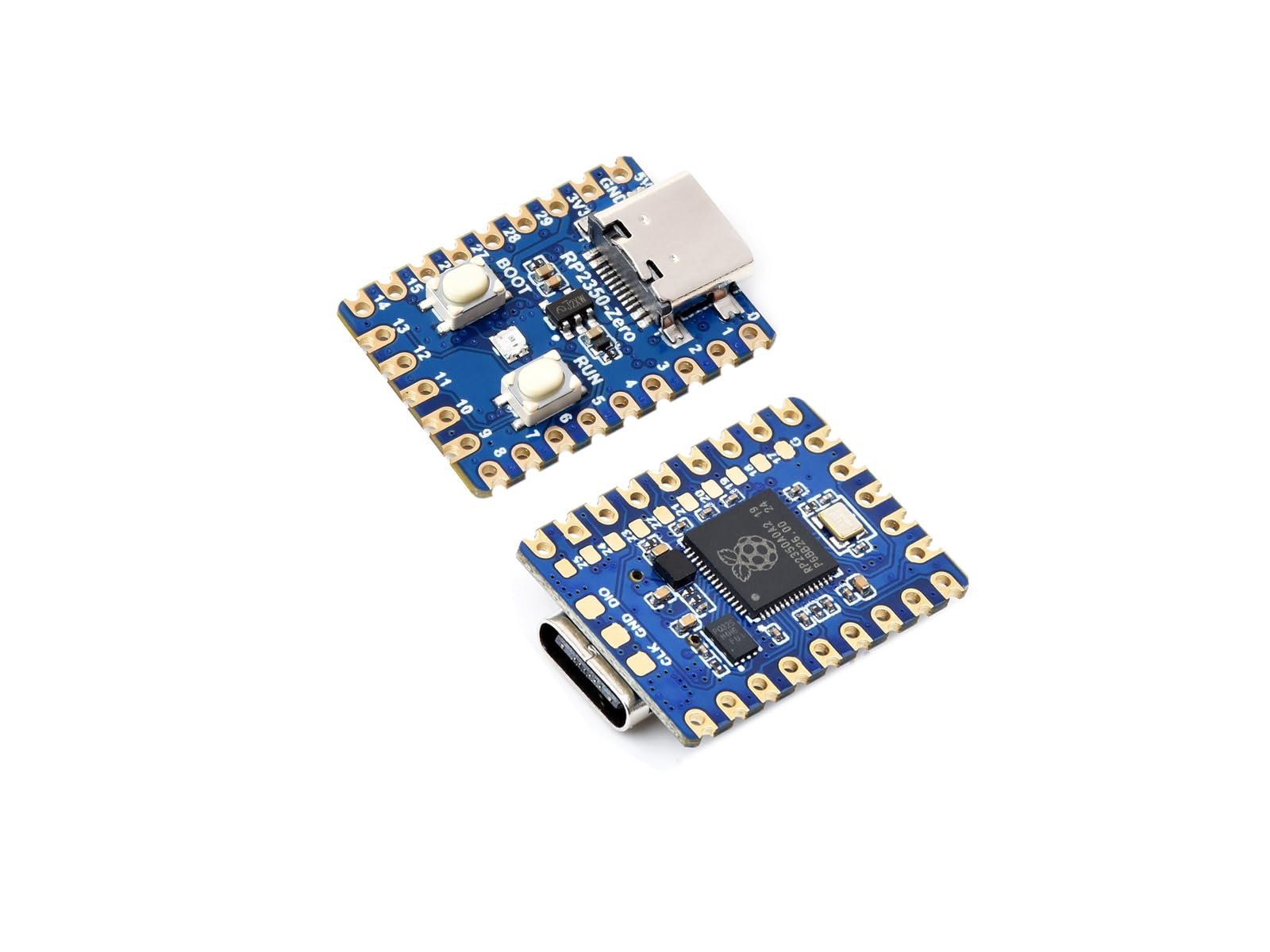
Image 1: The RP2350 MCU Board Zero, showcasing its compact size, Type-C connector, and dual-core architecture.
Key Features:
- Microcontroller: Raspberry Pi RP2350A chip with dual-core Arm Cortex-M33 and dual-core RISC-V processors, flexible clock up to 150 MHz.
- Memory: 520KB Static Random-Access Memory (SRAM) and 4MB on-board Flash memory.
- Connectivity: Type-C USB connector, supporting USB 1.1 with device and host capabilities.
- GPIO: 29 multi-function GPIO pins (20 via edge pinout, others via solder points).
- Peripherals: 2 SPI, 2 I2C, 2 UART, 4 12-bit ADC, 24 controllable PWM channels.
- Programming: Drag-and-drop programming via USB mass storage.
- Design: Castellated module for direct soldering to carrier boards.
- Additional Features: Low-power sleep/dormant modes, on-chip clock/timer, temperature sensor, accelerated floating-point libraries, 12 Programmable I/O (PIO) state machines.
2. Initial Setup
This section guides you through the initial steps to prepare your RP2350 MCU Board Zero for use.
2.1 Board Components Identification
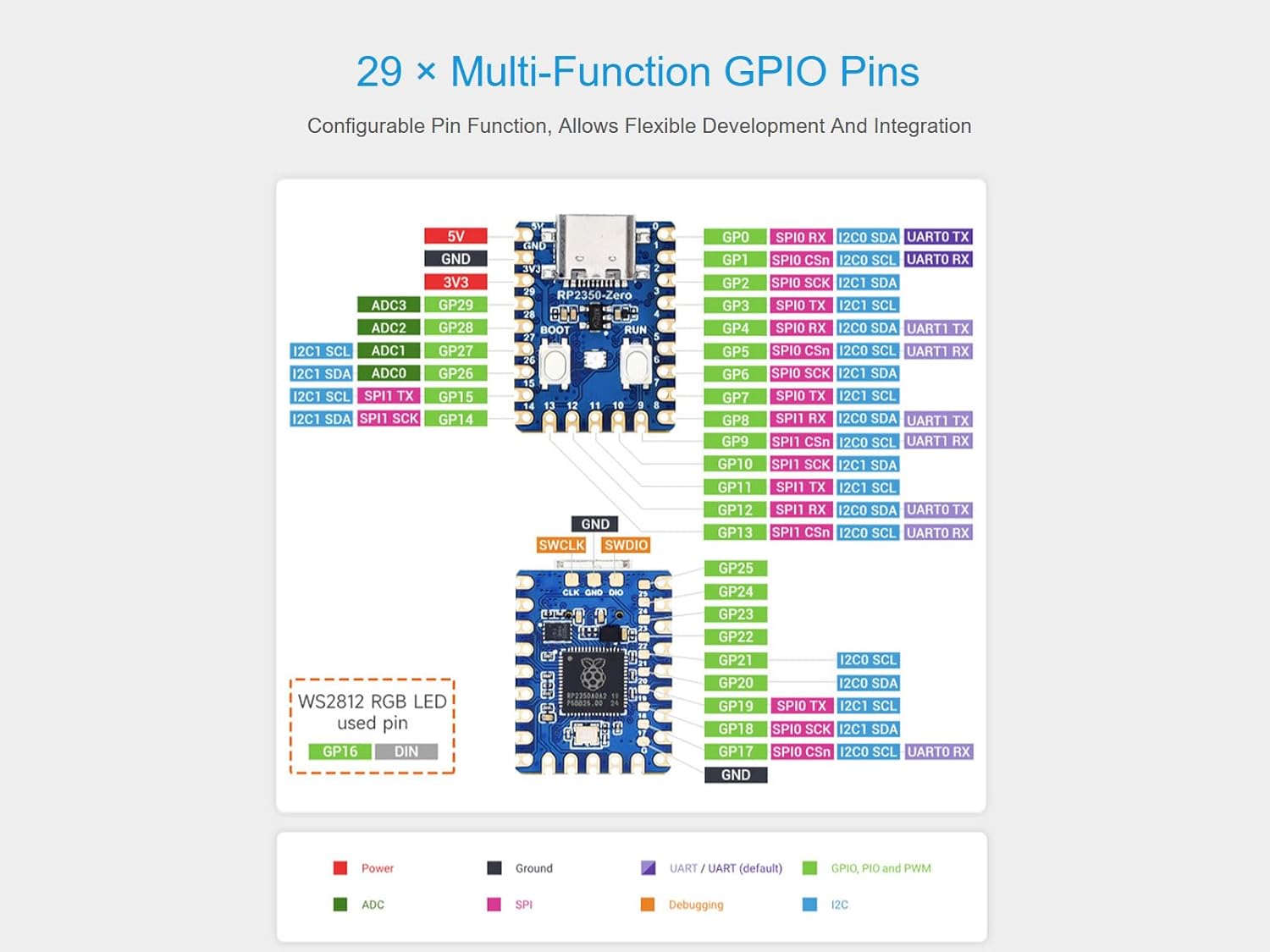
Image 2: Detailed view of the RP2350 MCU Board Zero with key components labeled.
- USB Type-C connector: For power and data transfer, supports USB 1.1 hosts and slave devices.
- ME6217C33M5G: Low dropout regulator, 800mA output (Max.).
- BOOT button: Press and hold during power-up or reset to enter download mode for programming.
- RUN reset button: Press to reset the board.
- WS2812: Cool RGB LED.
- P25Q32SH-UXH-IR: 4MB NOR-Flash memory.
- RP2350A: Dual-core and dual-architecture design, up to 150 MHz operating frequency.
- RP2350A pins: 10x solder points, 9 of which are GPIO pins.
- Debug pins.
2.2 Connecting the Board
Connect the RP2350 MCU Board Zero to your computer using a standard USB Type-C cable. The board will typically appear as a mass storage device, allowing for drag-and-drop programming.
2.3 Firmware Installation
For optimal functionality, especially when using MicroPython, it is essential to install the official firmware provided by Waveshare. This firmware can typically be found on the Waveshare product support page for the RP2350-Zero. Follow the instructions provided on their website for flashing the firmware onto the board.
To enter download mode for flashing firmware, press and hold the BOOT button while connecting the USB cable or pressing the RUN button.
3. Operating Instructions
The RP2350 MCU Board Zero supports development using C/C++ and MicroPython. This section outlines general operating principles.
3.1 Programming with C/C++
The Raspberry Pi C/C++ SDK can be used for development. This typically involves using a command-line interface or integrated development environments (IDEs) like Visual Studio Code or Eclipse. Refer to the official Raspberry Pi documentation for detailed instructions on setting up the C/C++ development environment for RP2350-based boards.
3.2 Programming with MicroPython
MicroPython is a lean and efficient implementation of the Python 3 programming language optimized to run on microcontrollers. After installing the Waveshare-specific MicroPython firmware, you can program the board using a MicroPython IDE or by directly uploading Python scripts to the board's mass storage. Ensure you are using the correct firmware version for the RP2350.
3.3 GPIO Pin Usage
The board features 29 multi-function GPIO pins, allowing for flexible development and integration. These pins can be configured for various functions including digital input/output, SPI, I2C, UART, ADC, and PWM.

Image 3: GPIO pinout diagram for the RP2350 MCU Board Zero, showing configurable pin functions.
Refer to the Waveshare documentation or the Raspberry Pi RP2350 datasheet for a complete pin mapping and configuration details.
4. Maintenance
The RP2350 MCU Board Zero is a robust electronic component, but proper care ensures its longevity and reliable operation.
- Storage: Store the board in a dry, anti-static environment when not in use.
- Cleaning: If necessary, gently clean the board with a soft, dry brush or compressed air. Avoid using liquids or abrasive materials.
- Handling: Always handle the board by its edges to avoid touching sensitive components and to prevent electrostatic discharge.
- Power: Ensure the power supply is stable and within the specified voltage range to prevent damage.
5. Troubleshooting
This section addresses common issues you might encounter with the RP2350 MCU Board Zero.
- Board not recognized by computer:
- Ensure the USB Type-C cable is fully inserted and functional.
- Try a different USB port or cable.
- Verify the board is powered correctly.
- If attempting to flash firmware, ensure the board is in BOOTSEL mode (hold BOOT button while connecting USB).
- Programs not running or behaving unexpectedly:
- Double-check your code for errors.
- Ensure the correct firmware (e.g., MicroPython for RP2350) is installed on the board. Incorrect or generic firmware can lead to unexpected behavior.
- Verify that the program was successfully uploaded to the board.
- Data loss after reboot (e.g., files wiped from drive):
- This can indicate an issue with the board's memory controller or an improperly flashed firmware.
- Re-flash the official Waveshare firmware, ensuring the process completes without interruption.
- If the issue persists after re-flashing official firmware, contact Waveshare technical support.
6. Technical Specifications
Below are the detailed technical specifications for the Waveshare RP2350 MCU Board Zero.

Image 4: Overview of the RP2350 MCU Board Zero's key specifications.
| Feature | Detail |
|---|---|
| Microcontroller | Raspberry Pi RP2350A |
| CPU Architecture | Dual-core Arm Cortex-M33 & Dual-core RISC-V |
| CPU Speed | Up to 150 MHz |
| SRAM | 520 KB |
| Flash Memory | 4 MB (on-board) |
| USB Interface | USB 1.1 with device and host support (Type-C connector) |
| GPIO Pins | 29 multi-function (20 via edge pinout, others via solder points) |
| SPI | 2 |
| I2C | 2 |
| UART | 2 |
| ADC | 4 x 12-bit |
| PWM Channels | 24 controllable |
| Operating System Support | Linux (for development environment) |
| Dimensions | Refer to outline dimensions diagram below. |

Image 5: Outline dimensions of the RP2350 MCU Board Zero (Unit: mm).
7. Warranty Information
Specific warranty details for the Waveshare RP2350 MCU Board Zero are not provided in this manual. Please refer to the Waveshare official website or contact your point of purchase for comprehensive warranty information and terms.
8. Support and Resources
For further assistance, development resources, and technical support, please utilize the following channels:
- Online Development Resources: Waveshare provides extensive online documentation, tutorials, and example code for their products. Visit the official Waveshare website for these resources.
- Technical Support: If you encounter issues that cannot be resolved using the troubleshooting guide or online resources, please contact Waveshare technical support directly. Contact information is typically available on their official website.
- Product Page: For product updates and additional information, refer to the product page on Amazon: Amazon Product Page.
No Official Product Videos Available
At this time, no official product videos from the seller are available for embedding in this manual.


