
1. Introduction
This manual provides detailed instructions for the setup, operation, maintenance, and troubleshooting of your FANPEEC Fanless Mini PC N100. This compact industrial-grade computer is designed for various applications, including home entertainment, office tasks, firewall solutions, and industrial automation, offering robust performance with its Intel N100 processor and fanless design.
2. Package Contents
Verify that all items listed below are present in your package:
- 1 x FANPEEC Mini PC
- 2 x WiFi Antennas
- 1 x VESA Bracket (for mounting)
- 1 x Power Adapter
- 1 x Power Cord
- 1 x SATA Cable
- 1 x HDMI Cable
- 1 x User Manual (this document)

Figure 2.1: Included accessories with the FANPEEC Mini PC N100.
3. Product Overview
3.1 Key Features
- Processor: 12th Gen Intel Alder Lake N100 (4 Cores, 4 Threads, up to 3.4GHz, 6W TDP)
- Graphics: Intel UHD Graphics, supporting 4K@60Hz triple display output
- Memory: 8GB DDR4 RAM (expandable up to 32GB via 260-pin SODIMM slot)
- Storage: 128GB MSATA SSD (pre-installed), with M.2 NVME SSD slot (up to 2TB) and SATA3.0 interface for 2.5-inch HDD/SSD (up to 2TB)
- Operating System: Pre-installed Windows 11 Pro, supports Windows 10, Linux, pfSense, OPNsense
- Connectivity: Dual Gigabit Ethernet, WiFi5, Bluetooth 4.2
- Ports: 2x HD 2.0, 1x DP 1.2, 2x USB 3.0, 2x USB 2.0, 2x RS232 COM, 2x LAN, Audio (SPK/MIC), DC In
- Special Features: Fanless design, TPM 2.0, Auto Power On, Wake On LAN, PXE, Watchdog Timer
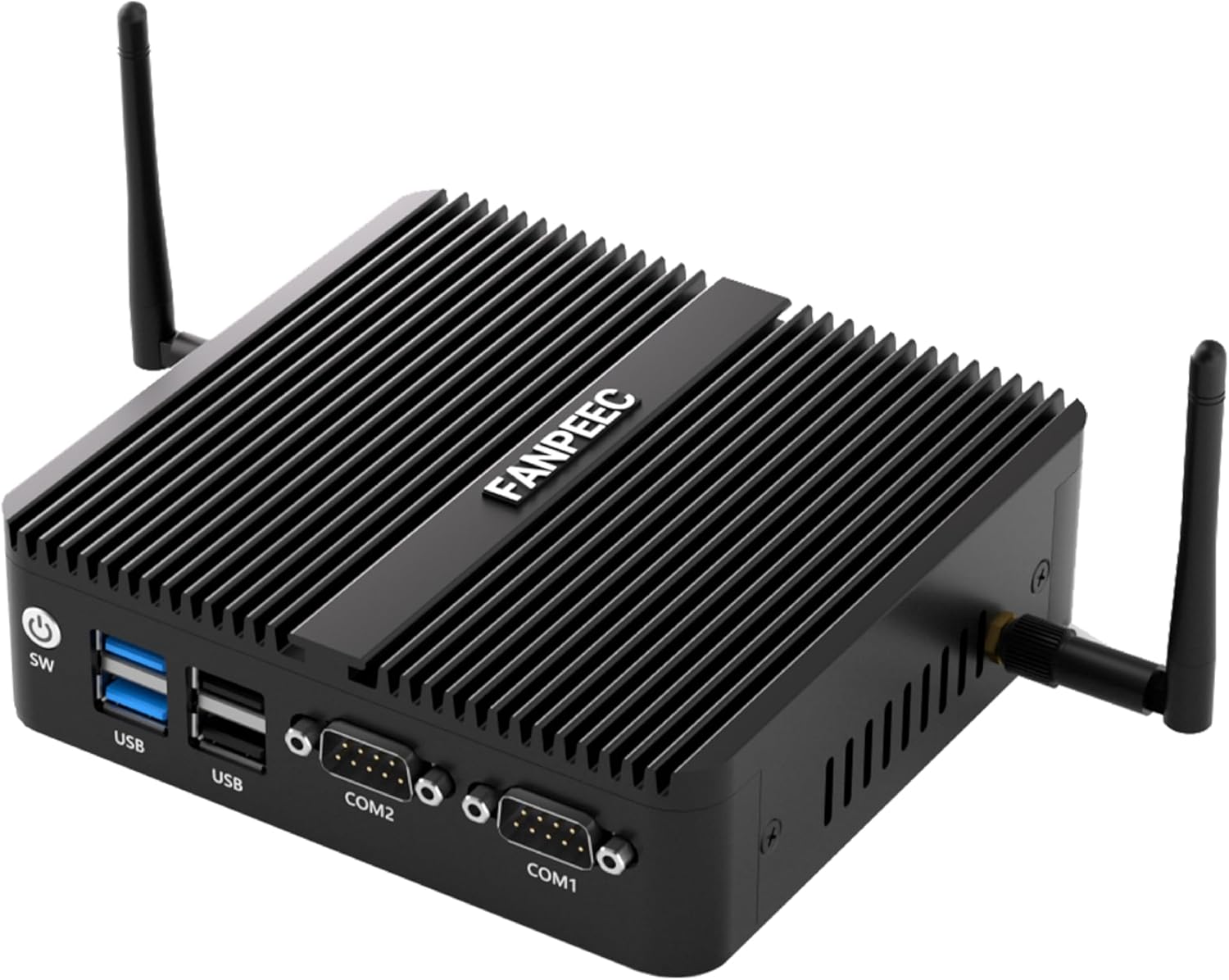
Figure 3.1: The FANPEEC Fanless Mini PC N100.
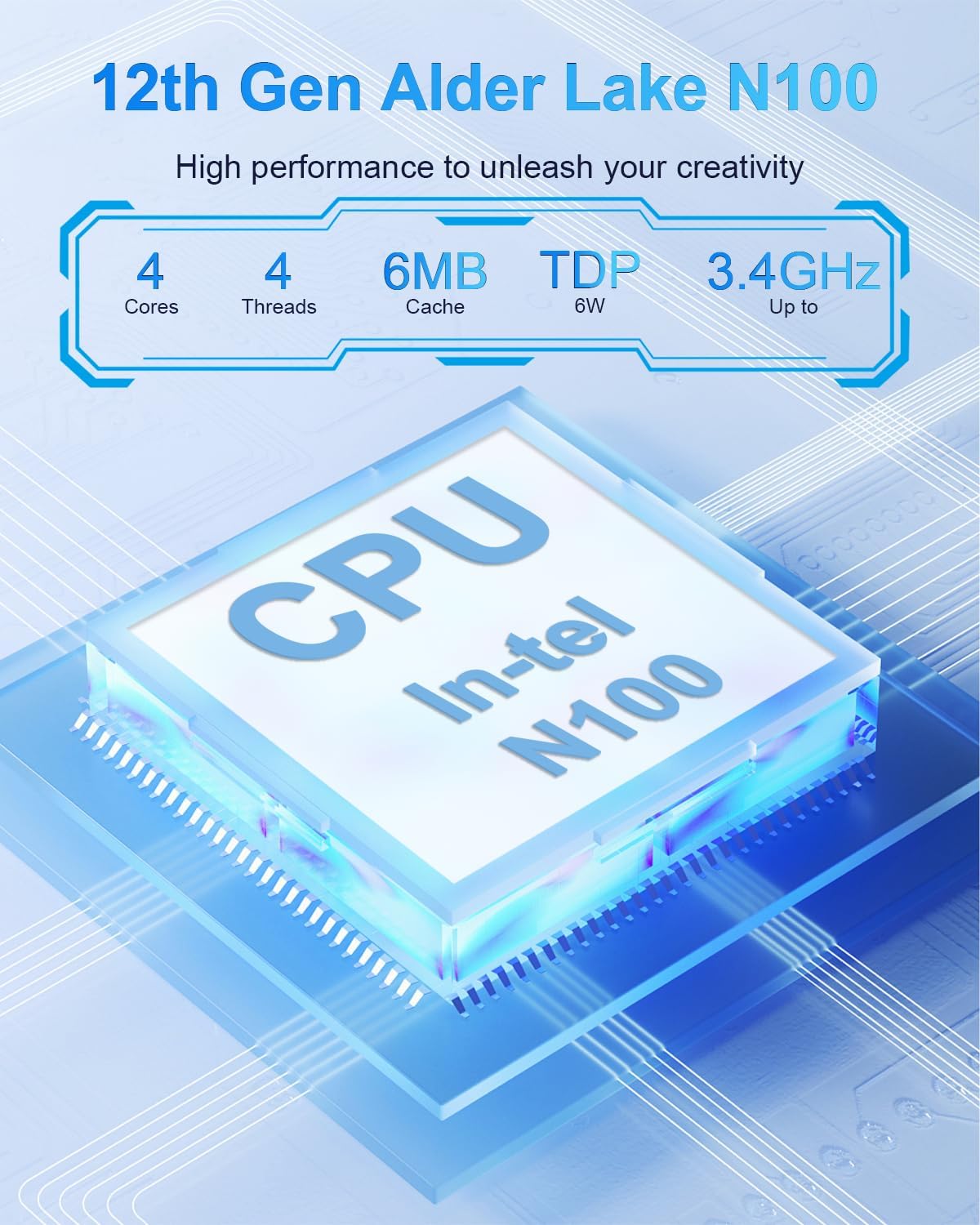
Figure 3.2: Intel N100 Processor details.
3.2 Hardware Overview (Ports)
The FANPEEC Mini PC N100 features a comprehensive set of ports for diverse connectivity:
- Front Panel: Power Button (SW), 2x USB 2.0 ports, 2x USB 3.0 ports, 2x RS232 COM ports (COM1, COM2)
- Rear Panel: DC In, 2x HD 2.0 ports, 1x DP 1.2 port, 2x Gigabit LAN ports, Audio (SPK/MIC)
- Wireless: 2x Antenna connectors for WiFi5 and Bluetooth 4.2

Figure 3.3: Front and Rear Port Layout.
4. Initial Setup
- Connect Antennas: Screw the two WiFi antennas onto the connectors on the rear panel of the mini PC.
- Connect Display: Connect your monitor(s) to the HD (HDMI) or DP (DisplayPort) ports using the provided HDMI cable or a compatible DP cable. The device supports up to three displays simultaneously.
- Connect Peripherals: Connect your keyboard, mouse, and other USB devices to the available USB 2.0 or USB 3.0 ports.
- Connect Network (Optional): For a wired network connection, connect an Ethernet cable from your router or modem to one of the LAN ports.
- Connect Power: Connect the power adapter to the DC In port on the mini PC, then plug the power cord into an electrical outlet.
- Power On: Press the power button (SW) on the front panel to turn on the mini PC.
4.1 Mounting Options
The FANPEEC Mini PC N100 can be placed on a desktop or mounted behind a monitor using the included VESA bracket to save space.
- Desktop Placement: Simply place the mini PC on a flat, stable surface.
- VESA Mount: Attach the VESA bracket to the back of your VESA-compatible monitor, then secure the mini PC to the bracket. This allows for a clean, integrated setup.

Figure 4.1: Various placement options including VESA mount.
5. Operating Instructions
5.1 Operating System
The mini PC comes with Windows 11 Pro pre-installed. It also supports other operating systems such as Windows 10, various Linux distributions, pfSense, and OPNsense. To install a different operating system, you may need to adjust BIOS settings for boot order.
5.2 Storage Expansion
The device offers flexible storage expansion options:
- M.2 NVME SSD Slot: Supports M.2 2280 NVME SSDs up to 2TB.
- MSATA Slot: Supports MSATA SSDs up to 1TB (one 128GB MSATA SSD is pre-installed).
- SATA3.0 Interface: For installing a 2.5-inch HDD/SSD (up to 2TB). Note: HDD thickness should not exceed 7mm.
To access the internal storage slots for upgrades, carefully open the chassis. Refer to Figure 5.1 for the internal layout.
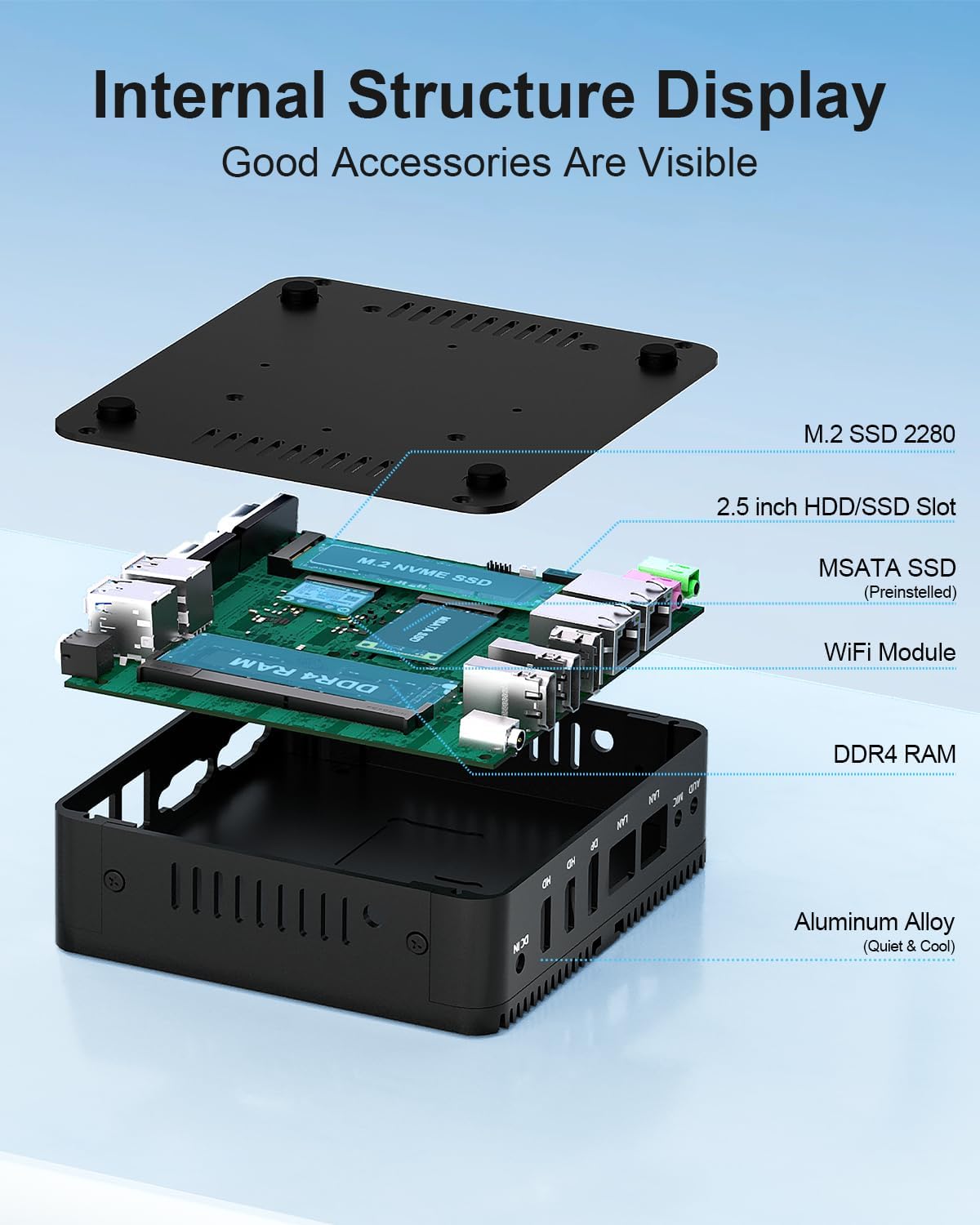
Figure 5.1: Internal Structure and Storage Slots.
5.3 Display Configuration
The mini PC supports connecting up to three displays simultaneously for enhanced productivity or multimedia experiences. Use the two HD 2.0 ports and one DP 1.2 port. Ensure your monitors support 4K resolution for optimal visual quality.
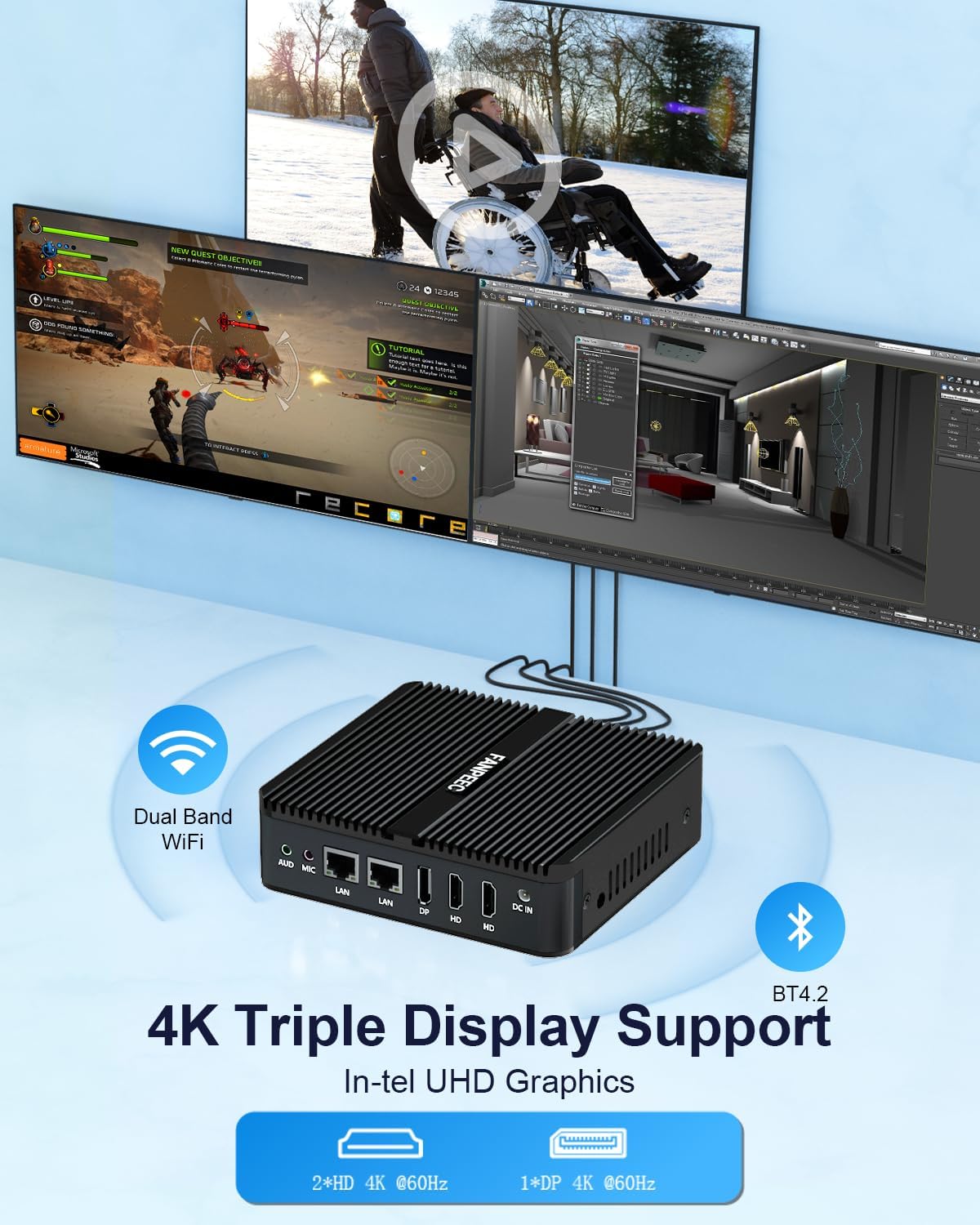
Figure 5.2: Triple Display Setup.
5.4 Wireless Connectivity
The device includes integrated WiFi5 and Bluetooth 4.2 for wireless connections. Ensure the antennas are properly installed for optimal signal strength. Dual Gigabit Ethernet ports are available for stable wired network connections.
5.5 Advanced System Settings
The FANPEEC Mini PC N100 includes several advanced features accessible via the BIOS/UEFI settings:
- TPM 2.0: Trusted Platform Module for enhanced security features, including secure boot and data encryption.
- Auto Power On: Configures the PC to automatically power on after a power outage.
- Wake On LAN (WOL): Allows the PC to be powered on remotely over a network connection.
- PXE Boot: Preboot Execution Environment for booting the PC from a network server.
- Watchdog Timer: A hardware timer that can reset the system if it becomes unresponsive, useful for industrial applications.
Access these settings by pressing the DEL or F2 key during startup to enter the BIOS/UEFI menu.
6. Maintenance and Care
To ensure the longevity and optimal performance of your fanless mini PC, follow these maintenance guidelines:
- Keep Clean: Regularly clean the exterior of the device with a soft, dry cloth. Avoid using liquid cleaners directly on the PC.
- Ventilation: Although fanless, ensure the heat sink fins are not obstructed to allow for proper heat dissipation.
- Environment: Operate the PC in a well-ventilated area, away from direct sunlight, excessive heat, humidity, and dust.
- Power Supply: Use only the original power adapter provided with the device.
- Software Updates: Keep your operating system and drivers updated to ensure stability and security.
7. Troubleshooting
This section addresses common issues you might encounter with your FANPEEC Mini PC N100.
7.1 No Power
- Check Power Connection: Ensure the power adapter is securely connected to the PC and the electrical outlet.
- Test Outlet: Verify the electrical outlet is functional by plugging in another device.
- Power Button: Confirm the power button is pressed firmly.
7.2 No Display Output
- Cable Connection: Ensure the HDMI or DP cable is securely connected to both the PC and the monitor.
- Monitor Input: Verify the monitor is set to the correct input source (e.g., HDMI1, DisplayPort).
- Test Monitor/Cable: Try connecting the monitor with a different cable or to another device to rule out monitor or cable issues.
7.3 No Internet Connection
- Wired Connection: Check the Ethernet cable connection to both the PC and the router/modem. Verify router/modem status.
- Wireless Connection: Ensure WiFi antennas are attached. Check if WiFi is enabled in the operating system and if you are connected to the correct network with the correct password.
- Driver Issues: Ensure network drivers are properly installed and updated in the operating system.
7.4 System Slowdown or Unresponsiveness
- Resource Usage: Check Task Manager (Windows) or system monitor (Linux) for applications consuming excessive CPU, memory, or disk resources.
- Overheating: Ensure the PC is in a well-ventilated area and the heat sink fins are not blocked. While fanless, prolonged high load in a hot environment can affect performance.
- Storage Space: Ensure there is sufficient free space on your primary drive.
- Malware Scan: Run a full system scan for viruses or malware.
8. Technical Specifications
| Feature | Specification |
|---|---|
| Brand | FANPEEC |
| Model Series | FA-H3D |
| Processor | Intel N100 (4 Cores, 4 Threads, 3.4 GHz Max, 6W TDP) |
| RAM | 8 GB DDR4 (3200 MHz, 260-pin SODIMM, Max 32GB) |
| Storage | 128 GB MSATA SSD (pre-installed), M.2 NVME SSD slot (Max 2TB), SATA3.0 for 2.5" HDD/SSD (Max 2TB) |
| Graphics Coprocessor | Intel UHD GPU |
| Max Screen Resolution | 3840 x 2160 (4K) |
| Display Outputs | 2x HD 2.0, 1x DP 1.2 (Triple Display Support) |
| Operating System | Windows 11 Pro (pre-installed) |
| Wireless Connectivity | WiFi5, Bluetooth 4.2 |
| LAN Ports | 2x Gigabit Ethernet |
| USB Ports | 2x USB 3.0, 2x USB 2.0 |
| Serial Ports | 2x RS232 COM |
| Audio Ports | SPK/MIC |
| Dimensions (LxWxH) | 5.31 x 5 x 1.54 inches (13.5 x 12.7 x 3.9 cm) |
| Item Weight | 1.32 pounds (0.6 kg) |
| Special Features | Fanless Design, TPM 2.0, Auto Power On, Wake On LAN, PXE, Watchdog Timer |
9. Safety and Warnings
Please observe the following safety guidelines:
- Connect the power supply correctly.
- Keep away from damp and high-temperature environments.
- Keep away from sources of fire and water.
- Parents should strictly control children's device time and content access.

Figure 9.1: Manufacturer Information and Warnings.
10. Warranty Information
For warranty details, please refer to the specific warranty card included with your product or your purchase documentation. FANPEEC products typically come with a manufacturer's warranty covering defects in materials and workmanship under normal use. Please retain your proof of purchase for warranty claims.
11. Customer Support
If you encounter any issues or have questions not covered in this manual, please contact FANPEEC customer support:
- Email Support: fanpeec_service@126.com
- Amazon Support: Log in to your Amazon account, find your order, and click "Get Help" for direct assistance from the seller.