
BigBuild Technology 32GB U3 Micro SDHC Memory Card
Instruction Manual
BigBuild Technology 32GB U3 Micro SDHC Memory Card
1. Product Overview
The BigBuild Technology 32GB U3 Micro SDHC Memory Card is designed to provide superior storage and performance for your digital devices, especially high-resolution cameras like Campark wildlife trail cameras. It offers ultra-fast 100MB/s speeds, making it ideal for capturing high-resolution photos and recording smooth Full HD, 3D, and 4K videos.
This memory card is built to high manufacturing standards, ensuring quality, reliability, and speed. Its advanced controller maintains sustained minimum speeds and broad compatibility for flawless operation.

Image 1.1: The BigBuild Technology 32GB Micro SDHC card, along with its included SD adapter and USB reader.
2. Key Features
- Capacity: 32GB for ample storage of photos and videos.
- Speed: Ultra-fast 100MB/s read speed, U3, Class 10, V30 for rapid data transfer and recording.
- Video Support: Optimized for Full HD, 3D, and 4K video recording.
- Durability: Designed to withstand demanding outdoor conditions, offering temperature, magnet, shock, vibration, and X-ray proofing.
- Included Accessories: Comes with an SD adapter and a USB reader for versatile data transfer.

Image 2.1: Visual representation of the memory card's capabilities, including support for various video formats and environmental resistance.
3. Package Contents
Your BigBuild Technology 32GB U3 Micro SDHC Memory Card package includes:
- 1 x BigBuild Technology 32GB Micro SDHC Memory Card
- 1 x SD Adapter
- 1 x USB Reader
- 1 x Durable Plastic Storage Case
4. Compatibility
This memory card is compatible with a wide range of devices that support Micro SDHC cards. It is specifically designed and tested for optimal performance with the following Campark Wildlife Trail Cameras:
- Campark T180
- Campark TC02
- Campark TC07
- Campark TC08
- Campark TC21
- Campark TC25
- Campark TC26
- Campark TC27
Always ensure your device supports Micro SDHC cards and the specified capacity before use.
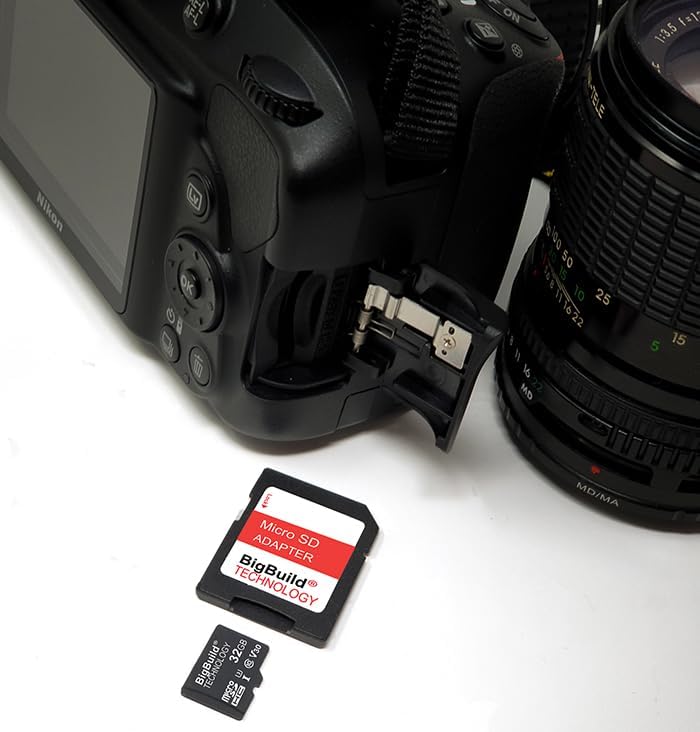
Image 4.1: The Micro SD card and SD adapter shown alongside a DSLR camera, illustrating broad compatibility with various camera types.
5. Setup and Installation
- Insert the Micro SD Card: Locate the memory card slot on your compatible device (e.g., trail camera, smartphone, tablet). Gently insert the Micro SD card into the slot until it clicks into place. Ensure the card is oriented correctly to avoid damage.
- Using the SD Adapter: If your device uses a standard SD card slot (e.g., DSLR camera, laptop), insert the Micro SD card into the provided SD adapter. Then, insert the SD adapter into your device's SD card slot.
- Initial Recognition: Upon first insertion, your device should recognize the memory card. Some devices may prompt you to format the card. Refer to the Troubleshooting section if you encounter an error message.

Image 5.1: A BigBuild Technology Micro SD card being inserted into the side slot of a digital camera, demonstrating the installation process.
6. Usage Guidelines (Operating)
- Capturing Data: Once installed, the memory card will serve as the primary storage for your device. You can now capture photos, record videos, or save other data as per your device's functionality.
- Data Transfer: To transfer data to a computer or other device, you have two options:
- Using the SD Adapter: Insert the Micro SD card into the SD adapter, then insert the adapter into your computer's SD card slot.
- Using the USB Reader: Insert the Micro SD card into the USB reader, then plug the USB reader into an available USB port on your computer. The card will appear as a removable drive.
- Safe Removal: Always safely eject the memory card from your device or computer before physically removing it to prevent data corruption.

Image 6.1: The Micro SD card inserted into the compact USB reader, which is then plugged into a laptop's USB port for easy data transfer.
7. Care and Maintenance
- Storage: Store the memory card in its durable plastic storage case when not in use to protect it from dust, dirt, and physical damage.
- Handling: Handle the card carefully by its edges. Avoid touching the gold contacts to prevent static discharge or contamination.
- Environmental Conditions: Keep away from extreme temperatures, humidity, and liquids. The card is designed to be robust, but excessive exposure can still cause damage.
- Physical Damage: Do not bend, twist, or apply excessive force to the card. Avoid using damaged cards.
- Data Backup: Regularly back up important data from your memory card to another storage device to prevent data loss.
8. Troubleshooting
If you encounter issues with your memory card, refer to the following common solutions:
- Card Error Message: If, after inserting the memory card, your device shows a card error message, it may need to be formatted. The "Format" option is usually available in your device's "Settings" or "Menu" options. Formatting will erase all data on the card, so ensure you have backed up any important files first.
- Card Not Recognized: Ensure the card is inserted correctly and fully into the slot. Try inserting it into another compatible device or using the USB reader to check if the card is recognized.
- Slow Performance: Ensure your device is compatible with U3/Class 10 speeds. If the issue persists, try formatting the card or testing it with another device.
9. Specifications
| Attribute | Value |
|---|---|
| Capacity | 32GB |
| Flash Memory Type | Micro SDHC |
| Secure Digital Association Speed Class | Class 10, U3, V30 |
| Product Dimensions | 1.26 x 0.94 x 0.08 inches |
| Item Weight | 1.06 ounces |
| Manufacturer | BigBuild Technology |
| ASIN | B0DP5G4BQM |
10. Safety Warnings
Please observe the following safety warnings to ensure safe and proper use of your memory card:
- Keep out of reach of children.
- Avoid extreme temperatures.
- Keep away from moisture and liquids.
- Handle gently to prevent physical damage.
- Use only with compatible devices.
- Insert correctly to avoid damage.
- Backup data regularly.
- Do not use damaged cards.
- Avoid bending or twisting the card.
- Do not remove while reading or writing data.

Image 10.1: Safety warnings provided in multiple languages, emphasizing proper handling and care.
11. Warranty and Support Information
For detailed warranty information and further support, please visit the manufacturer's website or contact customer service.
- Legal Disclaimer: The microSD, microSDHC and microSDXC Logos are trademarks of SD-3C LLC.
- Manufacturer / UK Representative:
Big Build Technology Ltd
18 Balquharn Circle, Portlethen
Aberdeen AB12 4AH
United Kingdom
Email: customer.service@ememorycards.co.uk - EU Representative:
Big Build Technology Ltd
c/o, Global E-Commerce Experts
Rijnlanderweg 766 Unit H
2132 NM Hoofddorp
Netherlands
Email: rp@globalecommexperts.com

Image 11.1: English safety warnings and contact details for BigBuild Technology's support and representatives.