
Introduction
This manual provides instructions for the proper installation, operation, and maintenance of your BigBuild Technology 16GB Micro SDHC Memory Card. This memory card is designed to enhance the storage capacity and performance of compatible devices, including Nokia 230, Nokia 235, and Nokia 3210 cell phones.
The 16GB Micro SDHC card offers ultra-fast read speeds of up to 80MB/s, facilitating quicker app loading and smooth high-resolution media playback. It is built to high manufacturing standards to ensure reliability and broad compatibility.
Package Contents
- 1x BigBuild Technology 16GB Micro SDHC Memory Card
- 1x SD Adapter
- 1x Durable Plastic Storage Case

Image: The 16GB Micro SDHC card and its accompanying SD adapter, both branded BigBuild Technology.
Setup and Installation
Follow these steps to properly install your Micro SDHC memory card into your compatible device.
1. Inserting into a Cell Phone (e.g., Nokia 230, 235, 3210)
- Locate the SIM/SD Card Tray: Depending on your phone model, this tray is usually on the side or under the battery cover. Refer to your phone's manual for exact location.
- Eject the Tray: Use a SIM ejector tool or a small paperclip to open the tray if it's a side-loading type.
- Place the Micro SD Card: Carefully place the BigBuild Technology Micro SDHC card into the designated slot on the tray. Ensure the gold contacts are facing down and the card is oriented correctly. Do not force the card.
- Reinsert the Tray: Gently slide the tray back into the phone until it clicks into place.
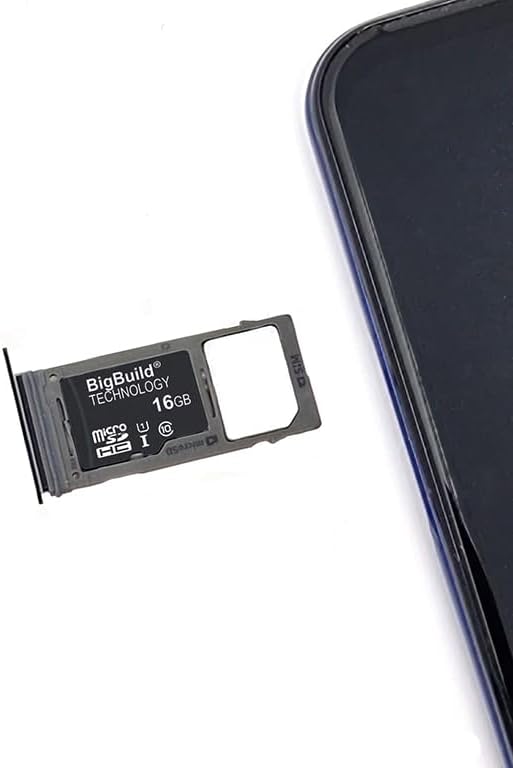
Image: A BigBuild Technology 16GB Micro SDHC card placed in a phone's SIM/SD card tray, ready for insertion into the device.

Image: Demonstrates the Micro SD card inserted into a phone's tray, while an SD adapter is shown inserted into a digital camera, illustrating versatile use.
2. Using the SD Adapter
The included SD adapter allows you to use your Micro SDHC card with devices that support standard SD cards, such as digital cameras, laptops, and card readers.
- Insert Micro SD Card into Adapter: Carefully slide the Micro SDHC card into the larger SD adapter until it clicks into place.
- Insert Adapter into Device: Insert the SD adapter (with the Micro SD card inside) into the SD card slot of your camera, laptop, or card reader.
- Data Transfer: Once recognized, you can transfer files to and from the card.
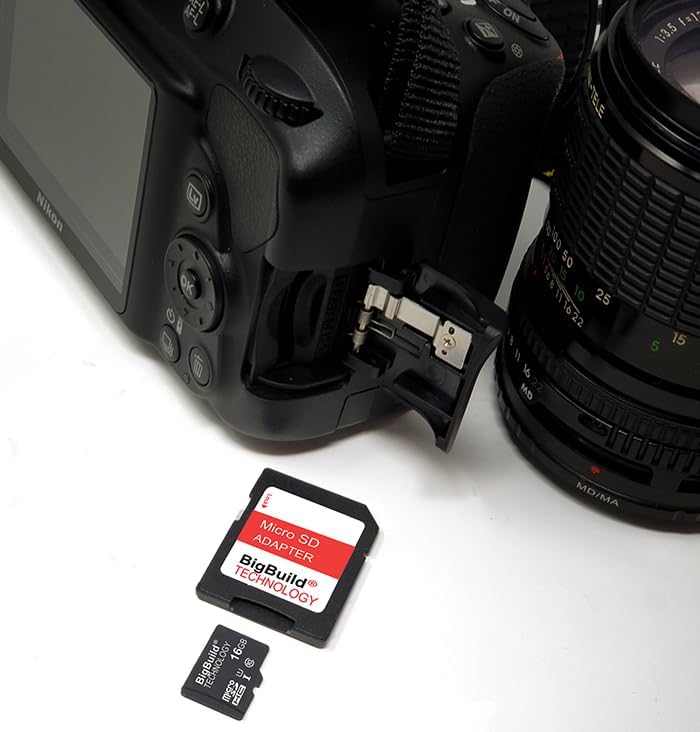
Image: The BigBuild Technology 16GB Micro SDHC card and its SD adapter are shown next to a digital camera, indicating compatibility for photography.

Image: The BigBuild Technology 16GB Micro SDHC card and its SD adapter are positioned next to a laptop, demonstrating its use for data transfer with computers.
Operating Instructions
Once installed, your BigBuild Technology 16GB Micro SDHC card will function as expanded storage for your device.
- Storage: Store photos, videos, music, and other files directly onto the memory card.
- App Storage: For compatible smartphones, you may be able to move certain applications or app data to the SD card to free up internal phone memory. Consult your device's settings for this option.
- High-Resolution Media: The card supports high-resolution photo storage and smooth Full HD video recording, ensuring your media is captured and stored without performance issues.
- Data Transfer: Use the included SD adapter to easily transfer files between your device and a computer or other SD-compatible devices.
Maintenance and Care
To ensure the longevity and optimal performance of your memory card, follow these guidelines:
- Keep Out of Reach of Children: Small parts can be a choking hazard.
- Avoid Extreme Temperatures: Do not expose the card to very high or very low temperatures.
- Avoid Moisture and Liquids: Keep the card dry.
- Handle Gently: Avoid bending, twisting, or applying excessive force to the card.
- Use Only with Compatible Devices: Ensure your device supports Micro SDHC cards.
- Insert Correctly: Always ensure the card is inserted properly to prevent damage.
- Backup Data Regularly: Periodically back up important data from your memory card to another storage device.
- Do Not Use Damaged Cards: If the card appears physically damaged, discontinue use.
- Do Not Remove While Reading or Writing Data: This can corrupt data or damage the card.

Image: The reverse side of the product packaging, displaying safety warnings and care instructions in English.
Troubleshooting
If you encounter issues with your memory card, consider the following:
- Card Not Recognized:
- Ensure the card is fully and correctly inserted into the device.
- Restart your device.
- Test the card in another compatible device or card reader to rule out a device-specific issue.
- Card Error Message:
If your device displays a card error message after inserting the memory card, it may require formatting. The "Format" option is usually available in your device's "Settings" or "Storage" menu. Warning: Formatting will erase all data on the card. Back up any important data before proceeding.
- Slow Performance:
- Ensure your device is compatible with SDHC Class 10 cards.
- Avoid filling the card to its maximum capacity, as this can sometimes affect performance.
- Check for any background processes on your device that might be impacting read/write speeds.
Specifications
| Brand | BigBuild Technology |
| Model Number | 8e0a3522-0de9-40a6-8b1e-3ab3155d8109 |
| Flash Memory Type | Micro SDHC |
| Memory Storage Capacity | 16 GB |
| Hardware Interface | SDHC |
| Secure Digital Association Speed Class | Class 10 |
| Read Speed | Up to 80 Megabytes Per Second |
| Product Dimensions | 1.26 x 0.94 x 0.08 inches (Micro SD card dimensions are smaller) |
| Item Weight | 0.04 Kilograms / 1.41 ounces |
| Compatible Devices | Nokia 230, Nokia 235, Nokia 3210 |
Note: All speed ratings are based on internal testing using USB 3.0 port. Maximum read/write speed is up to 18MB/s when using the USB 2.0 port. Read/write speed may vary depending on devices. 1GB = 1 billion bytes. Formatted storage space is less.

Image: The reverse side of the product packaging, detailing speed ratings and a legal disclaimer in multiple languages.
Warranty and Support
Your BigBuild Technology Micro SDHC Memory Card comes with a 5-Year Limited Warranty. For more detailed warranty information and other details, please visit www.ememorycards.com.
Legal Disclaimer
The microSD, microSDHC, and microSDXC Logos are trademarks of SD-3C LLC.
Contact Information
Manufacturer / UK Representative:
Big Build Technology Ltd
18 Balguharn Circle, Portlethen
Aberdeen AB12 4AH
United Kingdom
Email: customer.service@ememorycards.co.uk
EU Representative:
Big Build Technology Ltd
C/o, Global E-Commerce Experts
Rijnlanderweg 766 Unit H
2132 NM Hoofddorp
Netherlands
Email: rp@globalecommercexperts.com