1. Introduction
This manual provides comprehensive instructions for the setup, operation, and maintenance of your Zurjy Replacement Verizon FiOS TV One Voice Remote Control, model MG3-R32140B. Please read this manual thoroughly before use to ensure proper functionality and to maximize your user experience. This remote is designed to work specifically with Verizon FiOS TV One systems and does not support Frontier services.
2. Safety Information
- Do not expose the remote control to direct sunlight, heat sources, or extreme temperatures.
- Avoid dropping or subjecting the remote to strong impacts.
- Do not attempt to disassemble or modify the remote control. This will void the warranty.
- Keep batteries out of reach of children. If swallowed, seek immediate medical attention.
- Dispose of used batteries according to local regulations. Do not mix old and new batteries, or different types of batteries.
3. Package Contents
- 1 x Zurjy Verizon FiOS TV One Voice Remote Control (Model: MG3-R32140B)
- (Batteries are not included and must be purchased separately. AA batteries are required.)
4. Product Overview
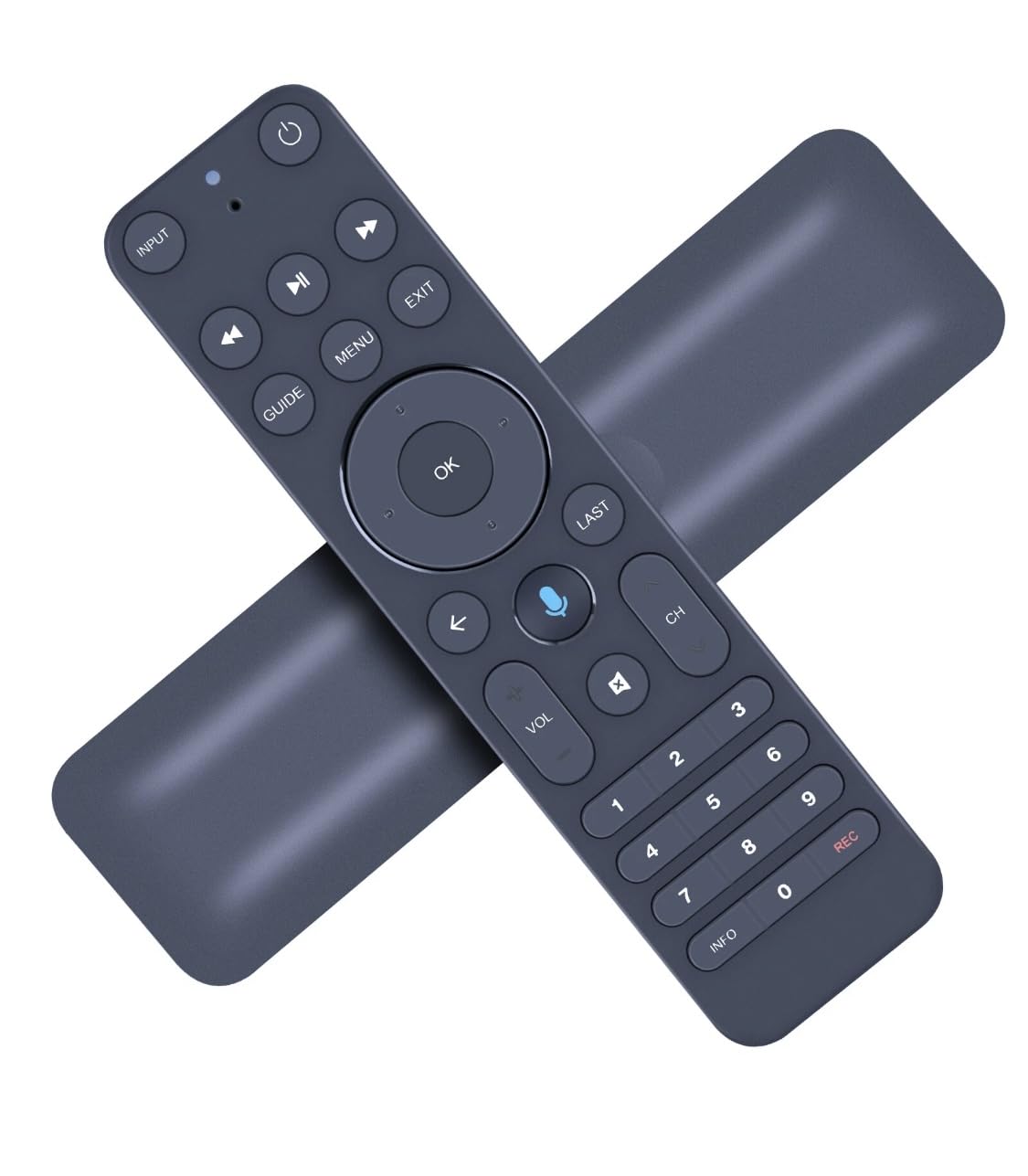
Figure 1: Front view of the Zurjy Verizon FiOS TV One Voice Remote Control.
This image displays the front of the Zurjy Verizon FiOS TV One Voice Remote Control. Key buttons visible include Power, Input, Play/Pause, Fast Forward, Rewind, Guide, Menu, Exit, OK, Last, Voice Search (microphone icon), Volume Up/Down, Channel Up/Down, Number Pad (0-9), Info, and Record.
Button Functions:
- Power Button: Turns the TV and/or FiOS TV One box on/off.
- Input Button: Cycles through video input sources on your TV.
- Navigation Pad (Up, Down, Left, Right, OK): Navigates menus and confirms selections.
- Play/Pause, Fast Forward, Rewind: Media playback controls.
- Guide: Accesses the TV program guide.
- Menu: Opens the main menu.
- Exit: Exits current menu or screen.
- Last: Returns to the previously viewed channel.
- Voice Search (Microphone Icon): Activates voice command functionality.
- VOL (Volume Up/Down): Adjusts the volume.
- CH (Channel Up/Down): Changes channels.
- Number Pad (0-9): Direct channel entry.
- Info: Displays program information.
- REC (Record): Initiates recording of current program.
5. Setup
5.1 Battery Installation
- Locate the battery compartment on the back of the remote control.
- Slide the battery cover downwards and lift to open.
- Insert two (2) AA batteries, ensuring the positive (+) and negative (-) terminals align correctly with the markings inside the compartment.
- Replace the battery cover by sliding it back into place until it clicks securely.
5.2 Pairing Instructions (Bluetooth Low Energy - BLE)
The Zurjy remote connects to your FiOS TV One box via Bluetooth, eliminating the need for direct line-of-sight. Ensure your FiOS TV One box is powered on before proceeding.
- Point the remote control towards your FiOS TV One box.
- Press and hold the OK button and the FiOS TV button (if present, otherwise refer to your FiOS TV One manual for pairing mode instructions) simultaneously for approximately 5 seconds. The indicator light on the remote should begin to flash.
- Follow any on-screen prompts that appear on your television to complete the pairing process.
- Once successfully paired, the indicator light on the remote will stop flashing.
- Test the remote's functionality by pressing various buttons.
Note: The remote can operate wirelessly up to 25 feet from the FiOS TV One box, even if the box is hidden in a non-metal enclosure.
6. Operating Instructions
6.1 Voice Search Functionality
The voice search feature allows for quick and convenient content discovery.
- Press and hold the Voice Search button (microphone icon) on the remote control.
- Speak your command clearly into the microphone located on the remote. Examples include:
- "What's on tonight?"
- "Find movies starring [Actor's Name]"
- "Go to channel [Channel Number]"
- "Open Netflix"
- Release the Voice Search button when you have finished speaking.
6.2 Motion Activated Backlight
The remote features a motion-activated backlight for improved visibility in low-light conditions.
- A sensor on the back of the remote detects movement.
- When motion is detected, the buttons will illuminate automatically.
- The backlight will turn off after a period of inactivity to conserve battery life.
6.3 Find My Remote Feature
If you misplace your remote, the FiOS TV One box can help you locate it.
- On your FiOS TV One box, press the Power button twice in quick succession.
- The paired remote control will emit a beeping sound.
- Once you locate the remote, press any button on it to silence the beeping.
7. Maintenance
- Clean the remote control with a soft, dry cloth. Do not use liquid cleaners or abrasive materials.
- If the remote is not used for an extended period, remove the batteries to prevent leakage.
- Ensure the battery compartment is always securely closed to prevent dust and moisture ingress.
8. Troubleshooting
| Problem | Possible Cause | Solution |
|---|---|---|
| Remote not responding. | Dead or incorrectly inserted batteries. | Replace batteries with new AA batteries, ensuring correct polarity. |
| Remote not responding. | Remote is not paired with FiOS TV One box. | Refer to Section 5.2 "Pairing Instructions" to re-pair the remote. |
| Voice search not working. | Microphone blocked or not holding the button. | Ensure the microphone is clear and you are holding down the Voice Search button while speaking. |
| Backlight not activating. | No motion detected or low battery. | Move the remote to activate the sensor. If still not working, replace batteries. |
| "Find My Remote" feature not working. | Remote is out of range or not paired. | Ensure the remote is within 25 feet of the FiOS TV One box and properly paired. |
| Remote does not control TV functions (e.g., volume, power). | TV control not programmed or compatible. | This remote is primarily for FiOS TV One. For universal TV control, refer to your FiOS TV One system's advanced settings or TV manual for programming instructions if supported. |
9. Specifications
- Model: MG3-R32140B
- Brand: Zurjy
- Connectivity: Bluetooth Low Energy (BLE)
- Compatible Devices: Verizon FiOS TV One (Television control may require additional setup via FiOS TV One system)
- Power Source: 2 x AA Batteries (not included)
- Dimensions: 3 x 1 x 5 inches (approximately)
- Weight: 3.2 ounces (without batteries)
- Special Features: Voice Control, Motion-Activated Backlight, "Find My Remote" function
- Color: Black
10. Warranty and Support
For warranty information or technical support, please refer to the documentation provided at the time of purchase or contact your retailer. Keep your purchase receipt as proof of purchase for any warranty claims.