1. Introduction
This manual provides essential information for the safe and efficient operation of your Antminer Power Supply APW12 PSU (Model: APW12-1417b). This power supply unit is specifically designed for Bitmain Bitcoin miners, including the S19, S19 Pro, S19j, T19, and L7 Air-Cooling ASIC mining machines. It ensures reliable and efficient power delivery to maintain smooth mining operations.
Key features include:
- Efficient Power Supply: Provides reliable power and cooling for Bitmain's ASIC mining machines.
- Robust Construction: Built with high-quality components for continuous operation in demanding environments.
- Multiple Connectors: Features multiple PCIe connectors for powering several mining units simultaneously.
- Air-Cooling System: Integrated powerful fans for optimal heat dissipation and overheating prevention.
- Compatibility: Seamless integration with various Bitmain Bitcoin and cryptocurrency mining hardware.
2. Safety Precautions
Always observe the following safety precautions to prevent injury or damage to the equipment:
- Ensure the power supply is disconnected from the main power source before installation or maintenance.
- Do not operate the PSU in wet or humid conditions.
- Ensure proper ventilation around the PSU to prevent overheating.
- Use only compatible power cables and connectors.
- Do not open the PSU casing; there are no user-serviceable parts inside.
- Keep out of reach of children.
3. Product Overview

Image 1: Front and side view of two Antminer APW12 PSUs, showcasing their compact design and cooling fans.
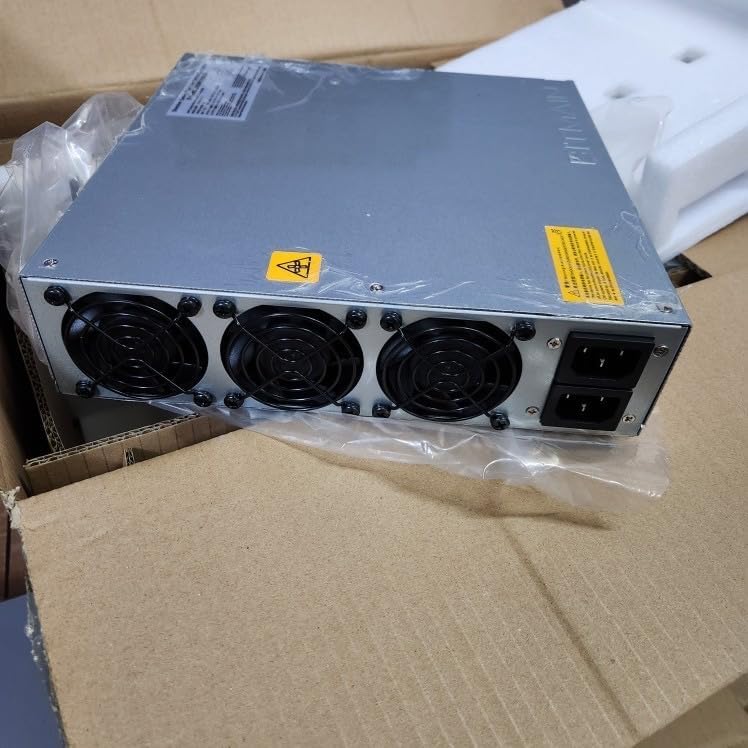
Image 2: The Antminer APW12 PSU as it appears when unboxed, showing the protective wrapping and fan array.

Image 3: Internal packaging of multiple Antminer APW12 PSUs, demonstrating secure foam inserts for shipping.
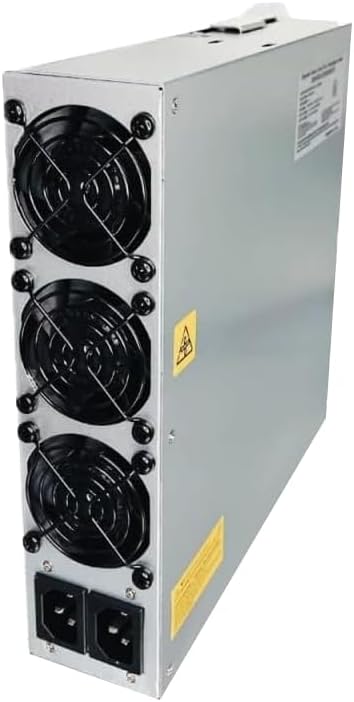
Image 4: Angled view of a single Antminer APW12 PSU, highlighting the power input ports and cooling fan arrangement.
4. Setup Instructions
- Unpacking: Carefully remove the APW12 PSU from its packaging. Inspect for any visible damage.
- Placement: Position the PSU in a well-ventilated area, ensuring adequate airflow around the unit. Avoid placing it near heat sources or in enclosed spaces.
- Connecting to Miner: Connect the PCIe power cables from the APW12 PSU to the corresponding power input ports on your Bitmain ASIC mining machine (e.g., S19, S19 Pro, S19j, T19, L7). Ensure all connections are secure.
- Power Connection: Connect the AC power cord(s) to the power input port(s) on the APW12 PSU. Then, plug the other end of the AC power cord(s) into a grounded electrical outlet. Ensure the outlet provides the correct voltage as specified in the PSU's specifications.
- Initial Power On: Once all connections are secure, you may power on your mining machine. The PSU will automatically begin providing power.
5. Operating Guidelines
The APW12 PSU is designed for continuous operation. Once properly installed, it will provide stable power to your mining equipment. Monitor the operating environment to ensure temperatures remain within recommended limits for optimal performance and longevity.
- Ensure consistent power input from your electrical source.
- Avoid sudden power interruptions, which can damage the PSU or connected equipment.
- Regularly check the PSU's fans for proper operation and ensure they are not obstructed.
6. Maintenance
Proper maintenance ensures the longevity and efficiency of your APW12 PSU.
- Cleaning: Periodically clean the exterior of the PSU and the fan grilles to prevent dust buildup. Use a soft, dry cloth or compressed air. Ensure the unit is powered off and unplugged before cleaning.
- Inspection: Regularly inspect power cables and connectors for any signs of wear, fraying, or damage. Replace damaged cables immediately.
- Ventilation: Ensure that the area around the PSU remains clear of obstructions to allow for proper airflow.
7. Troubleshooting
| Problem | Possible Cause | Solution |
|---|---|---|
| PSU does not power on. | No power from outlet; loose power cable; faulty PSU. | Check power outlet with another device. Ensure power cables are securely connected. If problem persists, contact support. |
| Overheating. | Insufficient ventilation; dust buildup in fans. | Ensure adequate space around PSU. Clean fans and vents. |
| Unstable power output. | Faulty power cable; overloaded PSU; internal component failure. | Replace power cables. Ensure total power draw does not exceed PSU capacity. Contact support if issue continues. |
8. Specifications
| Attribute | Value |
|---|---|
| Model Number | APW12-1417b |
| Brand | Generic |
| Product Dimensions | 10 x 10 x 3 inches |
| Item Weight | 9 pounds |
| Output Wattage | 4000 Watts |
| Manufacturer | Bitmain |
| Country of Origin | China |
| Date First Available | November 27, 2024 |
9. Warranty and Support
For information regarding warranty coverage, returns, or technical support, please refer to the seller's policy or contact the manufacturer directly. The product is sold by "Pstaroth" on Amazon.com.
You may also find additional support resources on the official Bitmain website or by contacting their customer service.
For protection plans, please refer to the options available at the time of purchase, such as the 3-Year or 4-Year Protection Plans offered.


