
ConsoleXpress O983840UR48ZS15D3O2BW
JCZK 300C PRO RC Helicopter User Manual
Model: JCZK 300C PRO | Brand: ConsoleXpress
1. Introduction
This manual provides essential information for the safe operation, setup, maintenance, and troubleshooting of your JCZK 300C PRO RC Helicopter. Please read this manual thoroughly before operating the helicopter to ensure proper function and to prevent damage or injury.
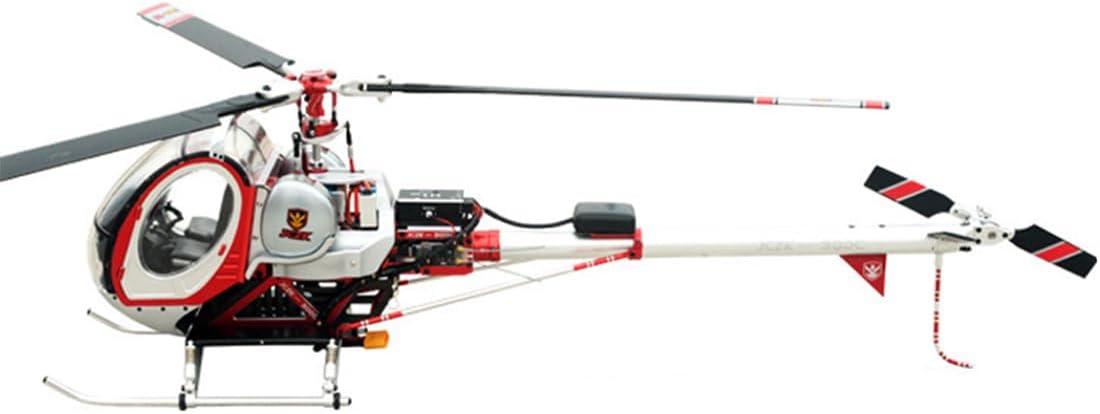
Figure 1.1: The JCZK 300C PRO RC Helicopter, showcasing its detailed design and robust build.
Key Features:
- Highly Realistic Design: Features true-to-life proportions with a detailed cockpit, opening doors, and scaled instrument panels, crafted from durable alloy materials with anodized and sandblasted finishes.
- Intelligent Flight Control: Equipped with an H1 Smart Flight Controller, offering auto-hover, GPS positioning, and one-touch return-to-home functions.
- Enhanced Aerodynamics & Stability: Triple rotor head with DFC flybarless design for improved handling and structural stability.
- Powerful Motor & Components: JCZK-470L professional brushless motor, 60A V4 Platinum ESC, and a 4000mAh 4S 30C battery for approximately 10 minutes of flight time.
- Premium Quality Build & Accessories: Spring-damped landing gear, full-metal high-pressure servos, LED navigation light system, AT9S PRO 12-channel remote control, and 80W IMAX B6AC smart charger.

Figure 1.2: Overview of key smart features including self-stabilization, hover, and return-to-home.
2. Safety Precautions
Always prioritize safety when operating the RC helicopter. Failure to follow these guidelines may result in injury, property damage, or voiding of the warranty.
- Operate in open areas away from people, animals, buildings, and power lines.
- Do not fly in strong winds or adverse weather conditions.
- Ensure the battery is fully charged and securely installed before each flight.
- Keep hands and face clear of rotating blades.
- Always turn on the remote controller before the helicopter and turn off the helicopter before the remote controller.
- Supervise children operating the helicopter. Recommended age is 12 years and up.
- Do not attempt to modify or disassemble the helicopter's components.
3. Setup and Assembly
3.1 Unboxing and Inspection
Carefully remove all components from the packaging. Inspect for any signs of damage during transit. The package should include:
- Aircraft *1
- Manual *1
- Remote controller *1 (RadioLink AT9S PRO)
- B6 charger *1 (IMAX B6AC smart charger)
- Battery *1 (YPG 40000mAh 4S battery)
3.2 Battery Charging
Use the provided IMAX B6AC smart charger to charge the YPG 40000mAh 4S battery. Connect the battery to the charger according to the charger's instructions. Ensure proper polarity. A full charge typically takes several hours. Do not leave charging batteries unattended.

Figure 3.1: The 4000mAh 4S LiPo battery, providing approximately 10 minutes of flight time.
3.3 Remote Controller Setup
The RadioLink AT9S PRO 12-channel remote controller comes pre-bound to the helicopter. Ensure the remote controller batteries are installed and charged. Familiarize yourself with the controls and switches as detailed in the remote controller's separate manual (if provided).

Figure 3.2: The AT9S PRO 12-channel remote control with LCD display, used for controlling the helicopter.
4. Operating Instructions
4.1 Pre-Flight Checklist
- Ensure the helicopter battery is fully charged and securely connected.
- Verify the remote controller batteries are charged.
- Check all blades and moving parts for obstructions or damage.
- Select a safe, open flying area.
4.2 Powering On and Binding
1. Turn on the remote controller first.
2. Connect the battery to the helicopter. The helicopter will perform a self-check and the LED navigation lights will indicate readiness.
3. Wait for GPS signal acquisition (if applicable). The H1 Smart Flight Controller will establish GPS positioning.

Figure 4.1: The H1 Smart Flight Controller enables precise GPS satellite positioning and enhanced stability.
4.3 Flight Modes
The JCZK 300C PRO offers three distinct flight modes for various skill levels and flight scenarios:
- Self-Stabilization Mode: The fuselage automatically restores balance. Manual adjustment is required to control flight attitude. This mode is fast, sensitive, and exciting, with a limited maximum inclination angle.
- Fixed-Point Mode: Intelligent flight control + GPS automatically maintains a fixed-point hover. No manual correction of flight attitude is needed. Suitable for beginners, offering super stable flight with no drift.
- Automatic Return Mode: After the helicopter rises to a certain height, it automatically returns to the take-off place. During the return descent, the left and right directions can be controlled to prevent collisions with obstacles.

Figure 4.2: Fixed-point hover simplifies flight for beginners by automatically maintaining balance and height.

Figure 4.3: Dual-mode GPS positioning enables intelligent return-to-home functions, including one-key return, low pressure automatic return, and signal interruption automatic return.
5. Maintenance
Regular maintenance ensures the longevity and optimal performance of your RC helicopter.
5.1 General Care
- Clean the helicopter with a soft, dry cloth after each use. Avoid water or harsh chemicals.
- Inspect blades, landing gear, and other components for cracks, bends, or loose connections.
- Ensure all screws are tightened appropriately. Do not overtighten.
- Store the helicopter in a cool, dry place away from direct sunlight.
5.2 Battery Care
- Always use the recommended charger.
- Do not overcharge or over-discharge the battery.
- Store batteries at room temperature and at approximately 50% charge if storing for extended periods.
- If the battery appears swollen or damaged, discontinue use immediately and dispose of it properly.
6. Troubleshooting
This section addresses common issues you might encounter with your JCZK 300C PRO RC Helicopter.
| Problem | Possible Cause | Solution |
|---|---|---|
| Helicopter does not respond to remote controller. | Battery low on helicopter or remote controller; Not properly bound; Interference. | Charge batteries; Re-bind remote controller and helicopter; Move to an area with less interference. |
| Helicopter drifts during flight. | Trims not adjusted; Wind interference; GPS signal weak. | Adjust trim settings on remote controller; Fly in calmer conditions; Ensure clear view of sky for GPS. |
| Short flight time. | Battery not fully charged; Battery degradation; Aggressive flying. | Ensure full charge; Consider replacing old battery; Fly more conservatively. |
| Helicopter crashes upon automatic return. | Obstacles in return path; GPS home point not accurately set. | Ensure clear return path; Confirm GPS lock and home point before takeoff. |
7. Specifications
Detailed technical specifications for the JCZK 300C PRO RC Helicopter:
| Component/Parameter | Specification |
|---|---|
| Model Number | O983840UR48ZS15D3O2BW |
| Body Length | 700mm |
| Body Width | 125mm |
| Body Height | 230mm |
| Main Rotor Size | 360mm |
| Tail Rotor Size | 69mm |
| Main Rotor Diameter | 820mm |
| Tail Rotor Diameter | 180mm |
| Motor Gear | 13T |
| Transmission Main Gear | 151T |
| Tail Transmission Main Gear | 56T |
| Tail Transmission Gear | 15T |
| Gear Ratio | 11:1:3.72 |
| Single Aircraft Weight | 2000g (4.41 lbs) |
| Motor | Professional brushless motor (JCZK-470L, 1150W output) |
| ESC | 60A brushless ESC (V4 Platinum) |
| Servo | Swashplate servo*3, tail servo*1 (full-metal high-pressure servos) |
| Remote Controller | RadioLink AT9S PRO 2.4GHz/12-channel |
| Battery | YPG 40000mAh 4S 30C battery |
| Charger | Intelligent balance charger (IMAX B6AC 80W) |
| Flight Time | Approximately 10 minutes (under ideal conditions) |
| Product Dimensions | 70 x 82 x 23cm (27.56 x 32.28 x 9.06 inches) |
| Product Weight | 3000g (6.61 pounds) |
| Recommended Age | 12 years and up |
8. Warranty and Support
ConsoleXpress stands behind the quality of its products. For specific warranty terms and conditions, please refer to the warranty card included with your product or visit the official ConsoleXpress website.
If you encounter any issues or require technical assistance, please contact ConsoleXpress customer support through their official channels. Provide your product model number (JCZK 300C PRO / O983840UR48ZS15D3O2BW) and a detailed description of the problem for efficient service.
Note: Unauthorized modifications or improper operation may void your warranty.
Ask a question about this manual
Ask about setup, troubleshooting, compatibility, parts, safety, or missing instructions. Manuals+ will review the question and use this page’s manual context to help answer it.