
SANSHREUNI A16Pro
SANSHREUNI A16 Pro Unlocked Phone User Manual
Model: A16Pro
Introduction
This manual provides comprehensive instructions for the setup, operation, maintenance, and troubleshooting of your SANSHREUNI A16 Pro Unlocked Phone. Please read this manual thoroughly before using your device to ensure proper functionality and to maximize your user experience.
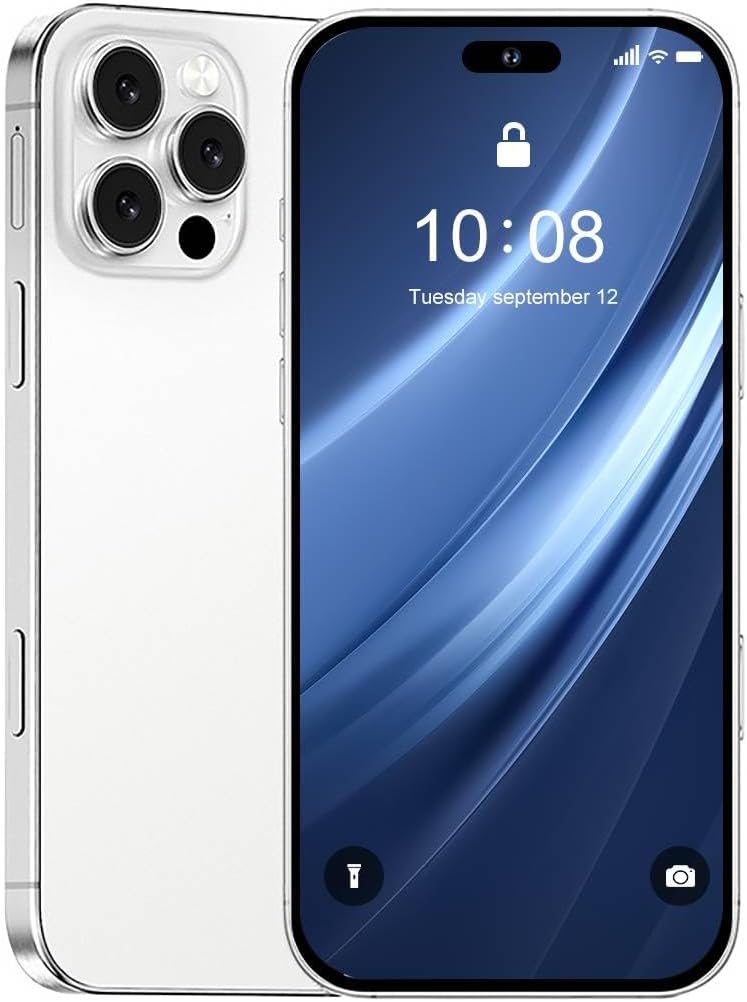
Image: Front and back view of the SANSHREUNI A16 Pro Unlocked Phone, showcasing its sleek design and camera module.
Package Contents
Upon opening your SANSHREUNI A16 Pro package, please verify that all items listed below are present and in good condition.
- SANSHREUNI A16 Pro Unlocked Phone
- Charger (Type-C compatible)
- Earphones
- Screen Protector
- Protective Phone Case
- Mobile Manual (this document)
- SIM Ejector Tool (Needle)

Image: Visual representation of the items included in the SANSHREUNI A16 Pro phone package, such as the phone, charger, earphones, screen protector, case, and manual.
Setup Guide
1. Inserting SIM Cards and TF Card
- Locate the SIM card tray on the side of your phone.
- Insert the SIM ejector tool into the small hole next to the tray and gently push until the tray pops out.
- Place your Nano SIM cards (up to two) and/or a TF card into the designated slots on the tray. Ensure the gold contacts face downwards.
- Carefully reinsert the tray into the phone until it clicks into place.

Image: Close-up view of the dual Nano SIM card and TF card tray, illustrating how to correctly insert the cards.
2. Initial Power On and Setup
- Press and hold the Power button (located on the side) until the SANSHREUNI logo appears.
- Follow the on-screen prompts to select your language, connect to a Wi-Fi network, and set up your Google account.
- Configure security settings, including facial recognition and fingerprint unlock, for enhanced privacy.
3. Charging the Battery
Before first use, it is recommended to fully charge the phone's 7000mAh battery. Use the provided Type-C charger.
- Connect the Type-C end of the charging cable to the phone's charging port.
- Connect the USB end of the cable to the power adapter, then plug the adapter into a wall outlet.
- The charging indicator will appear on the screen.

Image: An illustration demonstrating the phone being charged, highlighting its 7000mAh battery capacity and Type-C charging port.
Operating Your Phone
Display and Navigation
The A16 Pro features a vibrant 6.73-inch HD display with a resolution of 3088 x 1440 pixels and a 120Hz refresh rate, providing a smooth visual experience for all your activities.

Image: The phone displaying a high-definition image on its 6.73-inch full-screen, emphasizing the visual quality.
Camera Functions
Equipped with a 108MP camera system, the A16 Pro allows for high-quality photography. The side fingerprint button can also be used as a camera shutter for quick captures.
- Launch Camera: Click the side fingerprint button to quickly open the camera app.
- Take Photo: Click the side fingerprint button again to instantly take a photo.
- Record Video: Click and hold the side fingerprint button to start recording video.
- Zoom Control: A light press on the side fingerprint button can open zoom controls.

Image: Hands holding the phone, demonstrating the use of the side fingerprint button as a camera shutter for various functions like launching the camera, taking photos, and recording videos.
Performance and Storage
The A16 Pro is powered by a Snapdragon 8 Gen 3 processor, ensuring smooth performance for demanding tasks, gaming, and streaming. It comes with 8GB of RAM and 256GB of internal storage, providing ample space for apps, photos, and files.

Image: A visual representation of the Snapdragon 8 Gen 3 processor chip, highlighting its role in the phone's powerful performance.

Image: An illustration showing the phone's large memory capacity, indicating 8GB RAM and 256GB ROM, with a graphic of a game running smoothly.
Maintenance and Care
- Cleaning: Use a soft, lint-free cloth to clean the screen and body of the phone. Avoid abrasive materials or harsh chemicals.
- Battery Life: To prolong battery life, avoid extreme temperatures and do not let the battery drain completely before recharging regularly.
- Software Updates: Keep your Android 13 OS updated to the latest version for optimal performance and security.
- Protection: Use the provided screen protector and phone case to guard against scratches and minor impacts.
Troubleshooting
| Problem | Possible Cause | Solution |
|---|---|---|
| Phone does not turn on | Low battery; software crash | Charge the phone for at least 30 minutes. If still unresponsive, perform a force restart by holding the Power button for 10-15 seconds. |
| Poor network signal | Out of network coverage; incorrect SIM insertion | Move to an area with better coverage. Reinsert SIM card correctly. Verify carrier compatibility (does not work with AT&T, Cricket, CDMA networks like Verizon, Sprint, Boost). |
| Apps crashing or freezing | Insufficient RAM; outdated app; software bug | Close background apps. Update the app from the Play Store. Clear app cache/data. Restart the phone. |
| Battery drains quickly | High screen brightness; many background apps; poor signal | Reduce screen brightness. Close unnecessary background apps. Enable battery saver mode. |
Specifications
| Feature | Detail |
|---|---|
| Model | A16Pro |
| Operating System | Android 13.0 |
| Display | 6.73 inches HD, 3088 x 1440 resolution, 120Hz Refresh Rate |
| Processor | Snapdragon 8 Gen 3 (10-Core CPU, 2.6 GHz) |
| RAM | 8 GB |
| Internal Storage | 256 GB |
| Expandable Storage | Supports TF Card |
| Battery Capacity | 7000mAh |
| Camera | 108MP (Main) |
| Connectivity | 5G, Dual SIM, USB, GPS, Bluetooth 5.3, 3.5mm Audio Jack |
| Security Features | Facial Recognition, Fingerprint Button Unlock |
| Color | White |
| Dimensions | 7.08 x 3.74 x 2.16 inches |
| Weight | 15.7 ounces |
Warranty and Support
For any issues or inquiries regarding your SANSHREUNI A16 Pro Unlocked Phone, please refer to the contact information provided in your purchase documentation or visit the official SANSHREUNI website for support resources.
The product comes with a standard manufacturer's warranty. Please retain your proof of purchase for warranty claims. Details regarding the warranty period and terms are typically included in the packaging or available on the manufacturer's website.
If you have any problems during the experience of the phone, please feel free to contact us, we will solve the problem with you in time, wish you a happy life.
Ask a question about this manual
Ask about setup, troubleshooting, compatibility, parts, safety, or missing instructions. Manuals+ will review the question and use this page’s manual context to help answer it.