
VSYSTO D6RL
VSYSTO Motorcycle Dash Cam D6RL User Manual
Model: D6RL
Introduction
This user manual provides detailed instructions for the installation, operation, maintenance, and troubleshooting of your VSYSTO D6RL Motorcycle Dash Cam. Please read this manual thoroughly before using the product to ensure proper function and safety. The VSYSTO D6RL is designed to record your rides with dual 1080P cameras, offering features like night vision, WiFi connectivity, loop recording, and emergency recording.
What's in the Box
Verify that all components listed below are included in your package:
- Main unit with bracket
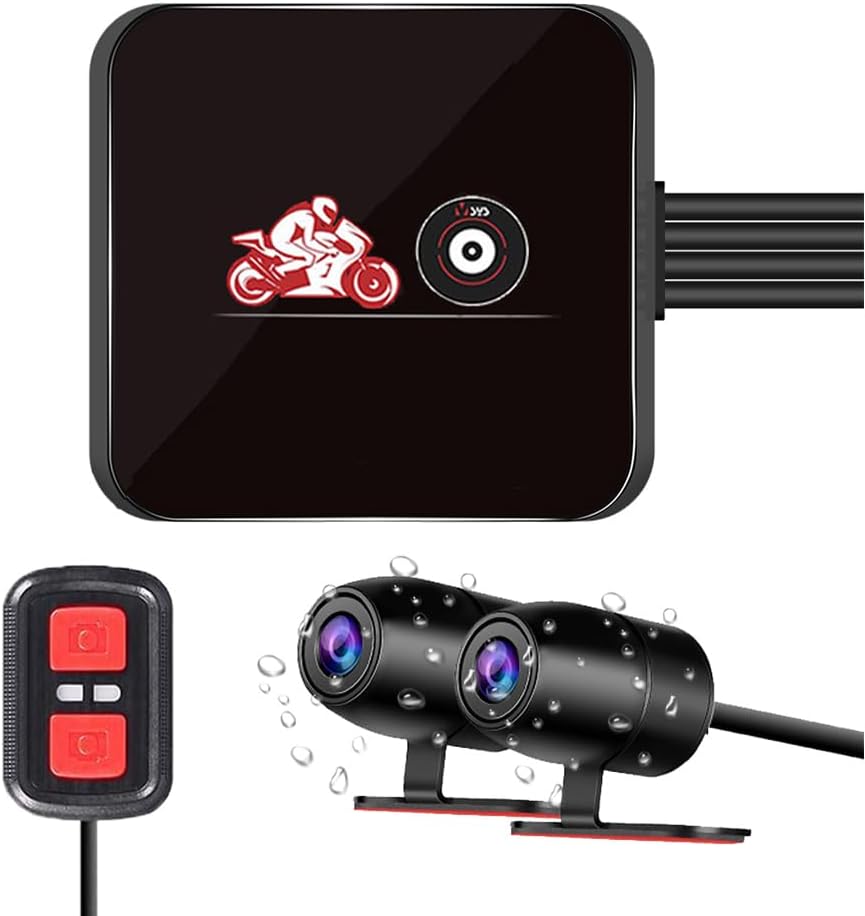
- 2 Cameras (Front and Rear)
- Wired controller
- Power cable
- USB Cable (for testing/data transfer)
- Cable ties

Product Overview
The VSYSTO D6RL Motorcycle Dash Cam system consists of a main recording unit, two cameras (front and rear), and a wired controller. Key features include:
- Dual 1080P Night Vision Cameras: Records clear video in various lighting conditions.
- WiFi Function: Connects to a mobile app for viewing, editing, and sharing recordings.
- Wired Controller: Allows for one-key photo capture and video locking, with LED indicators for status.
- Waterproof Cameras and Wired Controller: Designed to withstand rain and splashes (main unit is not waterproof).
- Loop Recording: Automatically overwrites older files when the storage card is full.
- Emergency Recording (G-Sensor): Automatically locks video files upon detecting a collision.
- 130° Wide Angle Lens: Captures a broad field of view.


Setup and Installation
Proper installation is crucial for the optimal performance of your dash cam. The main unit is compact and designed to be placed in a dry location, such as under the motorcycle seat or in the trunk, as it is not waterproof.
Main Unit Placement
Select a secure, dry location for the main unit, such as under the seat. Ensure it is protected from direct water exposure.

Camera and Wired Controller Installation
Mount the front and rear cameras in positions that provide a clear, unobstructed view of the road. The wired controller should be mounted in an easily accessible location on your handlebars.

Power Connection
Connect the power cable to your motorcycle's battery and ACC power. The red wire connects to the positive pole, the black wire to the negative pole, and the yellow wire to the ACC power, which is controlled by the ignition key.


Important: Do not use chargers or power banks with output voltages exceeding 5V, as this may damage the recorder.

Operating Instructions
Power On/Off
The dash cam will automatically power on and begin recording when the motorcycle ignition is turned on (ACC triggered). It will power off automatically when the ignition is turned off.
Wired Controller Functions
The wired controller provides quick access to essential functions:
- Buttons: Press any button to save the current video file as an emergency file and simultaneously take two photos (front and rear cameras).
- Indicator Light:
- Slow flash: Recording normally.
- Quick flash: Emergency recording in progress.
- Always on: Recording stopped.

WiFi Function and Mobile App
The built-in WiFi module allows you to connect your smartphone to the dash cam via a dedicated mobile application (available for Android and iOS). This app enables you to:
- Real-time preview of video footage.
- Edit and playback recorded videos.
- Download and share video files directly from your phone.
- Turn on the recorder.
- Open WLAN function on your mobile phone, find the corresponding WiFi name of the recorder (e.g., "MotoDV_D6RL"), and enter the password to connect.
- Open the WiFi camera app, click "Enter Recorder".
- Connection successful.


Loop Recording
The dash cam supports loop recording, allowing you to set video segment lengths (e.g., 1, 2, 3, or 5 minutes). When the memory card is full, the system will automatically overwrite the oldest recorded video files to ensure continuous recording.

Emergency Recording
The VSYSTO D6RL offers two methods for emergency recording:
- Auto Emergency Recording: The built-in G-sensor detects collisions or sudden impacts and automatically locks the current video file, preventing it from being overwritten by loop recording. These files are typically named with "GSR".
- Manual Emergency Recording: Short press any button on the wired controller to manually trigger an emergency recording. This will lock the current video file, marked with "KEY" in its filename. Note: Only 10 emergency videos can be saved. Once this limit is reached, the oldest emergency video will be automatically deleted to make space for new ones.

Maintenance
Regular maintenance ensures the longevity and optimal performance of your VSYSTO D6RL dash cam.
Cleaning
Wipe the camera lenses and main unit with a soft, dry cloth. For stubborn dirt, a slightly damp cloth can be used, followed by immediate drying. Avoid using harsh chemicals or abrasive materials.
Waterproof Components Care
While the cameras and wired controller are IP67 waterproof, it is good practice to wipe them dry after exposure to heavy rain or washing to prevent water spots and maintain clarity. Ensure all connections are secure.


SD Card Management
Periodically format the memory card (via the mobile app or device settings, if available) to ensure optimal performance and prevent data corruption. Use a high-quality, high-speed microSD card (Class 10 or higher recommended).
Troubleshooting
If you encounter issues with your VSYSTO D6RL dash cam, please refer to the following common troubleshooting steps:
| Problem | Possible Cause | Solution |
|---|---|---|
| Device does not power on. | Incorrect power connection; no power from ACC. | Check power cable connections (red to positive, black to negative, yellow to ACC). Ensure motorcycle ignition is on. |
| Recording stops or freezes. | Memory card full or corrupted; low-quality/slow memory card. | Format the memory card. Replace with a high-speed (Class 10 or U3) microSD card if issues persist. |
| WiFi connection issues. | Incorrect WiFi password; app not updated; phone WiFi interference. | Ensure correct WiFi password. Restart phone and dash cam. Update the mobile app to the latest version. |
| Poor video quality. | Dirty camera lens; low light conditions; protective film still on lens. | Clean camera lenses. Ensure protective film is removed. Night vision performance is optimized for low light, but extreme darkness may still affect clarity. |
| Wired controller not responding. | Loose connection; controller malfunction. | Check the wired controller's connection to the main unit. |
If the problem persists after trying these steps, please contact VSYSTO customer support for further assistance.
Specifications
| Feature | Detail |
|---|---|
| Product Dimensions | 0.79 x 2.4 x 2.4 inches (Main Unit) |
| Item Weight | 1.43 pounds |
| Model Number | D6RL |
| Connectivity Technologies | Wi-Fi |
| Special Features | Built-in WiFi module, G-Sensor, HD 1080P Front and Rear camera, 130° Wide Angle lens, Starlight Night Vision, Loop Recording, Waterproof Camera and wired controller |
| Video Capture Resolution | 1080p |
| Mounting Type | Under seat mount (for main unit) |
| Field Of View | 130 Degrees |
| Control Method | App, Wired Controller |
| Power Input | 12-24V (ACC Power Module), Max 5V (USB Charger/Power Bank) |
Warranty and Support
For warranty information or technical support, please refer to the documentation included with your product or visit the official VSYSTO website. You can also contact VSYSTO customer service directly for assistance with product inquiries, troubleshooting, or warranty claims.
Manufacturer: Huizhou V-SYS Technology Co.,Ltd.