
1. Introduction
The GardePro E8PMB Trail Camera is a high-performance device designed for capturing wildlife images and videos. Featuring a 64MP camera, 1296p video recording, Wi-Fi and Bluetooth connectivity, an 8000mAh rechargeable battery, and a built-in 32GB SD card, it offers a reliable solution for outdoor monitoring. Its robust, IP66-rated housing ensures durability in various environmental conditions.

Figure 1.1: GardePro E8PMB Trail Camera with its key features highlighted, including built-in 32GB memory and an 8000mAh rechargeable battery.
2. Safety Information
- Do not expose the camera to extreme temperatures outside its operating range (-4°F to 140°F).
- Ensure the battery compartment is securely closed to maintain IP66 waterproof rating.
- Use only the specified USB cable for charging.
- Keep the camera away from strong magnetic fields.
- Do not attempt to disassemble or modify the camera. This will void the warranty.
- Dispose of the rechargeable battery responsibly according to local regulations.
3. Package Contents
Verify that all items are present in your package:
- GardePro E8PMB Trail Camera
- USB cable
- Mounting strap
- User Manual (this document)
4. Product Overview
4.1 Camera Components
Familiarize yourself with the main parts of your GardePro E8PMB Trail Camera:

Figure 4.1: Internal view of the camera showing the rechargeable lithium battery and the built-in 32GB SD card. The Type-C charging port is also visible.
- Main Lens: Captures high-resolution images and videos.
- PIR Sensors: Passive Infrared sensors for motion detection. The camera features three motion detection zones for ultra-fast 0.1s motion detection.
- Infrared LEDs: Provide illumination for night vision without a visible glow (940nm no-glow).
- 2.4" Color Screen: For menu navigation, settings adjustment, and viewing captured media.
- Control Buttons: Menu, OK, Navigation (Up/Down/Left/Right), Power, Shot, Playback.
- Antenna: For Wi-Fi and Bluetooth connectivity.
- Battery Compartment: Houses the 8000mAh rechargeable lithium battery pack.
- Type-C Charging Port: For recharging the battery.
- Built-in 32GB SD Card: Internal storage for all captured data.
5. Setup
5.1 Battery & Charging
The GardePro E8PMB comes with an 8000mAh lithium rechargeable battery pack. Before first use, ensure the battery is fully charged.
- Open the camera housing latch.
- Locate the Type-C charging port on the side of the camera.
- Connect the provided USB cable to the camera's Type-C port and the other end to a suitable USB power adapter (not included).
- The charging indicator on the camera will show charging status. A full charge may take several hours.
- Once fully charged, disconnect the USB cable and securely close the camera housing.
5.2 Built-in Storage
The camera features a built-in 32GB SD card, eliminating the need for external memory card installation. All captured images and videos will be stored directly on this internal memory.
5.3 Mounting the Camera
The E8PMB can be mounted using the included strap or a wall mount (sold separately).

Figure 5.1: The camera mounted on a tree, demonstrating its robust housing design and IP66 waterproof rating, suitable for outdoor use in various weather conditions.
- Tree Mount: Thread the provided mounting strap through the slots on the back of the camera. Securely fasten the camera to a tree or pole at the desired height and angle. Ensure the camera is stable and pointed towards the area you wish to monitor.
- Wall Mount: If using a wall mount, attach the mount to a flat surface using appropriate screws. Then, secure the camera to the wall mount.
For optimal performance, position the camera to capture the desired area within its 110° wide viewing angle and 100ft detection distance.
6. Operation
6.1 Powering On/Off
To power on the camera, slide the power switch to the 'ON' position. The screen will light up, indicating the camera is active. To power off, slide the switch to 'OFF'.
6.2 App Connection (Wi-Fi/Bluetooth)
The GardePro E8PMB can be controlled and accessed via the GardePro Mobile app (available for iOS and Android devices).

Figure 6.1: A smartphone screen showing a live stream from the GardePro E8PMB camera, illustrating the Wi-Fi connection and app control capabilities within a 45ft range.
- Download the 'GardePro Mobile' app from your device's app store.
- Ensure Bluetooth is enabled on your smartphone.
- Open the GardePro Mobile app and follow the on-screen instructions to connect to your camera via Bluetooth. This connection will then activate the camera's Wi-Fi.
- Once connected, you can access live streaming, adjust settings, and view/download captured media within the Wi-Fi signal range (up to approximately 45ft).
6.3 Capturing Images/Videos
The camera automatically captures images or videos when motion is detected by its PIR sensors.

Figure 6.2: An example of sharp image clarity, demonstrating the camera's ability to capture 64MP clear images and 1296P HD video with H.264 compression and clear audio.

Figure 6.3: A night vision image of a lioness, showcasing the camera's dynamic night vision capabilities with smart IR-LEDs, a 100ft night vision range, and 940nm no-glow technology.
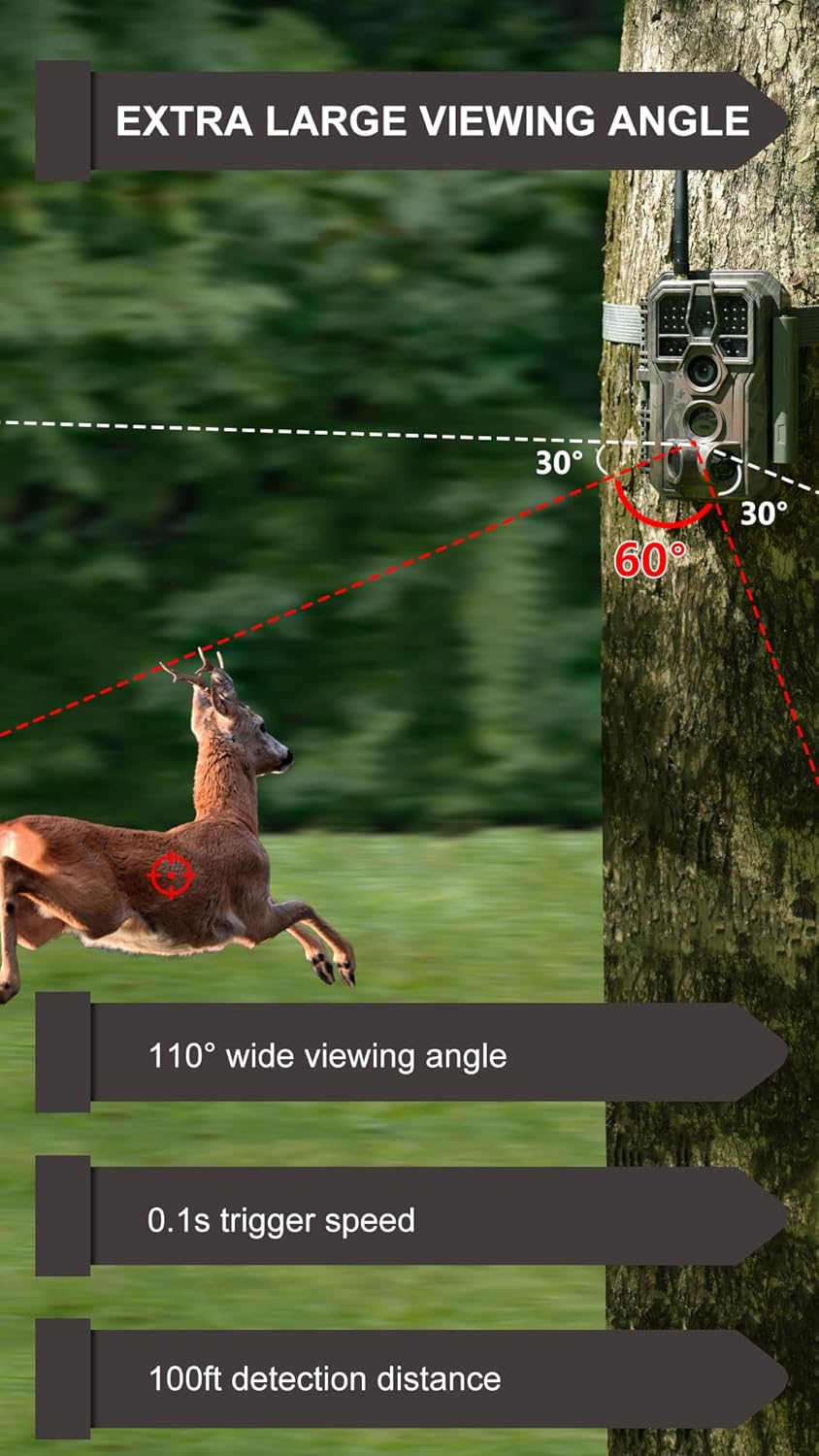
Figure 6.4: A diagram illustrating the camera's extra large viewing angle (110° wide), 0.1s trigger speed, and 100ft detection distance, with preactivated and capture zones.
- Photo Mode: Captures still images up to 64MP resolution.
- Video Mode: Records video at 1296p resolution with clear audio.
- Hybrid Mode: Captures both a photo and a video clip per trigger.
- Trigger Speed: The camera boasts an ultra-fast 0.1s trigger speed to ensure no motion is missed.
- Night Vision: Equipped with 940nm no-glow infrared LEDs for clear night captures up to 100ft without disturbing wildlife.
6.4 Viewing/Downloading Content
You can view and download content directly from the camera using the GardePro Mobile app.
- Connect to the camera via the GardePro Mobile app (refer to Section 6.2).
- Navigate to the 'Gallery' or 'Playback' section within the app.
- Browse through the captured images and videos.
- Select desired files and use the download option to save them to your smartphone.
7. Maintenance
- Cleaning: Use a soft, dry cloth to clean the camera lens and housing. Do not use abrasive cleaners or solvents.
- Battery Care: Recharge the battery regularly, especially if the camera will be stored for an extended period. Avoid fully draining the battery frequently to prolong its lifespan.
- Storage: Store the camera in a cool, dry place when not in use.
- Environmental Durability: The camera has an IP66 waterproof rating, making it resistant to dust and strong jets of water. It is designed to operate reliably in temperatures ranging from -4°F to 140°F.
8. Troubleshooting
| Problem | Possible Cause | Solution |
|---|---|---|
| Camera not powering on | Low or depleted battery | Recharge the 8000mAh lithium battery pack fully. |
| Poor image/video quality | Dirty lens; improper lighting; camera too far from subject | Clean the lens. Ensure adequate lighting or proper night vision conditions. Adjust camera placement. |
| Wi-Fi connection issues | Out of range; app not properly connected | Ensure you are within 45ft of the camera. Restart the app and camera. Re-establish Bluetooth connection first. |
| No motion detection | PIR sensitivity too low; obstructions in detection zone | Adjust PIR sensitivity in settings. Clear any obstructions. Ensure proper camera angle. |
| Cannot download files via app | Weak Wi-Fi signal; app error | Move closer to the camera. Restart the app. Ensure sufficient storage on your phone. |
9. Specifications
| Feature | Detail |
|---|---|
| Model Name | E8PMB |
| Image Resolution | Up to 64MP |
| Video Resolution | 1296p (30 frames per second) |
| Trigger Speed | 0.1s |
| Detection Distance | 100ft |
| Night Vision Range | 100ft (940nm No-Glow IR LEDs) |
| Viewing Angle | 110° wide |
| Connectivity | Wi-Fi, Bluetooth |
| App Compatibility | iOS or Android app |
| Battery Type | 8000mAh Lithium Ion Rechargeable Battery (included) |
| Charging Port | Type-C USB |
| Internal Storage | Built-in 32GB SD Card |
| Waterproof Rating | IP66 |
| Operating Temperature | -4°F to 140°F (-20°C to 60°C) |
| Dimensions (L x W x H) | 7.2 x 4.6 x 3.7 inches |
| Item Weight | 15.9 ounces (450 Grams) |
| Mounting Type | Tree Mount, Wall Mount |
10. Warranty & Support
GardePro products are designed for reliability and performance. For specific warranty details, please refer to the warranty card included with your product or visit the official GardePro website. For technical support, troubleshooting assistance, or any inquiries, please contact GardePro customer service through their official channels.
No official product videos from the seller were found to be included in this manual.


