
Mosthink V202T with Speed Talk SIM Card Black
Mosthink 4G Unlocked Flip Cell Phone for Senior User Manual
Model: V202T with Speed Talk SIM Card Black
1. Introduction
This user manual provides essential information for setting up, operating, and maintaining your Mosthink 4G Unlocked Flip Cell Phone. Designed with ease of use in mind, this phone is ideal for seniors, mobile phone beginners, and individuals who require basic communication functionalities with enhanced accessibility features.
Please read this manual thoroughly to ensure proper usage and to take full advantage of all the phone's features.
2. What's in the Box
- Mosthink 4G Unlocked Flip Cell Phone (Model V202T)
- 1450mAh Lithium Ion Battery
- Charging Dock
- Power Adapter
- USB-C Charging Cable
- Speedtalk SIM Card (pre-installed)
- User Manual (this document)
- Phone Case

Image: Mosthink flip phone in its charging dock, with a Speedtalk SIM card shown next to it, indicating the SIM is pre-installed.
Video: An overview of the Mosthink 4G Unlocked Flip Senior Cell Phone, highlighting its features and the included Speed Talk SIM Card.
3. Getting Started (Setup)
3.1 Battery and SIM Card Installation
The Speedtalk SIM card is pre-installed in the phone for your convenience. Before first use, you must install the battery and remove any insulation paper.
- Carefully remove the rear cover of the phone.
- Locate the battery compartment. If there is a small piece of insulation paper on the battery contacts, gently tear it off.
- Insert the 1450mAh battery into the compartment, ensuring the gold contacts align with the phone's terminals.
- Replace the rear cover, pressing firmly until it clicks into place.

Image: Hands demonstrating the installation of the battery and replacement of the back cover on the flip phone, showing the pre-installed SIM card slot.
3.2 Charging the Phone
Your Mosthink flip phone comes with a convenient charging dock. For initial use, fully charge the phone.
- Connect the power adapter to the charging dock.
- Place the phone into the charging dock. Ensure it is seated correctly and the charging indicator light on the dock illuminates.
- Alternatively, you can connect the USB-C charging cable directly to the phone's charging port.
A full charge provides up to 5 hours of talk time and approximately 7 days of standby time.
Image: The Mosthink flip phone securely placed in its charging dock.
3.3 SIM Card Activation
The included Speedtalk SIM card is pre-installed. To activate your service plan, visit the Speedtalk Mobile activation website:
https://activate.speedtalkmobile.com/

Image: A visual guide illustrating the steps to activate the pre-installed Speedtalk SIM card for the phone.
4. Operating Your Phone
4.1 Display and Keypad
The phone features a 2.4-inch HD main display and a 1.77-inch external colorful HD screen. Both screens display large fonts and icons for easy viewing. The keypad consists of large, easy-to-press buttons with clear numbering.
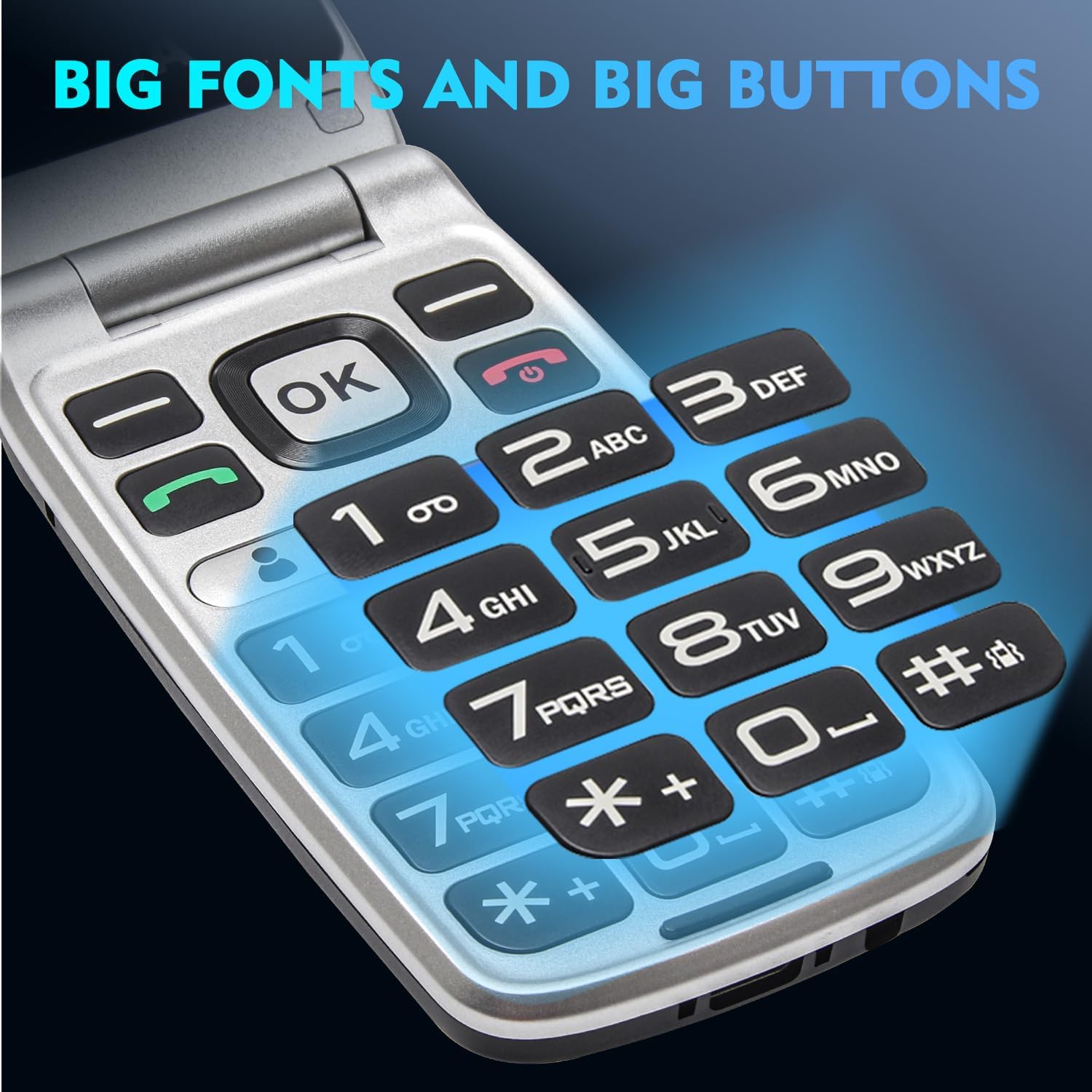
Image: The Mosthink flip phone in an open position, showcasing its large internal display and user-friendly keypad.
The speaking keypad feature, which announces each button press, is off by default. You can enable it in the phone's settings for enhanced accessibility.
4.2 Making and Receiving Calls
To make a call, simply dial the number using the large keypad and press the green call button. To answer an incoming call, press the green call button. To end a call, press the red end call button.
The phone features a powerful speaker for clear sound and loud ringtones, ensuring calls are easily heard. It is also Hearing Aid Compatible (M4/T4), providing clear call quality free of interference for hearing aid users.
4.3 Sending and Receiving Text Messages
The phone supports basic text messaging. Use the dedicated message button on the keypad to access your inbox, outbox, and compose new messages. The large fonts make reading messages straightforward.
4.4 SOS Emergency Button
For added safety, the phone includes a simple SOS button located on the back. This feature is designed to provide quick assistance in emergencies.

Image: A visual representation of the SOS emergency button on the phone and how it can be used to contact pre-set emergency numbers.
You can configure up to five emergency contacts in the phone's settings. When the SOS button is pressed and held, the phone will automatically call these saved contacts in a loop until one of the calls is answered, ensuring your loved ones are notified in case of an emergency.
5. Compatibility
The Mosthink V202T is an unlocked senior cell phone that supports 2G (GSM), 3G (WCDMA), and 4G (FDD-LTE/TDD-LTE) global network bands.
It is compatible with Speedtalk and T-Mobile and its MVNO operators (e.g., Metro by T-Mobile, Tello, Mint Mobile, Ultra Mobile, Lyca Mobile, RedPocket Mobile).
Important: This phone does NOT support SIM cards from AT&T, Verizon, and Sprint.

Image: A detailed chart illustrating the network compatibility of the Mosthink flip phone, specifying supported and unsupported carriers.
6. Specifications
| Feature | Detail |
|---|---|
| Product Dimensions | 4 x 2 x 1 inches |
| Item Weight | 8.4 ounces |
| Item Model Number | V202T with Speed Talk SIM Card Black |
| Battery | 1 Lithium Ion batteries required (included), 1450mAh |
| Phone Talk Time | Up to 5 Hours |
| Standby Time | Up to 7 Days |
| Main Display Size | 2.4 Inches HD |
| External Display Size | 1.77 Inches Colorful HD |
| Human Interface Input | Buttons |
| Form Factor | Flip |
| Wireless Carrier | Unlocked (Speedtalk, T-Mobile & MVNOs) |
| Cellular Technology | 4G (2G/3G/4G bands) |
| Operating System | Android |
| Manufacturer | Mosthink |
7. Troubleshooting
If you encounter any issues with your Mosthink flip phone, please consider the following common solutions:
- Phone not turning on: Ensure the battery is correctly installed and fully charged. Check if the insulation paper has been removed from the battery contacts.
- No network signal: Verify that the SIM card is properly inserted. Confirm that your carrier is supported by the phone (Speedtalk, T-Mobile, or their MVNOs). Check your service plan status with your carrier.
- Cannot make/receive calls: Ensure you have sufficient credit or an active plan with your carrier. Check network signal strength.
- Sound issues: Adjust the volume using the side buttons. Ensure the speaker is not obstructed.
- SOS button not working: Verify that emergency contacts are correctly set up in the phone's settings.
For further assistance, please refer to the detailed user manual included in the box or contact Mosthink customer support.
8. Warranty and Support
The Mosthink 4G Unlocked Flip Cell Phone is CERTIFIED SAFE with FCC and IC with UL certification on accessories. For specific warranty information and customer support, please refer to the warranty card included with your product or visit the official Mosthink website.
You can also visit the Mosthink Store on Amazon for more information: Mosthink Store