
1. Introduction
Thank you for choosing the GMUME 4K 8MP Dual Lens WiFi PTZ Outdoor Security Camera. This manual provides essential information for the proper installation, operation, and maintenance of your security camera. Please read this manual thoroughly before use and retain it for future reference.
2. Product Overview
The GMUME 4K 8MP Dual Lens WiFi PTZ Outdoor Security Camera features advanced surveillance capabilities, including dual lenses for comprehensive coverage, 4K 8MP resolution for clear imaging, and Pan-Tilt-Zoom (PTZ) functionality. It is designed for outdoor use with an IP66 waterproof rating and includes features like AI human detection, two-way audio, and various night vision modes.
Key Features:
- 4K 8MP Resolution: Dual lens system providing a combined 8MP image (4MP per lens).
- Pan-Tilt-Zoom (PTZ): 270° horizontal pan and 90° vertical tilt for wide area monitoring.
- AI Human Detection: Intelligent detection of human figures to reduce false alarms.
- Auto Tracking: Automatically follows moving objects once detected.
- Two-Way Audio: Built-in microphone and speaker for remote communication.
- Color Night Vision: Enhanced night vision with IR LEDs and white LEDs for clear, colored images in low light.
- IP66 Waterproof: Durable design suitable for various outdoor weather conditions.
- Storage Options: Supports TF card storage (up to 128GB) and cloud storage (subscription required).
- Remote Access: View live feed and recordings via a mobile application.
Camera Components:

Image Description: This image illustrates the camera's Pan and Tilt capabilities. The camera can rotate 355 degrees horizontally (pan) and 110 degrees vertically (tilt), allowing for extensive coverage. An arrow indicates the rotational movement, and a smartphone screen in the background shows the live view and control interface within the mobile application.

Image Description: This image highlights the camera's IP66 waterproof rating. The camera is depicted with water droplets, and icons for rain, sun, and snow are shown, indicating its suitability for outdoor use in various weather conditions.
3. Setup
3.1 Package Contents
Verify that all components are present in the package:
- GMUME Security Camera
- Power Adapter
- Mounting Screws and Anchors
- User Manual (this document)
3.2 Installation Steps
- Choose a Location: Select an outdoor location with a clear view of the area you wish to monitor. Ensure the camera is within range of your WiFi network.
- Mount the Camera: Use the provided screws and anchors to securely mount the camera to a wall or ceiling.
- Connect Power: Connect the power adapter to the camera and plug it into a power outlet. The camera will power on and initiate its startup sequence.
- Download the App: Download the recommended mobile application (refer to packaging or quick start guide for app name) from your smartphone's app store.
- Register/Log In: Create an account or log in to the application.
- Add Camera: Follow the in-app instructions to add your camera. This typically involves scanning a QR code on the camera or connecting to its temporary WiFi hotspot.
- Connect to WiFi: Configure the camera to connect to your home WiFi network via the app.
4. Operating Instructions
4.1 Live View and PTZ Control
Once connected, open the mobile application to access the live video feed. Use the on-screen controls to pan (horizontal rotation) and tilt (vertical rotation) the camera to adjust its viewing angle.
Image Description: This image illustrates the camera's Pan and Tilt capabilities. The camera can rotate 355 degrees horizontally (pan) and 110 degrees vertically (tilt), allowing for extensive coverage. An arrow indicates the rotational movement, and a smartphone screen in the background shows the live view and control interface within the mobile application.
4.2 Two-Way Audio
The camera supports two-way audio communication. In the live view interface of the app, locate the microphone icon to speak through the camera's speaker and the speaker icon to listen to audio from the camera's vicinity.

Image Description: This image demonstrates the two-way audio feature. A man is shown interacting with the camera, with speech bubbles indicating a conversation between him and someone speaking through the camera remotely. This highlights the ability to hear and talk back.
4.3 Night Vision Modes
The camera offers different night vision modes:
- Color Night Vision: White LEDs activate to provide full-color images in low-light conditions.
- IR Night Vision: Infrared LEDs provide black and white images in complete darkness.
- Smart Night Vision: The camera automatically switches between IR and color night vision based on detected motion or events.
You can select your preferred mode within the camera settings in the mobile application.
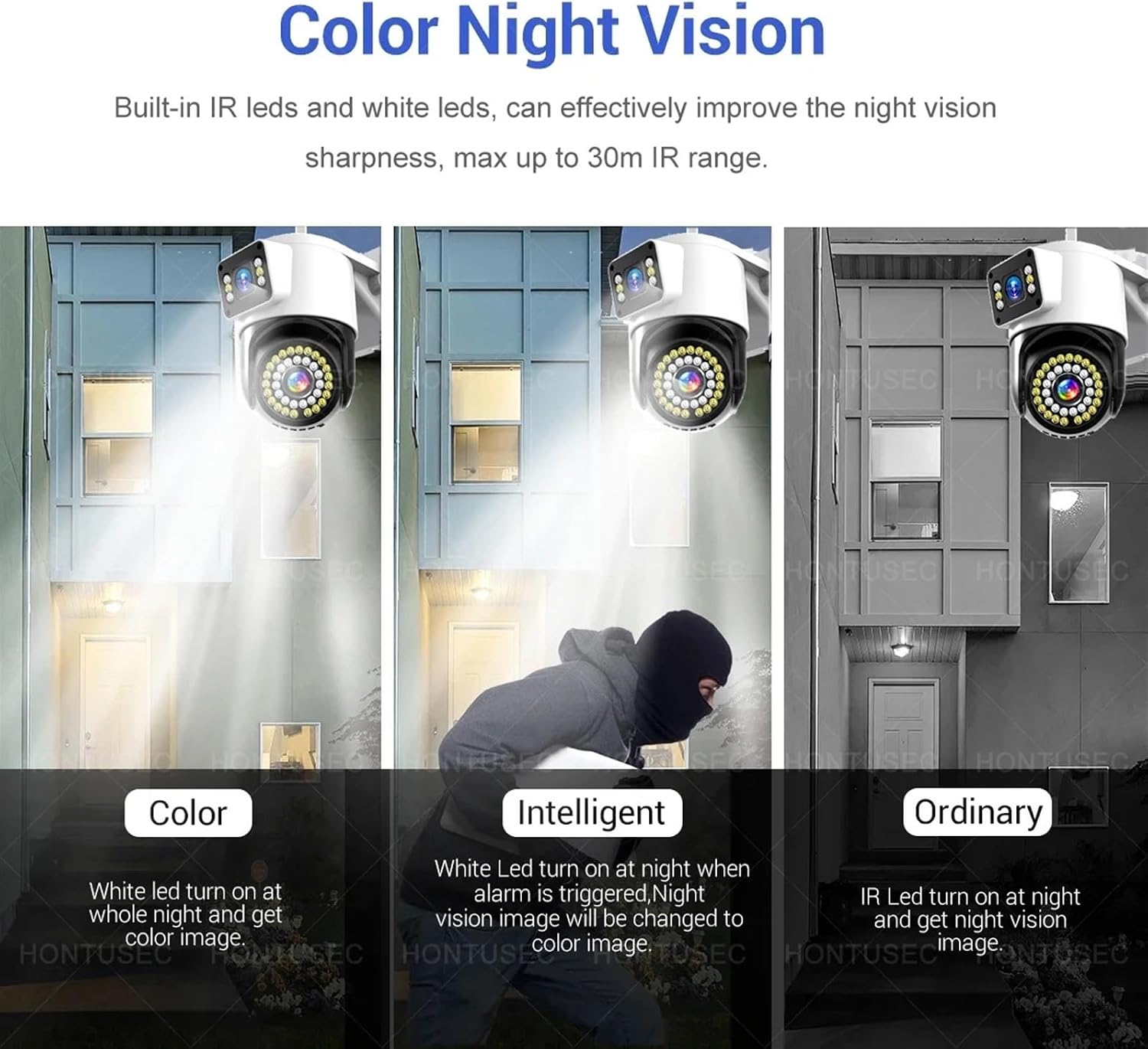
Image Description: This image compares three night vision modes: Color, Intelligent, and Ordinary. The 'Color' mode shows a scene illuminated by white LEDs, providing a full-color view. The 'Intelligent' mode shows a scene where white LEDs activate upon alarm, changing the image to color. The 'Ordinary' mode shows a standard black and white IR night vision image.
4.4 AI Human Detection and Auto Tracking
Enable AI Human Detection in the app settings to receive alerts only when a human figure is detected, minimizing false alarms from pets or other movements. When enabled, the Auto Tracking feature will automatically adjust the camera's pan and tilt to follow the detected human target.

Image Description: This image illustrates the auto-tracking function. A person is shown walking in a garden at night, and the camera's spotlight is focused on them, with red target circles indicating the camera is actively tracking the moving object.
4.5 Recording and Storage
The camera supports two storage methods:
- TF Card Storage: Insert a TF (microSD) card (up to 128GB, not included unless specified in variant) into the designated slot on the camera. The camera will automatically begin recording based on your settings (e.g., continuous, motion-triggered).
- Cloud Storage: The camera offers cloud storage services for an additional fee. Refer to the mobile application for subscription details and activation.
Recorded footage can be accessed and reviewed through the mobile application.
5. Maintenance
5.1 Cleaning the Camera
To ensure optimal performance and image clarity, periodically clean the camera lens and housing. Use a soft, damp cloth to wipe away dust and dirt. Avoid using harsh chemicals or abrasive materials that could damage the lens or finish.
5.2 Firmware Updates
Regularly check the mobile application for available firmware updates. Keeping your camera's firmware up-to-date ensures you have the latest features, security patches, and performance improvements.
5.3 Environmental Considerations
The camera has an IP66 waterproof rating, making it suitable for outdoor use. However, avoid submerging the camera in water or exposing it to extreme temperatures beyond its operating range.
6. Troubleshooting
| Problem | Possible Cause | Solution |
|---|---|---|
| Camera not powering on | No power supply; Faulty adapter | Check power connection; Try a different outlet; Verify adapter functionality. |
| Unable to connect to WiFi | Incorrect WiFi password; Camera too far from router; Router issues | Ensure correct password; Move camera closer to router; Restart router; Check router settings (2.4GHz network required). |
| Poor image quality | Dirty lens; Low light conditions; Network bandwidth issues | Clean the lens; Ensure adequate lighting or proper night vision mode; Check internet speed. |
| No motion detection alerts | Detection sensitivity too low; Detection zone not set; App notifications disabled | Adjust sensitivity in app; Configure detection zones; Enable app notifications. |
| Two-way audio not working | Microphone/speaker disabled in app; Volume too low | Enable audio features in app; Adjust volume settings. |
7. Specifications
| Feature | Detail |
|---|---|
| Brand | GMUME |
| Model Number | YZL2024.4.88 |
| Resolution | 8MP (4MP per lens) |
| Connectivity | Wireless (WiFi) |
| Pan Range | 270° (as per product description, image states 355°) |
| Tilt Range | 90° (as per product description, image states 110°) |
| Night Vision | IR-CUT, IR light, White LED (Color Night Vision) |
| Audio | Two-Way Audio |
| Storage | TF Card (up to 128GB), Cloud Storage |
| Waterproof Rating | IP66 |
| Human Detection | AI Human Detection |
| Auto Tracking | Supported |
| Power Supply | DC Power Adapter (included) |
Note: Specifications are subject to change without prior notice.
8. Warranty and Support
This product comes with a standard manufacturer's warranty. For specific warranty terms and conditions, please refer to the documentation provided with your purchase or contact the retailer. For technical support, troubleshooting assistance, or any inquiries regarding your GMUME security camera, please contact GMUME customer service through the contact information provided on the product packaging or the official GMUME website.