
VRIG Direct TP-16
VRIG TP-16 Tripod Instruction Manual
Model: TP-16 | Brand: VRIG Direct
Introduction
This manual provides instructions for the safe and effective use of your VRIG TP-16 Tripod. Please read this manual thoroughly before using the product and retain it for future reference.
Safety Information
- Do not exceed the maximum load capacity of 1.5 kg to prevent damage to the tripod or attached devices.
- Ensure all locking mechanisms are securely fastened before use to prevent accidental collapse.
- Keep the tripod away from extreme temperatures, direct sunlight, and corrosive liquids.
- Avoid placing the tripod on unstable or uneven surfaces.
- When folding or unfolding the tripod, be careful to avoid pinching fingers or other body parts.
- Do not attempt to modify or disassemble the product. Repairs should only be performed by qualified personnel.
Package Contents
Verify that all items are present in the package:
- Tripod x 1
- Mounting Parts x 1
- Bluetooth Shutter Remote x 1
Product Overview
The VRIG TP-16 is a versatile tripod designed for smartphones, cameras, and action cameras. It features a compact, foldable design and multiple functionalities for various shooting scenarios.
Key Features:
- 6-Section Extendable Design: Adjustable height from 35 cm to 145 cm.
- 360° Rotatable Ball Head: Allows for flexible horizontal and vertical shooting angles.
- 2-in-1 Hidden Smartphone Holder: Integrated holder compatible with smartphones 6-9 cm wide.
- 1/4" Screw Mount: Standard screw for attaching cameras, ring lights, and other accessories.
- Dual Cold Shoe Mounts: Two expansion cold shoes for attaching external accessories like LED video lights or microphones.
- Enhanced Stability: Features anti-slip pads on tripod feet and a reinforced triangular bracket for secure placement.
- Compact and Lightweight: Folds down to 35 cm and weighs only 0.4 kg, made from durable ABS and aluminum.
Setup
1. Unfolding the Tripod
- Gently pull the legs outwards until they are fully extended and the reinforced triangular bracket is stable.
- Ensure the tripod feet are firmly on a flat surface.

Image: The VRIG TP-16 tripod shown in different configurations, demonstrating its versatility as a selfie stick, tabletop tripod, and floor-standing tripod for live streaming, vlogging, and recording.
2. Attaching a Device (Smartphone/Camera)
For Smartphones:
- Locate the hidden smartphone holder on the top of the tripod.
- Open the Clip: Press the "PULL" tab and open the clip.
- Extend the Holder: Pull out the extendable arm of the smartphone holder.
- Expand: Gently expand the spring-loaded clamp to insert your smartphone (6-9 cm width). Ensure the phone is securely gripped.
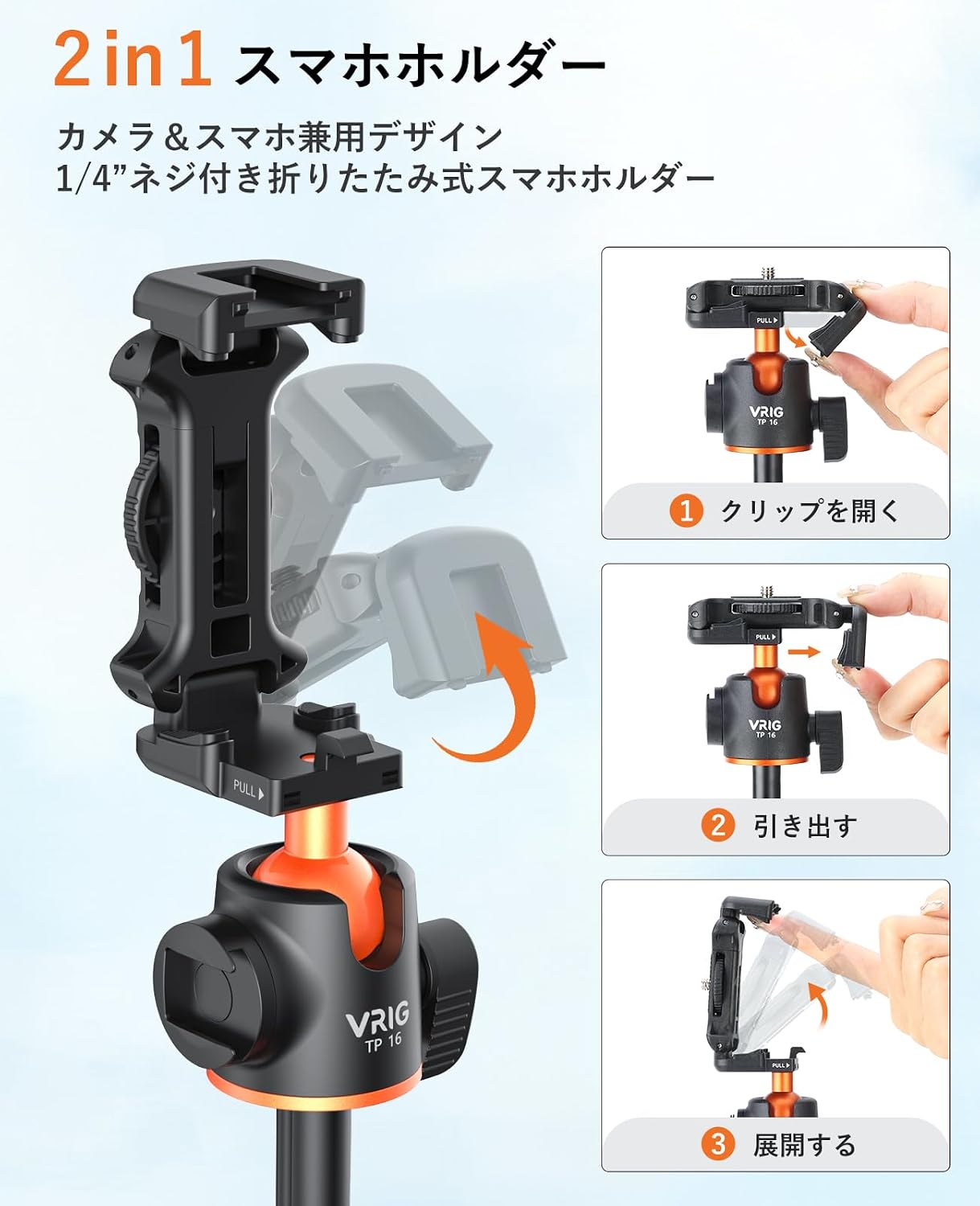
Image: A visual guide demonstrating three steps to activate the 2-in-1 smartphone holder: 1) Opening the clip, 2) Pulling out the holder, and 3) Expanding it to secure a smartphone.
For Cameras/Action Cameras:
- If the smartphone holder is extended, fold it back into its compact position.
- Locate the standard 1/4" screw mount on the ball head.
- Carefully screw your camera or action camera onto the 1/4" mount until it is secure. Do not overtighten.
3. Pairing the Bluetooth Remote
- Turn on the Bluetooth remote by pressing and holding the power button until the indicator light flashes.
- On your smartphone, go to Bluetooth settings and search for available devices.
- Select "VRIG Remote" or a similar name from the list to pair.
- Once paired, the indicator light will stop flashing. You can now use the remote to trigger your smartphone's camera shutter.
Operating Instructions
1. Adjusting Height
The tripod features a 6-section extendable design. To adjust the height:
- Unlock the section locks on the tripod legs.
- Extend or retract the legs to your desired height (between 35 cm and 145 cm).
- Securely lock all section locks to ensure stability.

Image: A person using the VRIG TP-16 tripod, extended to its maximum height of 145cm, with a smartphone mounted. The image highlights the adjustable height range from 35cm to 145cm.
2. Adjusting Shooting Angle (Ball Head)
The integrated 360° rotatable ball head allows for precise angle adjustments:
- Loosen the locking knob on the ball head.
- Adjust your device to the desired horizontal or vertical orientation, or tilt it for specific angles.
- Tighten the locking knob firmly to secure the position.

Image: Close-up of the VRIG TP-16 tripod's metal ball head, illustrating its 360-degree rotation and ability to switch between horizontal and vertical shooting modes for smartphones.
3. Using Cold Shoe Mounts
The tripod includes two cold shoe mounts for expanding your setup:
- Slide compatible accessories (e.g., LED video lights, microphones) into the cold shoe slots.
- Ensure accessories are securely seated.

Image: The VRIG TP-16 tripod with a smartphone mounted, demonstrating the use of its two cold shoe mounts. An LED video light is attached to the top cold shoe, and a microphone is attached to the side cold shoe.
Maintenance
- Clean the tripod regularly with a soft, dry cloth. Do not use abrasive cleaners or solvents.
- Store the tripod in a dry, cool place when not in use.
- Periodically check all screws and connections for tightness and re-tighten if necessary.
Troubleshooting
| Problem | Possible Cause | Solution |
|---|---|---|
| Tripod is unstable. | Legs not fully extended or locked; uneven surface; overloaded. | Ensure legs are fully extended and all locks are secured. Move to a flat surface. Reduce load to within 1.5 kg. |
| Bluetooth remote not pairing. | Remote battery low; Bluetooth not enabled on phone; remote not in pairing mode. | Replace remote battery. Enable Bluetooth on your phone. Press and hold remote button to enter pairing mode. |
| Device not holding securely. | Smartphone holder not fully expanded; camera screw loose; device too heavy. | Ensure smartphone holder is fully expanded and gripping the phone. Tighten camera screw. Check device weight against 1.5 kg limit. |
Specifications
| Brand | VRIG Direct |
| Model | TP-16 (Manufacturer Model: 103AV) |
| Compatible Devices | Smartphones (6-9 cm width), Cameras, Action Cameras |
| Material | Acrylonitrile Butadiene Styrene (ABS), Aluminum |
| Item Weight | 0.4 kg |
| Maximum Load Capacity | 1.5 kg |
| Maximum Height | 145 cm |
| Minimum Height | 35 cm |
| Folded Size (D x W x H) | 5 x 7 x 35 cm |
| Tripod Head Type | Ball Head (360° Rotation) |
| Features | Foldable, Hidden Smartphone Holder, Dual Cold Shoe Mounts, Bluetooth Remote |
Warranty and Support
This VRIG TP-16 Tripod comes with a 1-year manufacturer's warranty from the date of purchase.
For warranty claims, technical support, or inquiries, please contact VRIG Direct customer service through your purchase platform or their official website.
Please retain your proof of purchase for warranty validation.
Ask a question about this manual
Ask about setup, troubleshooting, compatibility, parts, safety, or missing instructions. Manuals+ will review the question and use this page’s manual context to help answer it.