
1. Safety Information
Please read all safety instructions carefully before using the LIJIANI SH-01 Pocket AM/FM Radio. Keep this manual for future reference.
- Do not expose the device to extreme temperatures, direct sunlight, or high humidity.
- Avoid dropping or subjecting the radio to strong impacts.
- Do not attempt to disassemble or modify the radio. This will void the warranty and may cause damage.
- Keep batteries away from children. If swallowed, seek immediate medical attention.
- Dispose of used batteries according to local regulations.
- Use only AAA batteries as specified.
2. Product Components
The LIJIANI SH-01 Pocket AM/FM Radio package includes the following items:
- LIJIANI SH-01 Pocket AM/FM Radio Unit
- Stereo Earphones (3.5mm jack)
- User Manual (this document)

Image 2.1: Front view of the LIJIANI SH-01 Pocket AM/FM Radio with connected earphones. The radio features a large LCD screen displaying time and frequency, along with control buttons for volume, band selection, scanning, and alarm functions.
3. Setup
3.1. Battery Installation
- Locate the battery compartment cover on the back of the radio.
- Slide the cover open in the direction indicated by the arrow.
- Insert two (2) AAA batteries, ensuring correct polarity (+/-) as marked inside the compartment.
- Close the battery compartment cover securely.

Image 3.1: Rear view of the LIJIANI SH-01 radio showing the open battery compartment. Two AAA batteries are inserted, demonstrating the correct orientation for power.
Note: Batteries are not included and must be purchased separately. For optimal performance, use high-quality alkaline AAA batteries.
3.2. Connecting Earphones
The included earphones serve as both the audio output and the FM antenna. For best FM reception, ensure the earphone cable is fully extended.
- Insert the 3.5mm jack of the earphones into the earphone port located on the top of the radio.

Image 3.2: The LIJIANI SH-01 radio with earphones plugged into the top jack. This image highlights the compact size of the radio and its portability.
4. Operation
4.1. Power On/Off
- To power on, press and hold the POWER button (usually located on the side or top).
- To power off, press and hold the POWER button again.
4.2. Adjusting Volume
- Press the VOL+ button to increase the volume.
- Press the VOL- button to decrease the volume.
4.3. Selecting Radio Band (AM/FM)
- Press the BAND/PRE button to switch between AM and FM bands. The current band will be displayed on the LCD screen.
4.4. Tuning Stations
4.4.1. Automatic Scan
- Press and hold the SCAN/SLEEP button to automatically scan for available stations and save them as presets.
4.4.2. Manual Tuning
- Press the UP or DOWN buttons to manually tune the frequency step by step.
- Press and hold UP or DOWN to quickly scan to the next strong station.
4.5. Managing Presets
4.5.1. Saving a Preset
- Tune to the desired station.
- Press and hold the M+ or M- button until the preset number flashes, then release.
- Use the UP or DOWN buttons to select the desired preset number.
- Press M+ or M- again to confirm and save the station.
4.5.2. Recalling a Preset
- Press the M+ or M- button to cycle through saved preset stations.
4.5.3. Deleting a Preset
- Recall the preset you wish to delete.
- Press the DEL/TIME button. The preset will be removed.
4.6. Setting Time and Alarm
4.6.1. Setting Time
- With the radio off, press and hold the DEL/TIME button until the hour digits flash.
- Use the UP or DOWN buttons to adjust the hour.
- Press DEL/TIME again to switch to minute adjustment.
- Use the UP or DOWN buttons to adjust the minutes.
- Press DEL/TIME to confirm and exit time setting.
4.6.2. Setting Alarm
- With the radio off, press and hold the ALARM button until the alarm hour digits flash.
- Use the UP or DOWN buttons to adjust the alarm hour.
- Press ALARM again to switch to alarm minute adjustment.
- Use the UP or DOWN buttons to adjust the alarm minutes.
- Press ALARM to confirm and activate the alarm. An alarm icon will appear on the display.
- To deactivate the alarm, press the ALARM button once when the radio is off. The alarm icon will disappear.

Image 4.1: The LIJIANI SH-01 radio on a bedside table, with the display showing the time and an alarm icon. This illustrates the alarm clock functionality.
4.7. Sleep Timer Function
The sleep timer allows the radio to automatically turn off after a set period.
- While the radio is on, repeatedly press the SCAN/SLEEP button to cycle through available sleep timer options (e.g., 10, 15, 30, 45, 60, 90 minutes).
- The selected time will be displayed, and the radio will turn off automatically after the countdown.
- To cancel the sleep timer, press SCAN/SLEEP until "OFF" or no timer icon is displayed.

Image 4.2: The LIJIANI SH-01 radio on a bedside table, illustrating the sleep countdown shutdown feature with options for 10, 15, 30, 45, 60, and 90 minutes.
4.8. Lock Screen Function
The lock screen function prevents accidental button presses.
- To activate the lock, slide the LOCK switch (usually on the side of the radio) to the locked position. A key icon will appear on the display.
- To deactivate, slide the LOCK switch back to the unlocked position. The key icon will disappear.
5. Maintenance
- Cleaning: Use a soft, dry cloth to clean the radio's exterior. Do not use abrasive cleaners, solvents, or harsh chemicals.
- Battery Care: If the radio will not be used for an extended period, remove the batteries to prevent leakage and damage.
- Storage: Store the radio in a cool, dry place away from direct sunlight and extreme temperatures.
6. Troubleshooting
| Problem | Possible Cause | Solution |
|---|---|---|
| Radio does not power on. |
|
|
| Poor reception or static. |
|
|
| No sound from earphones. |
|
|
| Buttons are unresponsive. |
|
|
7. Specifications
| Feature | Detail |
|---|---|
| Model Number | SH-01 |
| Brand | LIJIANI |
| Tuner Technology | FM, AM |
| Power Source | 2 x AAA Batteries (not included) |
| Battery Life (Approx.) | 10-12 hours (continuous use) |
| Display | 1.8-inch LCD with backlight |
| Connectivity | 3.5mm Earphone Jack (Auxiliary) |
| Product Dimensions | 2.3"L x 3.2"W x 1"H (approx. 58.4 x 81.3 x 25.4 mm) |
| Item Weight | 3.87 ounces (approx. 110 grams) |
| Special Features | Digital Tuning, Stereo Earphone Output, Alarm Clock, Sleep Timer, Lock Screen Function |
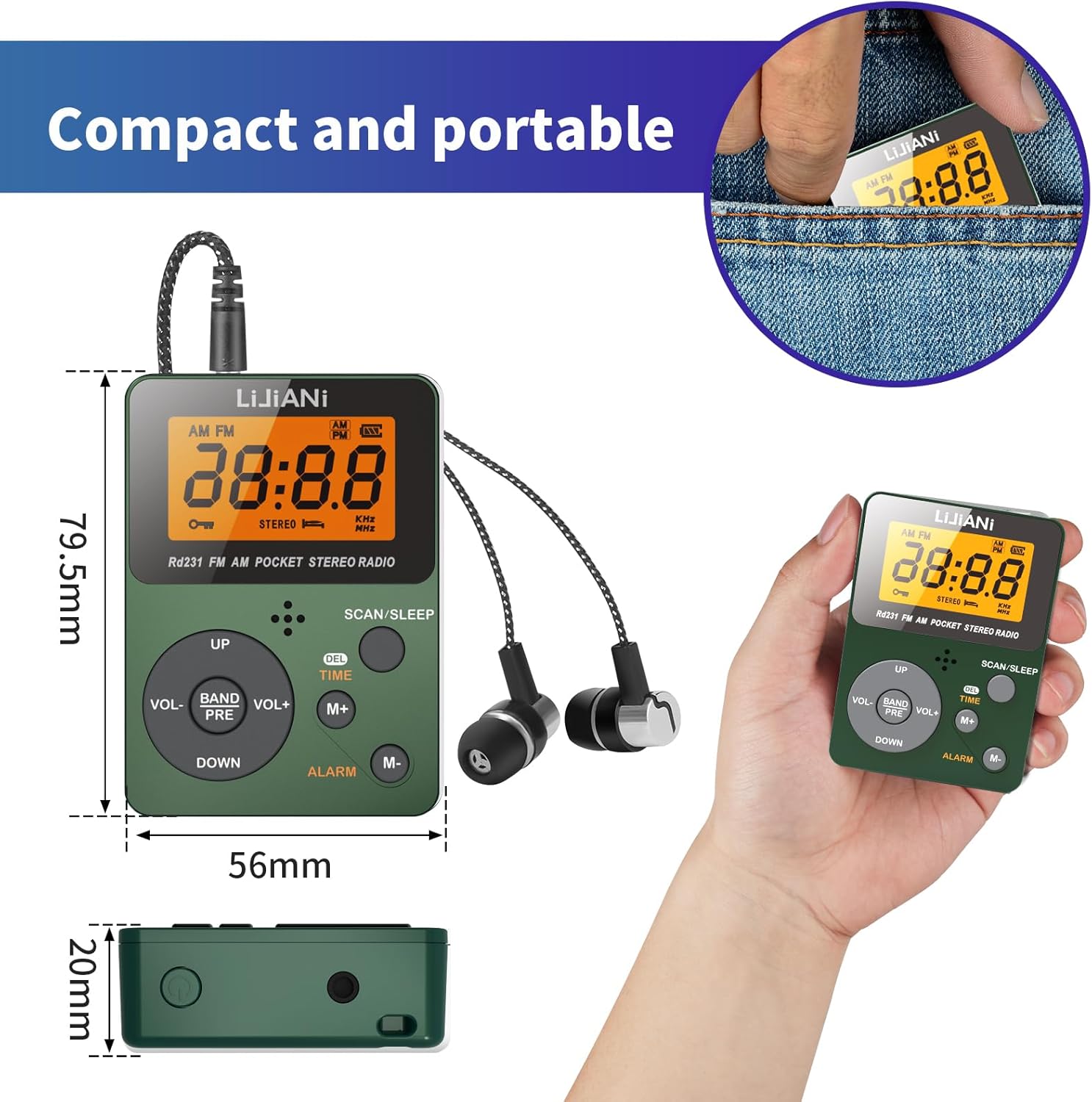
Image 7.1: A visual comparison of the LIJIANI SH-01 radio's dimensions against a standard credit card, highlighting its compact and mini portable design.
8. Warranty and Support
LIJIANI products are designed for reliability and performance. For warranty information and customer support, please refer to the contact details provided with your purchase or visit the official LIJIANI website.
Please retain your proof of purchase for any warranty claims.