
Introduction
Thank you for choosing the Green Soul Icon Pro Office Chair. This manual provides detailed instructions for the assembly, operation, and maintenance of your new ergonomic office chair. Please read this manual carefully before use to ensure proper setup and to maximize your comfort and the chair's lifespan.
Product Overview
The Green Soul Icon Pro is designed for optimal ergonomic support and comfort during long hours of work. Key features include:
- ErgoLift Back Technology: Adjustable backrest and lumbar support for targeted spine care.
- Premium Korean Mesh: Ensures breathability and durability for a cool and comfortable experience.
- IntelliAdapt Recline Mechanism: Automatically adjusts to your weight and posture for effortless reclining.
- Multi-Dimensional Adjustments: Includes 2D adjustable headrest, 4D adjustable armrests, and adjustable seat depth.
- 360-Degree Swivel: Provides flexibility and ease of movement.
- Robust Construction: Features a corrosion-free aluminum base and supports up to 120 kg.
Dimensions
Refer to the diagram below for detailed product dimensions.

Image Description: A diagram showing the front and side views of the Green Soul Icon Pro office chair with various dimensions labeled. Key dimensions include: A (Headrest width) - 35cm, B (Backrest width) - 52cm, C (Lumbar support width) - 49cm, D (Seat width) - 52cm, E (Seat height range) - 44cm-55cm, F (Base width) - 66cm, G (Headrest height adjustment) - 14cm, H (Backrest height range) - 85cm-92cm, I (Seat depth) - 50cm, J (Overall chair height range) - 117cm-135cm.
Setup and Assembly
Your Green Soul Icon Pro chair requires assembly. All necessary chair parts and hardware are included in the box. Please refer to the dedicated Assembly Manual provided with your product for step-by-step instructions. Ensure all components are present and undamaged before beginning assembly.
Included Components:
- Chair Parts
- Assembly Manual
- Hardware (screws, tools if applicable)
Operating Instructions
1. ErgoLift Back Technology (Adjustable Backrest and Lumbar Support)
The ErgoLift Back Technology allows for personalized back support by adjusting the height of the backrest and lumbar area. To adjust:
- To Lift: Grip the backrest and apply gentle upward force. You will hear clicks as it reaches different height positions (adjustable up to 10cm).
- To Lower: Fully lift the backrest to its highest point to reset the mechanism, then smoothly lower it to your desired position.

Image Description: Close-up view of the chair's backrest showing the ErgoLift Back Technology. Arrows indicate vertical adjustment of the backrest and the contoured lumbar support area, highlighting targeted lumbar care.

Image Description: A graphic illustrating the Ergo-Lift Back Technology. Text explains "Lift with Ease" (grip backrest, apply force to elevate, adjustable up to 10cm) and "Simple Lowering" (fully lift to reset, then lower). An image of the chair's backrest with arrows shows the vertical movement.

Image Description: A close-up image of the chair's concave lumbar support, designed to cradle the lower back for comfort.
2. IntelliAdapt Recline Mechanism
The IntelliAdapt Recline Mechanism automatically adjusts the recline tension based on your weight and posture, eliminating the need for manual tension adjustments. Simply lean back to recline. The chair supports reclining up to 135 degrees.
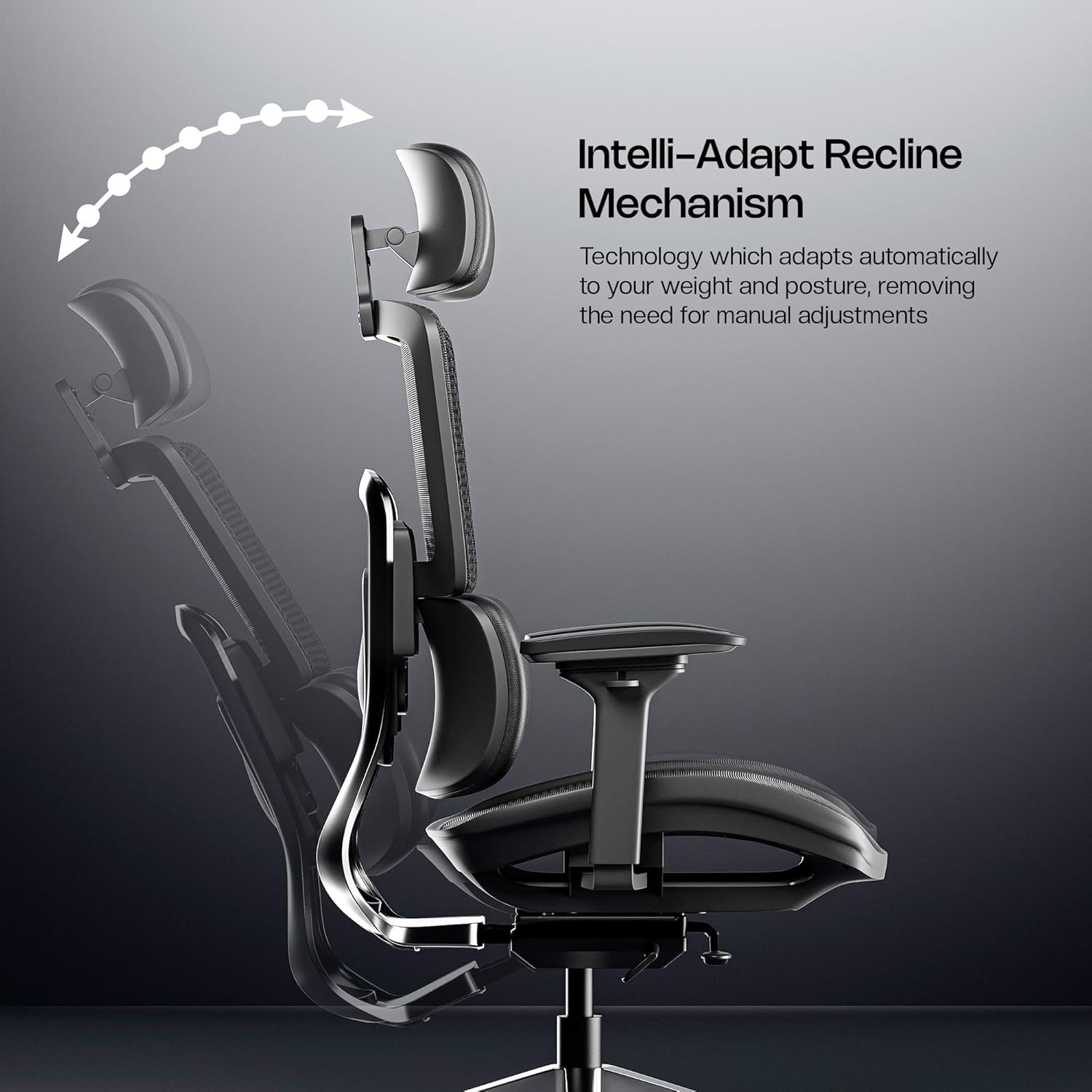
Image Description: A side view of the chair demonstrating the Intelli-Adapt Recline Mechanism. The chair is shown reclining backward, with an arrow indicating the automatic adjustment.

Image Description: A graphic showing the Intelli-Adapt Recline Mechanism. Text explains that it adapts automatically to your weight and posture, removing the need for manual adjustments, and allows reclining up to 135 degrees.
3. 4D Adjustable Armrests
The armrests can be adjusted in four dimensions to suit various body types and preferences:
- Height: Move up and down.
- Width: Move left and right.
- Depth: Move front and back.
- Swivel: Rotate inward and outward.
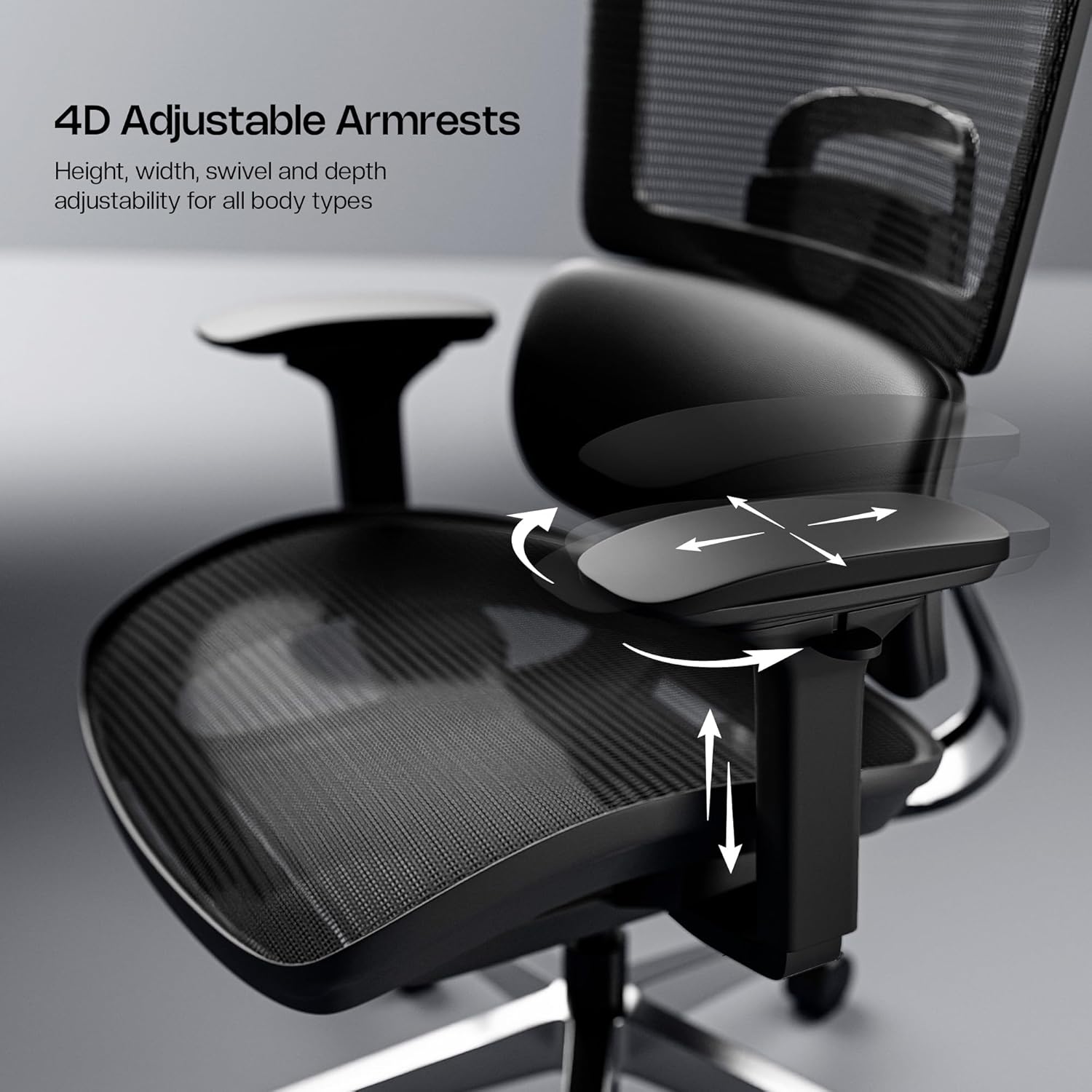
Image Description: A close-up of the chair's armrest, illustrating the four directions of adjustment (height, width, swivel, depth) with arrows.

Image Description: A graphic detailing the 4D adjustable armrests, showing icons and text for "Move Up & Down", "Move Front & Back", "Move Left & Right", and "Swivel Left & Right".
4. 2D Adjustable Headrest
The headrest can be adjusted in two dimensions to provide optimal neck and head support.

Image Description: A graphic showing the chair's headrest with arrows indicating its vertical and tilt adjustments, labeled "Custom Comfort Awaits with 2D adjustable Headrest."
5. Adjustable Seat Depth
Adjust the seat depth to ensure proper thigh support and comfort. Locate the seat slider mechanism (usually a lever under the seat) and push to slide the seat forward or backward.

Image Description: A close-up view of the chair's seat base, showing the mechanism for adjustable seat depth with arrows indicating forward and backward movement. Also shows "Premium Wired Korean Mesh" on the seat.

Image Description: A graphic illustrating the seat depth adjustment. Text instructs to "Adjust seat depth with just a push. Slide to your sweet spot with our 2D seat slider for custom thigh support." Arrows show the seat sliding forward and backward.
6. Chair Height Adjustment
To adjust the chair's height, locate the lever typically found under the right side of the seat. Pull the lever up while seated to lower the chair, or pull it up while standing to raise the chair. Release the lever at your desired height.
Video Description: A short video demonstrating the various adjustable features of the Green Soul Icon Pro office chair, including Ergo-Lift Back, targeted lumbar care, effortless recline, adjustable seat depth, 4-way adjustable armrests, and seamless height movement. The video highlights the chair's ergonomic design and Korean mesh material.
Material and Construction
The Green Soul Icon Pro chair is constructed with high-quality materials for durability and comfort.
- Korean Wired Mesh: Used for the backrest and seat, providing superior breathability, elasticity, and resilience. This helps keep you cool and prevents sweat build-up.
- Frame Material: Durable Nylon.
- Base: Corrosion-free Aluminum base for stability and longevity.

Image Description: An image highlighting the Korean mesh material on the chair's backrest and seat, with visual cues for airflow and text stating "Stay Cool, Work Better" and mentioning superior airflow and comfort.

Image Description: A graphic explaining the benefits of Premium Wired Korean Mesh, including "15.2% Higher Breathability", "Uniform division of pressure", and "High Elasticity and Resilience". The image shows the chair with airflow lines, emphasizing "No Sweat, Just Comfort!".

Image Description: An image showcasing the chair's robust construction, specifically highlighting the corrosion-free aluminum base. It also mentions "5 Year Assurance" and "BIFMA Compliant" for quality and safety.
Maintenance
Regular maintenance will help prolong the life and appearance of your Green Soul Icon Pro chair.
- Cleaning Mesh: Use a vacuum cleaner with a brush attachment to remove dust and debris from the fine mesh. For hard-to-reach areas, use compressed air.
- General Cleaning: Wipe down plastic and metal parts with a soft, damp cloth. Avoid harsh chemicals or abrasive cleaners.
- Tighten Screws: Periodically check and tighten all screws every 3-6 months to ensure stability and safety.
Specifications
| Feature | Detail |
|---|---|
| Brand | Green Soul |
| Model Name | Icon Pro |
| Colour | Black |
| Material | Korean Wired Mesh, Nylon Frame |
| Product Dimensions (D x W x H) | 66D x 66W x 135H Centimeters |
| Item Weight | 19 Kilograms |
| Maximum Weight Recommendation | 120 Kilograms |
| Back Style | ErgoLift Back |
| Arm Style | 4D Adjustable |
| Headrest | 2D Adjustable |
| Tilt Mechanism | GreenSoul IntelliAdapt (3 Reclining Positions) |
| Swivel | 360 Degree |
| Assembly Required | Yes |
| Country of Origin | China |
Troubleshooting
If you encounter any issues with your Green Soul Icon Pro chair, please refer to the following common solutions:
- Chair feels wobbly: Ensure all screws and bolts are securely tightened. Refer to the assembly manual for correct tightening procedures.
- Adjustments are stiff: Check for any obstructions or debris in the adjustment mechanisms. Apply a silicone-based lubricant if necessary, avoiding oil-based products on plastic parts.
- Chair not reclining smoothly: The IntelliAdapt mechanism is designed to adjust automatically. Ensure there are no obstructions and that the chair is not overloaded beyond its maximum weight capacity (120 kg).
- Casters not rolling smoothly: Check for hair or debris wrapped around the caster wheels. Clean them thoroughly.
For issues not covered here, please contact Green Soul customer support.
Warranty and Support
The Green Soul Icon Pro Office Chair comes with a 5-year warranty by Green Soul, ensuring peace of mind regarding manufacturing defects and material quality.
For warranty claims, technical assistance, or any other inquiries, please contact Green Soul customer support:
- Customer Care: +91 8444-956-789
- Email: info@greensoul.online
- Manufacturer: Green Soul Ergonomics Pvt. Ltd., Maharashtra, India.
Please retain your purchase receipt as proof of purchase for warranty purposes.