
1. Introduction
This manual provides comprehensive instructions for the safe and effective use of your Sweet taize Endoscope Inspection Camera. Please read this manual thoroughly before operating the device and retain it for future reference.
The Sweet taize Endoscope Inspection Camera is designed for visual inspection in hard-to-reach areas. It features an 8mm lens, HD resolution, USB-C WiFi connectivity, and a waterproof design with 6 LED lights for illumination.
2. Product Overview and Components
The package includes the following items:
- 1 x Wireless Endoscope
- 1 x Wireless Transmitter
- 1 x Charging cable
- 1 x set Accessories (Hook, Magnet, Mirror, Waterproof Cap)

Figure 2.1: The Sweet taize Endoscope Inspection Camera, showing the camera probe, hard cable, WiFi transmitter module, and USB-C connector.
3. Technical Specifications
| Feature | Specification |
|---|---|
| Lens Diameter | 8mm |
| Resolution | 640*480, 1280*720 (for 720P models) |
| Frame Rate | 30fps |
| Focal Distance | 4-10cm |
| Waterproof Level | IP68 |
| Operating Temperature | 0°C to 70°C |
| Illumination | 6 LED (for 720P models) |
| Transmitting Frequency | 2400~2483.5MHz |
| Minimum Illumination | 0 lux |
| Power Supply | 3.7V 600mAh lithium battery (built-in) |
| Charging Input | 5V 2A/1A/500mA |
| Charging Time | Approximately 1 hour |
| Photo Format | MJPEG |
| Video Format | AVI |
4. Setup Instructions
- Charge the Device: Connect the wireless transmitter to a 5V power source using the provided charging cable. Ensure the device is fully charged before first use. The charging time is approximately 1 hour.
- Download the Application: Scan the QR code provided in the manual (or search for "WIFI look" in your device's app store) to download and install the compatible application on your smartphone or tablet.
- Connect the Endoscope: Plug the endoscope camera cable into the wireless transmitter module.
- Power On: Press and hold the power button on the wireless transmitter to turn it on. A Wi-Fi indicator light should illuminate.
- Connect to Wi-Fi: On your smartphone or tablet, go to Wi-Fi settings and connect to the Wi-Fi network broadcast by the endoscope (usually named something like "WIFI look_XXXX").
- Launch the App: Open the "WIFI look" application. The live video feed from the endoscope camera should appear on your screen.

Figure 4.1: The endoscope is compatible with various cell phones and tablets for displaying the inspection feed via the 'WIFI look' application.
5. Operating Instructions
5.1 Adjusting LED Brightness
The endoscope camera features 6 adjustable LED lights. Use the brightness control wheel located on the cable to increase or decrease the illumination as needed for clear visibility in dark environments.
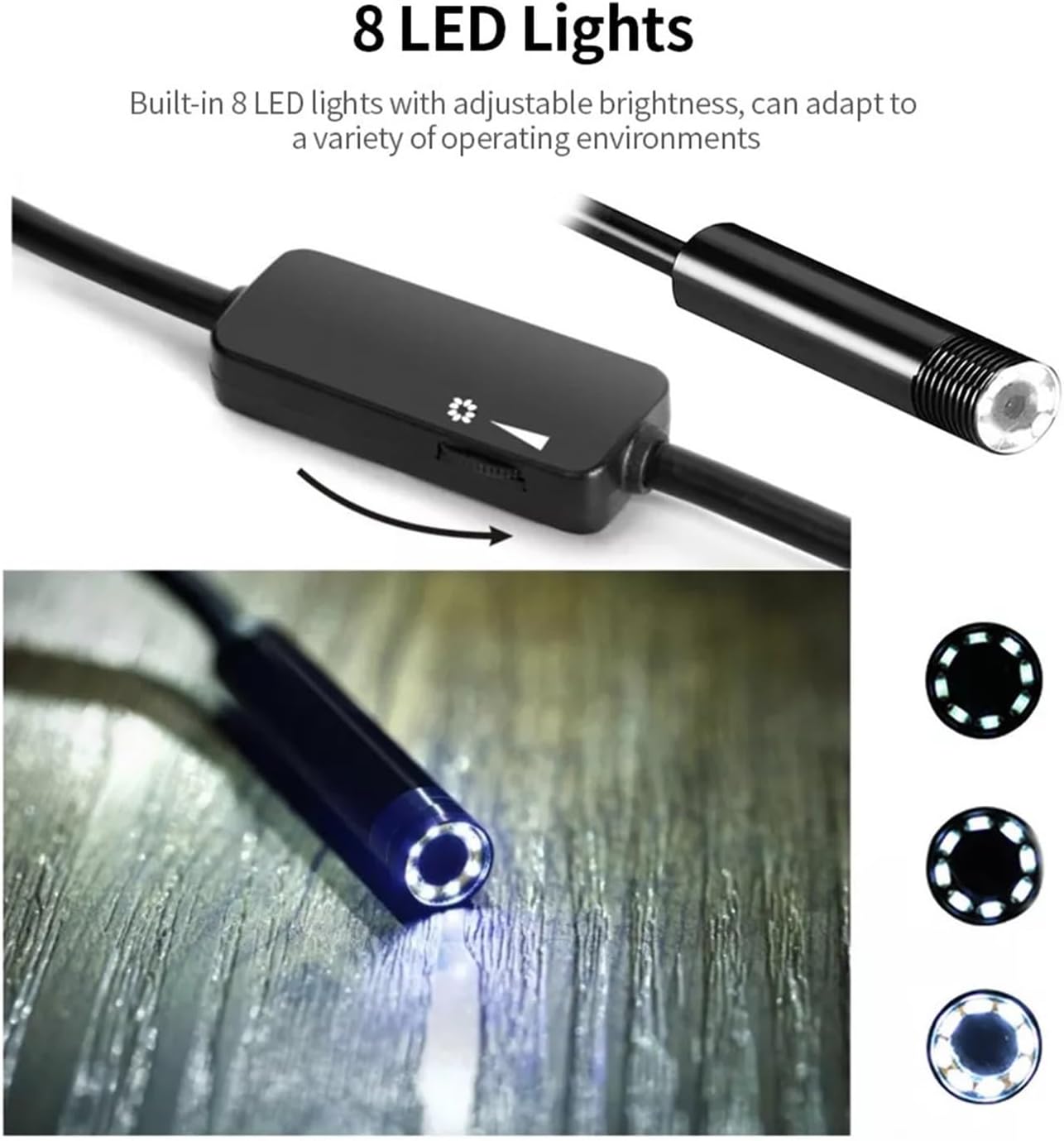
Figure 5.1: The endoscope camera head with adjustable LED lights and the brightness control on the cable. Note: This image depicts 8 LEDs, but the 720P model features 6 LEDs.
5.2 Capturing Images and Videos
Within the "WIFI look" application, you will find options to capture still images and record videos. Refer to the in-app interface for specific button locations and functions.
5.3 Using Accessories
The included accessories (hook, magnet, mirror, waterproof cap) can be attached to the camera tip to assist with various inspection tasks. For example, the mirror can provide a side view, and the hook/magnet can retrieve small objects.
5.4 Cable Management
The semi-rigid cable allows for greater control over the direction of the camera, making it suitable for navigating tight spaces. Gently guide the cable to the desired inspection area.

Figure 5.2: Illustrative examples of common applications for the endoscope camera, including industrial, automotive, and household inspections.
6. Maintenance and Care
- Cleaning: After each use, gently wipe the camera lens and cable with a soft, dry cloth. For stubborn dirt, a slightly damp cloth can be used, ensuring no moisture enters the wireless transmitter.
- Storage: Store the endoscope in a cool, dry place, away from direct sunlight and extreme temperatures. Coil the cable loosely to prevent damage.
- Battery Care: To prolong battery life, avoid fully discharging the device frequently. Charge the battery regularly, even if not in use for extended periods.
- Waterproof Cap: Ensure the waterproof cap is securely in place when operating the camera in wet environments to maintain its IP68 rating.
7. Troubleshooting
| Problem | Possible Cause | Solution |
|---|---|---|
| No image on screen | Device not powered on; Wi-Fi not connected; App not open; Low battery. | Ensure transmitter is on; Connect to endoscope Wi-Fi; Open "WIFI look" app; Charge the device. |
| Poor image quality | Insufficient lighting; Dirty lens; Beyond focal distance. | Adjust LED brightness; Clean the lens; Position camera within 4-10cm of object. |
| Wi-Fi connection issues | Incorrect Wi-Fi password; Interference; Device too far from phone. | Do not reset Wi-Fi password (as per product description); Move closer to the device; Restart both devices. |
| Device not charging | Faulty cable/charger; Power source issue. | Try a different USB-C cable or charger; Ensure power source is active. |
Important Note: Do not reset the Wi-Fi password by yourself, as this may render the endoscope unusable.
8. Safety Information
- This device is intended for industrial and household inspection purposes only. Do not use it for medical or personal examination.
- Keep the device away from children.
- Do not attempt to disassemble or modify the device. Unauthorized modifications can void the warranty and pose safety risks.
- Avoid exposing the wireless transmitter to water or extreme temperatures. Only the camera probe is waterproof.
- Use only the provided charging cable and a compatible 5V power adapter.
9. Warranty and Support
For warranty information or technical support, please refer to the contact details provided with your purchase documentation or visit the Sweet taize official website. Please have your model number (3.5m 720P Hard Cable) and purchase date available when contacting support.
Manufacturer: Sweet taize
Date First Available: November 27, 2024