
ET120MC2 Pro
TOOLTOP ET120MC2 Pro Portable Smart Oscilloscope User Manual
Model: ET120MC2 Pro | Brand: Generic
1. Introduction
This manual provides detailed instructions for the safe and effective operation of the TOOLTOP ET120MC2 Pro Portable Smart Oscilloscope. Please read this manual thoroughly before using the device to ensure proper functionality and to prevent damage.
The ET120MC2 Pro is a dual-channel oscilloscope with a 120MHz single-channel bandwidth and 40MHz dual-channel bandwidth, featuring a 500MSa/S sampling rate. It is designed for various applications including home appliance inspection, automobile diagnosis, scientific research, education, product development, and power testing.
2. Safety Information
Always observe the following safety precautions to avoid injury and prevent damage to the instrument or other devices connected to it.
- Do not operate the device in wet or damp conditions.
- Do not operate the device in explosive atmospheres.
- Ensure proper ventilation to prevent overheating.
- Use only the specified power adapter for charging.
- Do not attempt to disassemble or modify the device.
- Keep the device away from strong electromagnetic fields.
- Maximum test voltage: 1X: 80Vpp, 10X: 800Vpp. Do not exceed these limits.
3. What's in the Box
Upon opening the package, please verify that all components are present and in good condition.
- TOOLTOP ET120MC2 Pro Oscilloscope Body
- Probe
- Charging Cable
- User Manual (this document)
- Cloth bag

Image: Front view of the TOOLTOP ET120MC2 Pro Portable Smart Oscilloscope, showing its display and control buttons.
4. Setup
4.1 Charging the Battery
The device comes with a built-in lithium battery. Before first use, it is recommended to fully charge the battery. Connect the charging cable to the DC5V/1A/2A input port on the device and to a suitable USB power adapter.
- Charging indicator: The display will show a charging icon.
- Standby time: Approximately 4 hours on a full charge.
4.2 Connecting the Probe
Connect the oscilloscope probe to the input channel of the device. Ensure a secure connection. For accurate measurements, calibrate the probe before use if necessary.

Image: The TOOLTOP ET120MC2 Pro Oscilloscope shown alongside its probe, illustrating the connection setup.
5. Operating Instructions
5.1 Power On/Off
Press and hold the power button (usually located on the side or top) to turn the device on or off. The device has an auto-shutdown feature if no operation is detected for 15 minutes.
5.2 Basic Waveform Display
Once powered on, the device will display the waveform. The 320x240 high-definition color LCD display provides clear and accurate waveforms.

Image: Diagram highlighting key features of the oscilloscope, including waveform detection, signal output, compact body, safety chamois, free adjustment, efficient and precise measurements, waveform storage, and lithium battery.
5.3 AUTO Function
Press the AUTO button for automatic waveform adaptation to the screen. This eliminates the need for manual parameter adjustments, simplifying operation.

Image: Illustration demonstrating the "AUTO" function, showing how pressing the AUTO button automatically adjusts the waveform to fit the screen.
5.4 Waveform Scanning Modes
The device supports three waveform scanning modes:
- Automatic: Continuously scans and displays the waveform.
- Single: Captures a single waveform when triggered.
- Normal: Displays the waveform only when a stable trigger condition is met.
5.5 Parameter Adjustment
Waveform parameters such as time base, amplitude, and trigger slope can be manually set using the control buttons.

Image: A detailed diagram illustrating the control panel and the functions of each button for setting parameters on the TOOLTOP ET120MC2 Pro Oscilloscope.
- MENU: Accesses the menu or goes back.
- F1: Adjusts voltage parameters.
- F2: Adjusts time parameters.
- SAVE: Saves the current waveform.
- AC/DC: Toggles input coupling between AC and DC.
- 1X/10X: Adjusts magnification.
- 50%: Sets trigger voltage to 50% of the waveform's average value.
- Up/Down Arrows: Increase/decrease trigger level.
- MODE OK: Waveform zoom/movement; OK button.
- Left/Right Arrows: Move waveform horizontally.
- Up/Down Arrows (with MODE OK): Shrink/zoom waveform vertically.
- TRIG: Selects trigger mode.
- EDGE: Selects trigger edge (rising/falling).
- STOP: Stops/runs the waveform acquisition.
5.6 Automatic Measurement Functions
The device supports automatic measurement of various waveform parameters:
- Vpp (Peak-to-Peak Voltage)
- Vrms (Root Mean Square Voltage)
- Vavg (Average Voltage)
- Vp (Peak Voltage)
- Vmax (Maximum Voltage)
- Vmin (Minimum Voltage)
- F (Frequency)
- T (Period)
- T+ (Positive Pulse Width)
- T- (Negative Pulse Width)
- Du+ (Positive Duty Cycle)
- Du- (Negative Duty Cycle)

Image: Screenshots of the oscilloscope display showing various automatic waveform measurement functions, including voltage and time parameters.
5.7 Signal Source Output
The oscilloscope can also function as a signal generator, outputting various waveforms:
- Sine wave/Triangular wave: 10Hz to 100KHz
- Square wave: 10Hz to 3MHz
- Square wave duty cycle: 10% to 90%
- Output voltage: 0-3Vpp
5.8 Waveform Storage and Management
The device can store up to 2500 DSO waveforms. It supports thumbnail browsing and waveform deletion for easy management of saved data.
6. Maintenance
6.1 Cleaning
To clean the device, use a soft, dry cloth. For stubborn dirt, a slightly damp cloth with mild detergent can be used. Do not use abrasive cleaners or solvents. Ensure the device is powered off and disconnected from any power source before cleaning.
6.2 Storage
When not in use for extended periods, store the oscilloscope in a cool, dry place, away from direct sunlight and extreme temperatures. The silicone protective covers on both sides of the fuselage provide anti-slip and anti-fall protection during handling and storage.
- Save conditions: -10°C to +60°C; <90%RH.
6.3 Battery Care
To prolong battery life, avoid fully discharging the battery frequently. If storing for a long time, charge the battery to about 50% every few months.
7. Troubleshooting
| Problem | Possible Cause | Solution |
|---|---|---|
| Device does not power on. | Battery is depleted. | Connect the charging cable and charge the device. |
| No waveform displayed. | Probe not connected or faulty; Input signal too weak or out of range; Trigger settings incorrect. | Check probe connection; Verify input signal; Adjust trigger level or mode; Use AUTO function. |
| Waveform is unstable. | Trigger settings are not optimal. | Adjust trigger level, slope, or mode (e.g., to Normal or Single). |
| Screen is dim. | Brightness setting is low. | Adjust backlight brightness (8 levels available). |
8. Specifications
| Parameter | Value |
|---|---|
| Waveform Bandwidth | 120MHz |
| Channel Quantity | 2 |
| Max Test Voltage | 1X: 80Vpp, 10X: 800Vpp |
| Maximum Sampling Rate | 500MSa/S (Software equivalent) |
| Storage Depth | 12.8div |
| Vertical Sensitivity | 50mV~100V |
| Time Base Range | 6ns~50S |
| Trigger Mode | Auto/Normal/Single |
| Trigger Slope | Rising / Falling |
| Rising Time | <3nS |
| Coupling Method | DC/AC |
| Voltage Accuracy | 10% |
| Frequency Accuracy | 1% |
| Input Impedance | 1MΩ |
| Signal Source Output (Sine/Triangular) | 10Hz to 100KHz |
| Signal Source Output (Square) | 10Hz~3MHz |
| Square Wave Duty Cycle | 10%~90% |
| Output Voltage | 0-3Vpp |
| Screen Resolution | 320*240 |
| Display Type | 2.4 Inches TFT SCREEN |
| Display Area | 50mm x 40mm |
| Backlight | White, 8 levels of brightness |
| Battery | Lithium battery |
| Standby Time | About 4 hours |
| Charging | DC5V/1A/2A |
| Auto Shutdown | No operation for 15 mins |
| Size | 124x80x35(mm) |
| Weight | About 187g |
| Use Conditions | 0°C~+40°C; <75%RH |
| Save Conditions | -10°C~+60°C; <90%RH |

Image: A visual representation of the product dimensions and key specifications, including display type, battery, and operating conditions.
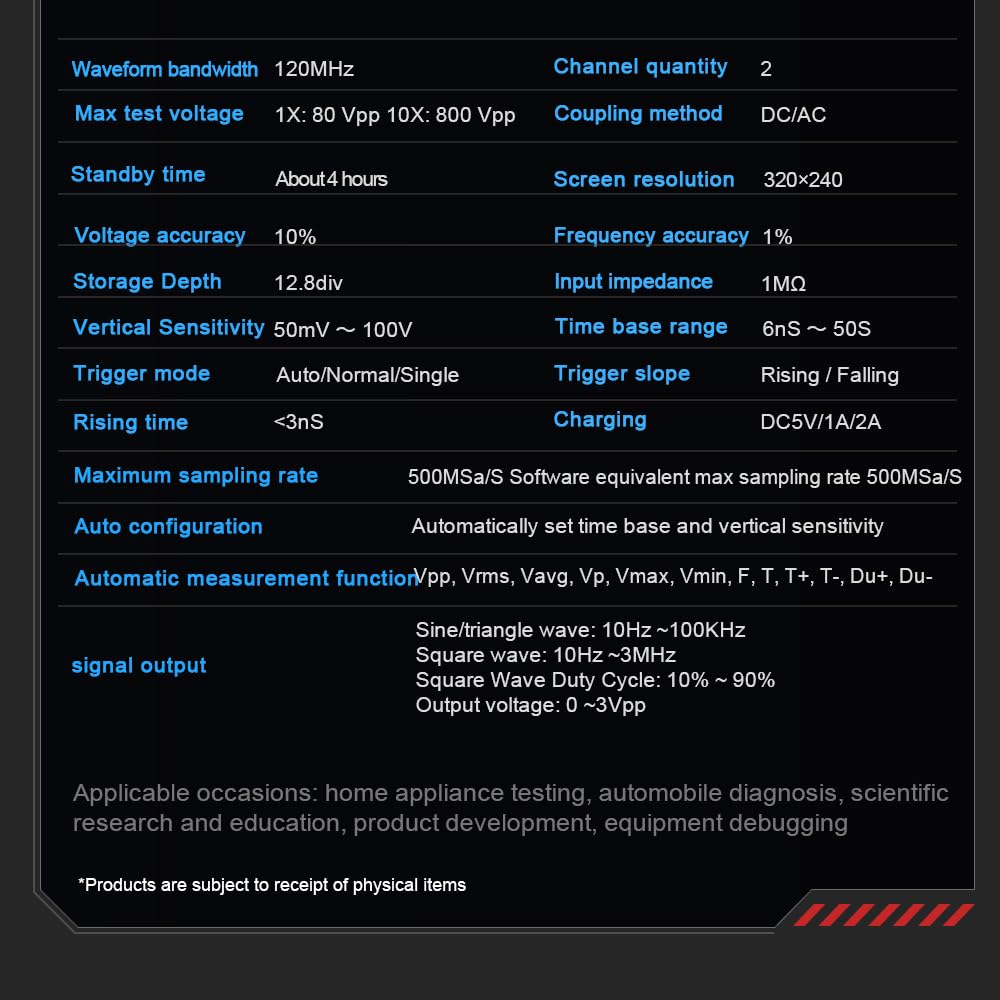
Image: A table summarizing detailed technical specifications of the oscilloscope, such as bandwidth, sampling rate, and signal output capabilities.
9. Warranty and Support
For warranty information and technical support, please refer to the manufacturer's official website or contact the seller directly. Keep your purchase receipt as proof of purchase.
Manufacturer: Heegkyu
Date First Available: November 26, 2024
Ask a question about this manual
Ask about setup, troubleshooting, compatibility, parts, safety, or missing instructions. Manuals+ will review the question and use this page’s manual context to help answer it.