
1. Introduction
Thank you for choosing the Airwheel SE3SL Lightweight Rideable Luggage. This manual provides essential information for the safe and efficient operation, maintenance, and troubleshooting of your device. Please read this manual thoroughly before use and retain it for future reference.
The Airwheel SE3SL is an innovative, lightweight, and portable rideable carry-on suitcase designed to enhance your travel experience. It features APP control, a one-button telescoping handle, and a robust design for ease of use and durability.
2. Product Overview
2.1 Key Features
- Lightweight Design: Weighing approximately 6.8kg, the SE3SL is designed for easy portability.
- Smartphone APP Control: Manage various functions and settings via a dedicated mobile application.
- One-Button Telescoping: Effortlessly adjust the handle length with a single button.
- Dual Control System: Provides comprehensive control over the luggage's movement.
- Durable Tires: Equipped with 5.2-inch high-strength solid tires for stability and smooth riding.
- Intelligent Handle Design: Integrates acceleration, braking, and reversing controls for intuitive operation.
- Electric Telescoping & Stepless Speed Regulation: Advanced control over speed and handle extension.
- Enhanced Lighting: Features 9 types of light effects and added bottom lighting for visibility and aesthetics.
- Detachable External Battery: Convenient for airline regulations and charging.
- International TSA Password Lock: Ensures security for your belongings.
- External USB Interface: For charging external devices.
2.2 Components and Accessories
The Airwheel SE3SL package includes the rideable luggage unit, a charger, a power bank, a power cord, and a cushion for comfortable riding.
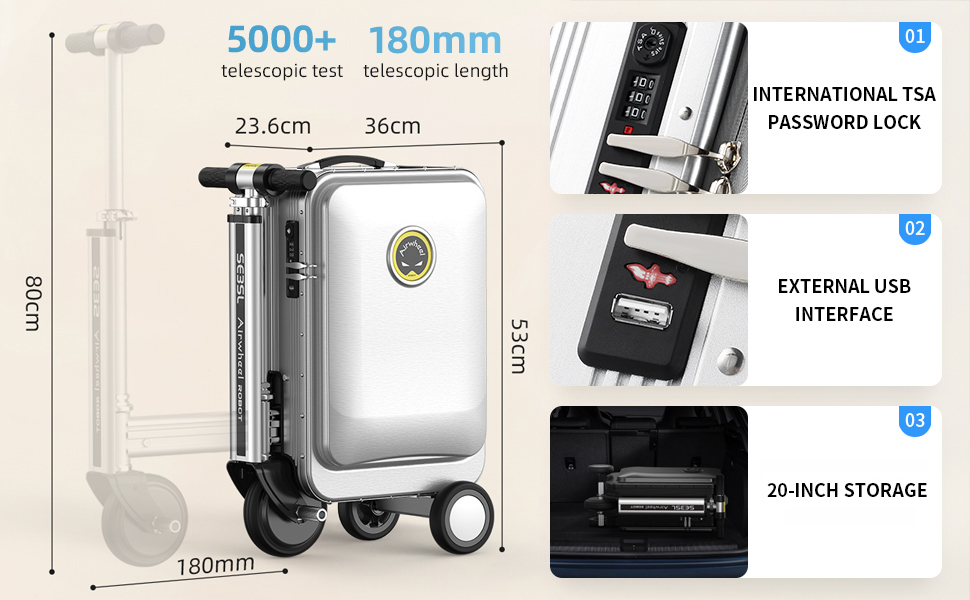
Figure 1: Airwheel SE3SL Product Family Portrait

Figure 2: Airwheel SE3SL in Riding Configuration

Figure 3: Airwheel SE3SL in Folded Configuration
3. Setup
3.1 Battery Installation and Charging
- Locate the battery compartment on the side of the luggage, typically near the handle base.
- Insert the Lithium-Ion battery into the compartment. Ensure it clicks into place, indicating the self-locking mechanism is engaged.
- Connect the charger to the charging port on the luggage and then to a power outlet. The charging indicator light will show the charging status.
- Allow the battery to fully charge before first use.
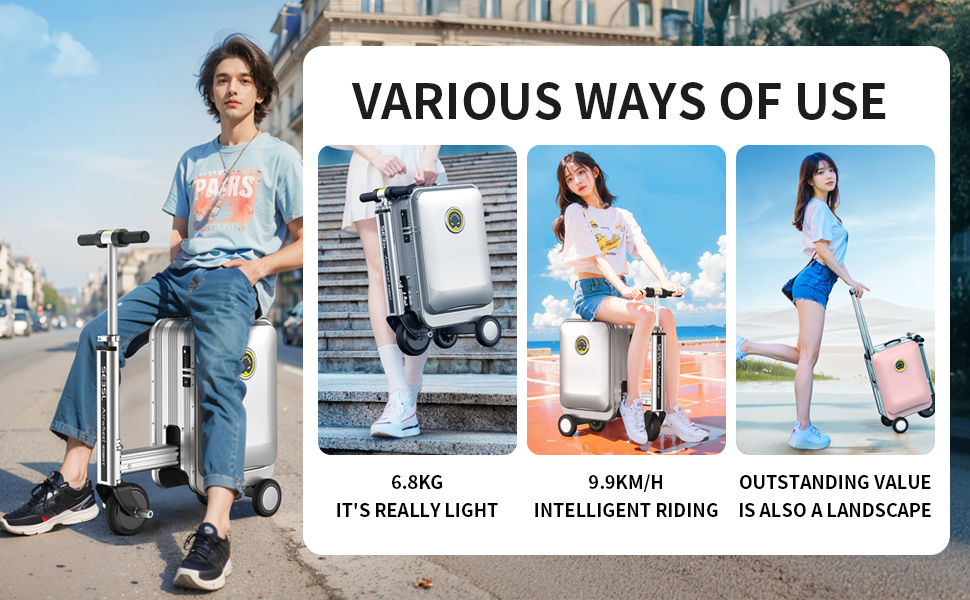
Figure 4: Detachable External Battery Installation
3.2 APP Download and Connection
- Download the official Airwheel APP from your smartphone's app store (iOS or Android).
- Ensure your luggage is powered on and your smartphone's Bluetooth is enabled.
- Open the Airwheel APP and follow the on-screen instructions to search for and connect to your SE3SL luggage.
- Once connected, you can access various control and monitoring features.

Figure 5: Airwheel APP Interface and Functions
4. Operating Instructions
4.1 Riding the Luggage
- Extend the Handle: Press the one-button telescoping control to extend the handle to a comfortable riding height.
- Mounting: Carefully sit on the luggage, ensuring your feet are placed on the footrests.
- Acceleration: Use the right side of the intelligent handlebar to accelerate.
- Braking: Use the left side of the intelligent handlebar to brake.
- Reversing: Press both the left and right handlebar controls simultaneously to engage reverse.
- Steering: Lean gently in the desired direction to steer the luggage.

Figure 6: Intelligent Handle Design and Controls
4.2 APP Control Functions
The Airwheel APP provides advanced control options:
- Speed Regulation: Adjust the maximum speed (stepless speed regulation) to suit your preference and environment.
- Remote Control Telescoping: Extend or retract the handle remotely.
- Lighting Effects: Choose from 9 different light effects and control the bottom lighting.
- Programming Mode: Customize specific operational sequences.
- Real-time Data: Monitor battery level, speed, mileage, and other statistics.
- Security Features: Utilize Bluetooth alarm and low battery alerts.
4.3 Other Functions
- TSA Lock: Set your personal combination for the integrated TSA lock. Refer to the lock manufacturer's instructions for setting the code.
- USB Charging: Use the external USB port to charge your mobile devices while traveling.
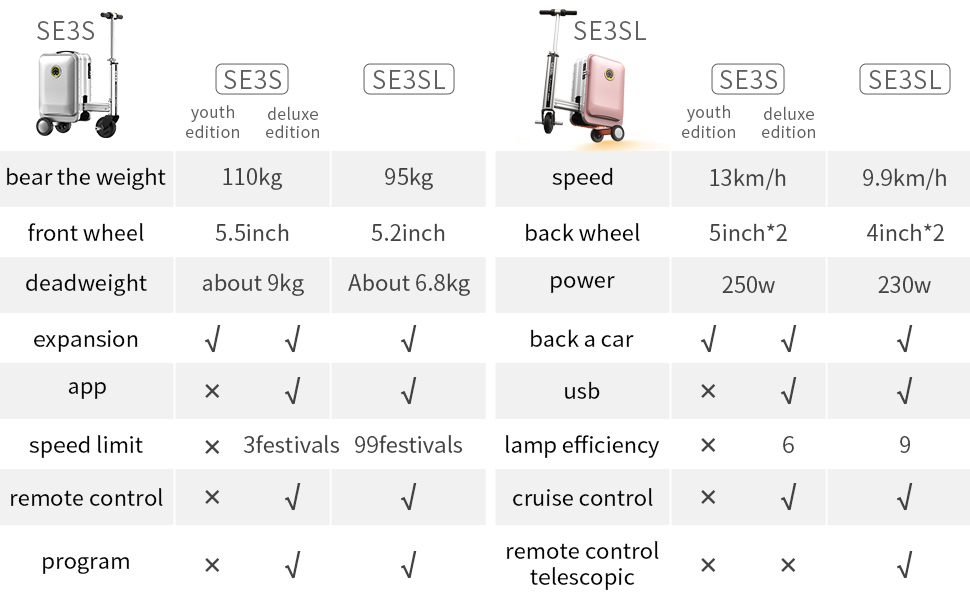
Figure 7: Smart Riding Luggage Key Features
Figure 8: Various Ways of Use
5. Maintenance
5.1 Battery Care
- Charge the battery regularly, even if not in use, to maintain its lifespan.
- Avoid completely draining the battery before recharging.
- Store the battery in a cool, dry place away from direct sunlight and extreme temperatures.
- If storing for an extended period, charge the battery to approximately 50-60% capacity.
5.2 Cleaning
- Wipe the exterior of the luggage with a soft, damp cloth.
- Avoid using harsh chemicals or abrasive cleaners, as they may damage the surface.
- Ensure all ports and openings are dry before charging or operating.
5.3 Tire Inspection
- Periodically inspect the tires for wear, damage, or embedded debris.
- Ensure the tires are clean to maintain optimal grip and performance.
6. Troubleshooting
| Problem | Possible Cause | Solution |
|---|---|---|
| Luggage does not power on | Battery not installed correctly or discharged. | Ensure battery is securely installed. Charge the battery fully. |
| Cannot connect to APP | Bluetooth is off; APP not updated; luggage not powered on. | Enable Bluetooth on your phone. Update the APP. Power on the luggage. |
| Handle not telescoping | Obstruction; low battery; mechanism fault. | Check for obstructions. Charge the battery. If issue persists, contact support. |
| Riding performance is poor | Low battery; uneven surface; exceeding weight limit. | Charge the battery. Use on smooth surfaces. Ensure user weight is within limits. |
| Lights not working | APP setting; electrical fault. | Check light settings in the APP. If issue persists, contact support. |
If you encounter issues not listed here or if the suggested solutions do not resolve the problem, please contact Airwheel customer support for assistance.
7. Specifications
| Feature | Specification |
|---|---|
| Model Number | SE3SL |
| Product Dimensions | 14.17 x 9.29 x 20.87 inches |
| Item Weight | 19.96 pounds (approx. 6.8 kg) |
| Battery Type | 1 Lithium Ion battery (included) |
| Capacity | 20 Liters |
| Max Load | 95 kg |
| Front Wheel Size | 5.2 inches |
| Back Wheel Size | 4 inches * 2 |
| Max Speed | 9.9 km/h |
| Motor Power | 230W |
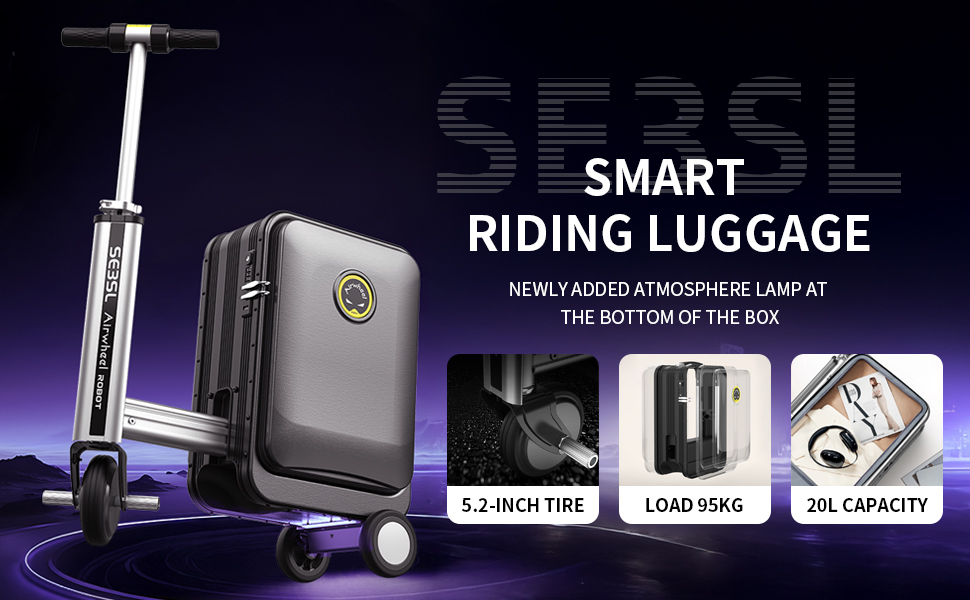
Figure 9: Product Comparison (SE3S vs SE3SL)
8. Warranty and Support
For warranty information and customer support, please refer to the documentation included with your purchase or visit the official Airwheel website. You may also contact the Official Airwheel Store directly for assistance with product-related inquiries or service requests.
It is recommended to keep your purchase receipt as proof of purchase for any warranty claims.